
JESIMAIK R18Lite
JESIMAIK R18Lite Motorcycle Intercom User Manual
Your guide to seamless communication and entertainment on the road.
1. บทนำ
Welcome to the JESIMAIK R18Lite Motorcycle Intercom. This device is designed to enhance your riding experience by providing clear communication, music playback, and FM radio functionality. Please read this manual carefully to ensure proper installation, operation, and maintenance of your intercom.
คุณสมบัติหลัก
- 2-Person Simultaneous Communication & 6-Unit Connection: Enables simultaneous communication between two riders and connection with up to six units for group rides.
- ชิปบลูทูธ Qualcomm 5.1: Ensures high signal transmission, significantly reduced latency, and stable connectivity. Ideal communication distance up to 1500m in open environments.
- ระบบตัดเสียงรบกวน 5 ระดับ: Features ENC2.0, DSP, and CVC8.0 noise suppression technologies, along with a high-density microphone sponge, to eliminate over 90% of environmental noise, wind noise, and engine sounds for crystal-clear audio.
- อายุการใช้งานแบตเตอรี่ที่ยาวนานขึ้น: Built-in 800mAh battery provides up to 25 hours of continuous talk time, perfect for long rides.
- การแบ่งปันเพลงและวิทยุ FM: Share music with another rider or enjoy FM radio (76-108MHz) for news, traffic, and sports updates.
- 4 Music Sound Effects: Choose from Default, Bass, Rock, and Pop sound effects to customize your audio experience.
- Comfortable & High-Fidelity Speakers: Equipped with 7mm ultra-slim speakers to reduce ear pressure and 40mm dynamic drivers for balanced, high-quality HIFI stereo sound.
- IP67 กันน้ำและกันฝุ่น: Designed with special insert molded rubber for superior protection against rain and dust, ensuring reliable performance in various weather conditions.
- ใช้งานได้สะดวกแม้สวมถุงมือ: Large, tactile buttons allow for easy and quick operation even while wearing gloves.
- การสนับสนุนผู้ช่วยเสียง: Double-click the power button to activate Siri or other smartphone voice assistants.
- Universal Intercom Connection: Compatible with other brands of intercoms using universal Bluetooth protocol.
- Japanese Voice Guidance & Battery Level Detection: Provides voice prompts in Japanese and announces battery level upon power-on. Battery status can also be checked on Android smartphones.
- ชาร์จเร็ว: USB Type-C charging port allows for a full charge in just 1.5 hours (using a standard 5V1A adapter).
2. เนื้อหาบรรจุภัณฑ์
โปรดตรวจสอบสิ่งของภายในกล่องทันทีที่เปิด เพื่อให้แน่ใจว่าสินค้าทุกชิ้นครบถ้วนและอยู่ในสภาพดี

Image: All components included in the JESIMAIK R18Lite package.
| รายการ | ปริมาณ |
|---|---|
| Main Intercom Unit | 1 |
| Jet Helmet Microphone | 1 |
| Full-face Helmet Microphone | 1 |
| Clip-type Mount | 1 |
| Adhesive-type Mount | 1 |
| Speakers (pair) | 1 |
| Speaker Adhesive Pads | 2 |
| Jet Helmet Mic Adhesive Pad | 1 |
| Full-face Helmet Mic Adhesive Pad | 1 |
| คู่มือการใช้งาน | 1 |
| สายชาร์จแบบ USB Type-C | 1 |
| คู่มือเริ่มต้นอย่างรวดเร็ว | 1 |
3. สินค้าหมดview
การจัดวางอุปกรณ์

Image: JESIMAIK R18Lite Intercom Unit Layout and Dimensions.
- ระดับเสียง + ปุ่ม: เพิ่มปริมาณเสียง
- Power / Call Button: Powers the device on/off, answers/ends calls.
- ปุ่มปรับระดับเสียง: ลดระดับเสียง
- ปุ่มอินเตอร์คอม: เริ่มหรือยุติการสื่อสารผ่านระบบอินเตอร์คอม
- Charging Port / Earphone Port: USB Type-C port for charging and connecting speakers/microphone.
ขนาดและน้ำหนัก
| ข้อมูลจำเพาะ | ค่า |
|---|---|
| Intercom Unit Dimensions (approx.) | 9.5 ซม. (L) x 4.2 ซม. (W) x 2.8 ซม. (H) |
| Intercom Unit Weight (approx.) | 51 กรัม |
| ความหนาของลำโพง | 7 มม. |
| เส้นผ่านศูนย์กลางของลำโพง | 40 มม. |
4. การตั้งค่า
การชาร์จอุปกรณ์
Before first use, fully charge the intercom unit.

Image: Charging the JESIMAIK R18Lite Intercom.
- Connect the supplied USB Type-C cable to the charging port on the intercom unit and to a 5V1A USB power adapter (not supplied).
- ไฟแสดงสถานะจะติด สีแดง ขณะกำลังชาร์จ
- Once fully charged (approximately 1.5 hours), the indicator light will turn สีฟ้า.
การติดตั้งลำโพงและไมโครโฟน
Install the speakers and microphone inside your helmet. Ensure correct and secure connection for optimal audio quality and waterproof integrity.

Image: JESIMAIK R18Lite 7mm Ultra-Slim Speakers.
- Attach the speakers to the inside of your helmet using the provided adhesive pads. Position them directly over your ears for the best sound.
- Choose the appropriate microphone (jet helmet or full-face helmet) and attach it to the helmet using its adhesive pad. Position the microphone close to your mouth.
- Connect the speaker and microphone cable to the intercom unit's earphone port. Ensure the connector is fully inserted to maintain the waterproof seal.

Image: Correct Speaker Connection Method.
Mounting the Intercom Unit
Choose between the clip-type or adhesive-type mount to attach the intercom unit to your helmet.
- Clip-type Mount: Slide the clip between the helmet shell and the inner padding. Secure it firmly.
- Adhesive-type Mount: Clean the desired mounting surface on your helmet. Peel off the protective film from the adhesive pad and firmly press the mount onto the helmet for at least 30 seconds. Allow the adhesive to cure for 24 hours before use.
- Once the mount is secured, slide the intercom unit onto the mount until it clicks into place.

Image: Detaching the Intercom Unit from its Mount.
5. คู่มือการใช้งาน
เปิด/ปิดเครื่อง
- เปิดเครื่อง: Press and hold the Power / Call button for 3 seconds until you hear a voice prompt.
- หมดแรง: Press and hold the Power / Call button for 3 seconds until you hear a voice prompt.
การจับคู่บลูทูธ (โทรศัพท์/GPS)
To connect your smartphone or GPS device:
- With the intercom powered off, press and hold the Power / Call button for 5 seconds until the indicator light flashes red and blue, indicating pairing mode.
- On your phone/GPS, enable Bluetooth and search for "JESIMAIK R18Lite".
- เลือกอุปกรณ์ที่ต้องการจับคู่ เมื่อเชื่อมต่อแล้ว ไฟแสดงสถานะจะกะพริบเป็นสีน้ำเงินช้าๆ

Image: Universal Connection and Battery Life.
Intercom Pairing and Communication
The R18Lite supports 2-person simultaneous communication and connection with up to 6 units.
- 2-Person Intercom: Power on both R18Lite units. Press the Intercom button on one unit. It will automatically search and connect to the other unit.
- Multi-Unit Intercom: Follow the instructions in the Quick Start Guide for detailed pairing steps for multiple units.
- To end intercom communication, press the Intercom button again.

Image: 1500m Communication Range.
การเล่นและแบ่งปันเพลง
Enjoy music from your paired device and share it with another rider.
- เล่น/หยุดชั่วคราว: Short press the Power / Call button.
- เพลงถัดไป: กดปุ่มเพิ่มระดับเสียงสั้นๆ
- แทร็กก่อนหน้า: กดปุ่มปรับระดับเสียง - สั้นๆ
- การแบ่งปันเพลง: While music is playing, press and hold the Intercom button for 2 seconds to initiate music sharing with a paired intercom unit.

Image: Music Sharing and FM Radio.
เอฟเฟกต์เสียงเพลง
Customize your music experience with 4 different sound effects.

Image: 4 Music Sound Effects.
- While music is playing, simultaneously press and hold the Volume + and Power / Call buttons for 2 seconds to cycle through the sound effects: Default, Bass, Rock, Pop.
วิทยุเอฟเอ็ม
Listen to FM radio stations on the go.
- วิธีเปิด/ปิดวิทยุ FM: Double-click the Intercom button.
- สถานีสแกน: While FM radio is on, short press the Power / Call button to automatically scan and save available stations.
- สถานีต่อไป: กดปุ่มเพิ่มระดับเสียงสั้นๆ
- สถานีก่อนหน้า: กดปุ่มปรับระดับเสียง - สั้นๆ
ผู้ช่วยเสียง (Siri/Google Assistant)
Activate your smartphone's voice assistant directly from the intercom.

Image: Voice Assistant and Automatic Call Connection.
- Double-click the Power / Call button to activate your smartphone's voice assistant (e.g., Siri, Google Assistant).
ระบบตัดเสียงรบกวน
The R18Lite features advanced noise cancellation for clear audio.

Image: 5-Level Noise Reduction Technology.
- The combination of ENC2.0, DSP, and CVC8.0 technologies actively suppresses ambient noise, ensuring your voice is transmitted clearly to others and incoming audio is crisp.
6. การบำรุงรักษา
คุณสมบัติกันน้ำและกันฝุ่น
The JESIMAIK R18Lite is rated IP67 for water and dust resistance.
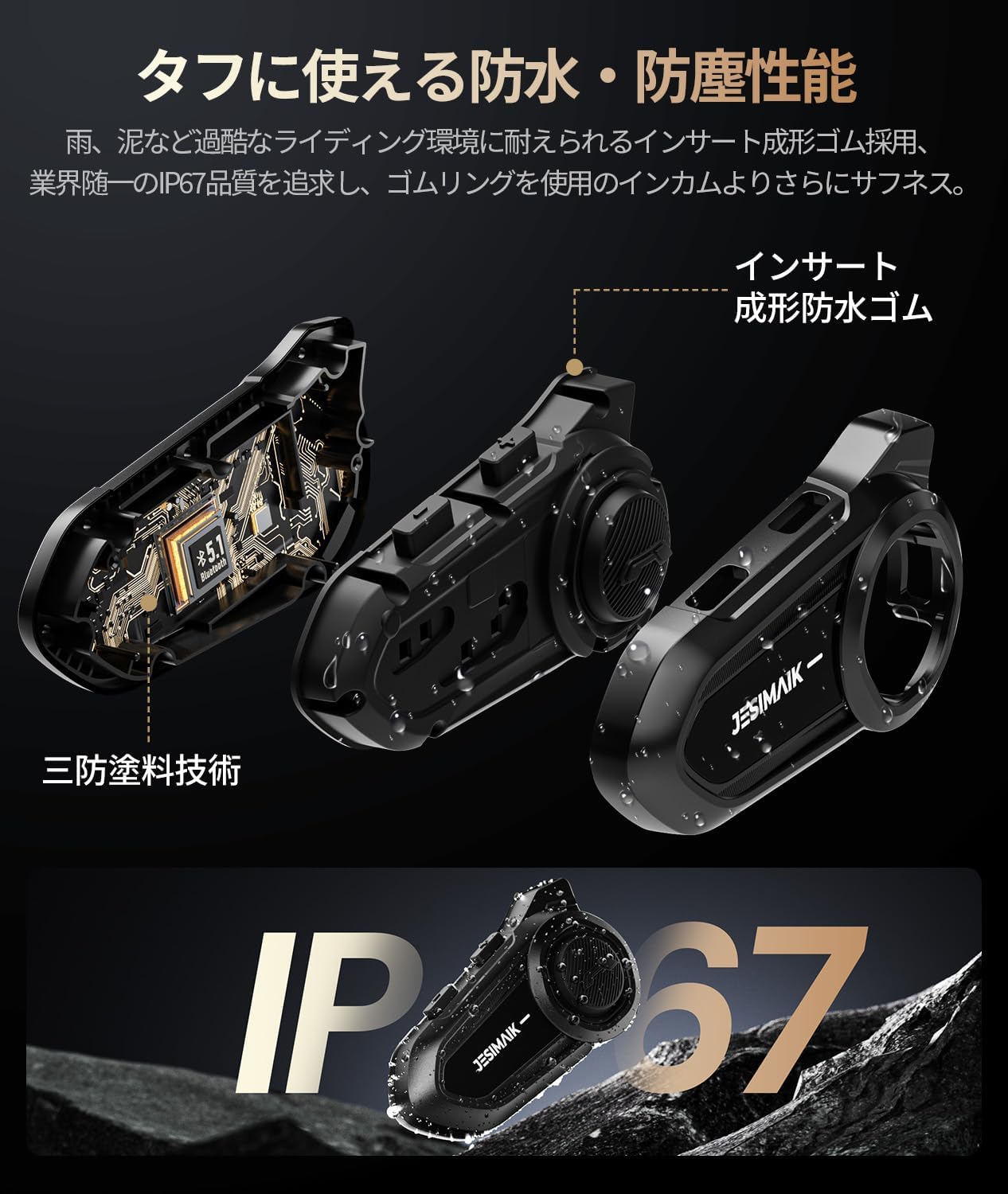
Image: IP67 Waterproof and Dustproof Design.
- While designed to withstand rain and dust, avoid prolonged exposure to heavy downpours or submersion in water.
- ตรวจสอบให้แน่ใจว่าได้ปิดช่องต่างๆ อย่างแน่นหนาเมื่อไม่ได้ใช้งาน เพื่อรักษาคุณสมบัติกันน้ำ
การทำความสะอาด
- เช็ดทำความสะอาดตัวเครื่องอินเตอร์คอมด้วยผ้าเนื้อนุ่มและแห้งamp ผ้า. อย่าใช้สารเคมีที่รุนแรงหรือน้ำยาทำความสะอาดที่มีฤทธิ์กัดกร่อน
- For the microphone sponge, gently clean with a soft brush if necessary.
การดูแลแบตเตอรี่
- ชาร์จอุปกรณ์เป็นประจำ แม้จะไม่ได้ใช้งานบ่อยก็ตาม เพื่อรักษาสุขภาพแบตเตอรี่
- Avoid storing the device in extreme temperatures (hot or cold) as this can degrade battery performance.
7 การแก้ไขปัญหา
If you encounter any issues with your JESIMAIK R18Lite, please refer to the following common problems and solutions:
| ปัญหา | วิธีแก้ปัญหาที่เป็นไปได้ |
|---|---|
| ไม่มีเสียงออกจากลำโพง | Ensure the speaker connector is fully and correctly inserted into the intercom unit's port. Check volume levels. |
| ระบบอินเตอร์คอมเชื่อมต่อไม่ได้ | Ensure both units are powered on and within range. Re-initiate pairing process. Check if other devices are interfering. |
| คุณภาพเสียงไม่ดี / มีเสียงรบกวนมากเกินไป | Check microphone placement (ensure it's close to your mouth). Verify speaker connection. Ensure the microphone sponge is not damaged. |
| อุปกรณ์ไม่ได้เปิด | ชาร์จแบตเตอรี่ให้เต็ม หากปัญหายังคงอยู่ โปรดติดต่อฝ่ายบริการลูกค้า |
| การจับคู่บลูทูธล้มเหลว | Ensure the intercom is in pairing mode (flashing red and blue). Turn off and on Bluetooth on your phone/GPS. Try pairing again. |
8. ข้อมูลจำเพาะทางเทคนิค
| ข้อมูลจำเพาะ | ค่า |
|---|---|
| แบบอย่าง | R18Lite |
| ยี่ห้อ | เจสิไมค |
| เวอร์ชันบลูทูธ | 5.1 |
| ระยะการสื่อสาร | สูงสุด 1500 เมตร (ในสภาวะที่เหมาะสม) |
| ความจุของแบตเตอรี่ | 800mAh |
| เวลาสนทนา | นานถึง 25 ชั่วโมง |
| เวลาเล่นเพลง | นานถึง 30 ชั่วโมง |
| เวลาสแตนด์บาย | นานถึง 400 ชั่วโมง |
| เวลาในการชาร์จ | ประมาณ 1.5 ชั่วโมง |
| พอร์ตชาร์จ | ยูเอสบี ไทป์ ซี |
| คะแนนกันน้ำ/กันฝุ่น | IP67 |
| เส้นผ่านศูนย์กลางของลำโพง | 40มม. |
| ความหนาของลำโพง | 7มม. |
| ความถี่วิทยุ FM | 76-108เมกะเฮิรตซ์ |
| ระบบตัดเสียงรบกวน | ENC2.0, DSP, CVC8.0 |
| น้ำหนักผลิตภัณฑ์ | 330 กรัม (น้ำหนักบรรจุภัณฑ์) |
9. การรับประกันและการสนับสนุน
JESIMAIK is committed to providing high-quality products and excellent customer service.
- การรับประกันมาตรฐาน: This product comes with a standard 1-year warranty from the date of purchase.
- การรับประกันแบบขยายเวลา: Register your product on the official JESIMAIK website to extend your warranty by an additional 1 year, for a total of 2 years.
- During the warranty period, if the product is found to be defective, we will provide free repair or replacement.
ติดต่อฝ่ายสนับสนุน
If you have any questions, concerns, or require assistance with your product, please do not hesitate to contact us:
- ผ่านทางอเมซอน: Go to "Your Account" → "Your Orders" → "Contact Seller".
- อีเมลสนับสนุนอย่างเป็นทางการ: support@jesimaik.com
- Official Support Phone: +81 045-550-7406
Ask a question about this manual
Ask about setup, troubleshooting, compatibility, parts, safety, or missing instructions. Manuals+ will review the question and use this page’s manual context to help answer it.