
1. บทนำ
This manual provides instructions for the safe and efficient use of your Brother CP2160F Computerized Sewing Machine. Please read this manual thoroughly before operating the machine to ensure proper function and to prevent damage or injury. Keep this manual in a safe place for future reference.
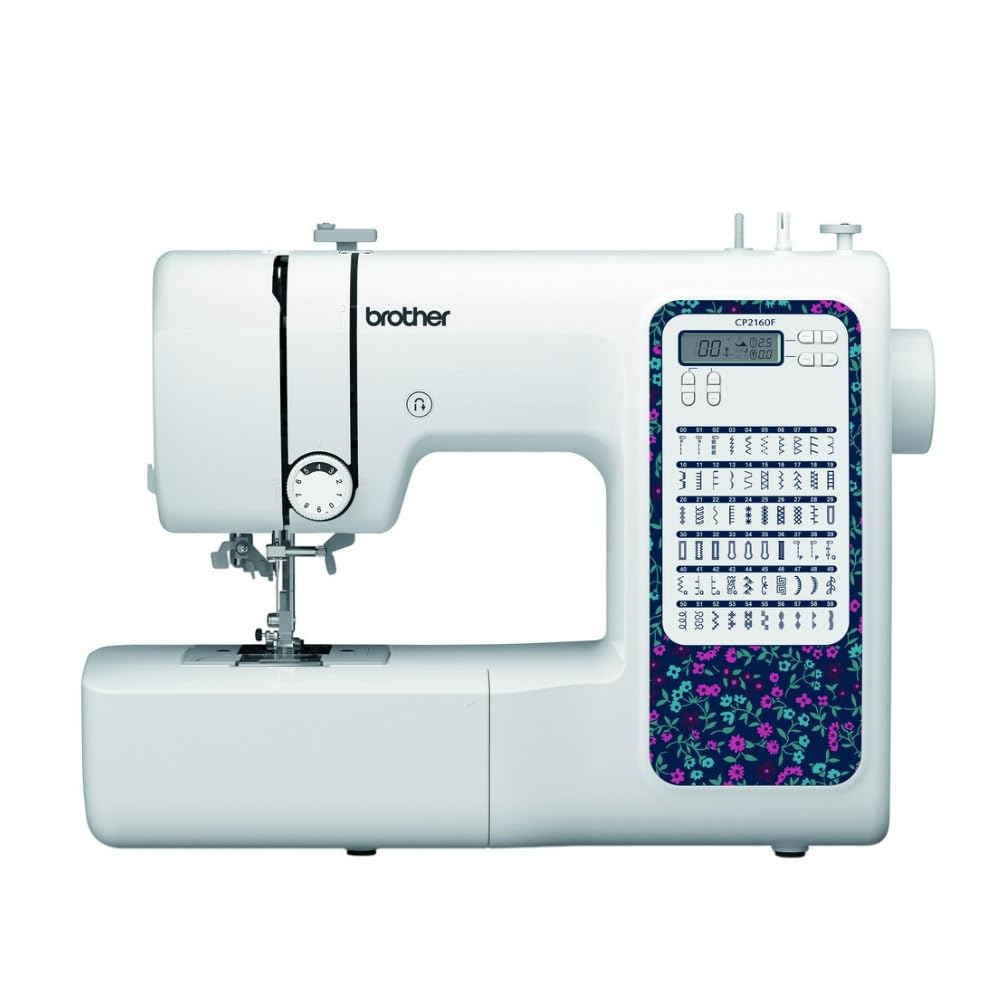
Figure 1: Brother CP2160F Computerized Sewing Machine. This image shows the overall view of the sewing machine, highlighting its compact design and the LCD screen for stitch selection.
2. คำแนะนำด้านความปลอดภัยที่สำคัญ
เมื่อใช้เครื่องใช้ไฟฟ้า ควรปฏิบัติตามข้อควรระวังด้านความปลอดภัยพื้นฐานเสมอ ซึ่งรวมถึงสิ่งต่อไปนี้:
- อ่านคำแนะนำทั้งหมดก่อนใช้จักรเย็บผ้านี้
- วางนิ้วให้ห่างจากชิ้นส่วนที่เคลื่อนไหวทั้งหมด ต้องใช้ความระมัดระวังเป็นพิเศษรอบ ๆ เข็มจักรเย็บผ้า
- ควรใช้แผ่นยึดเข็มให้เหมาะสมเสมอ หากใช้แผ่นยึดเข็มที่ไม่ถูกต้อง เข็มอาจหักได้
- ควรปิดจักรเย็บผ้าทุกครั้งเมื่อทำการปรับแต่งบริเวณเข็ม เช่น การร้อยด้ายเข้าเข็ม การเปลี่ยนเข็ม การร้อยด้ายเข้ากระสวย หรือการเปลี่ยนตีนผี
- ถอดปลั๊กจักรเย็บผ้าออกจากเต้ารับไฟฟ้าเสมอเมื่อถอดฝาครอบ หล่อลื่น หรือเมื่อทำการปรับเปลี่ยนการซ่อมบำรุงอื่นๆ ที่ผู้ใช้ระบุไว้ในคู่มือการใช้งาน
- ห้ามทำตกหรือเสียบวัตถุใดๆ ลงในช่องเปิดใดๆ
- ห้ามใช้กลางแจ้ง
- ห้ามดำเนินการในบริเวณที่มีการใช้ผลิตภัณฑ์สเปรย์ หรือในบริเวณที่มีการส่งออกซิเจน
- หากต้องการตัดการเชื่อมต่อ ให้หมุนปุ่มควบคุมทั้งหมดไปที่ตำแหน่งปิด จากนั้นถอดปลั๊กออกจากเต้าเสียบ
3. เนื้อหาบรรจุภัณฑ์
ตรวจสอบว่ามีส่วนประกอบทั้งหมดอยู่ในแพ็คเกจ:
- Brother CP2160F Computerized Sewing Machine
- สายไฟ
- ตัวควบคุมเท้า
- Accessory Bag (containing bobbins, needle set, twin needle, screwdriver, spool caps, extra spool pin, seam ripper, cleaning brush)
- 7 Sewing Feet: Buttonhole foot, Zipper foot, Blind stitch foot, Button sewing foot, Overcasting foot, Monogramming foot, Zigzag foot (on machine)
- คู่มือการใช้งาน (เอกสารนี้)
4. การตั้งค่า
4.1 การเชื่อมต่อสายไฟ
- วางเครื่องบนพื้นผิวเรียบและมั่นคง
- Insert the machine plug into the jack on the right side of the machine.
- Insert the power supply plug into a standard electrical outlet.
- Turn on the main power switch, located on the right side of the machine. The LCD screen will illuminate.
4.2 การม้วนกระสวย
- วางหลอดด้ายไว้บนแกนยึดหลอดด้าย
- Guide the thread through the upper thread guide and around the pre-tension disc.
- วางกระสวยเปล่าลงบนแกนหมุนกระสวย แล้วดันไปทางขวา
- พันด้ายตามเข็มนาฬิการอบกระสวยหลายๆ รอบ
- Press the foot controller (or Start/Stop button) to begin winding. The machine will stop automatically when the bobbin is full.
- Cut the thread, push the bobbin winder shaft to the left, and remove the wound bobbin.
4.3 Threading the Machine (Upper Thread)
- ยกคันโยกตีนผีขึ้น
- วางหลอดด้ายไว้บนแกนยึดหลอดด้าย
- สอดด้ายผ่านตัวนำด้ายด้านบน
- Follow the numbered threading path indicated on the machine, ensuring the thread passes through the tension discs and takes up lever.
- Use the advanced needle threading system: Lower the presser foot, lower the needle, then push down the needle threader lever to engage it. Guide the thread through the hook and release the lever.
- ดึงห่วงด้ายผ่านรูเข็ม
4.4 การติดตั้งเข็ม
- ปิดเครื่อง
- คลายเข็ม clamp ขันสกรูโดยหมุนทวนเข็มนาฬิกา
- ถอดเข็มเก่าออก
- ใส่เข็มใหม่โดยให้ด้านแบนหันไปทางด้านหลังของเครื่อง แล้วดันเข้าไปให้สุดเท่าที่จะทำได้
- ขันเข็มให้แน่นamp ขันสกรูให้แน่น
5. การดำเนินการ
5.1 การเลือกเย็บ
The CP2160F features 60 built-in stitches. Use the stitch selector buttons (usually '+' and '-') to navigate through the stitch patterns displayed on the LCD screen. The recommended stitch length and width will be displayed automatically, but can be adjusted if desired.
5.2 รังดุมอัตโนมัติ
This machine includes 7 auto-size buttonhole styles. Attach the buttonhole foot. Place the button you wish to match into the buttonhole foot's holder. Select the desired buttonhole stitch. The machine will automatically sew a buttonhole to the correct size.
5.3 Free-Arm Sewing
To convert to free-arm sewing, slide off the accessory box located at the front of the machine. This exposes the free arm, ideal for sewing cylindrical items like cuffs, sleeves, and pant hems.
5.4 การเย็บผ้าหนา
The CP2160F's robust feed system and fixed needle bar are designed to handle thick materials such as denim and tweed. Ensure you use the correct needle type and size for the fabric thickness to prevent needle breakage and ensure smooth feeding.
5.5 Using Included Sewing Feet
The machine comes with seven specialized sewing feet. Refer to the specific stitch instructions for which foot to use. To change a presser foot:
- ยกเข็มและตีนผีขึ้น
- กดคันโยกสีดำด้านหลังของที่ยึดตีนผีเพื่อปลดตีนผีที่ใช้งานอยู่
- Align the new foot with the pin on the presser foot holder and lower the presser foot lever until it snaps into place.
6. การบำรุงรักษา
6.1 การทำความสะอาดเครื่องจักร
Regular cleaning helps maintain optimal performance. Always unplug the machine before cleaning.
- ฟีดด็อก: Remove the needle plate and use the cleaning brush to remove lint and dust from the feed dogs and bobbin area.
- Hook Race: Carefully remove the bobbin case and clean the hook race area with the brush.
- ภายนอก: เช็ดพื้นผิวภายนอกด้วยผ้าแห้งนุ่มๆ ห้ามใช้น้ำยาทำความสะอาดหรือสารเคมีรุนแรง
Note: This machine does not require user lubrication.
7 การแก้ไขปัญหา
ก่อนที่จะติดต่อฝ่ายสนับสนุนลูกค้า โปรดอ่านview ปัญหาทั่วไปเหล่านี้และวิธีแก้ไข:
| ปัญหา | สาเหตุที่เป็นไปได้ | สารละลาย |
|---|---|---|
| เข็มแตก | Incorrect needle size/type for fabric; bent needle; needle not fully inserted; pulling fabric while sewing. | Use correct needle; replace bent needle; re-insert needle correctly; guide fabric gently. |
| ข้ามตะเข็บ | Needle bent or dull; incorrect needle insertion; improper threading; wrong needle for fabric. | Replace needle; re-insert needle; re-thread machine; use appropriate needle. |
| Thread jams | Improper threading; lint in bobbin case; bobbin wound unevenly. | Re-thread machine; clean bobbin area; re-wind bobbin evenly. |
| เครื่องไม่เปิดเครื่อง | Power cord not connected; power switch off; electrical outlet issue. | Check power cord connections; ensure switch is ON; test outlet with another appliance. |
8. ข้อมูลจำเพาะ
- แบบอย่าง: Brother CP2160F
- จำนวนการเย็บ: 60 ตะเข็บในตัว
- รังดุม: 7 One-step auto-size buttonholes
- ตัวร้อยเข็ม: Advanced Needle Threading System
- แสดง: หน้าจอ LCD
- Sewing Area: Free-arm capability
- ระบบการป้อนอาหาร: Exceptional feed for thick fabrics
- Included Feet: 7 (Buttonhole, Zipper, Blind Stitch, Button Sewing, Overcasting, Monogramming, Zigzag)
- สี: สีขาว
- วัสดุ: โลหะ, พลาสติก
- ขนาดสินค้า (ลึก x กว้าง x สูง): 6.65" x 12.2" x 16.26"
- น้ำหนักสินค้า: 226 ออนซ์ (ประมาณ 14.1 ปอนด์)
- แหล่งพลังงาน: สายไฟ
- ยูพีซี: 196271536956
9. การบริการลูกค้าและการรับประกัน
For technical assistance, warranty information, or service inquiries, please contact Brother customer support. Refer to the official Brother webโปรดตรวจสอบเว็บไซต์หรือเอกสารที่แนบมาพร้อมกับสินค้าที่ซื้อเพื่อดูรายละเอียดการติดต่อและเงื่อนไขการรับประกันล่าสุด
การสนับสนุนทางออนไลน์: www.brother-usa.com/support
หมายเหตุ: เงื่อนไขการรับประกันอาจแตกต่างกันไปตามภูมิภาคและร้านค้า โปรดเก็บหลักฐานการซื้อไว้เพื่อใช้สิทธิ์การรับประกัน