
1. สินค้าหมดview
The Pknight DMX-S6RT is a 6-channel DMX signal splitter and amplifier designed to distribute a single DMX input signal to six independent output channels. This device is engineered to meet the control needs of multiple DMX-compatible lighting fixtures, making it ideal for stage lighting and performance control applications. Its robust design incorporates optical isolation for signal stability and a built-in terminal resistor to prevent signal reflection, ensuring reliable and clean DMX signal transmission.
The compact cylindrical form factor, coupled with Velcro mounting straps and a safety rope, allows for versatile and flexible installation in various environments, including tight spaces or hanging on poles. Power is supplied via a secure PowerCON input, with a daisy-chain output feature to simplify power distribution across multiple units, reducing cable clutter and enhancing system integration.
2. คุณสมบัติหลัก
- 6-Channel DMX Signal Ampการทำให้บริสุทธิ์: Distributes one DMX input signal to six independent outputs.
- การแยกแสง: Each output channel is optically isolated to prevent signal interference and protect connected equipment from high-voltagกระแสไฟฟ้า
- PowerCON Daisy-Chain: Features a secure, lockable PowerCON input and output for easy power linking of multiple units, reducing cable management complexity.
- ตัวต้านทานปลายทาง: Built-in functionality ensures proper DMX signal termination, preventing signal reflection and improving overall system stability and signal quality.
- การออกแบบที่กะทัดรัดและอเนกประสงค์: Cylindrical shape with integrated Velcro mounting straps (40cm / 15.7 inches each end) and a safety rope (60cm / 23.6 inches with safety clips) for flexible installation options.
- โครงสร้างทนทาน: Made from robust materials for reliable performance in demanding environments.
3. ส่วนประกอบผลิตภัณฑ์
The Pknight DMX-S6RT package typically includes the following items:
- Pknight DMX-S6RT 6-Channel DMX Signal Splitter
- Power Adapter (AC plug)
- คู่มือการใช้งาน
- Velcro Mounting Straps (pre-attached)
- Safety Rope with Safety Clips (pre-attached)
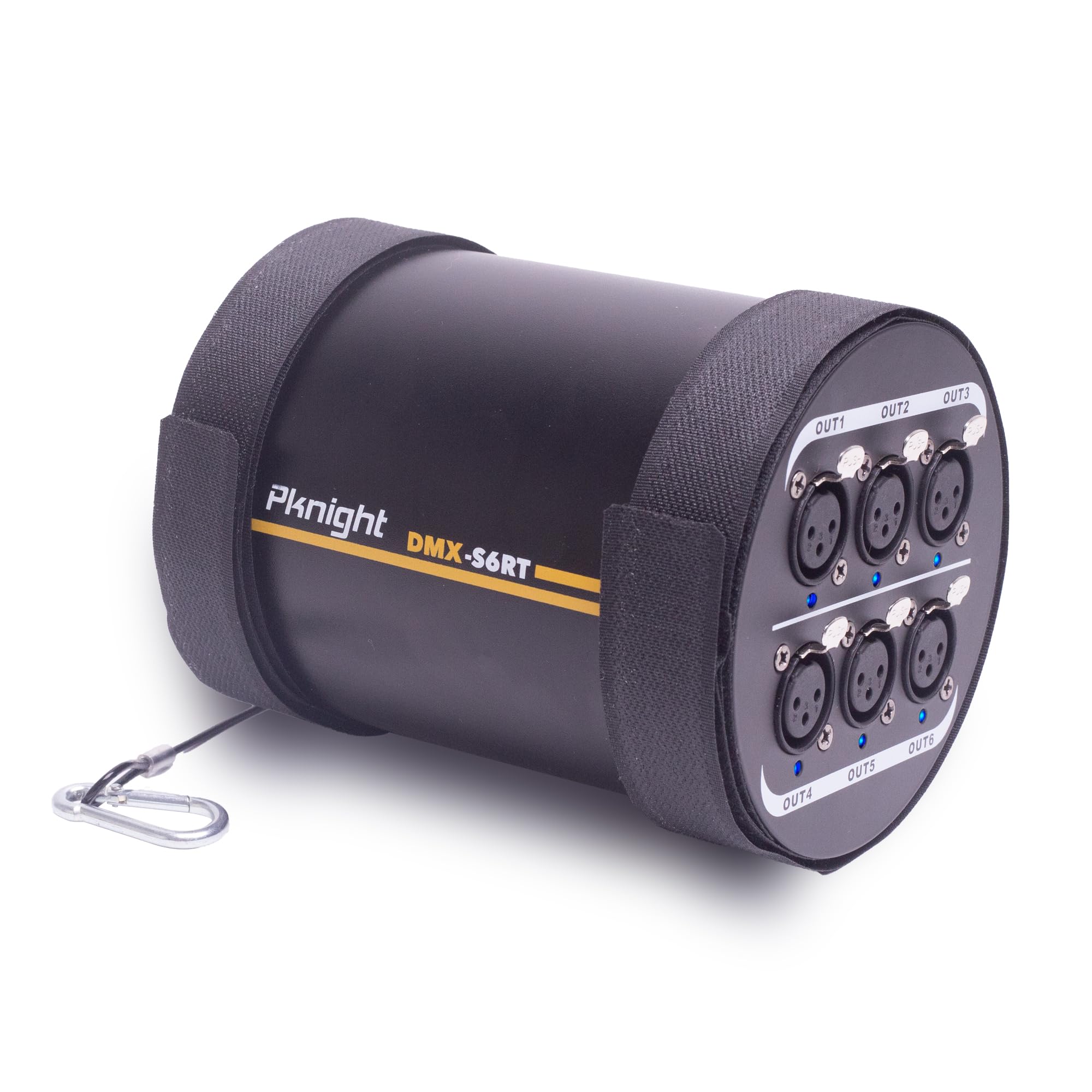
Figure 3.1: Pknight DMX-S6RT 6-Channel DMX Signal Splitter. This image shows the compact cylindrical design of the DMX splitter with its input/output ports and mounting straps.
4. คำแนะนำในการตั้งค่า
Follow these steps to set up your Pknight DMX-S6RT signal splitter:
- การติดตั้ง: Utilize the integrated Velcro straps to secure the splitter to a truss, pole, or other suitable structure. For added security, attach the safety rope to a reliable anchor point.
- การเชื่อมต่อไฟฟ้า: Connect the provided PowerCON cable to the 'POWER IN' port on the splitter. If daisy-chaining multiple units, connect a PowerCON cable from the 'POWER OUT' port of this unit to the 'POWER IN' port of the next unit. Ensure the power adapter is connected to a suitable power outlet (AC90-240V, 50/60Hz).
- อินพุต DMX: Connect your DMX controller's output to the 'DMX INPUT' port on the splitter using a standard DMX cable.
- เอาต์พุต DMX: Connect your DMX-compatible lighting fixtures to the 'DMX OUTPUT 1' through 'DMX OUTPUT 6' ports using DMX cables. Each output is optically isolated.
- ตัวต้านทานปลายทาง: Ensure the terminal resistor switch is set to 'ON' if this is the last device in your DMX chain to prevent signal reflection.
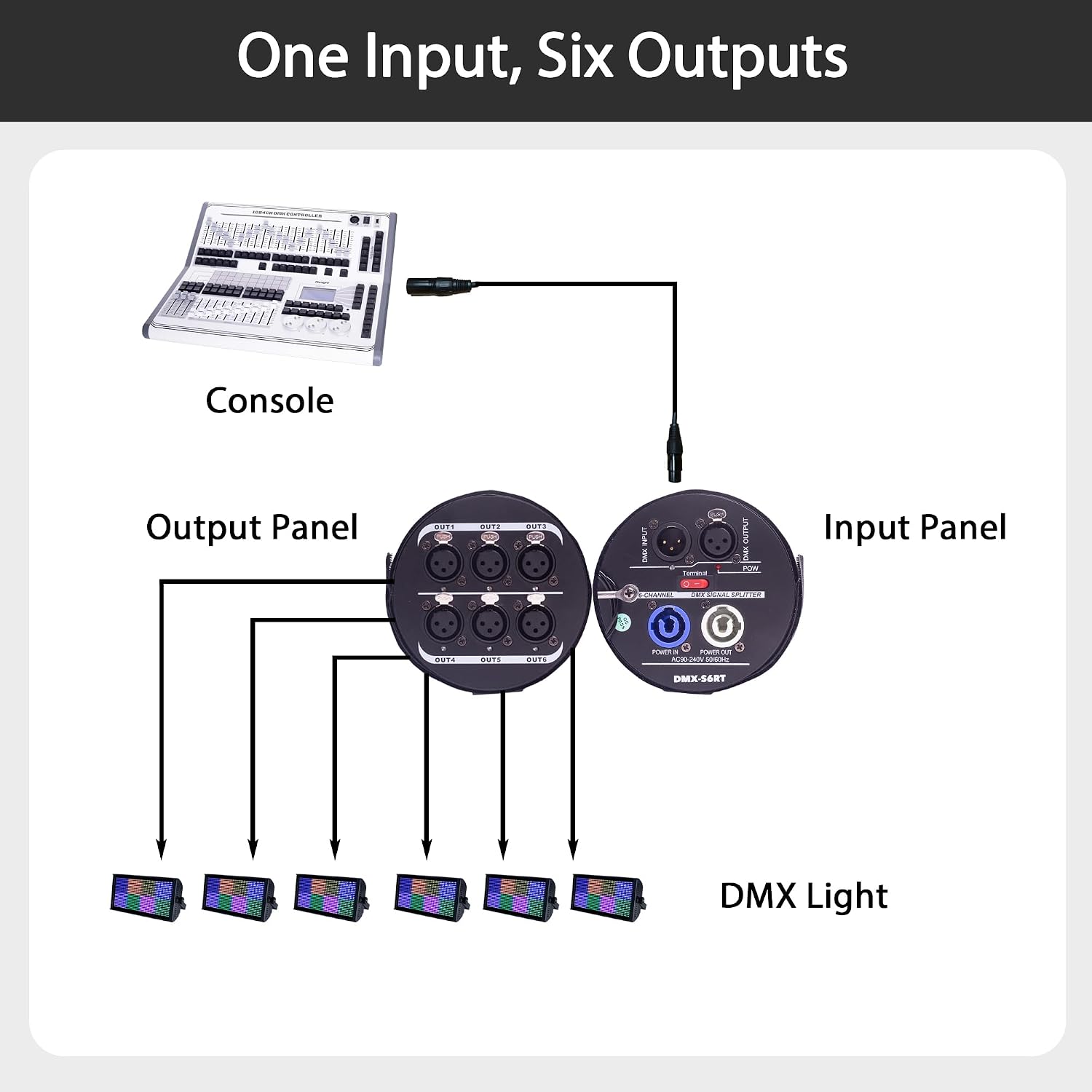
Figure 4.1: DMX Signal Flow Diagram. This diagram illustrates how a DMX console connects to the splitter's input, and how the six outputs distribute the signal to multiple DMX lights.

Figure 4.2: Front and Rear Panel Connections. This image details the DMX input/output (thru), safety tether, termination resistor, power indicator, PowerCON daisy-chain (in & out), and DMX output ports with their respective power indicators.
5. คู่มือการใช้งาน
The Pknight DMX-S6RT is designed for straightforward operation:
- เปิดเครื่อง: Once all connections are made, ensure the power switch is in the 'ON' position. The power indicator light will illuminate.
- การส่งสัญญาณ: The splitter will automatically receive the DMX signal from your controller and distribute it to all connected output channels. The signal indicator lights for each active output will illuminate, confirming signal presence.
- การติดตาม: Observe the signal indicator lights for each DMX output. A lit indicator confirms that a DMX signal is being transmitted through that specific channel.
- หมดแรง: To power down the unit, switch the power button to the 'OFF' position and then disconnect the power cable from the outlet.
Video 5.1: Pknight 6-Channel DMX Signal Splitter Overviewวิดีโอนี้แสดงภาพประกอบเกี่ยวกับ...view of the Pknight 6-Channel DMX Signal Splitter, demonstrating its physical features and basic connectivity.
6. การบำรุงรักษา
To ensure the longevity and optimal performance of your DMX-S6RT splitter, follow these maintenance guidelines:
- การทำความสะอาด: Regularly clean the exterior of the unit with a soft, dry cloth. Avoid using abrasive cleaners or solvents.
- การตรวจสอบ: Periodically inspect all cables and connections for any signs of wear or damage. Replace damaged cables immediately.
- พื้นที่จัดเก็บ: When not in use, store the splitter in a cool, dry place away from direct sunlight and extreme temperatures.
- การระบายอากาศ : ตรวจสอบให้แน่ใจว่ามีการระบายอากาศที่เพียงพอรอบๆ เครื่องเพื่อป้องกันความร้อนสูงเกินไป อย่าปิดกั้นช่องระบายอากาศ
7 การแก้ไขปัญหา
If you encounter issues with your DMX-S6RT splitter, refer to the following troubleshooting tips:
- ไม่มีไฟฟ้า:
- Check if the power adapter is securely connected to both the splitter and a working power outlet.
- Ensure the power switch on the splitter is in the 'ON' position.
- ตรวจสอบว่าเต้ารับไฟฟ้าใช้งานได้โดยเสียบอุปกรณ์อื่น
- ไม่มีสัญญาณ DMX ส่งออก:
- Confirm that the DMX controller is powered on and sending a signal.
- Check the DMX input cable connection to the splitter.
- Ensure DMX output cables are securely connected to both the splitter and the lighting fixtures.
- Verify that the lighting fixtures are correctly addressed and configured for DMX control.
- If using the terminal resistor, ensure it is correctly engaged if the splitter is the last device in the chain.
- Intermittent Signal or Flickering Lights:
- Check all DMX cable connections for looseness or damage.
- Ensure DMX cables are of appropriate quality and length for your setup.
- Verify that the terminal resistor is correctly used at the end of the DMX chain.
- Minimize electromagnetic interference by keeping DMX cables away from power cables.
8. ข้อมูลจำเพาะ
| คุณสมบัติ | ข้อมูลจำเพาะ |
|---|---|
| หมายเลขรุ่น | DMX-S6RT |
| อินพุต Voltage | แรงดันไฟฟ้า 90-240 โวลต์, 50/60 เฮิรตซ์ |
| ช่อง DMX | 6 ช่องสัญญาณออก |
| การแยกตัว | Optical Isolation per Output |
| ตัวเชื่อมต่อ | 3-pin XLR (Input, Thru, Outputs), PowerCON (In, Out) |
| ขนาด | 67.56 x 54.36 x 54.36 นิ้ว (ขนาดสินค้า) |
| น้ำหนัก | 1.98 ปอนด์ |
| การติดตั้ง | Velcro Straps, Safety Rope |
| คุณสมบัติ | Built-in Terminal Resistor, PowerCON Daisy-Chain |
9. การรับประกันและการสนับสนุน
Pknight products are designed for reliability and performance. For warranty information, technical support, or service inquiries, please refer to the contact details provided on the product packaging or visit the official Pknight webไซต์ โปรดเก็บใบเสร็จรับเงินไว้เป็นหลักฐานการซื้อสำหรับการเรียกร้องการรับประกัน