
1. บทนำ
This manual provides essential information for setting up, operating, and maintaining your TCL 32V5C Smart QLED Full HD Android TV. Please read this manual thoroughly before using your television to ensure proper functionality and safety.
The TCL 32V5C series combines a sleek design with QLED and HDR image quality, powered by the advanced Android TV system. It offers a smart visual experience, allowing you to enjoy movies, streaming applications, and multiplayer games with ease.
2. ข้อมูลด้านความปลอดภัยที่สำคัญ
ปฏิบัติตามข้อควรระวังด้านความปลอดภัยขั้นพื้นฐานเสมอเมื่อใช้โทรทัศน์เครื่องนี้เพื่อลดความเสี่ยงต่อการเกิดไฟไหม้ ไฟฟ้าช็อต และการบาดเจ็บ
- อย่าให้ทีวีโดนฝนหรือความชื้น
- ห้ามเปิดตู้ ให้ส่งการบริการทั้งหมดให้กับบุคลากรที่มีคุณสมบัติเหมาะสม
- ตรวจสอบให้แน่ใจว่ามีการระบายอากาศที่เหมาะสมรอบๆ ทีวี
- ใช้เฉพาะสายไฟที่ผู้ผลิตจัดมาให้เท่านั้น
- เก็บทีวีให้ห่างจากแสงแดดโดยตรงและแหล่งความร้อน
- ทำความสะอาดทีวีด้วยผ้าแห้งนุ่มเท่านั้น
3. อะไรอยู่ในกล่อง
ตรวจสอบว่าส่วนประกอบทั้งหมดมีอยู่ก่อนดำเนินการติดตั้ง:
- TCL 32V5C Smart QLED TV
- รีโมทคอนโทรล
- สายไฟ
- คู่มือการใช้งาน (เอกสารนี้)
- TV Stand and Support Screws
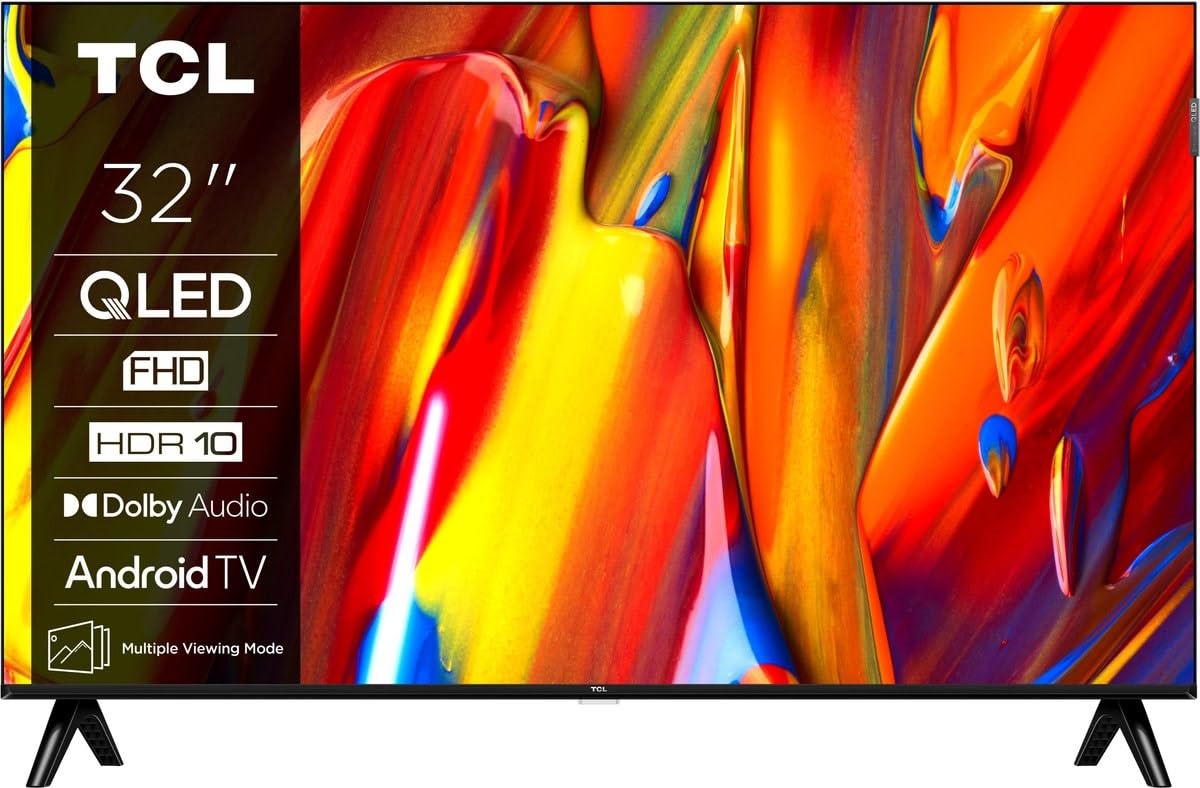
ภาพ: ด้านหน้า view of the TCL 32V5C Smart QLED Full HD Android TV, showcasing its slim design and display features.
4. คู่มือการติดตั้ง
4.1 การติดตั้งขาตั้งทีวี
To attach the included stand:
- วางทีวีคว่ำหน้าลงบนพื้นผิวที่นุ่มและเรียบเพื่อป้องกันหน้าจอเสียหาย
- จัดตำแหน่งส่วนประกอบขาตั้งให้ตรงกับรูสำหรับติดตั้งที่ด้านล่างของทีวี
- ยึดขาตั้งด้วยสกรูที่ให้มา ตรวจสอบให้แน่ใจว่าขันสกรูทั้งหมดให้แน่น

Image: Diagram showing the dimensions of the TCL 32V5C TV and the included remote control (RC733A).
4.2 การติดตั้งบนผนัง (ทางเลือก)
If you choose to wall mount your TV, ensure you use a VESA-compatible wall mount (100 x 100 mm). Consult a professional for installation to prevent damage or injury.
4.3 การต่อสายไฟ
Connect the power cable to the TV's power input and then plug it into a wall outlet. The TV is designed for 220-240V AC, 50/60Hz power supply.
4.4 การเชื่อมต่ออุปกรณ์ภายนอก
Your TCL 32V5C TV offers various connectivity options:
- ช่องต่อ HDMI: Connect Blu-ray players, game consoles, or set-top boxes using one of the two HDMI ports.
- ยูเอสบี: Use the single USB port for media playback from USB drives.
- อีเธอร์เน็ต: เพื่อให้ได้การเชื่อมต่ออินเทอร์เน็ตแบบใช้สายที่เสถียร ให้เสียบสายอีเธอร์เน็ตเข้ากับพอร์ต LAN
- ไวไฟ : เชื่อมต่อกับเครือข่ายไร้สายที่บ้านของคุณเพื่อเข้าถึงอินเทอร์เน็ต
- บลูทูธ: Pair wireless headphones, soundbars, or other Bluetooth-enabled devices.
5. การใช้งานทีวีของคุณ
5.1 First-Time Setup and Android TV
Upon first power-on, the TV will guide you through the initial setup process. This includes selecting your language, connecting to Wi-Fi, and logging into your Google account to activate Android TV features.
Android TV provides access to over 400,000 movies and shows from various streaming services. Utilize Google Cast to transfer photos, videos, and music from your smart devices directly to your TV.
5.2 ฟังก์ชั่นการควบคุมระยะไกล
Use the provided remote control to navigate menus, adjust volume, change channels, and access smart features. Refer to the remote control diagram for specific button functions.
5.3 คุณภาพของภาพและเสียง
Your TV features QLED technology, which uses quantum dot materials to deliver exceptional colors and optical properties, enhancing brightness and fine details for a realistic viewing experience. Direct LED backlighting further improves image quality and energy efficiency.
With HDR10 support, the TV displays a wider range of colors and contrasts, bringing more depth to compatible content. Dolby Audio processing ensures clear and immersive sound quality through the integrated speakers.
6. การบำรุงรักษา
เพื่อให้ทีวีของคุณมีอายุการใช้งานยาวนานและมีประสิทธิภาพเหมาะสมที่สุด ให้ทำดังนี้:
- การทำความสะอาดหน้าจอ: เช็ดหน้าจอเบาๆ ด้วยผ้านุ่มที่ไม่เป็นขุย สำหรับรอยฝังแน่น ให้เช็ดเบาๆampเทน้ำหรือน้ำยาทำความสะอาดหน้าจอชนิดพิเศษลงบนผ้า (อย่าฉีดลงบนหน้าจอโดยตรง)
- ทำความสะอาดตู้: ใช้ผ้าแห้งนุ่มๆ เช็ดทำความสะอาดตู้ทีวี หลีกเลี่ยงการใช้สารทำความสะอาดที่มีฤทธิ์กัดกร่อนหรือตัวทำละลาย
- การระบายอากาศ : ตรวจสอบให้แน่ใจว่าช่องระบายอากาศด้านหลังทีวีไม่มีสิ่งกีดขวาง
- สายไฟ: ตรวจสอบสายไฟเป็นประจำเพื่อดูว่ามีการชำรุดเสียหายหรือไม่
7 การแก้ไขปัญหา
หากคุณประสบปัญหาเกี่ยวกับทีวี โปรดดูวิธีแก้ไขทั่วไปต่อไปนี้:
| ปัญหา | วิธีแก้ปัญหาที่เป็นไปได้ |
|---|---|
| ไม่มีไฟฟ้า | ตรวจสอบว่าสายไฟเชื่อมต่อกับทีวีและเต้ารับที่ผนังอย่างแน่นหนาหรือไม่ ตรวจสอบให้แน่ใจว่าเต้ารับใช้งานได้ |
| ไม่มีภาพ แต่มีเสียง | Verify the correct input source is selected. Check external device connections (HDMI, etc.). |
| ไม่มีเสียง แต่มีภาพ | ตรวจสอบระดับเสียงและการตั้งค่าปิดเสียง ตรวจสอบให้แน่ใจว่าอุปกรณ์เสียงภายนอกเชื่อมต่อและเลือกอย่างถูกต้องแล้ว |
| รีโมตคอนโทรลไม่ทำงาน | เปลี่ยนแบตเตอรี่ ตรวจสอบให้แน่ใจว่าไม่มีสิ่งกีดขวางระหว่างรีโมทและเซ็นเซอร์อินฟราเรดของทีวี |
| ปัญหาการเชื่อมต่อ Wi-Fi | รีสตาร์ทเราเตอร์และโมเด็มของคุณ จากนั้นเชื่อมต่อทีวีกับเครือข่าย Wi-Fi อีกครั้งในเมนูการตั้งค่า |
For further assistance, please contact TCL customer support.
8. ข้อมูลจำเพาะ
| คุณสมบัติ | รายละเอียด |
|---|---|
| ยี่ห้อ | ทีซีแอล |
| หมายเลขรุ่น | 32V5C |
| ขนาดหน้าจอ | 32 นิ้ว |
| เทคโนโลยีการแสดงผล | คิวแอลอีดี |
| ปณิธาน | 1080p (ฟูลเอชดี) |
| อัตราการรีเฟรช | 60 เฮิรตซ์ |
| คุณสมบัติพิเศษ | QLED & Android TV, HDR10, Google Cast |
| เทคโนโลยีการเชื่อมต่อ | บลูทูธ, อีเทอร์เน็ต, HDMI, USB, Wi-Fi |
| พอร์ต HDMI | 2 |
| พอร์ต USB | 1 |
| อัตราส่วนภาพ | 16:9 น. |
| ขนาดสินค้า (ลึก x กว้าง x สูง) | 18P x 71.5l x 46.5H cm (with stand) |
| น้ำหนักสินค้า (ไม่รวมขาตั้ง) | 3.1 กิโลกรัม |
| มาตรฐาน VESA Mount | 100 x 100 มม. |
| รูปแบบเสียง | ระบบเสียงดอลบี้ |
| ประเภทจูนเนอร์ | DVB-T2 |
| สี | สีดำ |
9. การรับประกันและการสนับสนุน
9.1 ข้อมูลการรับประกัน
This product comes with a Limited Warranty. Please refer to the warranty card included in the packaging or visit the official TCL website for detailed terms and conditions regarding your specific region.
9.2 การสนับสนุนลูกค้า
For technical assistance, troubleshooting not covered in this manual, or service inquiries, please contact TCL customer support through their official webไซต์หรือข้อมูลการติดต่อที่ระบุไว้ในเอกสารการรับประกันของคุณ
You can often find additional resources, FAQs, and software updates on the TCL อย่างเป็นทางการ Webเว็บไซต์.