
อาร์เอสเอช แอนดรอยด์ สมาร์ท Tag
อาร์เอสเอช แอนดรอยด์ สมาร์ท Tag คู่มือการใช้งาน
รุ่น: แอนดรอยด์สมาร์ท Tag
แบรนด์: RSH
การแนะนำ
RSH Android Smart Tag เป็นอุปกรณ์ขนาดกะทัดรัดและมีประสิทธิภาพสูง ออกแบบมาเพื่อช่วยคุณค้นหาสิ่งของมีค่าโดยใช้แอป Google Find My Device คู่มือนี้ให้คำแนะนำอย่างละเอียดเพื่อให้คุณใช้งานสมาร์ทวอทช์ได้อย่างเต็มประสิทธิภาพ Tag.

ภาพ: สมาร์ทโฟน RSH Android จำนวน 4 เครื่อง Tags, แสดงasinโดยพิจารณาจากดีไซน์และปริมาณของสินค้าในบรรจุภัณฑ์
การตั้งค่า
1. การเปิดและปิดเครื่อง
RSH Android Smart Tag มีปุ่มฟังก์ชันสำหรับการใช้งานพื้นฐาน โปรดดูแผนภาพด้านล่างเพื่อดูตำแหน่งของปุ่ม
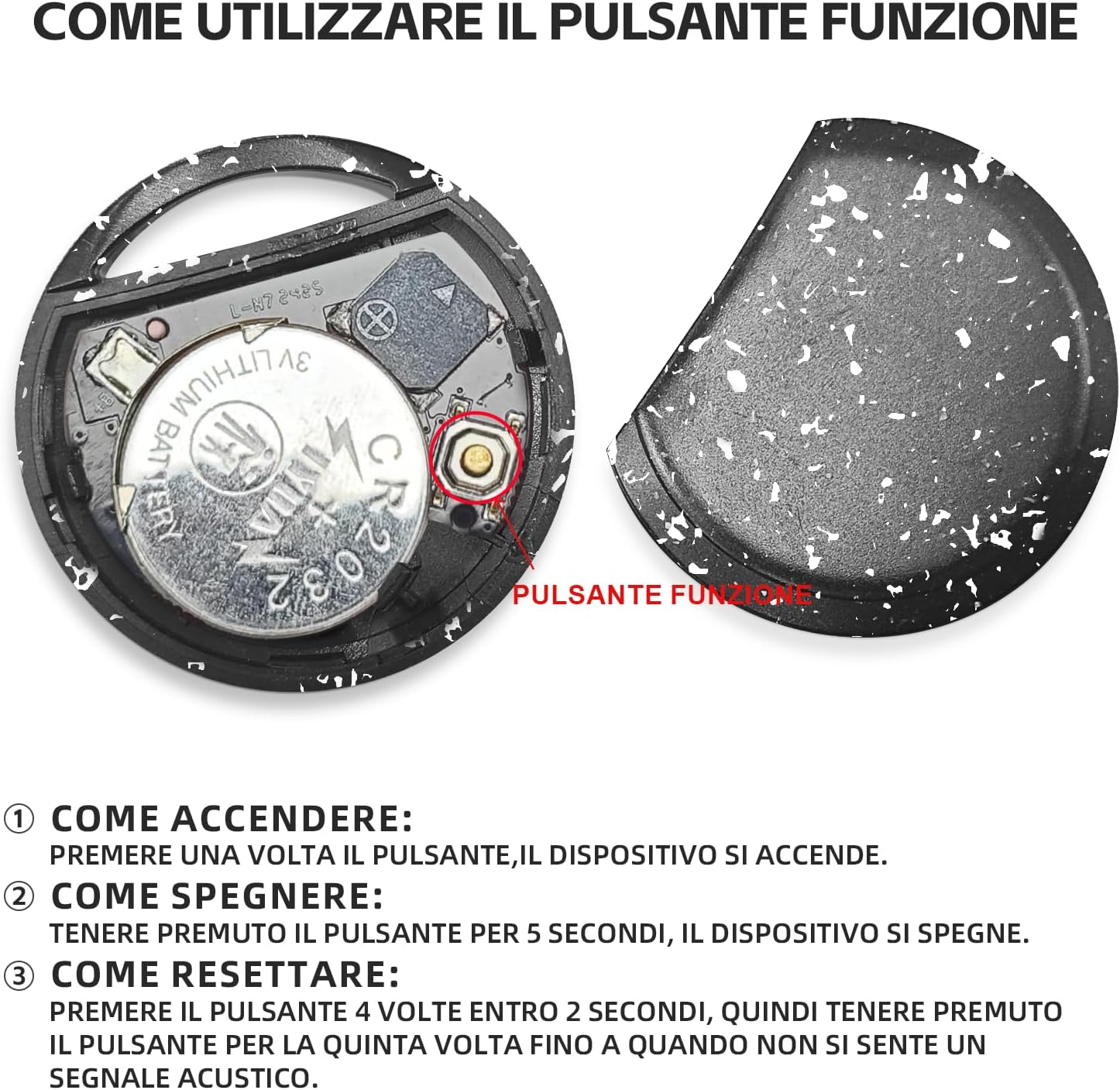
ภาพ: ภายใน view ของสมาร์ท Tagโดยแสดงให้เห็นถึงแบตเตอรี่และปุ่มฟังก์ชัน
- วิธีเปิดใช้งาน: กดปุ่มฟังก์ชั่นหนึ่งครั้ง อุปกรณ์จะเปิดใช้งาน
- วิธีปิด: กดปุ่มฟังก์ชั่นค้างไว้ 5 วินาที อุปกรณ์จะปิดลง
2. จับคู่กับอุปกรณ์ Android ได้อย่างรวดเร็ว
ความฉลาด Tag ออกแบบมาเพื่อการจับคู่กับสมาร์ทโฟน Android ของคุณอย่างรวดเร็วและราบรื่น
- โปรดตรวจสอบให้แน่ใจว่าได้เปิดใช้งานบลูทูธในโทรศัพท์ Android ของคุณแล้ว
- นำ RSH Android Smart มาใช้งาน Tag ใกล้กับโทรศัพท์ของคุณ
- คำเชิญเชื่อมต่อจะปรากฏขึ้นบนหน้าจอโทรศัพท์ของคุณโดยอัตโนมัติ ทำตามคำแนะนำบนหน้าจอเพื่อทำการจับคู่ให้เสร็จสมบูรณ์

ภาพ: ภาพแสดงลักษณะของสมาร์ท Tagสามารถใช้งานร่วมกับอุปกรณ์ Android ได้หลากหลายรุ่น
คำแนะนำการใช้งาน
1. การติดตามและการค้นหาสินค้า
ใช้แอป Google Find My Device เพื่อค้นหาสมาร์ทโฟน RSH Android ของคุณ Tag.
- อยู่ในระยะบลูทูธ: เปิดแอป Google Find My Device หาก... tag หากอยู่ในระยะบลูทูธ คุณสามารถเปิดใช้งานลำโพงในตัวเพื่อส่งสัญญาณเสียง ช่วยให้คุณระบุตำแหน่งที่แน่นอนได้
- อยู่นอกระยะบลูทูธ: หากมีการ tag หากอยู่นอกระยะบลูทูธ แอปจะแสดงตำแหน่งสุดท้ายที่ทราบบนแผนที่ โดยใช้เครือข่าย Google Find My Device

ภาพ: ตัวอย่างการใช้งานฟีเจอร์ 'เล่นเสียง' ภายในแอป Google Find My Device

ภาพ: เดอะสมาร์ท Tag ติดไว้กับกระเป๋าเป้สะพายหลัง เพื่อแสดงวิธีการใช้งานในการติดตามสิ่งของ

ภาพ: เดอะสมาร์ท Tag ติดไว้กับกระเป๋าเดินทาง เพื่อเน้นประโยชน์ใช้สอยสำหรับการเดินทาง
2. โหมดการสูญเสีย
หากสิ่งของของคุณหายไป ให้เปิดใช้งานโหมดค้นหาหายในแอป Google Find My Device คุณสมบัตินี้ใช้ประโยชน์จากเครือข่ายอุปกรณ์ Android นับพันล้านเครื่องเพื่อช่วยค้นหาสิ่งของที่หายไปของคุณ
3. การแบ่งปันสิ่งของ
คุณสามารถแชร์การเข้าถึงสมาร์ทของคุณได้ Tag เชื่อมต่อกับผู้อื่นผ่านแอป Google Find My Device ซึ่งช่วยให้ผู้ใช้หลายคนสามารถใช้งานร่วมกันได้ view ตำแหน่งของสิ่งของบนแผนที่

ภาพ: ตัวอย่างการใช้งานต่างๆ ของสมาร์ท Tagซึ่งแสดงให้เห็นถึงความอเนกประสงค์ในการติดตามสิ่งของต่างๆ
การซ่อมบำรุง
1. การเปลี่ยนแบตเตอรี่
RSH Android Smart Tag ใช้แบตเตอรี่ CR2032 ที่สามารถเปลี่ยนได้ ซึ่งโดยทั่วไปจะมีอายุการใช้งานนานถึง 1 ปี วิธีการเปลี่ยนแบตเตอรี่:
- เปิดสมาร์ทอย่างระมัดระวัง Tag casing.
- ถอดแบตเตอรี่ CR2032 เก่าออก
- ใส่แบตเตอรี่ CR2032 ใหม่ โดยตรวจสอบให้แน่ใจว่าใส่ขั้วถูกต้อง
- ปิด casinก. อย่างปลอดภัย
2. ความทนทานต่อน้ำ
มิTag อุปกรณ์ติดตามนี้ได้รับการรับรองมาตรฐาน IP67 ซึ่งหมายความว่าได้รับการปกป้องจากฝุ่นละอองและสามารถทนต่อการจุ่มน้ำลึก 1 เมตรได้นานถึง 30 นาที แม้ว่าจะกันน้ำได้ แต่ไม่แนะนำให้จุ่มน้ำเป็นเวลานานหรือใช้ขณะว่ายน้ำ
การแก้ไขปัญหา
การรีเซ็ตอุปกรณ์
หากคุณพบปัญหาการเชื่อมต่อหรือพฤติกรรมผิดปกติ คุณอาจต้องรีเซ็ต RSH Android Smart ของคุณ Tag:
- กดปุ่มฟังก์ชัน 4 ครั้งภายใน 2 วินาที
- หลังจากกดปุ่มครั้งที่สี่แล้ว ให้กดปุ่มฟังก์ชันค้างไว้เป็นครั้งที่ห้าทันที จนกว่าคุณจะได้ยินเสียงสัญญาณ ซึ่งแสดงว่าอุปกรณ์ได้รับการรีเซ็ตเรียบร้อยแล้ว
ข้อมูลจำเพาะ
| คุณสมบัติ | รายละเอียด |
|---|---|
| ยี่ห้อ | อาร์เอสเอช |
| วัสดุ | พลาสติก |
| ขนาดสินค้า | ขนาด 36L x 36W x 8Th มิลลิเมตร |
| น้ำหนักสินค้า | 7.6 กรัม |
| อุปกรณ์ที่รองรับ | สมาร์ทโฟน (เฉพาะระบบแอนดรอยด์) |
| วิธีการควบคุม | แอป (Google Find My Device) |
| ประเภทแบตเตอรี่ | 1 ก้อน CR2032 (มีให้ในชุด สามารถเปลี่ยนได้) |
| ความต้านทานต่อน้ำ | ได้รับการรับรอง IP67 |
การรับประกันและการสนับสนุน
ข้อมูลการรับประกันสินค้าและการบริการลูกค้าไม่มีอยู่ในข้อมูลที่มีอยู่ โปรดดูที่บรรจุภัณฑ์ของผลิตภัณฑ์หรือข้อมูลจากผู้ขาย webดูรายละเอียดเกี่ยวกับการรับประกันและวิธีการติดต่อฝ่ายบริการลูกค้าได้ที่เว็บไซต์นี้
Ask a question about this manual
Ask about setup, troubleshooting, compatibility, parts, safety, or missing instructions. Manuals+ will review the question and use this page’s manual context to help answer it.