
ซีที211
User Manual for Generic Dual Lens Outdoor Security Camera
รุ่น : CT211
1. บทนำ
Thank you for choosing the Generic Dual Lens Outdoor Security Camera. This manual provides detailed instructions for the installation, operation, and maintenance of your new security camera. Please read this manual thoroughly before use to ensure proper functionality and to maximize the camera's features.
เนื้อหาแพ็คเกจ
- Generic Dual Lens Outdoor Security Camera
- สายไฟ
- สกรูยึด
- คู่มือการใช้งาน (เอกสารนี้)
2. ข้อมูลด้านความปลอดภัย
เพื่อป้องกันการบาดเจ็บต่อตัวคุณหรือผู้อื่น หรือความเสียหายต่ออุปกรณ์ของคุณ โปรดอ่านข้อมูลด้านความปลอดภัยทั้งหมดก่อนใช้อุปกรณ์
- Ensure the power supply is stable and matches the camera's requirements.
- อย่าให้กล้องสัมผัสกับอุณหภูมิที่สูงหรือความชื้นสูง หรือโดนแสงแดดโดยตรง
- ควรหลีกเลี่ยงการวางกล้องไว้ใกล้สนามแม่เหล็กไฟฟ้าที่มีความเข้มสูง
- ห้ามถอดประกอบหรือดัดแปลงกล้องโดยเด็ดขาด การกระทำดังกล่าวจะทำให้การรับประกันเป็นโมฆะ
- เก็บกล้องและอุปกรณ์เสริมให้พ้นมือเด็ก
- For outdoor installation, ensure the camera is securely mounted to prevent falling.
3. สินค้าหมดview
The Generic Dual Lens Outdoor Security Camera is designed to provide comprehensive surveillance with its advanced features.
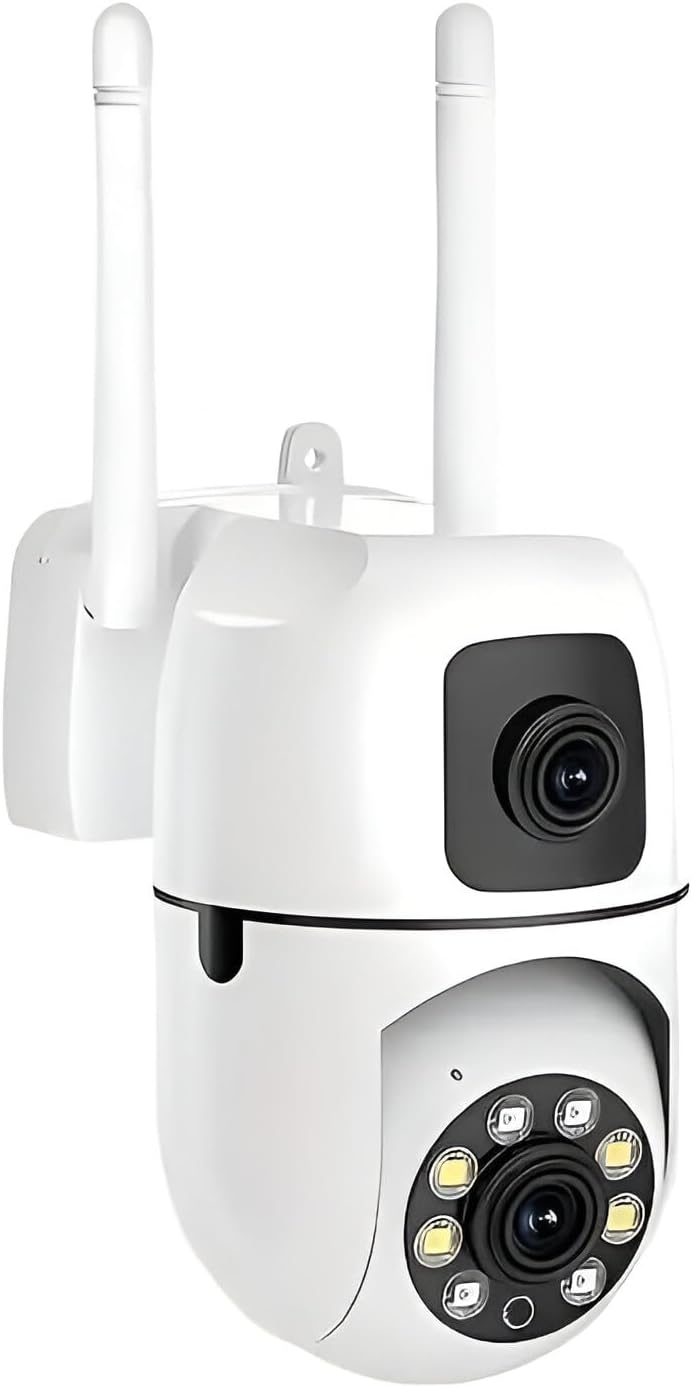
รูปที่ 3.1 : ด้านหน้า view of the Generic Dual Lens Outdoor Security Camera.
คุณสมบัติหลัก:
- ความละเอียด 2K HD: Provides clear and detailed images and video.
- ระบบเลนส์คู่: Features one fixed lens for key areas and one rotating lens for broader coverage.
- สนาม 360 องศา View: Comprehensive coverage of your property.
- การติดตามการเคลื่อนไหว: Automatically tracks detected movement.
- Human Detection & Real-time Alerts: Sends notifications to your smartphone upon detection.
- เสียงสองทาง: มีไมโครโฟนและลำโพงในตัวสำหรับใช้ในการสื่อสาร
- การมองเห็นตอนกลางคืนแบบสีเต็มรูปแบบ: Three night vision modes (Full-color, Infrared, Smart Vision) with up to 33 feet range.
- ตัวเลือกการจัดเก็บข้อมูลหลากหลาย: รองรับการ์ด Micro SD (สูงสุด 128GB) และที่เก็บข้อมูลบนคลาวด์
- การเชื่อมต่อ Wi-Fi: Easy wireless setup and remote access.

รูปที่ 3.2: เกินview of camera features including motion detection, auto tracking, pan & tilt, two-way audio, color night vision, and alarm push.
4. การตั้งค่า
4.1 แกะกล่อง
Carefully remove all components from the packaging. Verify that all items listed in the "Package Contents" section are present and undamaged.
4.2 การติดตั้งกล้อง
The camera is designed for both indoor and outdoor wall mounting.
- เลือกตำแหน่งที่เหมาะสมสำหรับการติดตั้ง โดยต้องแน่ใจว่ามีพื้นที่โล่งกว้าง view และสามารถเข้าถึงเต้าเสียบปลั๊กไฟ
- Use the provided mounting screws to securely attach the camera to the wall. Ensure the mounting surface is strong enough to support the camera's weight.
4.3 การเชื่อมต่อสายไฟ
เชื่อมต่อสายไฟที่ให้มากับพอร์ตรับไฟของกล้อง แล้วเสียบเข้ากับเต้ารับไฟฟ้าทั่วไป กล้องจะเปิดเครื่องและเริ่มกระบวนการเริ่มต้นทำงาน
4.4 การติดตั้งแอปและการเชื่อมต่อเครือข่าย
To control and monitor your camera, you need to install the iCSee app on your smartphone or tablet.
- ดาวน์โหลดแอป: ค้นหา "iCSee" in your device's app store (Google Play Store for Android or Apple App Store for iOS) and download the official application.
- ลงทะเบียน/เข้าสู่ระบบ: Open the iCSee app and follow the on-screen instructions to register a new account or log in if you already have one.
- เพิ่มอุปกรณ์: แตะไอคอน "+" ในแอปเพื่อเพิ่มอุปกรณ์ใหม่
- เลือกวิธีการเชื่อมต่อ: The camera supports WiFi, personal hotspot, or Ethernet cable connections.
- การเชื่อมต่อ WiFi: Select WiFi connection in the app. Ensure your phone is connected to a 2.4GHz WiFi network (5GHz is not supported). Enter your WiFi password when prompted. The app will guide you through connecting the camera to your WiFi network, often using a QR code scan or sound wave pairing.
- การเชื่อมต่อสายเคเบิลอีเธอร์เน็ต: If using an Ethernet cable, connect one end to the camera's Ethernet port and the other to your router. The app should automatically detect the camera.
- ฮอตสปอตส่วนตัว: Follow the app's instructions for connecting via a personal hotspot if WiFi is unavailable.
- ตั้งค่าให้เสร็จสมบูรณ์: Once connected, name your camera and set a password for security. The camera is now ready for use.
5. คู่มือการใช้งาน
5.1 สด View and Dual Screen Control
Access the live feed from your camera through the iCSee app. The dual-lens system allows for unique viewความสามารถในการพัฒนา

Figure 5.1: The iCSee app displaying dual-screen preview from both fixed and rotating lenses.
The app provides a dual-screen preview, showing the fixed lens view and the rotating lens view simultaneously. You can switch between views or control the rotating lens independently.

Figure 5.2: The camera's dual view capability, illustrating 355-degree pan and 90-degree tilt for comprehensive coverage.

Figure 5.3: The camera allows monitoring of crucial spots with the fixed camera and remote adjustment of the rotating camera to patrol wider areas.
5.2 เสียงสองทาง
กล้องมีไมโครโฟนและลำโพงในตัว ทำให้สามารถสื่อสารสองทางได้
- ในไลฟ์สด view interface of the iCSee app, tap the microphone icon to speak through the camera's speaker.
- แตะไอคอนลำโพงเพื่อฟังเสียงจากบริเวณรอบกล้อง

Figure 5.4: The camera supports two-way audio communication and automatic motion tracking.
5.3 การตรวจจับการเคลื่อนไหวและการแจ้งเตือน
The camera is equipped with human detection and motion tracking capabilities.
- การตรวจจับของมนุษย์: When a human figure is detected, the camera can trigger real-time alerts.
- การติดตามการเคลื่อนไหว: The rotating lens will automatically track the movement of detected subjects, displaying their path.
- การแจ้งเตือน: Configure alert settings in the iCSee app to receive instant notifications on your smartphone, including images or video clips of the suspicious activity.
5.4 โหมดการมองเห็นตอนกลางคืน
The camera offers three night vision modes for optimal visibility in low-light conditions, with a range of up to 33 feet.
- การมองเห็นกลางคืนแบบเต็มสี: Provides color images even in low light by activating the camera's built-in lights.
- อินฟราเรดคืนวิสัยทัศน์: Uses infrared LEDs for clear black-and-white images in complete darkness.
- วิชั่นอัจฉริยะ: สลับระหว่างโหมดอินฟราเรดและโหมดสีเต็มรูปแบบโดยอัตโนมัติตามการตรวจจับการเคลื่อนไหวหรือสภาพแสง
You can switch between these modes within the iCSee app settings.
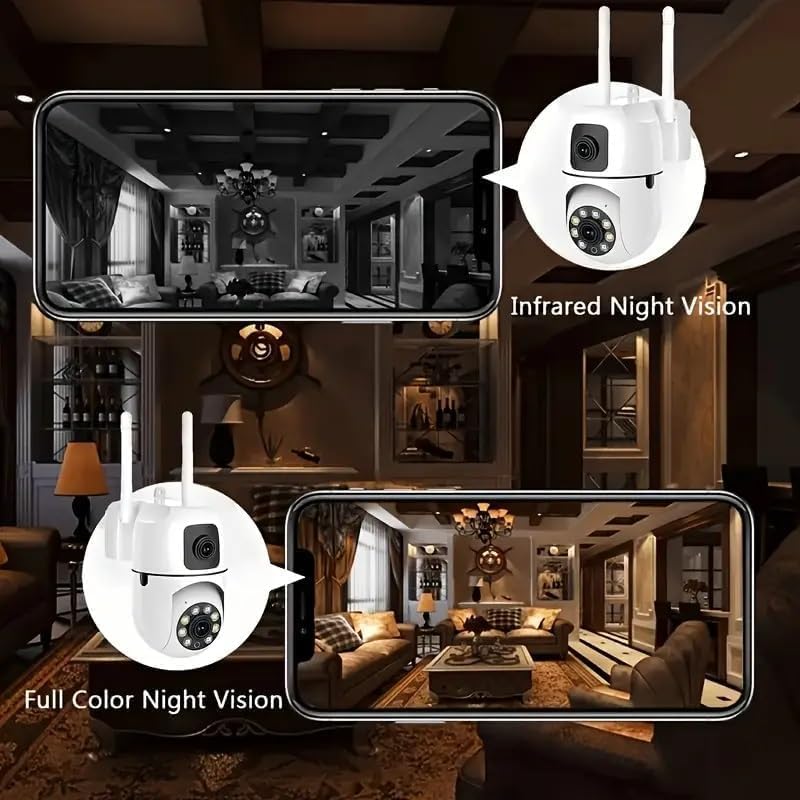
Figure 5.5: Comparison of Infrared Night Vision (top) and Full Color Night Vision (bottom) capabilities.
5.5 การบันทึกและการเก็บรักษา
The camera supports continuous recording and event-triggered recording.
- ที่เก็บข้อมูลไมโคร SD การ์ด: Insert a Micro SD card (up to 128GB, not included) into the camera's SD card slot. The camera will automatically begin recording to the card. You can view playback directly from the app.
- การเก็บข้อมูลบนคลาวด์: The camera also supports cloud storage services (subscription may be required). Refer to the iCSee app for details on activating and managing cloud storage.
- NVR System Compatibility: The PTZ camera works with NVR systems for 24/7 recording.
6. การบำรุงรักษา
6.1 การทำความสะอาดกล้อง
To maintain optimal image quality, regularly clean the camera lens and body.
- ใช้ผ้าแห้งนุ่มเช็ดตัวกล้อง
- สำหรับเลนส์ ให้ใช้ผ้าเช็ดเลนส์และน้ำยาทำความสะอาดเลนส์โดยเฉพาะเพื่อป้องกันรอยขีดข่วน
- อย่าใช้สารเคมีรุนแรงหรือน้ำยาทำความสะอาดที่มีฤทธิ์กัดกร่อน
การอัปเดตเฟิร์มแวร์ 6.2 รายการ
Periodically check the iCSee app for available firmware updates. Keeping your camera's firmware updated ensures optimal performance, new features, and security enhancements. Follow the in-app instructions for firmware updates.
7 การแก้ไขปัญหา
| ปัญหา | สาเหตุที่เป็นไปได้ | สารละลาย |
|---|---|---|
| Camera cannot connect to Wi-Fi. | Incorrect Wi-Fi password; Camera too far from router; 5GHz Wi-Fi network used; Network issues. |
|
| ไม่มีภาพหรือหน้าจอดำขณะถ่ายทอดสด view. | Camera is offline; Power issue; Network problem. |
|
| ไม่ได้รับการแจ้งเตือนการตรวจจับการเคลื่อนไหว | Alerts disabled in app; Incorrect sensitivity settings; App notification permissions. |
|
| คุณภาพการมองเห็นในเวลากลางคืนไม่ดี | เลนส์ถูกบดบัง; โหมดการมองเห็นในเวลากลางคืนไม่ถูกต้อง; แสงสว่างโดยรอบไม่เพียงพอสำหรับโหมดสี |
|
8. ข้อมูลจำเพาะ
| คุณสมบัติ | รายละเอียด |
|---|---|
| ชื่อรุ่น | CT211-Dual-Lens-Camera |
| ยี่ห้อ | ทั่วไป |
| การใช้งานภายใน/ภายนอกอาคาร | กลางแจ้ง, ในร่ม |
| ความละเอียดในการจับภาพวิดีโอ | 2048p (2K HD) |
| Viewอิงแองเกิล | 360 องศา |
| เทคโนโลยีการเชื่อมต่อ | ไร้สาย (Wi-Fi) |
| โปรโตคอลการเชื่อมต่อ | บลูทู ธ Wi-Fi |
| แหล่งพลังงาน | สายไฟ |
| ประเภทตัวควบคุม | YiIoT (Implied iCSee app) |
| ประเภทการติดตั้ง | ติดผนัง |
| คุณสมบัติพิเศษ | HD Resolution, Night Vision, 2-Way Audio, PTZ Technology, Motion Sensor |
| การสนับสนุนการจัดเก็บข้อมูล | การ์ด Micro SD (สูงสุด 128GB), พื้นที่จัดเก็บข้อมูลบนคลาวด์ |
| ขนาดสินค้า (กว้าง x ยาว x สูง) | 2.67 x 4.72 x 4.72 นิ้ว |
| น้ำหนักสินค้า | 11.2 ออนซ์ |

Figure 8.1: Physical dimensions of the camera.
9. การรับประกันและการสนับสนุน
This product comes with a standard manufacturer's warranty. Please refer to the packaging or contact the seller for specific warranty terms and conditions.
For technical assistance or customer support, please contact the seller or manufacturer. Customer support is available around the clock to assist you with any queries or issues.
Ask a question about this manual
Ask about setup, troubleshooting, compatibility, parts, safety, or missing instructions. Manuals+ will review the question and use this page’s manual context to help answer it.