
1. บทนำ
The Xvive U35D Stereo XLR Plug-on Wireless Audio System provides a reliable and high-quality wireless solution for audio transmission. Operating on the stable 5.8GHz frequency band, it minimizes interference, ensuring clear and consistent audio performance. This system is designed for versatility, supporting various configurations for live performances, PA systems, and studio applications, offering users the freedom to move without cable constraints.

Figure 1: Xvive U35D Stereo XLR Plug-on Wireless Audio System components.
The Xvive U35D system is ideal for singers, rappers, harmonica players, public speakers, DJs, preachers, auctioneers, actors, politicians, and anyone seeking mobility while speaking or performing.
2. เนื้อหาบรรจุภัณฑ์
The Xvive U35D Dual Stereo System package includes the following items:
- Xvive U35 Transmitter x 2
- Xvive U35 Receiver x 2
- สาย USB x2
- กระเป๋าx2
- XLR Female to XLR Male Adapter x 1

Figure 2: All items included in the Xvive U35D Dual Stereo System package.
3. หมดระบบview
The Xvive U35D system consists of two transmitters and two receivers, designed for seamless integration with your existing audio equipment. Key features include:
- Stable 5.8GHz Wireless Band: Operates on the 5.8GHz frequency to reduce interference and ensure a clear, reliable signal.
- 6 ช่อง: Provides multiple channels for flexible setup and interference avoidance.
- ความหน่วงต่ำ: Less than 5ms latency for real-time audio transmission.
- แบตเตอรี่ใช้งานได้นาน 5 ชั่วโมง: Built-in rechargeable batteries offer extended usage.

รูปที่ 3: เกินview of Xvive U35D system features.
4. คำแนะนำในการตั้งค่า
4.1. การชาร์จอุปกรณ์
Before initial use, fully charge both the transmitters and receivers using the provided USB cables. Connect the USB cables to the charging ports on each unit and plug them into a standard USB power source.
4.2 การเชื่อมต่อตัวส่งสัญญาณเข้ากับไมโครโฟน
Plug the Xvive U35 Transmitter directly into the XLR output of your dynamic microphone. Ensure a secure connection.
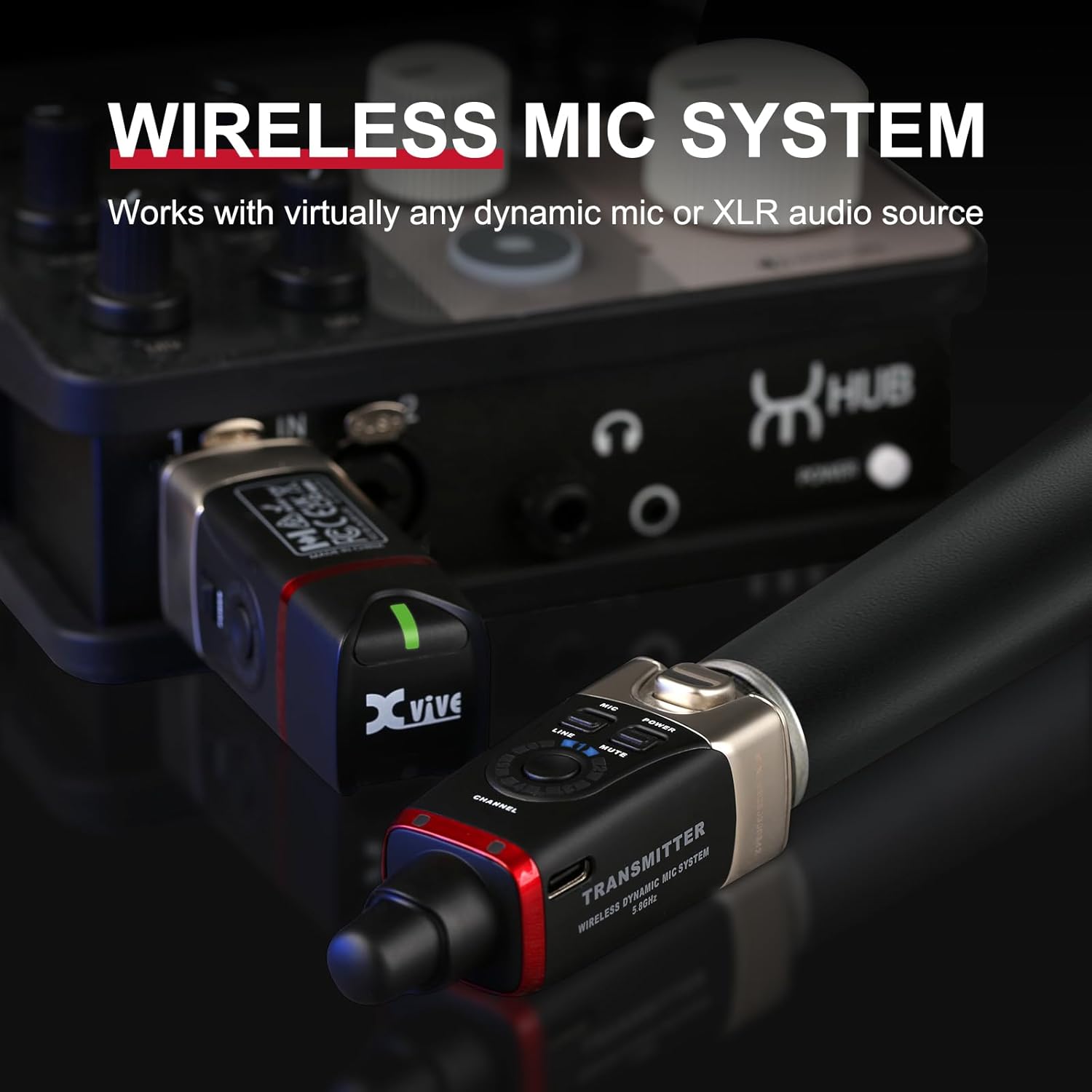
Figure 4: Transmitter connected to a dynamic microphone.
4.3. Connecting the Receiver to an Audio Input
Plug the Xvive U35 Receiver into the XLR input of your mixer, PA system, or audio interface. If connecting to a device with an XLR female input, use the provided XLR Female to XLR Male Adapter if necessary.
5. การใช้งานระบบ
5.1. การเปิด/ปิดเครื่อง
Press and hold the Power button on both the transmitter and receiver to turn them on or off. The indicator lights will illuminate when the units are active.
5.2. การเลือกช่อง
Both the transmitter and receiver have a channel selection button. Press this button to cycle through the available 6 channels. Ensure that both the transmitter and receiver are set to the same channel for proper operation.
5.3. Mic/Line Mode Selection
The transmitter features a switch to select between 'MIC' and 'LINE' modes. Select 'MIC' for microphones and 'LINE' for line-level audio sources (e.g., instruments).
6. Usage Configurations
6.1. Mono System Setup
For a mono setup, set one transmitter to broadcast to two receivers on the same channel. This allows a single audio source to be sent wirelessly to multiple speakers or inputs.

Figure 5: Mono system setup diagram.
6.2. Stereo System Setup
To achieve full stereo sound, connect two XLR transmitters (one for the left channel, one for the right channel) to your audio source. Then, connect two receivers (Receiver 1 for left, Receiver 2 for right) to your stereo speakers or mixer inputs.
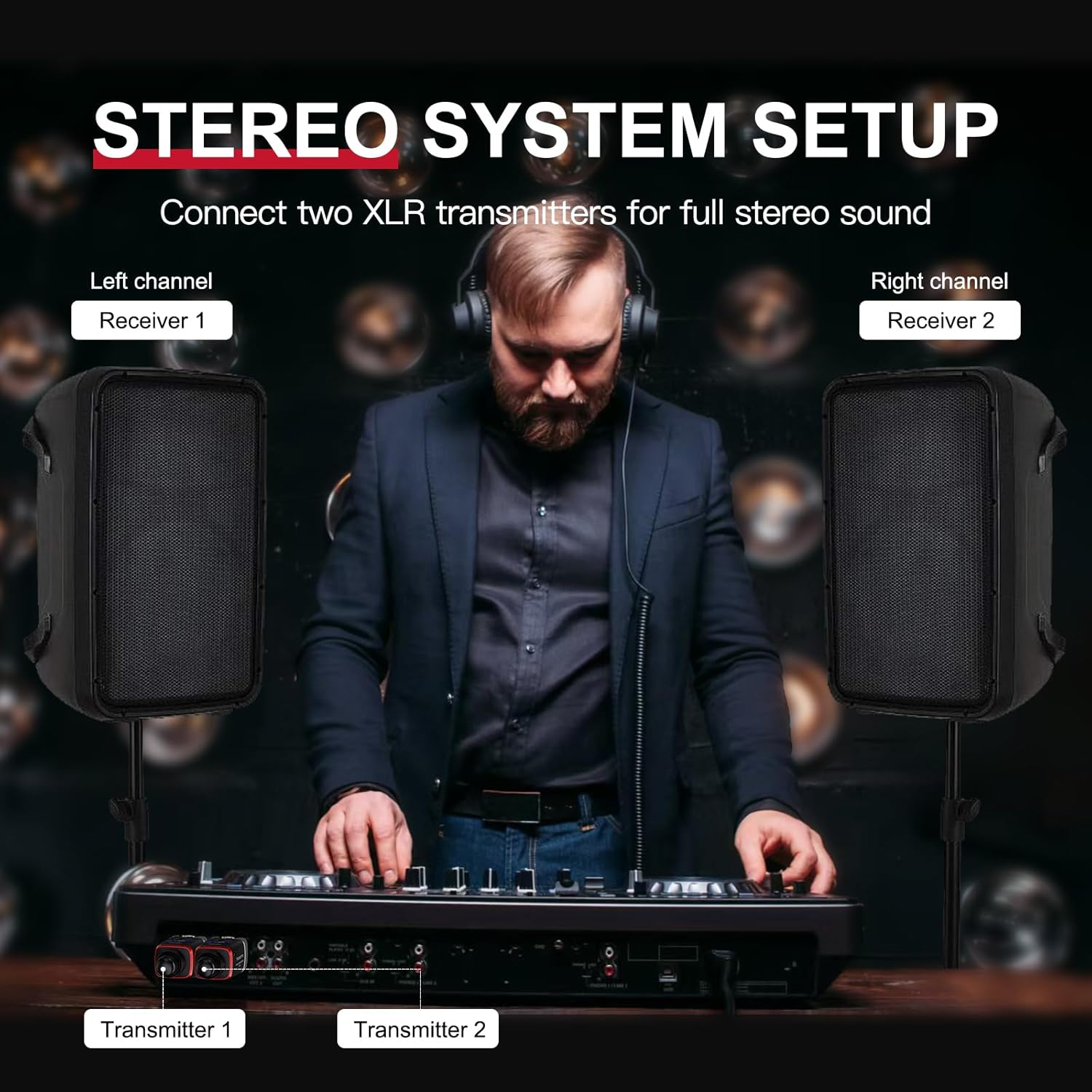
Figure 6: Stereo system setup diagram.
6.3. PA System Integration
The U35D system is PA system friendly. It can wirelessly connect from a PA mixing console to a powered main speaker, eliminating the need for long speaker cables. It also supports wireless connections between powered mains or monitors.
6.4. Mixer-Free Operation
Address audiences through powered speaker cabinets without requiring a mixer. Simply connect the U35 receiver directly to the speaker's XLR input.
7. ข้อมูลแบตเตอรี่
The Xvive U35D units are equipped with Lithium Polymer batteries. Each unit provides approximately 5 hours of battery life on a full charge. Use the provided USB cables for recharging.
8. ข้อมูลจำเพาะ
- ยี่ห้อ: เอ็กซ์ไวฟ์
- หมายเลขรุ่น: U35 Dual
- ย่านความถี่ไร้สาย: 5.8กิกะเฮิรตซ์
- จำนวนช่องสัญญาณ: 6
- ความหน่วง: น้อยกว่า 5ms
- ประเภทแบตเตอรี่: ลิเธียมโพลีเมอร์
- อายุการใช้งานแบตเตอรี่: ประมาณ 5 ชั่วโมง
- น้ำหนักสินค้า: 1.3 ปอนด์
- ขนาดแพ็คเกจ: 7.13 x 6.57 x 1.61 นิ้ว
9 การแก้ไขปัญหา
- ไม่มีเสียง: Ensure both transmitter and receiver are powered on and set to the same channel. Check battery levels. Verify all cables are securely connected.
- สัญญาณรบกวน/สัญญาณขาดหาย: Try switching to a different channel. Ensure there are no large obstructions between the transmitter and receiver. Avoid operating near other 5.8GHz devices if possible.
- แบตเตอรี่ต่ำ: Recharge units using the provided USB cables.