
การแนะนำ
This manual provides comprehensive instructions for the installation, operation, and maintenance of your Vrabocry DC5V-24V Smart Tuya APP LED SPI Controller. This device is designed to control various SPI RGB/RGBW LED strips, offering versatile lighting effects through APP and music synchronization.
มีอะไรอยู่ในกล่อง
โปรดตรวจสอบให้แน่ใจว่ามีส่วนประกอบครบถ้วนก่อนดำเนินการติดตั้ง
- 1 x Tuya SPI RGB/RGBW LED Controller (Colorful-X7)
- 1 x คู่มือผู้ใช้
- Necessary connection cables (as supplied)

Image: The Vrabocry LED SPI Controller, its accompanying cables, and a small screwdriver, laid out next to its packaging and a user manual. This illustrates the complete package contents.
ข้อมูลจำเพาะ
| คุณสมบัติ | รายละเอียด |
|---|---|
| ชื่อสินค้า | Tuya SPI RGB/RGBW LED Controller |
| ฉบับทำงานtage | กระแสตรง 5~24 โวลต์ |
| วิธีการควบคุม | APP (Smart Life or Tuya) or Music |
| การเชื่อมต่อ | WiFi-IEEE 802.11b/g/n 2.4GHz, Bluetooth mesh |
| เอาท์พุต | 4A/ช่อง (เอาท์พุตรวมสูงสุด 12A) |
| Supported LED Strip Types | All SPI RGB LED strips (WS/SK/SM/TX/LPD/TM series) |
| อุณหภูมิในการทำงาน | -20°C ถึง 60°C |
| Max Supported Pixel Number | 1024 พิกเซล |
| วัสดุ | พลาสติก |
| การใช้งานภายใน/ภายนอกอาคาร | ในร่ม |
การตั้งค่า
1. การเชื่อมต่อทางกายภาพ
Ensure all power is disconnected before making any connections. Refer to the diagram below for proper wiring.
- Connect the DC 5-24V power supply to the controller's power input terminals (DC5-24V).
- Connect the LED strip to the controller's output terminals:
- จีเอ็นดี: Ground connection for the LED strip.
- ว่าที่: Data line for the LED strip.
- ซีแอลเค: Clock line for the LED strip (if applicable for your strip type).
- วีซีซี: Positive power supply for the LED strip.
- The AUX IN port is for external audio input for music synchronization.
- The SET button is used for pairing and mode selection.

ภาพ: รายละเอียด view of the Vrabocry Colorful-X7 Smart LED Music Controller, highlighting the DC5-24V power input, AUX IN, SET button, and the GND, DAT, CLK, VCC output terminals for LED strip connection.
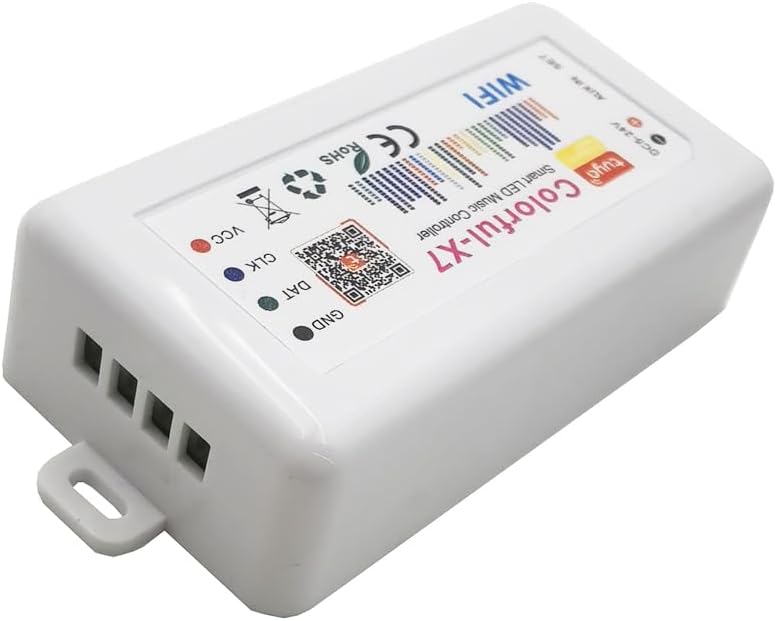
Image: An angled perspective of the Vrabocry Colorful-X7 LED controller, focusing on the output terminals (GND, DAT, CLK, VCC) where the LED strip connects.
2. การติดตั้งแอพ
Download the "Smart Life" or "Tuya" app from your mobile device's app store (iOS App Store or Google Play Store). Register or log in to your account.
3. การเชื่อมต่อ WiFi
- เปิดสวิตช์ควบคุม LED
- Open the Smart Life or Tuya app.
- แตะไอคอน "+" เพื่อเพิ่มอุปกรณ์ใหม่
- Follow the in-app instructions to connect the controller to your 2.4GHz WiFi network. This typically involves putting the device into pairing mode (often by pressing and holding the SET button until an indicator light flashes).

Image: The Vrabocry LED controller shown alongside a smartphone displaying the Smart Life/Tuya control app interface, and two smart speakers, illustrating its smart home integration capabilities.
คำแนะนำการใช้งาน
1. Basic Control via APP
Once connected, you can control the LED strip directly from the Smart Life or Tuya app. The app allows you to:
- เปิด/ปิดไฟ
- Adjust brightness and color.
- Select from 40 different dynamic lighting modes.
- Add up to 10 customized lighting modes.
2. Music Sync Control
The controller features a built-in microphone for music synchronization. The lights will react to the rhythm and beat of the music playing in the environment. For external audio input, connect an audio source to the AUX IN port.
3 การปรับแต่งและคุณสมบัติขั้นสูง
The app provides advanced tools for creating personalized lighting effects:
- ระบบไฟส่องสว่างแบบไดนามิก DIY: Utilize tools like Paint Bucket, Color Pen, and Eraser within the app to design unique lighting patterns.
- Device Name Modification: Rename your controller in the app for easier identification.
- Color Order Correction: Adjust the color order (RGB, GRB, etc.) to match your specific LED strip.
- การตั้งเวลา: Schedule your lights to turn on or off at specific times.
การซ่อมบำรุง
To ensure the longevity and optimal performance of your LED SPI Controller, follow these maintenance guidelines:
- ควรเก็บตัวควบคุมไว้ในที่แห้ง หลีกเลี่ยงความชื้นและอุณหภูมิที่สูงหรือต่ำเกินไป
- ทำความสะอาดอุปกรณ์ด้วยผ้านุ่มและแห้ง ห้ามใช้น้ำยาทำความสะอาดหรือวัสดุขัดถู
- ตรวจสอบให้แน่ใจว่ามีการระบายอากาศที่เหมาะสมรอบๆ ตัวควบคุมเพื่อป้องกันความร้อนสูงเกินไป
- Regularly check connections for any signs of wear or looseness.
การแก้ไขปัญหา
| ปัญหา | สาเหตุที่เป็นไปได้ | สารละลาย |
|---|---|---|
| ตัวควบคุมไม่เปิดเครื่อง | ไม่มีแหล่งจ่ายไฟ; แรงดันไฟฟ้าไม่ถูกต้องtage; faulty power adapter. | Check power connections. Ensure power supply is DC 5-24V. Test with a different power adapter if available. |
| แถบไฟ LED ไม่ติด | Incorrect wiring (GND, DAT, CLK, VCC); incompatible LED strip; faulty LED strip. | Verify all wiring connections are correct. Ensure your LED strip is an SPI type. Test the LED strip with another controller if possible. Check color order settings in the app. |
| ไม่สามารถเชื่อมต่อ WiFi ได้ | Incorrect WiFi password; 5GHz WiFi network; controller not in pairing mode; weak signal. | Double-check WiFi password. Ensure you are connecting to a 2.4GHz network. Put the controller into pairing mode (refer to app instructions). Move controller closer to router. |
| การซิงค์เพลงไม่ทำงาน | No music playing; music too quiet; microphone obstructed; incorrect AUX IN connection. | Ensure music is playing loudly enough near the controller. Check if the microphone port is clear. If using AUX IN, ensure the cable is properly connected and the audio source is active. |
การรับประกันและการสนับสนุน
Vrabocry products are designed for reliability and performance. For warranty information and technical support, please refer to the contact details provided on the product packaging or visit the official Vrabocry webไซต์นี้ โปรดเก็บใบเสร็จรับเงินที่ซื้อไว้เพื่อใช้เรียกร้องการรับประกัน