การแนะนำ
This manual provides detailed instructions for the setup, operation, and maintenance of your Lotus Smartwatch 50050/4. Please read this manual thoroughly before using your device to ensure proper functionality and to maximize its features.
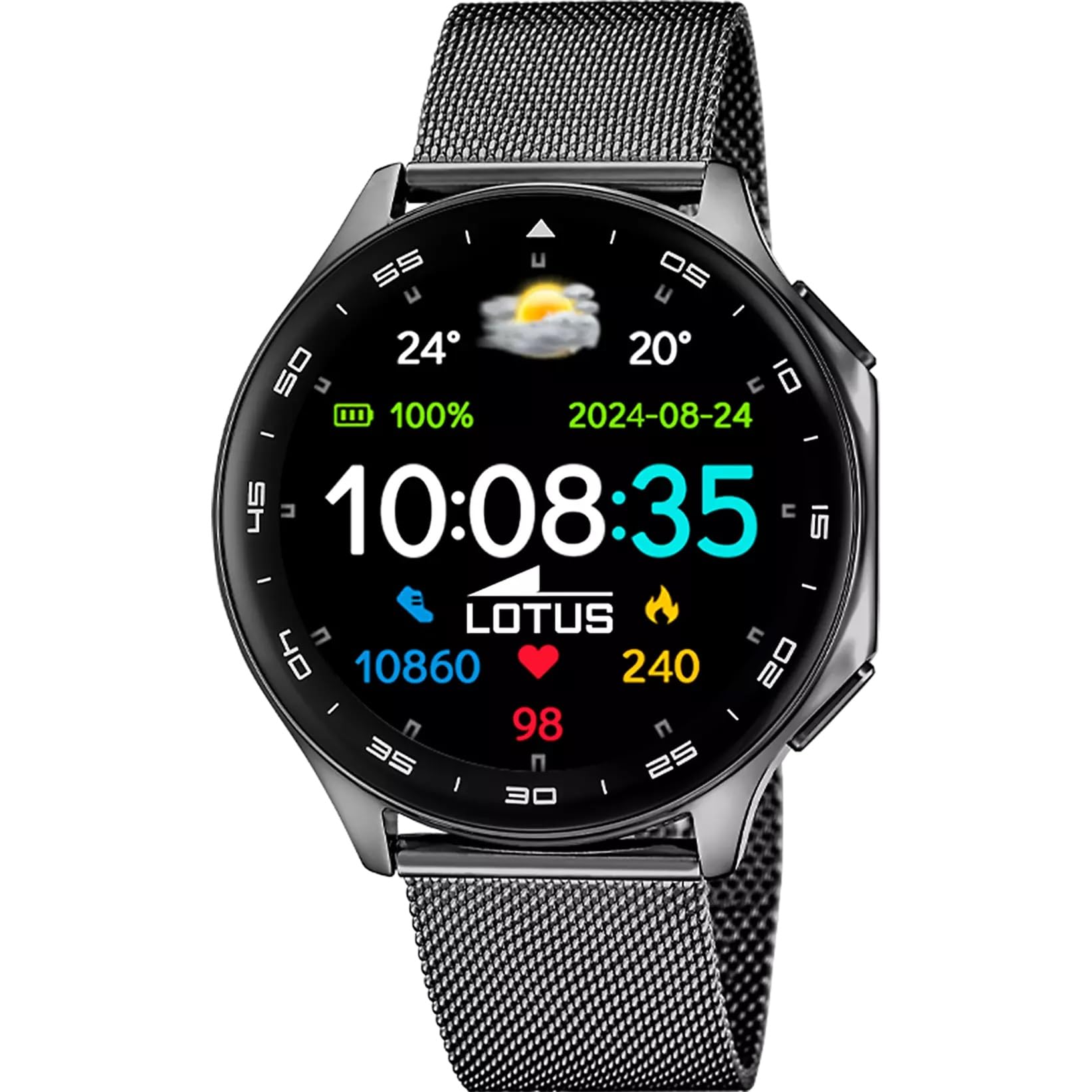
The Lotus Smartwatch 50050/4 is an outdoor sports watch designed for active lifestyles. It features a durable zinc alloy case, a black Milanese steel mesh strap, and a digital display. The watch offers a range of functions including sports tracking, health monitoring, and smart notifications.
มีอะไรอยู่ในกล่อง
- Lotus Smartwatch 50050/4
- สายชาร์จ
- คู่มือการใช้งาน (เอกสารนี้)
- สายรัดเพิ่มเติม
การตั้งค่า
1. การชาร์จสมาร์ทวอทช์
Before initial use, fully charge your smartwatch. Connect the charging cable to the charging port on the back of the watch and plug the other end into a USB power adapter (not included) or a computer's USB port. The watch display will indicate charging status.
บันทึก: Use a standard 5V/1A USB charger. Overcharging or using incompatible chargers may damage the device.
2. การเปิด/ปิดเครื่อง
- การเปิดเครื่อง: Press and hold the side button for a few seconds until the Lotus logo appears.
- วิธีปิดเครื่อง: กดปุ่มด้านข้างค้างไว้ จากนั้นเลือก "ปิดเครื่อง" บนหน้าจอ
3. การติดตั้งและการจับคู่แอป
To unlock the full potential of your smartwatch, download the official Lotus Smartwatch application on your smartphone. The app is compatible with Android devices.
- ค้นหา the "Lotus Smartwatch" app in your smartphone's app store (Google Play Store for Android).
- ติดตั้งแอปพลิเคชัน
- เปิดแอปและทำตามคำแนะนำบนหน้าจอเพื่อสร้างบัญชีหรือเข้าสู่ระบบ
- เปิดใช้งานบลูทูธบนสมาร์ทโฟนของคุณ
- In the app, navigate to the device pairing section and select your Lotus Smartwatch 50050/4 from the list of available devices.
- ยืนยันคำขอจับคู่บนสมาร์ทโฟนและสมาร์ทวอทช์ของคุณทั้งคู่
เมื่อจับคู่แล้ว นาฬิกาจะซิงโครไนซ์เวลา วันที่ และการตั้งค่าอื่นๆ กับสมาร์ทโฟนของคุณ
คำแนะนำการใช้งาน
การนำทางพื้นฐาน
- หน้าจอสัมผัส: Swipe left, right, up, or down to navigate through menus and functions. Tap to select an item.
- ปุ่มด้านข้าง: Press to return to the previous screen or to the watch face. Press and hold for power options.
ฟังก์ชั่นหลัก
- โหมดกีฬา: Access various sports modes (e.g., running, walking, cycling) to track your activity, including steps, calories burned, and distance.
- การติดตามสุขภาพ:
- อัตราการเต้นของหัวใจ: ตรวจสอบอัตราการเต้นของหัวใจของคุณแบบเรียลไทม์
- ออกซิเจนในเลือด: วัดระดับออกซิเจนในเลือดของคุณ
- การติดตามการนอนหลับ: วิเคราะห์รูปแบบการนอนหลับของคุณ (หลับสนิท หลับตื้น ระยะเวลาตื่น)
- การออกกำลังกายการหายใจ: การฝึกหายใจแบบมีคำแนะนำเพื่อการผ่อนคลาย
- การแจ้งเตือน: Receive notifications for incoming calls, SMS messages, and app alerts directly on your watch. You can reject calls from the watch.
- การควบคุมเพลง: ควบคุมการเล่นเพลงบนสมาร์ทโฟนที่เชื่อมต่ออยู่ (เล่น หยุดชั่วคราว ข้ามเพลง)
- สภาพอากาศ: View สภาพอากาศและพยากรณ์อากาศปัจจุบัน
- สัญญาณเตือนและตัวจับเวลา: Set alarms, use the stopwatch, or set a countdown timer.
- รีโมทกล้อง: ใช้นาฬิกาของคุณเป็นชัตเตอร์ระยะไกลสำหรับกล้องสมาร์ทโฟนของคุณ
- Video Calculator: Access a video calculator function.
- AI Voice Calculator: Utilize an AI voice-activated calculator.
- ค้นหาโทรศัพท์: ค้นหาสมาร์ทโฟนที่เชื่อมต่ออยู่โดยการทำให้สมาร์ทโฟนส่งเสียงดัง
- ไฟฉาย: เปิดใช้งานหน้าจอเพื่อใช้เป็นไฟฉาย
- การปรับแต่งหน้าปัดนาฬิกา: Change the watch face (dial) through the watch settings or the companion app.
- อัพเดตเฟิร์มแวร์: Update the watch's software via the companion app to ensure optimal performance and access new features.
- Language, Time, and Date: Adjust these settings through the watch or the companion app.
การซ่อมบำรุง
การทำความสะอาดและการดูแลรักษา
- เช็ดหน้าจอและตัวเรือนนาฬิกาด้วยผ้าแห้งเนื้อนุ่มที่ไม่เป็นขุย
- สำหรับคราบฝังแน่น ให้งเล็กน้อยampชุบผ้าให้เปียกน้ำ ห้ามใช้สารเคมีรุนแรงหรือวัสดุที่มีฤทธิ์กัดกร่อน
- ตรวจสอบให้แน่ใจว่าหน้าสัมผัสการชาร์จสะอาดและแห้งก่อนชาร์จ
ความต้านทานต่อน้ำ (IP65)
The Lotus Smartwatch 50050/4 has an IP65 rating, meaning it is protected against dust ingress and low-pressure water jets from any direction. This rating indicates resistance to splashes and light rain. It is not suitable for swimming, showering, or submersion in water. Exposure to high-pressure water or prolonged submersion may cause damage.
เปลี่ยนสาย
The watch comes with an additional strap. To replace the strap, locate the quick-release pins on the underside of the strap where it connects to the watch case. Slide the pin to detach the strap, then align the new strap and slide the pin back into place to secure it.
การแก้ไขปัญหา
นาฬิกาไม่เปิด
- ตรวจสอบให้แน่ใจว่านาฬิกาชาร์จเต็มแล้ว เสียบนาฬิกาเข้ากับเครื่องชาร์จอย่างน้อย 30 นาที
- ลองกดปุ่มด้านข้างค้างไว้ 10-15 วินาทีเพื่อบังคับให้รีสตาร์ท
ไม่สามารถจับคู่กับสมาร์ทโฟนได้
- ตรวจสอบให้แน่ใจว่าได้เปิดใช้งาน Bluetooth บนสมาร์ทโฟนของคุณแล้ว
- Ensure the watch is within range of your smartphone (typically 10 meters).
- รีสตาร์ททั้งสมาร์ทโฟนและสมาร์ทวอทช์ของคุณ
- ล้างแคชบลูทูธบนสมาร์ทโฟนของคุณ (ถ้ามี) แล้วลองจับคู่ใหม่อีกครั้ง
- Ensure the Lotus Smartwatch app is updated to the latest version.
ข้อมูลสุขภาพที่ไม่ถูกต้อง
- ตรวจสอบให้แน่ใจว่าสวมนาฬิกาให้พอดีกับข้อมือ แต่ไม่แน่นเกินไป
- รักษาเซ็นเซอร์ด้านหลังนาฬิกาให้สะอาดและปราศจากสิ่งสกปรก
- ปัจจัยด้านสิ่งแวดล้อมและสรีรวิทยาของแต่ละบุคคลสามารถส่งผลต่อความแม่นยำของเซ็นเซอร์ได้
รีเซ็ตเป็นค่าโรงงาน
If you experience persistent issues, a factory reset may resolve them. This will erase all data on the watch and restore it to its original settings. Consult the watch's settings menu or the companion app for the factory reset option.
ข้อมูลจำเพาะ
| หมายเลขรุ่น | 50050/4 |
| ยี่ห้อ | ดอกบัว |
| ขนาดจอแสดงผล | 46.7 มม. |
| รูปร่าง | กลม |
| วัสดุตัวเรือน | โลหะผสมสังกะสี |
| วัสดุสายรัด | Milanese Steel Mesh |
| ความต้านทานต่อน้ำ | IP65 (Splash and dust resistant) |
| การเชื่อมต่อ | บลูทูธ |
| ระบบปฏิบัติการที่รองรับ | แอนดรอยด์ (สำหรับแอปคู่หู) |
| จีพีเอส | เลขที่ |
| คุณสมบัติพิเศษ | Advanced sport and health functions |
การรับประกันและการสนับสนุน
The Lotus Smartwatch 50050/4 comes with a รับประกัน 3 ปี from the date of purchase. This warranty covers manufacturing defects. It does not cover damage caused by misuse, accidents, unauthorized modifications, or failure to follow the instructions in this manual, including water damage beyond the specified IP65 rating.
For warranty claims or technical support, please contact your authorized Lotus retailer or visit the official Lotus webเว็บไซต์สำหรับข้อมูลการบริการลูกค้า
นโยบายการคืนสินค้า: If purchased from Amazon, the product is subject to a 30-day return policy for refund or replacement, as per Amazon's terms.
รูปภาพสินค้า