
1. บทนำ
The KONNWEI KW330 is an advanced OBD2 diagnostic scanner designed to help vehicle owners and technicians quickly and accurately diagnose engine-related issues. This tool provides comprehensive OBDII/EOBD diagnostic capabilities, including reading and clearing Diagnostic Trouble Codes (DTCs), performing battery voltage tests, monitoring live data streams, and checking I/M readiness status. It is compatible with most OBDII compliant vehicles manufactured since 1996.
2. อะไรอยู่ในกล่อง
- เครื่องสแกน OBD2 KONNWEI KW330
- คู่มือการใช้งาน
- สาย USB (สำหรับอัปเดตและพิมพ์ข้อมูล)
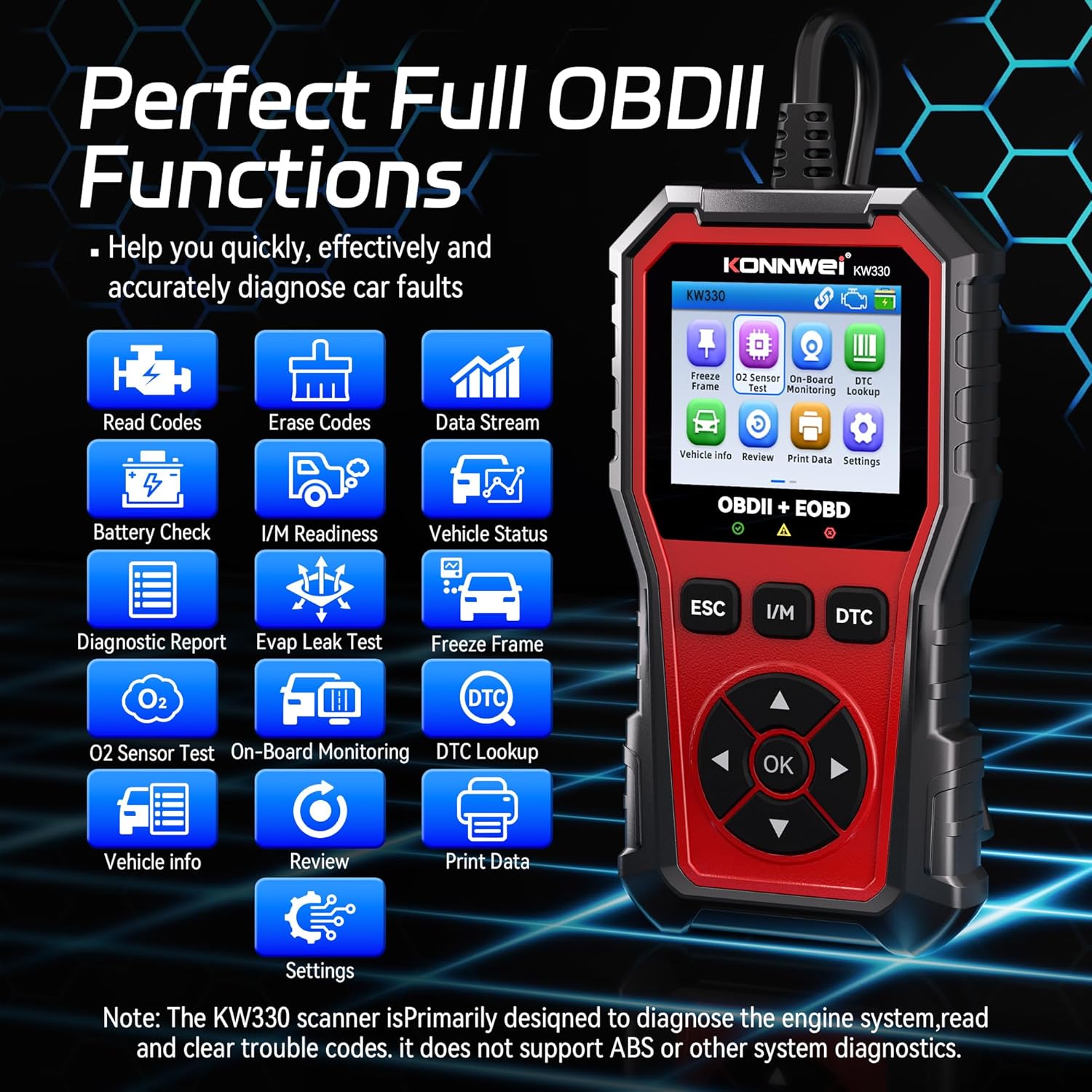
Image: The KONNWEI KW330 OBD2 Scanner unit with its diagnostic cable.
Video: An unboxing of the KONNWEI KW330 OBD2 Scanner, showing the device and included accessories.
3. สินค้าหมดview
The KW330 features a robust design with a 2.8-inch color LCD screen, making it easy to read diagnostic information. It includes dedicated buttons for navigation, ESC (Escape), I/M (I/M Readiness), and DTC (DTC Lookup) for quick access to key functions.

Image: The KONNWEI KW330 scanner's main menu interface showing various diagnostic functions.
4. การตั้งค่า
The KONNWEI KW330 is designed for plug-and-play operation, requiring no complex setup or external power source beyond the vehicle's OBDII port.
4.1 การเชื่อมต่อเครื่องสแกนเนอร์
- ค้นหาขั้วต่อข้อมูล (DLC) 16 พินของรถยนต์ โดยปกติจะอยู่ใต้แผงหน้าปัดด้านคนขับ
- ตรวจสอบให้แน่ใจว่ากุญแจรถอยู่ที่ OFF
- เสียบหัวต่อ OBDII ของ KW330 เข้ากับพอร์ต DLC ของรถให้แน่นสนิท
- Turn the vehicle's ignition to the ON position (engine can be off or running, depending on the test). The scanner will automatically power on and establish communication with the vehicle's ECU.
Video: Demonstration of connecting the KW330 OBD2 scanner to a vehicle's diagnostic port and initiating a scan.
5. คู่มือการใช้งาน
The KW330 offers various diagnostic functions accessible through its intuitive menu system.
5.1 Reading Trouble Codes (DTCs)
This function allows you to retrieve Diagnostic Trouble Codes (DTCs) from the vehicle's computer, which indicate specific issues detected by the system.
- From the main menu, select 'Read Codes' and press 'OK'.
- เครื่องสแกนจะแสดงรหัส DTC ที่บันทึกไว้ กำลังรอการแก้ไข หรือแก้ไขถาวรทั้งหมด
- Use the up/down arrows to scroll through the codes and their descriptions.

Image: The KW330 displaying a P0123 trouble code with its description.
5.2 Clearing Trouble Codes
After performing necessary repairs, you can use this function to clear the DTCs and turn off the Check Engine Light (CEL).
- From the main menu, select 'Erase Codes' and press 'OK'.
- ยืนยันการดำเนินการเมื่อได้รับแจ้ง
- The scanner will clear the codes, and the Check Engine Light should turn off.

Image: Visual representation of the Check Engine Light turning off after codes are cleared.
5.3 การทดสอบความพร้อม I/M
This function checks the readiness of the vehicle's emission-related monitoring systems, indicating if the vehicle is ready for an emissions test.
- From the main menu, select 'I/M Readiness' and press 'OK'.
- The scanner will display the status of various monitors (e.g., MIS, FUE, CCM, CAT, EVAP, O2S). A '✓' indicates completion, while an 'X' indicates an incomplete test.

Image: The KW330 displaying the I/M Readiness status for various vehicle systems.

Image: A visual guide to performing the one-click I/M Readiness test.
5.4 สตรีมข้อมูลสด
View real-time operational parameters of the vehicle's engine, such as RPM, coolant temperature, and fuel system status.
- From the main menu, select 'Data Stream' and press 'OK'.
- คุณสามารถเลือกที่จะ view สินค้าทั้งหมด เลือกสินค้าเฉพาะรายการ หรือ view graphic frames.
- The scanner will display the selected data in numerical or graphical format.

Image: The KW330 showing real-time data stream in a graphical format, including RPM, FRP, IAT, and O2S values.
5.5 ปริมาณแบตเตอรี่tage ทดสอบ
This feature allows you to check the voltage of your vehicle's battery and assess the charging system's performance.
- From the main menu, select 'Battery Check' and press 'OK'.
- Follow the on-screen prompts to turn the engine off, then start it.
- The scanner will display the battery voltage performance, including minimum and maximum values during cranking and running.

Image: The KW330 displaying battery voltage test results, indicating normal ranges for before starting, instant ignition, and after starting.

Image: A visual guide demonstrating the battery voltage test with the KW330 scanner.
5.6 การค้นหา DTC
The built-in DTC Lookup feature provides detailed definitions for over 40,000 trouble codes, helping you understand the meaning of a code without needing to search online.
- Press the 'DTC' hotkey from the main menu or during a diagnostic scan.
- ป้อนรหัส DTC โดยใช้ปุ่มนำทาง
- เครื่องสแกนจะแสดงความหมายของรหัส
Image: The KW330's DTC Lookup interface, illustrating how to input a code and view คำจำกัดความของมัน
6. การตั้งค่า
Customize your KW330 scanner experience through the settings menu.
- From the main menu, select 'Settings' and press 'OK'.
- ตัวเลือกประกอบด้วย:
- หน่วยวัด: Switch between Metric and Imperial units.
- ภาษา: Select from supported languages (e.g., English, German, French, Spanish).
- ธีม: Switch between day and night display modes for optimal visibility.
- บีปเปอร์: Turn audible alerts on or off.
- การสแกนเริ่มต้นระบบ: Enable or disable automatic scanning on startup.

Image: The KW330's settings menu, highlighting the option to switch between day and night display themes.
7. ความเข้ากันได้ของยานพาหนะ
The KONNWEI KW330 is designed to be universally compatible with most OBDII compliant vehicles. This includes:
- US-based cars after 1996
- EU-based cars after 2000
- Asian-based cars after 2008
For specific compatibility questions, it is recommended to contact customer service with your vehicle's VIN before purchase.

Image: A chart illustrating the broad vehicle compatibility of the KW330 scanner across different regions and manufacturing years.
8. การบำรุงรักษา
เพื่อให้มั่นใจถึงอายุการใช้งานที่ยาวนานและประสิทธิภาพสูงสุดของเครื่องสแกน KONNWEI KW330 โปรดปฏิบัติตามคำแนะนำการบำรุงรักษาดังต่อไปนี้:
- รักษาอุปกรณ์ให้สะอาด ปราศจากฝุ่นและความชื้น ใช้ผ้านุ่มและแห้งทำความสะอาด
- ควรหลีกเลี่ยงการทำอุปกรณ์ตกหรือวางไว้ในที่ที่มีอุณหภูมิสูงหรือต่ำเกินไป
- Store the scanner in a safe place when not in use, preferably in its original packaging or a protective case.
- Regularly check the diagnostic cable for any signs of damage.
8.1 การอัปเดตซอฟต์แวร์
The KW330 supports free lifetime software upgrades to ensure compatibility with new vehicle models and to add new features. Refer to the official KONNWEI webเว็บไซต์สำหรับซอฟต์แวร์ล่าสุดและคำแนะนำเกี่ยวกับวิธีการอัปเดตอุปกรณ์ของคุณโดยใช้สาย USB ที่ให้มา
9 การแก้ไขปัญหา
If you encounter issues while using your KW330 scanner, refer to the following common troubleshooting tips:
- ไม่มีไฟฟ้า: Ensure the OBDII connector is firmly plugged into the vehicle's DLC. Check the vehicle's ignition status.
- ข้อผิดพลาดลิงค์: Verify the ignition is ON. Check for a secure connection to the DLC. Ensure the vehicle is OBDII compliant. Try the scanner on another vehicle if possible to rule out a vehicle-specific issue.
- รหัสข้อผิดพลาด (DTC) ไม่หายไป: Ensure the ignition is ON and the engine is OFF when attempting to clear codes. Some codes may require multiple drive cycles to clear after repairs.
- ปัญหาหน้าจอ: If the screen is unreadable, adjust the display theme in the settings (Day/Night mode).
For persistent issues, consult the detailed user manual or contact KONNWEI customer support.
10. ข้อมูลจำเพาะ
| คุณสมบัติ | คำอธิบาย |
|---|---|
| ยี่ห้อ | KONNWEI |
| แบบอย่าง | KW330 |
| แหล่งพลังงาน | ใช้พลังงานจากแบตเตอรี่ (ผ่านพอร์ต OBDII) |
| ระบบปฏิบัติการ | ลินุกซ์ |
| ขนาดหน้าจอ | 2.8 นิ้ว |
| ประเภทความพอดีของยานยนต์ | Universal Fit (ยานพาหนะที่รองรับ OBDII) |
| ส่วนประกอบที่รวมอยู่ | KW330 OBD2 Scanner, Manual |
11. การรับประกันและการสนับสนุน
The KONNWEI KW330 OBD2 Diagnostic Scanner comes with a standard manufacturer's warranty. For detailed warranty information, product support, or technical assistance, please visit the official KONNWEI webหรือติดต่อฝ่ายบริการลูกค้าโดยตรง โปรดเก็บใบเสร็จรับเงินไว้เป็นหลักฐานการซื้อสำหรับการเรียกร้องการรับประกัน