
1. บทนำ
This manual provides detailed instructions for the installation, operation, and maintenance of your Walfront 1000W Solar Power Inverter. This device is designed to convert DC power from solar panels into AC power for various applications, including RVs and grid-tie systems. It features remote monitoring capabilities via the Tuya APP and advanced heat dissipation for optimal performance and longevity.
2. คำแนะนำด้านความปลอดภัย
Please read all safety instructions carefully before installing or operating the inverter. Failure to follow these instructions may result in electric shock, fire, or serious injury.
- ตรวจสอบให้แน่ใจว่าการเชื่อมต่อทางไฟฟ้าทั้งหมดแน่นหนาและมีขั้วถูกต้อง
- Do not operate the inverter in wet conditions or expose it to water.
- บุคลากรที่มีคุณสมบัติเหมาะสมเท่านั้นที่ควรทำการติดตั้งและบำรุงรักษา
- Disconnect all power sources before performing any service or cleaning.
- Keep children away from the inverter during operation.
- ตรวจสอบให้แน่ใจว่ามีการระบายอากาศที่เพียงพอรอบๆ อินเวอร์เตอร์เพื่อป้องกันความร้อนสูงเกินไป
3. เนื้อหาบรรจุภัณฑ์
ตรวจสอบว่ารายการทั้งหมดที่ระบุไว้ด้านล่างนี้รวมอยู่ในแพ็คเกจของคุณ:
- 1 x Solar Power Inverter
- เบรกเกอร์ 1 ตัว
- 3 x Connecting Cables
- 1 x เสาอากาศ
- 3 x Terminal Connectors
- 1 x คู่มือผู้ใช้

Figure 3.1: Contents of the Walfront 1000W Solar Power Inverter package, including the inverter unit, circuit breaker, connecting cables, antenna, terminal connectors, and user manual.
4. สินค้าหมดview
The Walfront 1000W Solar Power Inverter is designed for efficient and reliable power conversion. Below are key components and their functions.

รูปที่ 4.1: ด้านบน view of the inverter, highlighting the DC input terminals (red and black), AC output terminals, and antenna connection point.
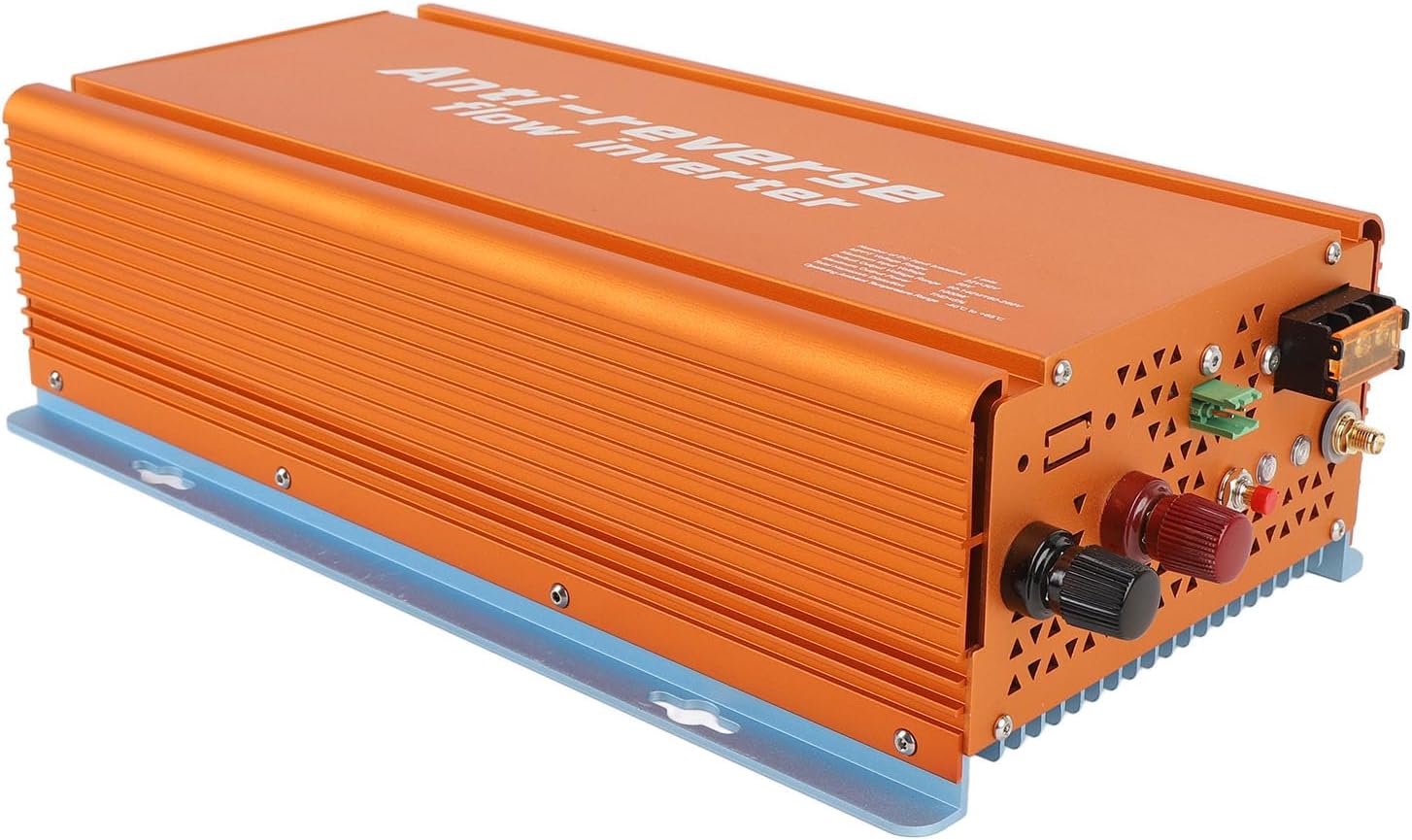
Figure 4.2: Front-side perspective of the inverter, showing the robust aluminum alloy casing and heat dissipation fins.

รูปที่ 4.3: ด้านหลัง view of the inverter, illustrating the cooling vents designed for efficient heat dissipation.
5. ข้อมูลจำเพาะ
| หมวดหมู่ | พารามิเตอร์ | ค่า |
|---|---|---|
| ข้อมูลอินพุต (DC, PV) | DC Input Branches | 1 ชุด |
| MPPT ฉบับที่tagอี เรนจ์ | 22V-50V | |
| ปฏิบัติการฉบับที่tagอี เรนจ์ | 20V-50V | |
| ปริมาณอินพุตสูงสุดtage | 50โวลต์ | |
| เริ่มต้นขึ้นฉบับที่tage | 20โวลต์ | |
| กำลังไฟฟ้าเข้าสูงสุด | 1050วัตต์ | |
| กระแสไฟเข้าสูงสุด | 30เอ | |
| ข้อมูลเอาท์พุต (AC) | กำลังขับสูงสุด | 1000วัตต์ |
| กำลังขับสูงสุด | 1000วัตต์ | |
| ช่วงความถี่เอาต์พุตเริ่มต้น | 48-62 เฮิรตซ์ | |
| ปัจจัยกำลังงาน | มากกว่า 0.98% | |
| ประสิทธิภาพ | ประสิทธิภาพสูงสุด | 95% |
| ประสิทธิภาพ MPPT ที่กำหนด | 99.5% | |
| การใช้พลังงานตอนกลางคืน | <50มิลลิวัตต์ | |
| วิศวกรรมเครื่องกลและสิ่งแวดล้อม | ช่วงอุณหภูมิแวดล้อมในการทำงาน | -40℃ ถึง +65℃ |
| ช่วงอุณหภูมิในการจัดเก็บ | -40℃ ถึง +85℃ | |
| Rain Proof Rating | IP22 | |
| วิธีการทำความเย็น | Nature Cooling, Fan Assistance | |
| น้ำหนักสินค้า | 5.5 ปอนด์ | |
| คุณสมบัติอื่น ๆ | การสื่อสาร | WiFi (Cloud Monitoring) |
| การออกแบบหม้อแปลง | HF หม้อแปลง | |
| Integrated Grounding | Device grounding provided by PE in AC Cable |
6. การตั้งค่าและการติดตั้ง
การติดตั้งอย่างถูกต้องเป็นสิ่งสำคัญอย่างยิ่งต่อการทำงานที่ปลอดภัยและมีประสิทธิภาพของอินเวอร์เตอร์ของคุณ โปรดปฏิบัติตามขั้นตอนเหล่านี้อย่างระมัดระวัง
6.1 การติดตั้งอินเวอร์เตอร์
- เลือกตำแหน่งที่เหมาะสม: Select a cool, dry, and well-ventilated area, away from direct sunlight, flammable materials, and moisture. Ensure sufficient clearance around the inverter for air circulation.
- การติดตั้งที่ปลอดภัย: Use appropriate screws and anchors to securely mount the inverter to a solid surface. The inverter can be mounted vertically or horizontally.
6.2 การเชื่อมต่อทางไฟฟ้า
Before making any electrical connections, ensure all power sources are disconnected.
- DC Input Connection (Solar Panels):
- Connect the positive (+) cable from your solar panel array to the red DC input terminal on the inverter.
- Connect the negative (-) cable from your solar panel array to the black DC input terminal on the inverter.
- ตรวจสอบให้แน่ใจว่าอินพุต DC ปริมาตรtage from your solar panels is within the inverter's MPPT voltage range (22V-50V) and does not exceed the maximum input voltagอี (50V)
- AC Output Connection (Grid/Load):
- Connect the AC output cables from the inverter to your electrical panel or load, ensuring correct phase, neutral, and ground connections.
- Install the provided circuit breaker in the AC output line as a protective measure.
- The inverter provides integrated grounding via the PE wire in the AC cable.
- การติดตั้งเสาอากาศ:
- Screw the provided antenna onto the designated antenna port on the inverter for WiFi communication.

รูปที่ 6.1: ด้านข้าง view of the inverter, indicating the locations for DC input, AC output, and antenna connections.
7. คู่มือการใช้งาน
Once installed, the inverter is ready for operation. This section covers basic startup and monitoring.
7.1 การเริ่มต้นเริ่มต้น
- ตรวจสอบการเชื่อมต่อ: Double-check all DC and AC connections to ensure they are secure and correct.
- Apply DC Power: Connect the solar panels to the inverter. The inverter will automatically start when sufficient DC voltagอีถูกตรวจพบ
- Apply AC Power: Turn on the circuit breaker connected to the inverter's AC output. The inverter will synchronize with the grid and begin power generation.
7.2 Tuya APP Remote Monitoring
The inverter supports remote monitoring via the Tuya APP, allowing you to track performance and manage settings from your smartphone.
- Download the Tuya APP: ค้นหา "Tuya Smart" or "Smart Life" in your mobile app store (iOS or Android) and install it.
- ลงทะเบียน/เข้าสู่ระบบ: Create a new account or log in to your existing Tuya account.
- เพิ่มอุปกรณ์:
- ตรวจสอบให้แน่ใจว่าสมาร์ทโฟนของคุณเชื่อมต่อกับเครือข่าย Wi-Fi 2.4GHz
- Open the Tuya APP, tap the "+" icon to add a device.
- Select "Electrical Engineer" or "Power Strip" (or similar category for inverters/power devices).
- Follow the in-app instructions to connect the inverter to your Wi-Fi network. This typically involves putting the inverter into pairing mode (refer to the inverter's display or indicator lights for specific instructions, if available).
- การตรวจสอบและการควบคุม: เมื่อเชื่อมต่อแล้ว คุณสามารถ view real-time power generation, energy consumption, historical data, and adjust operational modes (e.g., grid-tied, reverse termination) directly from the app.
8. การบำรุงรักษา
การบำรุงรักษาอย่างสม่ำเสมอจะช่วยให้เครื่องแปลงกระแสไฟฟ้าของคุณมีอายุการใช้งานยาวนานและทำงานได้อย่างมีประสิทธิภาพสูงสุด
- การทำความสะอาด: ควรทำความสะอาดภายนอกของอินเวอร์เตอร์เป็นระยะด้วยผ้าแห้งเนื้อนุ่ม ห้ามใช้น้ำยาทำความสะอาดหรือสารละลาย ตรวจสอบให้แน่ใจว่าช่องระบายความร้อนปราศจากฝุ่นและสิ่งสกปรก
- ตรวจสอบการเชื่อมต่อ: Annually inspect all electrical connections (DC and AC) for tightness and signs of corrosion. Tighten any loose connections.
- การระบายอากาศ : ตรวจสอบให้แน่ใจว่าบริเวณรอบอินเวอร์เตอร์โล่ง เพื่อให้มีการไหลเวียนของอากาศและการระบายความร้อนที่เหมาะสม
- การอัปเดตซอฟต์แวร์: Check the Tuya APP for any available firmware updates for the inverter to ensure you have the latest features and bug fixes.
9 การแก้ไขปัญหา
ส่วนนี้จะกล่าวถึงปัญหาทั่วไปที่คุณอาจพบเจอเกี่ยวกับอินเวอร์เตอร์ของคุณ
| ปัญหา | สาเหตุที่เป็นไปได้ | สารละลาย |
|---|---|---|
| อินเวอร์เตอร์ไม่เปิดเครื่อง | No DC input from solar panels; DC input voltage too low; Loose DC connections. | Check solar panel connections and ensure sufficient sunlight. Verify DC input voltage is within operating range (20V-50V). Tighten DC terminals. |
| ไม่มีเอาท์พุต AC | AC circuit breaker tripped; Grid power unavailable; Inverter not synchronized with grid; Loose AC connections. | Check and reset the AC circuit breaker. Verify grid power supply. Ensure AC connections are secure. Allow time for inverter to synchronize. |
| เอาต์พุตพลังงานต่ำ | Insufficient sunlight; Dirty solar panels; Shading on panels; DC input voltage ต่ำ/สูงเกินไป | Ensure panels are clean and free from shading. Check solar panel performance. Verify DC input voltage. |
| APP monitoring not working | Inverter not connected to Wi-Fi; Incorrect Wi-Fi password; Router issues; APP not updated. | Ensure inverter is in Wi-Fi range. Reconfigure Wi-Fi settings in the Tuya APP. Restart router. Update Tuya APP to the latest version. |
| ความร้อนสูงเกินไป | Poor ventilation; Ambient temperature too high; Blocked cooling vents. | Ensure adequate clearance around the inverter. Clean cooling vents. Relocate inverter to a cooler environment if necessary. |
10. การรับประกันและการสนับสนุน
Walfront products are designed for reliability and performance. For specific warranty details, please refer to the warranty card included with your product or visit the official Walfront webเว็บไซต์.
If you encounter any issues not covered in this manual or require technical assistance, please contact Walfront customer support:
- Webเว็บไซต์: Walfront Official Store on Amazon
- อีเมล: โปรดดูที่บรรจุภัณฑ์ของผลิตภัณฑ์ หรือ webเว็บไซต์สำหรับติดต่ออีเมล์
- โทรศัพท์: โปรดดูที่บรรจุภัณฑ์ของผลิตภัณฑ์ หรือ webเว็บไซต์สำหรับเบอร์ติดต่อ
Please have your model number (WALFRONTt47girfynh-11) and purchase date ready when contacting support.