1. บทนำ
This manual provides essential information for the proper setup, operation, and maintenance of your new Generic Replacement Remote Control. This infrared (IR) remote is designed to function as a direct replacement for the original remote controls of ALBA T-701, AXXION AXX-1028, and Polaroid T-901 portable DVD players. No programming or setup is required; simply insert batteries and begin use.
2. สินค้าหมดview
The replacement remote control is designed to replicate the primary functions of your original remote. It features a standard layout for DVD player controls, including number input, navigation, playback, and volume adjustments. Please compare the appearance of this remote with your original to ensure compatibility.
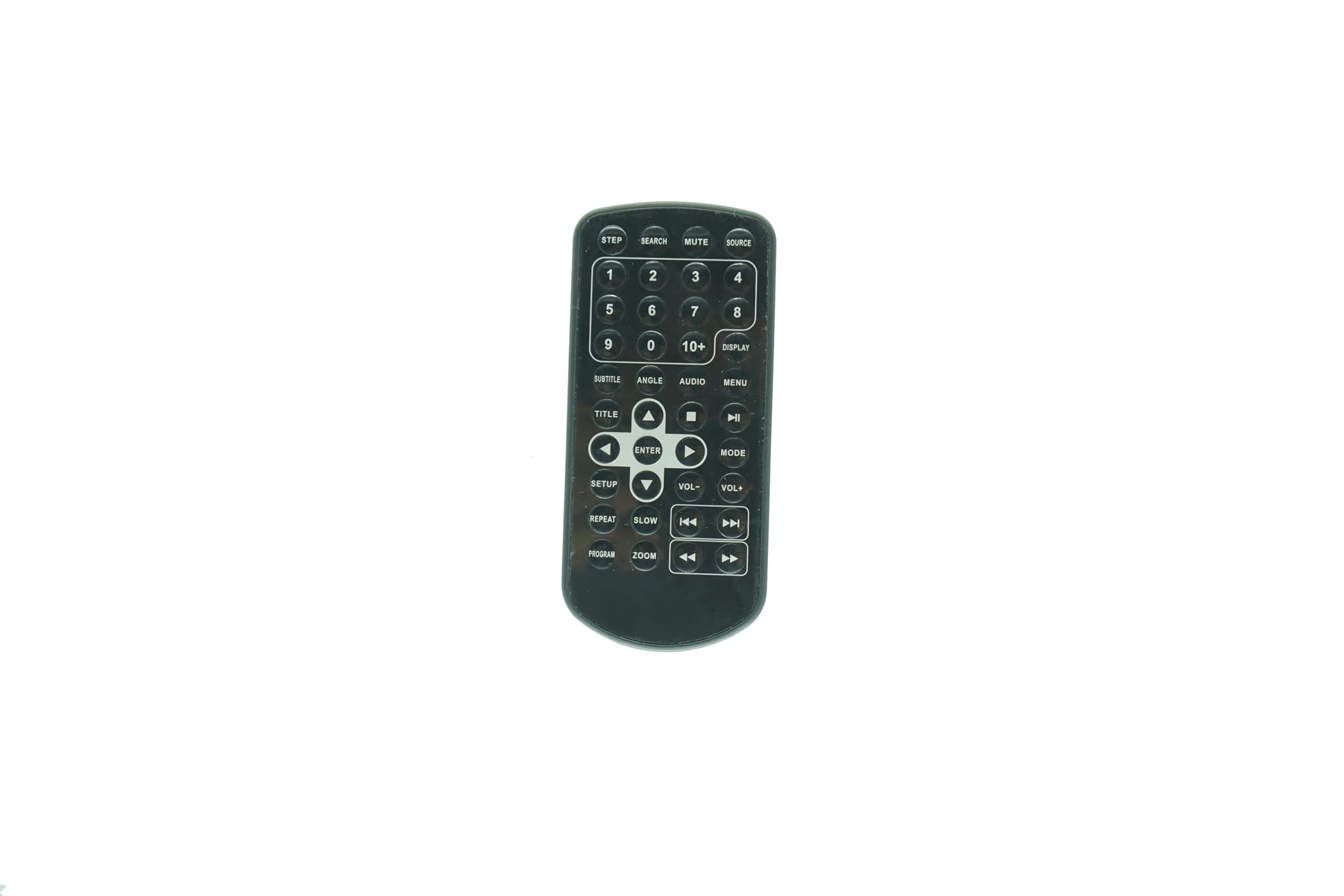
รูปที่ 2.1: ด้านหน้า view of the Generic Replacement Remote Control. This image displays the overall shape and button layout of the remote, confirming its design for compatibility.
3. การตั้งค่า: การติดตั้งแบตเตอรี่
Your remote control requires two (2) AAA batteries (not included) for operation. Follow these steps to install the batteries:
- ค้นหาช่องใส่แบตเตอรี่ที่ด้านหลังของรีโมทคอนโทรล
- ค่อยๆ เลื่อนฝาปิดช่องใส่แบตเตอรี่ลงด้านล่างหรือออกไปด้านนอกเพื่อเปิด
- Insert two AAA batteries, ensuring the positive (+) and negative (-) terminals align correctly with the markings inside the compartment. Incorrect insertion can prevent the remote from functioning.
- เลื่อนฝาปิดช่องใส่แบตเตอรี่กลับเข้าที่จนกระทั่งล็อคเข้าที่อย่างแน่นหนา

รูปที่ 3.1: กลับ view of the remote control, showing the battery compartment area and a small clip. This clip is part of the battery cover mechanism.
4. คู่มือการใช้งาน
This remote control operates via infrared (IR) signals. Point the remote directly at the IR receiver on your portable DVD player for optimal performance. No programming is needed; the remote is ready for use once batteries are installed.

รูปที่ 4.1: รายละเอียด view of the remote control's buttons. This image provides a clear reference for identifying each button and its label.
ปุ่มฟังก์ชั่น:
- Number Pad (0-9, 10+): ใช้สำหรับการเลือกแทร็กโดยตรงหรือป้อนค่าตัวเลข
- แหล่งที่มา: Selects the input source (if applicable to your DVD player model).
- ใบ้: Silences the audio output. Press again to restore sound.
- ค้นหา: Initiates a search function within the DVD content.
- การแสดงผล: Shows on-screen information such as current track, time, or settings.
- เมนู: Accesses the DVD's main menu.
- เสียง: สลับไปมาระหว่างแทร็กเสียงหรือภาษาที่มีให้เลือก
- มุม: Changes the camera angle during playback (if supported by the DVD).
- คำบรรยาย: Cycles through available subtitle options.
- ชื่อ: Returns to the DVD's title menu.
- ปุ่มนำทาง (ขึ้น, ลง, ซ้าย, ขวา): ใช้สำหรับนำทางและเลือกตัวเลือกต่างๆ ในเมนู
- เข้า: ยืนยันการเลือกหรือการดำเนินการ
- PLAY/PAUSE (►/❚❚): เริ่มหรือหยุดเล่นชั่วคราว
- หยุด (■): หยุดการเล่น
- กรอไปข้างหน้า (►►): การเล่นวิดีโอจะดำเนินไปอย่างรวดเร็ว
- ย้อนกลับ (◄◄): กรอเล่นย้อนกลับอย่างรวดเร็ว
- NEXT (►❚): ข้ามไปยังบทหรือเพลงถัดไป
- PREVIOUS (❚◄): Skips to the beginning of the current chapter or track, or to the previous one.
- ฉบับ+ / ฉบับ-: เพิ่มหรือลดระดับเสียง
- ติดตั้ง: Accesses the system setup menu of the DVD player.
- ช้า: Initiates slow-motion playback.
- ทำซ้ำ: Repeats the current track, chapter, or entire disc.
- โครงการ: Allows programming of track playback order.
- ซูม: Zooms in or out on the video display.
- ขั้นตอนที่: เลื่อนการเล่นทีละเฟรม
5. การบำรุงรักษา
- การทำความสะอาด: ใช้ผ้านุ่มและแห้งเช็ดทำความสะอาดรีโมทคอนโทรล ห้ามใช้น้ำยาทำความสะอาดหรือวัสดุที่มีฤทธิ์กัดกร่อน เพราะอาจทำให้พื้นผิวหรือส่วนประกอบภายในเสียหายได้
- การเปลี่ยนแบตเตอรี่: Replace batteries when the remote's performance degrades or stops working. Always replace both batteries at the same time with new ones of the same type (AAA).
- พื้นที่จัดเก็บ: หากไม่ได้ใช้งานรีโมทเป็นเวลานาน ควรนำแบตเตอรี่ออกเพื่อป้องกันการรั่วไหลและความเสียหายที่อาจเกิดขึ้น เก็บไว้ในที่แห้งและเย็น
6 การแก้ไขปัญหา
หากรีโมทคอนโทรลของคุณทำงานไม่เป็นไปตามที่คาดหวัง โปรดพิจารณาสิ่งต่อไปนี้:
- รีโมตไม่ตอบสนอง:
- ตรวจสอบให้แน่ใจว่าใส่แบตเตอรี่อย่างถูกต้องโดยมีขั้วที่ถูกต้อง (+/-)
- เปลี่ยนแบตเตอรี่เก่าด้วยแบตเตอรี่ AAA ใหม่
- Check for any obstructions between the remote and the DVD player's IR receiver.
- Ensure you are pointing the remote directly at the DVD player.
- ฟังก์ชันบางอย่างใช้งานไม่ได้:
- While this remote is a replacement, some advanced or unique functions of your original DVD player's remote may not be fully supported. The remote is designed for core playback and navigation.
- Verify that the function you are trying to use is supported by your specific DVD player model.
7. ข้อมูลจำเพาะ
- ความเข้ากันได้: ALBA T-701, AXXION AXX-1028, Polaroid T-901 Portable DVD Players
- พิมพ์: รีโมทคอนโทรลอินฟราเรด (IR)
- แหล่งพลังงาน: 2 x แบตเตอรี่ AAA (ไม่รวม)
- สี: สีดำ
- จำนวนสูงสุดของอุปกรณ์ที่รองรับ: 1
- ผู้ผลิต: อีซี่ทรี
8. การรับประกันและการสนับสนุน
As a generic replacement product, specific warranty details may vary. Please refer to the retailer's return policy for information regarding exchanges or refunds. For any operational questions or concerns not covered in this manual, please contact the seller directly through your purchase platform. It is recommended to verify your original remote's appearance against the product images before purchase to ensure full compatibility.


