
การแนะนำ
Thank you for choosing the Billboard Soul Advance True Wireless Stereo (TWS) Earbuds. These earbuds are designed to provide a superior audio experience with Active Noise Cancellation (ANC), Environmental Noise Cancellation (ENC), and a comfortable, splash-resistant design. This manual will guide you through the setup, operation, and maintenance of your new earbuds.
ข้อมูลด้านความปลอดภัย
- Do not expose the earbuds or charging case to extreme temperatures or direct sunlight for extended periods.
- หลีกเลี่ยงการทำตกหรือใช้แรงมากเกินไปกับอุปกรณ์
- Keep the earbuds and charging case away from water and liquids, except for light splashes as per IPX4 rating. Do not submerge.
- ห้ามถอดประกอบหรือดัดแปลงผลิตภัณฑ์ การกระทำดังกล่าวจะทำให้การรับประกันเป็นโมฆะ
- ใช้เฉพาะสายชาร์จที่ให้มาหรือที่เทียบเท่าที่ได้รับการรับรองเท่านั้น
- Listening at high volumes for prolonged periods can cause hearing damage. Adjust volume to a safe level.
เนื้อหาแพ็คเกจ
- Billboard Soul Advance TWS Earbuds (Left and Right)
- เคสชาร์จไฟ
- สายชาร์จ USB
- คู่มือการใช้งาน
สินค้าเกินview
Familiarize yourself with the components of your Billboard Soul Advance TWS Earbuds and charging case.
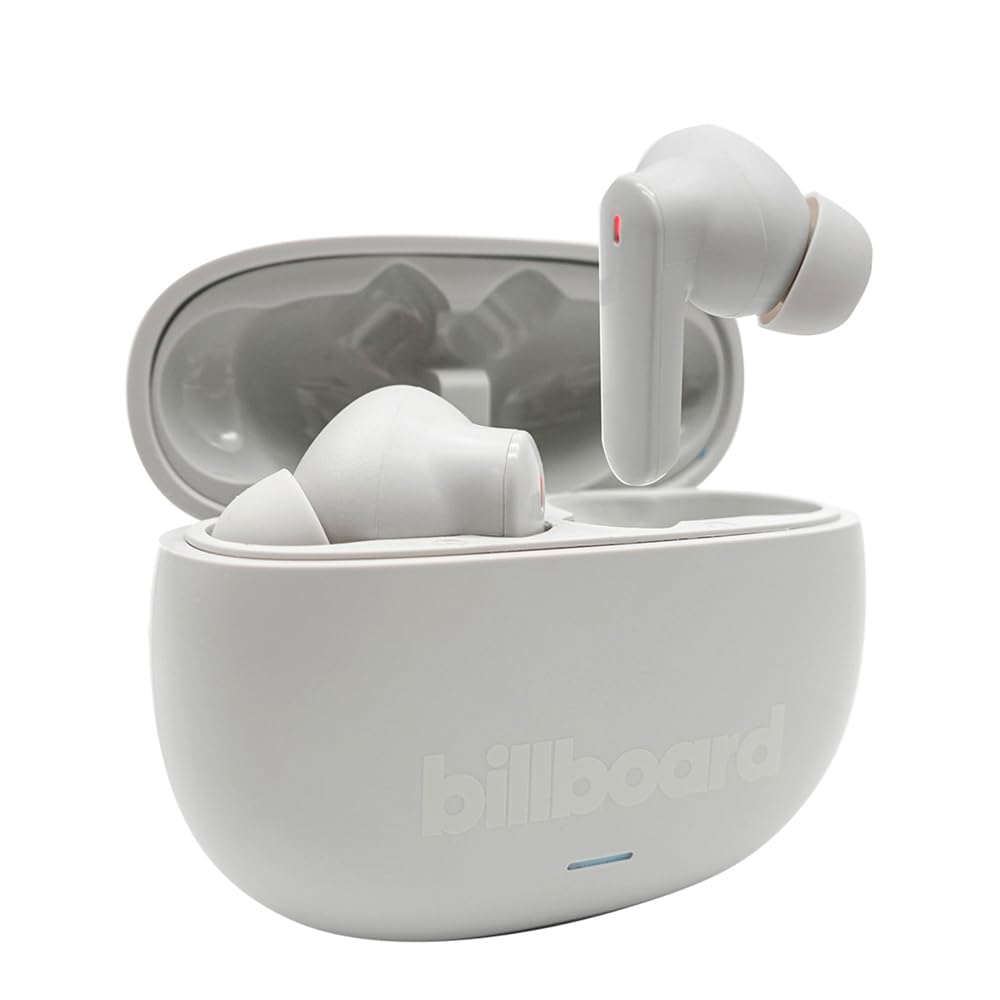
Image: The Billboard Soul Advance TWS Earbuds resting inside their open charging case. The earbuds are grey with red indicator lights visible, and the case is also grey with the 'billboard' logo embossed on the front.

Image: The Billboard Soul Advance TWS Earbuds charging case in a closed position. The case is grey with the 'billboard' logo embossed on the front and a small indicator light at the bottom.
Image: A person holding a single Billboard Soul Advance TWS earbud and the open charging case, demonstrating the compact size and design.
การตั้งค่า
1. การชาร์จหูฟังและเคส
ก่อนใช้งานครั้งแรก ควรชาร์จหูฟังและเคสชาร์จให้เต็ม
- ใส่หูฟังลงในกล่องชาร์จ ตรวจสอบให้แน่ใจว่าหูฟังอยู่ในช่องที่ถูกต้อง
- เสียบสายชาร์จ USB เข้ากับพอร์ตชาร์จบนเคสและแหล่งจ่ายไฟ USB (เช่น คอมพิวเตอร์ อะแดปเตอร์ติดผนัง)
- The indicator light on the case will show charging status. Once fully charged, the indicator will change or turn off. A full charge takes approximately 5 hours for the case and earbuds.
2. การจับคู่กับอุปกรณ์
วิธีเชื่อมต่อเอียร์บัดของคุณกับสมาร์ทโฟนหรืออุปกรณ์ที่รองรับ Bluetooth อื่นๆ:
- เปิดกล่องชาร์จ หูฟังจะเข้าสู่โหมดจับคู่โดยอัตโนมัติ ซึ่งจะแสดงโดยไฟแสดงสถานะที่กระพริบบนหูฟัง
- บนอุปกรณ์ของคุณ ไปที่การตั้งค่าบลูทูธ และตรวจสอบให้แน่ใจว่าได้เปิดใช้งานบลูทูธแล้ว
- ค้นหา available devices and select "Billboard Soul Advance" from the list.
- เมื่อเชื่อมต่อแล้ว ไฟแสดงสถานะของหูฟังจะหยุดกะพริบ
- เมื่อถอดหูฟังออกจากเคส หูฟังจะเชื่อมต่อกับอุปกรณ์ที่จับคู่ไว้ล่าสุดโดยอัตโนมัติ หากเปิดใช้งาน Bluetooth บนอุปกรณ์
การดำเนินงาน
การควบคุมแบบสัมผัส
The earbuds feature touch-sensitive controls on their outer surface. Specific functions may vary slightly by device or app.
| การกระทำ | การทำงาน |
|---|---|
| แตะครั้งเดียว (ซ้าย/ขวา) | เล่น/หยุดเพลง, รับสาย/วางสาย |
| แตะสองครั้ง (ขวา) | เพลงถัดไป |
| แตะสองครั้ง (ซ้าย) | เพลงก่อนหน้า |
| แตะสามครั้ง (ซ้าย/ขวา) | เปิดใช้งานผู้ช่วยเสียง |
| กดยาว (ซ้าย/ขวา) | สลับโหมด ANC/ความโปร่งใส |
| Incoming Call Long Press | ปฏิเสธการรับสาย |
ระบบตัดเสียงรบกวนแบบแอคทีฟ (ANC) และระบบตัดเสียงรบกวนจากสภาพแวดล้อม (ENC)
The Soul Advance earbuds feature both ANC and ENC for an optimized listening and calling experience.
- การตัดเสียงรบกวนแบบแอคทีฟ (ANC): Reduces external ambient noise, allowing for a more immersive audio experience. Activate/deactivate by long-pressing an earbud.
- การตัดเสียงรบกวนจากสิ่งแวดล้อม (ENC): Utilizes 4 built-in microphones to filter out background noise during calls, ensuring clearer conversations for both you and the listener. This feature is active automatically during calls.

Image: A graphic illustrating the concept of Ultra ANC (Active Noise Cancellation), showing sound waves being blocked by headphones, emphasizing a quiet listening experience.
การซ่อมบำรุง
การทำความสะอาด
- เช็ดหูฟังและกล่องชาร์จเบาๆ ด้วยผ้าแห้งนุ่มที่ไม่เป็นขุย
- ห้ามใช้สารทำความสะอาดที่มีฤทธิ์กัดกร่อน แอลกอฮอล์ หรือตัวทำละลายเคมี
- ตรวจสอบให้แน่ใจว่าหน้าสัมผัสการชาร์จบนหูฟังทั้งสองข้างและเคสสะอาดและแห้งเพื่อการชาร์จที่เหมาะสมที่สุด
พื้นที่จัดเก็บ
เมื่อไม่ได้ใช้งาน ให้เก็บหูฟังไว้ในกล่องชาร์จเพื่อปกป้องหูฟังและชาร์จไฟให้หูฟังอยู่เสมอ
การแก้ไขปัญหา
| ปัญหา | สารละลาย |
|---|---|
| หูฟังเอียร์บัดไม่จับคู่ | ตรวจสอบให้แน่ใจว่าหูฟังชาร์จแบตเตอรี่เต็มแล้ว ปิดและเปิดบลูทูธบนอุปกรณ์ของคุณ ลบอุปกรณ์ออกจากบลูทูธในตั้งค่า แล้วจับคู่ใหม่อีกครั้ง |
| เอียร์บัดตัวเดียวเท่านั้นที่ใช้งานได้ | Place both earbuds back in the case, close it, then open again. Ensure both are charged. |
| ไม่มีเสียง | ตรวจสอบระดับเสียงของอุปกรณ์ ตรวจสอบให้แน่ใจว่าหูฟังเชื่อมต่ออยู่ ลองเล่นไฟล์เสียงอื่นดู |
| ปัญหาการชาร์จ | Ensure charging cable is securely connected. Clean charging contacts. Try a different USB port or cable. |
ข้อมูลจำเพาะ
- ชื่อรุ่น : Soul Advance
- เทคโนโลยีการเชื่อมต่อ: ไร้สาย
- ส่วนประกอบที่รวมอยู่: สถานีชาร์จ
- การใช้งานที่เฉพาะเจาะจง: Outdoor activities, Sports
- เวลาในการชาร์จ: ประมาณ 5 ชั่วโมง
- อุปกรณ์ที่รองรับ: โทรศัพท์ แท็บเล็ต
- ระดับการต้านทานน้ำ: IPX4 (ป้องกันน้ำกระเซ็น)
- อายุการใช้งานแบตเตอรี่โดยเฉลี่ย: 27 ชั่วโมง (พร้อมเคสชาร์จ)
- ตำแหน่งหู: อินเอียร์
- ฟอร์มแฟกเตอร์: อินเอียร์
- การควบคุมเสียงรบกวน: ระบบตัดเสียงรบกวนแบบแอคทีฟ

Image: A graphic highlighting long battery life, showing headphones with '40H' and earbuds with '42H*' (battery + case), indicating extended usage times.
วิดีโอผลิตภัณฑ์อย่างเป็นทางการ
Video: Product demonstration video (0:49 duration).
Video: Product feature overview (0:44 duration).
Video: Additional product details (0:44 duration).
Video: Short product highlight (0:24 duration).
Video: Product feature showcase (0:24 duration).
Video: Detailed product review/demonstration (1:57 duration).
Video: Quick product overview (0:34 duration).
Video: Comprehensive product guide (2:00 duration).
การรับประกันและการสนับสนุน
Your Billboard Soul Advance TWS Earbuds come with a standard manufacturer's warranty. For detailed warranty information, please refer to the warranty card included in your package or visit the official Billboard website. For technical support or customer service, please contact the retailer or manufacturer directly.
For returns, a 30-day free return policy is available from the purchase date.

