
M113
User Manual for AI Intelligent Translation M113 Bluetooth Headset
รุ่น: M113 | ยี่ห้อ: ทั่วไป
การแนะนำ
Thank you for choosing the Generic M113 AI Intelligent Translation Bluetooth Headset. This manual provides detailed instructions on how to set up, operate, and maintain your new headset. Designed for convenience and high-quality audio, these true wireless earbuds feature a multi-function screen display and long battery life, making them ideal for various uses including entertainment and communication.
ข้อมูลด้านความปลอดภัย
- อย่าให้อุปกรณ์สัมผัสกับอุณหภูมิหรือความชื้นสูง
- Keep the device away from water and liquids, as it is not water resistant.
- หลีกเลี่ยงการทำอุปกรณ์หล่นหรือกระแทกอย่างรุนแรง
- อย่าพยายามถอดประกอบหรือซ่อมแซมอุปกรณ์ด้วยตนเอง โปรดติดต่อเจ้าหน้าที่บริการที่มีคุณสมบัติเหมาะสม
- ใช้เฉพาะสายชาร์จและอะแดปเตอร์ที่ให้มาหรือได้รับการอนุมัติเท่านั้น
- การฟังที่ระดับเสียงสูงเป็นเวลานานอาจทำให้สูญเสียการได้ยิน
เนื้อหาแพ็คเกจ
กรุณาตรวจสอบแพ็คเกจสำหรับรายการต่อไปนี้:
- Generic M113 AI Intelligent Translation Bluetooth Headset (Left and Right Earbuds)
- เคสชาร์จไฟ
- แผ่นรองหูฟัง
- คู่มือการใช้งาน
- สายชาร์จ
สินค้าเกินview
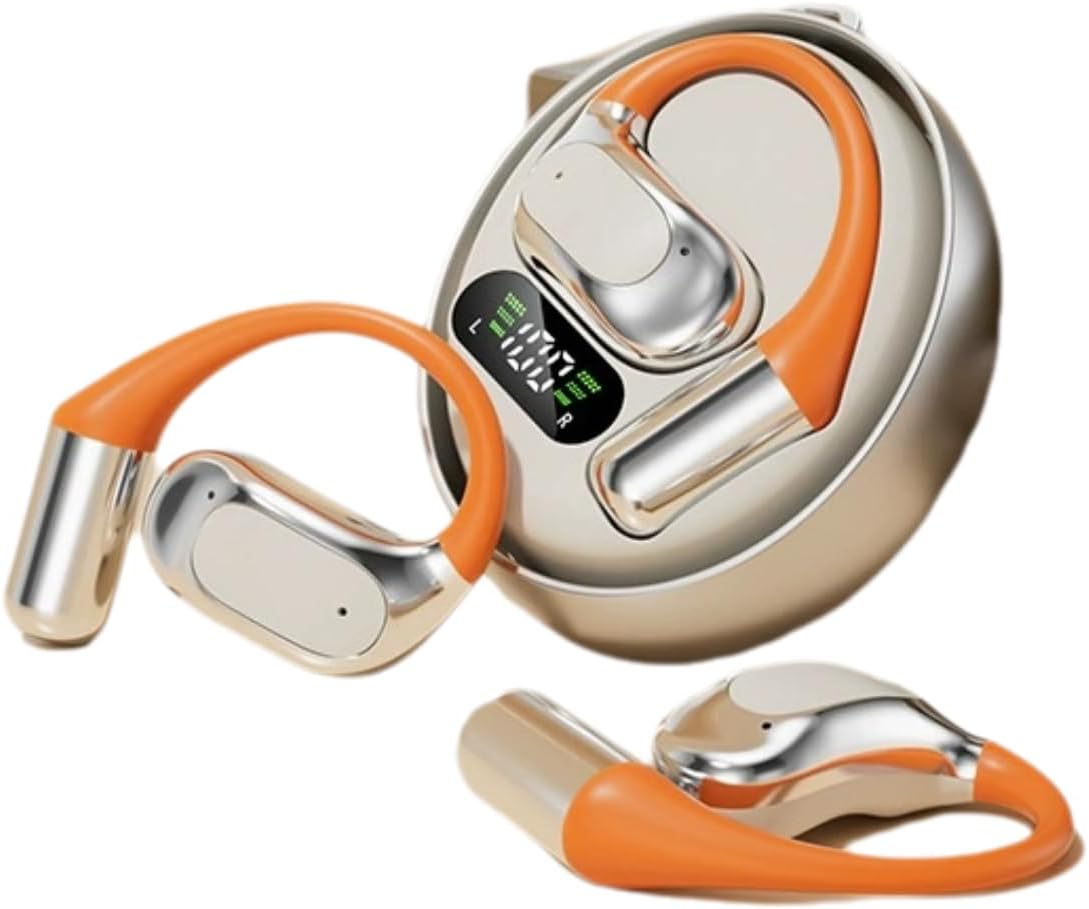
รูปที่ 1: M113 Headset and Charging Case. This image displays the two earbuds alongside their charging case, which features a digital display indicating battery levels for both the case and individual earbuds.

รูปที่ 2: Earbud in Charging Case. This image shows one earbud partially inserted into its charging slot within the case, highlighting the design and charging contacts.
ส่วนประกอบ:
- หูฟัง: Left (L) and Right (R) earbuds with in-ear design.
- เคสชาร์จ: Portable case with a multi-function screen display for battery status.
- พื้นที่ควบคุมแบบสัมผัส: For playback, calls, and AI translation activation.
- หน้าสัมผัสการชาร์จ: Located on earbuds and inside the charging case.
การตั้งค่า
1. การชาร์จชุดหูฟัง
- Place both earbuds into the charging case. Ensure they are correctly seated, and the charging indicators on the case's screen light up.
- Connect the charging case to a power source using the provided charging cable. The screen display will show the charging progress.
- A full charge typically takes approximately 1-2 hours for the earbuds and 2-3 hours for the charging case.
- The digital display on the case indicates the battery level of the case and each earbud (L and R).
2. การจับคู่บลูทู ธ
- ตรวจสอบให้แน่ใจว่าหูฟังชาร์จจนเต็มแล้ว
- เปิดกล่องชาร์จ หูฟังจะเข้าสู่โหมดจับคู่โดยอัตโนมัติ และไฟแสดงสถานะ (ถ้ามี) จะกะพริบ
- เปิดใช้งาน Bluetooth บนอุปกรณ์ของคุณ (สมาร์ทโฟน แท็บเล็ต ฯลฯ)
- ค้นหา available Bluetooth devices. Select "M113" from the list.
- Once connected, a voice prompt will confirm the successful pairing, and the indicator light will turn off or change color.
- หากการจับคู่ล้มเหลว ให้ใส่หูฟังกลับเข้าไปในเคส ปิดเคส แล้วทำตามขั้นตอนเดิมซ้ำอีกครั้ง
คำแนะนำการใช้งาน
เปิด/ปิดเครื่อง
- เปิดเครื่อง: เปิดกล่องชาร์จ หูฟังจะเปิดโดยอัตโนมัติ หรือกดปุ่มควบคุมแบบสัมผัสบนหูฟังทั้งสองข้างค้างไว้ 3 วินาที
- หมดแรง: ใส่หูฟังกลับเข้าไปในกล่องชาร์จและปิดฝา หูฟังจะปิดและเริ่มชาร์จโดยอัตโนมัติ หรือกดปุ่มควบคุมแบบสัมผัสบนหูฟังทั้งสองข้างค้างไว้ 5 วินาที
การเล่นเพลง
- เล่น/หยุดชั่วคราว: แตะที่พื้นที่ควบคุมแบบสัมผัสบนหูฟังข้างใดข้างหนึ่งหนึ่งครั้ง
- เพลงถัดไป: Double-tap the touch control area on the Right earbud.
- แทร็กก่อนหน้า: Double-tap the touch control area on the Left earbud.
- ปรับระดับเสียงขึ้น: Triple-tap the touch control area on the Right earbud.
- ลดเสียงลง: Triple-tap the touch control area on the Left earbud.
การจัดการการโทร
- รับ/วางสาย: แตะที่พื้นที่ควบคุมแบบสัมผัสบนหูฟังข้างใดข้างหนึ่งหนึ่งครั้ง
- ปฏิเสธสาย: กดปุ่มควบคุมแบบสัมผัสบนหูฟังข้างใดข้างหนึ่งค้างไว้ 2 วินาที
AI Intelligent Translation Function
The M113 headset features AI intelligent translation capabilities. To utilize this function, you may need to download a dedicated application on your smartphone. Please refer to the app's instructions for language selection and real-time translation usage.
การซ่อมบำรุง
- การทำความสะอาด: ใช้ผ้านุ่ม แห้ง และไม่เป็นขุยทำความสะอาดหูฟังและกล่องชาร์จ ห้ามใช้น้ำยาทำความสะอาดหรือสารละลายที่มีฤทธิ์กัดกร่อน
- พื้นที่จัดเก็บ: When not in use, store the headset in its charging case to protect it from dust and damage. Store in a cool, dry place.
- การดูแลแบตเตอรี่ เพื่อยืดอายุการใช้งานแบตเตอรี่ ควรหลีกเลี่ยงการคายประจุแบตเตอรี่จนหมดบ่อยๆ ควรชาร์จอุปกรณ์เป็นประจำ แม้ว่าจะไม่ได้ใช้งานเป็นเวลานานก็ตาม
- การสัมผัสน้ำ: The device is not water resistant. Avoid exposure to rain, sweat, or other liquids.
การแก้ไขปัญหา
| ปัญหา | สาเหตุที่เป็นไปได้ | สารละลาย |
|---|---|---|
| หูฟังไม่เปิดเครื่อง | แบตเตอรี่อ่อน | ชาร์จหูฟังและเคสชาร์จให้เต็ม |
| ไม่สามารถจับคู่กับอุปกรณ์ได้ | Bluetooth is off; earbuds not in pairing mode; device too far. | Ensure Bluetooth is enabled on your device. Place earbuds in case, close, then open to re-enter pairing mode. Keep devices within 10 meters. |
| ไม่มีเสียงจากหูฟังข้างหนึ่ง | หูฟังไม่ได้เชื่อมต่อ; แบตเตอรี่เหลือน้อย; ขั้วชาร์จสกปรก | Place both earbuds back in the case, close, then open. Ensure both are charged. Clean charging contacts. |
| คุณภาพเสียงไม่ดี | Weak Bluetooth signal; earbud placement; dirty ear cushions. | Move closer to your device. Adjust earbud fit. Clean or replace ear cushions. |
ข้อมูลจำเพาะ
| คุณสมบัติ | รายละเอียด |
|---|---|
| ชื่อรุ่น | M113 |
| ยี่ห้อ | ทั่วไป |
| การวางตำแหน่งหู | ในหู |
| ฟอร์มแฟกเตอร์ | ในหู |
| เทคโนโลยีการเชื่อมต่อ | บลูทูธ (ไร้สาย) |
| ประเภทการควบคุม | การควบคุมแอพ / การควบคุมแบบสัมผัส |
| วัสดุ | อลูมิเนียม |
| ระดับความต้านทานต่อน้ำ | ไม่ทนน้ำ |
| น้ำหนักสินค้า | 200 กรัม (7.1 ออนซ์) |
| ขนาดแพ็คเกจ | 4 x 4 x 1.58 นิ้ว |
| ส่วนประกอบที่รวมอยู่ | แผ่นรองหูฟัง |
การรับประกันและการสนับสนุน
สำหรับข้อมูลการรับประกันและการสนับสนุนทางเทคนิค โปรดดูเอกสารประกอบที่ให้มาพร้อมกับสินค้าที่คุณซื้อ หรือติดต่อผู้ขายโดยตรง โปรดเก็บหลักฐานการซื้อไว้เพื่อใช้ในกรณีเรียกร้องการรับประกัน
For further assistance, you may visit the Generic brand's official support channels if available, or contact the retailer where the product was purchased.
Ask a question about this manual
Ask about setup, troubleshooting, compatibility, parts, safety, or missing instructions. Manuals+ will review the question and use this page’s manual context to help answer it.