
302M231172, 302M231170, 302M231181, 302M231180
Instruction Manual: Kyocera Printer Paper Feed Shaft Gear
Model Numbers: 302M231172, 302M231170, 302M231181, 302M231180
1. บทนำ
This manual provides comprehensive instructions for the installation, operation, maintenance, and troubleshooting of the Lilianos Clutch Paper Feed Shaft Gear B Z38S. This component is designed as a direct replacement part for specific Kyocera printer models to ensure optimal paper feeding performance.

Figure 1.1: Packaging of the Lilianos Clutch Paper Feed Shaft Gear B Z38S.
2. ข้อมูลด้านความปลอดภัย
Always observe the following safety precautions when handling or installing this component:
- การตัดการเชื่อมต่อไฟฟ้า: Before attempting any installation or maintenance, ensure the printer is completely powered off and unplugged from the electrical outlet.
- ไฟฟ้าสถิต: Discharge any static electricity from your body by touching a grounded metal object before handling internal printer components.
- การจัดการส่วนประกอบ: Handle the gear by its edges to avoid touching the teeth or shaft, which could introduce contaminants or cause damage.
- การใช้เครื่องมือ: Use appropriate tools for disassembly and reassembly. Avoid excessive force.
- ความช่วยเหลือจากมืออาชีพ: หากคุณไม่แน่ใจเกี่ยวกับขั้นตอนใด ๆ โปรดปรึกษาช่างบริการที่มีคุณสมบัติเหมาะสม
3. รุ่นเครื่องพิมพ์ที่ใช้งานร่วมกันได้
This Clutch Paper Feed Shaft Gear is compatible with the following Kyocera printer models:
- Kyocera FS-1025MFP
- Kyocera FS-1120mfp
- Kyocera FS-1040
- Kyocera FS-1060
- Kyocera FS-1020mfp
Refer to your printer's service manual for specific instructions on accessing and replacing the paper feed shaft gear.
4. คู่มือการติดตั้ง
The following steps outline the general procedure for replacing the paper feed shaft gear. Specific disassembly and reassembly steps may vary by printer model. Always refer to your printer's official service manual for detailed instructions.
- เตรียมเครื่องพิมพ์ให้พร้อม: Ensure the printer is turned off and unplugged from the power source. Allow it to cool down if it has been recently in use.
- Access the Paper Feed Mechanism: Carefully open the printer covers and remove any components (e.g., toner cartridge, drum unit, paper trays) that obstruct access to the paper feed mechanism. You may need to remove screws or release clips.
- Locate the Old Gear: Identify the existing paper feed shaft gear that needs replacement. It is typically located near the paper pickup rollers.
- Remove the Old Gear: Gently disengage and remove the old gear. This may involve releasing a retaining clip or carefully sliding it off the shaft. Note its orientation for correct installation of the new gear.
- Inspect the New Gear: Before installation, inspect the new Lilianos Clutch Paper Feed Shaft Gear for any visible defects or damage.
- Install the New Gear: Carefully slide the new gear onto the shaft, ensuring it is correctly aligned and seated. If there was a retaining clip, reattach it securely.
- Reassemble the Printer: Reinstall all removed components and close the printer covers. Ensure all screws and clips are securely fastened.
- Test the Printer: Plug the printer back in and power it on. Perform a test print to verify that the paper feeding mechanism is functioning correctly.
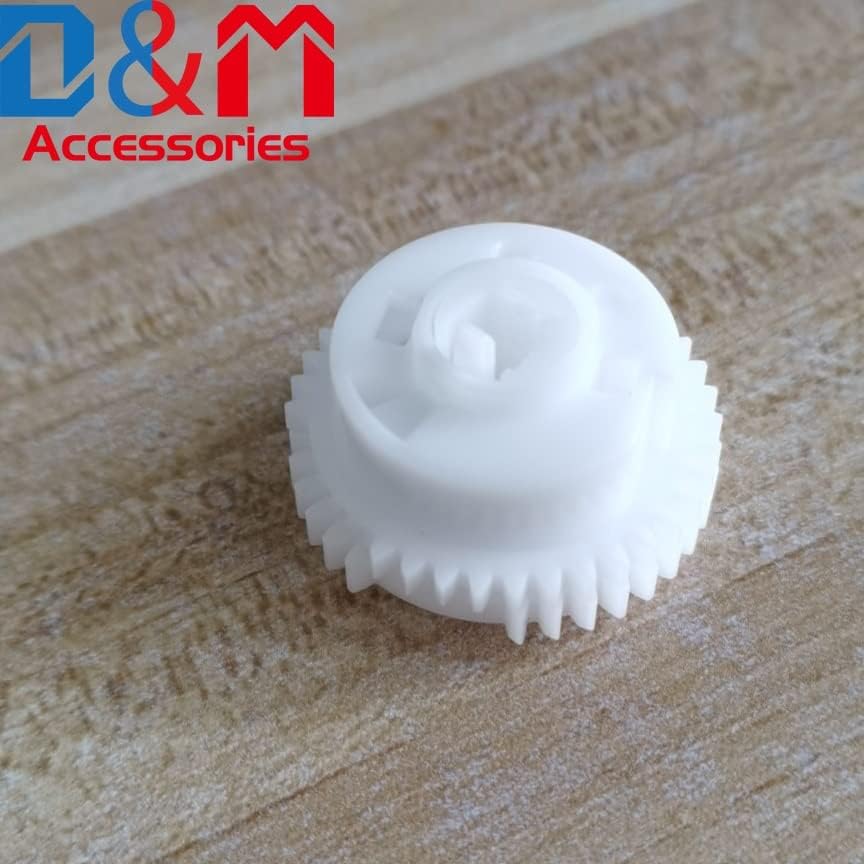
รูปที่ 4.1 : ด้านหน้า view of the Lilianos Clutch Paper Feed Shaft Gear.

รูปที่ 4.2: มุม view of the gear, highlighting its design for proper paper feeding.
5. การดำเนินการ
The Clutch Paper Feed Shaft Gear is an integral part of your printer's paper handling system. Its primary function is to precisely control the movement of paper from the tray through the printer's internal path. The clutch mechanism allows for smooth, consistent paper pickup and prevents multiple sheets from being fed simultaneously, ensuring reliable printing operations.
Once correctly installed, the gear operates automatically as part of the printer's normal functions. No user intervention is required for its operation.
6. การบำรุงรักษา
Regular maintenance of the paper feed mechanism can extend the life of your printer and its components. While the gear itself requires minimal maintenance, consider the following:
- ฝุ่นและเศษขยะ: Periodically inspect the area around the paper feed shaft gear for accumulation of paper dust, toner residue, or other debris. Use a soft, lint-free cloth or a small brush to gently remove any foreign material.
- การหล่อลื่น: The gear is designed for long-term operation without additional lubrication. Do not apply oils or greases unless specifically instructed by the printer's service manual.
- การทำความสะอาดลูกกลิ้ง: Ensure that the paper pickup rollers, which work in conjunction with this gear, are clean and free of residue. Refer to your printer's manual for instructions on cleaning the rollers.
7 การแก้ไขปัญหา
If you experience issues related to paper feeding after installing the new gear, consider the following:
| ปัญหา | สาเหตุที่เป็นไปได้ | สารละลาย |
|---|---|---|
| กระดาษติด | Incorrect gear installation, debris in paper path, worn rollers. |
|
| Multiple Sheets Fed | Worn separation pad, issue with clutch mechanism, incorrect paper loading. |
|
| No Paper Pickup | Gear not engaging, worn pickup rollers, empty paper tray. |
|
If problems persist after following these steps, it is recommended to consult a professional printer technician or refer to your printer's comprehensive service manual.
8. ข้อมูลจำเพาะ
| คุณลักษณะ | รายละเอียด |
|---|---|
| ชื่อสินค้า | Clutch Paper Feed Shaft Gear B Z38S |
| หมายเลขชิ้นส่วน | 302M231172, 302M231170, 302M231181, 302M231180 |
| ยี่ห้อ | Generic (Lilianos) |
| สี | White (as per typical product images) |
| ความเข้ากันได้ | Kyocera FS-1025MFP, 1120mfp, 1040, 1060, 1020mfp |
| วัสดุ | วัสดุพลาสติกคอมโพสิตที่ทนทาน |
9. ข้อมูลการรับประกัน
This product is covered by a standard manufacturer's warranty against defects in materials and workmanship. The warranty period typically begins from the date of purchase. Please retain your proof of purchase for warranty claims.
The warranty does not cover damage resulting from improper installation, misuse, neglect, unauthorized modification, or normal wear and tear. For specific warranty terms and conditions, please refer to the documentation provided with your purchase or contact the seller directly.
10. การสนับสนุนลูกค้า
For technical assistance, questions regarding installation, or warranty inquiries, please contact your point of purchase or the product manufacturer. When contacting support, please have your product model number and purchase details ready.
แหล่งข้อมูลออนไลน์: For additional support and resources, you may visit the manufacturer's or seller's official webเว็บไซต์.
Ask a question about this manual
Ask about setup, troubleshooting, compatibility, parts, safety, or missing instructions. Manuals+ will review the question and use this page’s manual context to help answer it.