
1. บทนำ
Thank you for choosing the UNITOPSCI 7086W Double Din Car Stereo. This advanced multimedia system is designed to enhance your driving experience with its 6.9-inch IPS touchscreen, wireless Apple CarPlay, Android Auto, Bluetooth 5.2, and a range of connectivity options. This manual provides essential information for installation, operation, and maintenance to ensure optimal performance and safety.

Image 1.1: UNITOPSCI 7086W Double Din Car Stereo and accessories.
2. ข้อมูลด้านความปลอดภัย
- Always consult a professional for installation to prevent damage to the unit or your vehicle.
- อย่าใช้งานอุปกรณ์ในลักษณะที่รบกวนสมาธิในการขับขี่ ให้ความสำคัญกับความปลอดภัยบนท้องถนนเสมอ
- ตรวจสอบให้แน่ใจว่าสายไฟทั้งหมดเชื่อมต่ออย่างถูกต้องเพื่อหลีกเลี่ยงไฟฟ้าลัดวงจรหรืออันตรายจากไฟฟ้า
- เก็บเครื่องให้ห่างจากน้ำและความชื้นที่มากเกินไป
- อย่าพยายามซ่อมแซมเครื่องด้วยตนเอง โปรดติดต่อช่างผู้ชำนาญการ
- ใช้เฉพาะแหล่งจ่ายไฟที่ระบุไว้เท่านั้น (DC 12V)
3. เนื้อหาบรรจุภัณฑ์
ตรวจสอบว่ามีรายการทั้งหมดอยู่ในแพ็คเกจ:
- 1 x Car MP5 Player (UNITOPSCI 7086W)
- สายไฟ 1 เส้น
- สายลำโพง 1 เส้น
- 1 x ไมโครโฟน (MIC)
- 1 x Steering Wheel Control (Battery Not Included)
- 1 x คู่มือผู้ใช้
- 1 x D-BUS Cable
- 1 x กล้องสำรอง
- 1 x Remote Control (Battery Not Included)
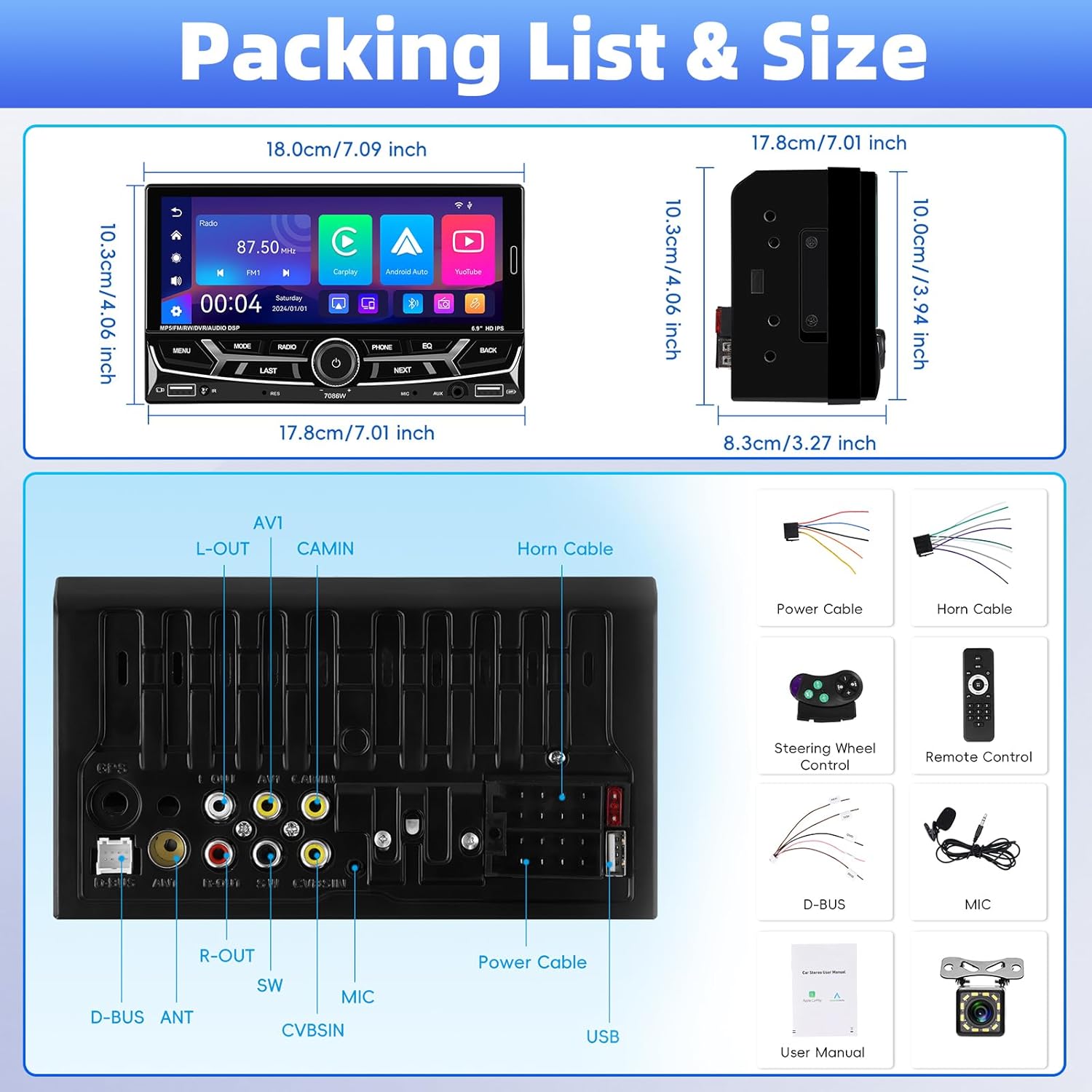
ภาพที่ 3.1: รายละเอียด view of package contents and wiring diagram.
4. ข้อมูลจำเพาะ
| คุณสมบัติ | ข้อมูลจำเพาะ |
|---|---|
| แบบอย่าง | 7086วัตต์ |
| วัสดุหน้าจอ | ไอพีเอส |
| เล่มที่tage | กระแสตรง 12 โวลต์ |
| ชิปซีพียู | 2900 |
| ขนาดหน้าจอ | 6.9 นิ้ว |
| ความละเอียดหน้าจอ | 1280*480 |
| ลิงค์มิเรอร์ | Support (iOS up to 13.4, Android up to 10.1) |
| วงวิทยุ | เอฟเอ็ม/เอเอ็ม/อาร์ดีเอส |
| ชิปวิทยุ | คำถามที่ 8035 |
| กำลังขับ | 45W*4 (Max 180 Watts) |
| อุณหภูมิในการทำงาน | -10~60℃ |
| เวอร์ชันบลูทูธ | 5.2 |
| แสงไฟที่มีสีสัน | Support (7 colors) |
| การย้อนกลับอินพุต | AHD720/CVBS |
| พลัง Ampชิปลิฟายเออร์ | TDA7388 |
| ความถี่วิทยุ | FM: 87.5-108MHz, AM: 530-1710KHz |
| รูปแบบเสียง | MP3 / WMA / WAV / APE / FLAC |
| รูปแบบวิดีโอ | RM/RMVB/AVI/MP4/MKV/3GP |
| รูปแบบภาพ | JPG BMP PNG |
| ขนาดสินค้า | 4.37 x 7 x 4.01 นิ้ว |
| น้ำหนักสินค้า | 2.64 ปอนด์ |
5. การตั้งค่าและการติดตั้ง
การติดตั้งอย่างถูกต้องมีความสำคัญอย่างยิ่งต่อประสิทธิภาพและความปลอดภัยของเครื่องเสียงรถยนต์ของคุณ ขอแนะนำอย่างยิ่งให้ติดตั้งโดยช่างผู้ชำนาญการ
5.1 การเชื่อมต่อสายไฟ
Refer to the detailed wiring diagram provided in Image 3.1 (Packing List & Size) and the included user manual for specific connection points. Key connections include:
- สายไฟ: เชื่อมต่อกับแหล่งจ่ายไฟของรถยนต์ (ไฟคงที่ 12V, ไฟเสริม 12V และสายกราวด์)
- สายลำโพง: เชื่อมต่อกับลำโพงในรถยนต์ของคุณ ตรวจสอบให้แน่ใจว่าขั้วถูกต้อง
- Backup Camera Input (CVBSIN): Connect the included backup camera for automatic rear view แสดง.
- ไมโครโฟน (MIC): Connect the external microphone for improved hands-free calling.
- ระบบควบคุมพวงมาลัย (SWC): เชื่อมต่อกับสายควบคุมพวงมาลัยของรถยนต์เพื่อการควบคุมแบบครบวงจร
- พอร์ต USB: Two USB ports are available for media playback, charging, and DVR input.
- อินพุต AUX: สำหรับเชื่อมต่ออุปกรณ์เสียงภายนอก
ตรวจสอบให้แน่ใจว่าการเชื่อมต่อทั้งหมดมีความปลอดภัยและมีฉนวนเพื่อป้องกันไฟฟ้าลัดวงจร
6. คู่มือการใช้งาน
6.1 การเปิด/ปิดเครื่องและการควบคุมพื้นฐาน
The unit powers on automatically with the vehicle's ignition. Use the physical knob and buttons on the front panel for basic operations like volume control, mode selection, and track skipping.
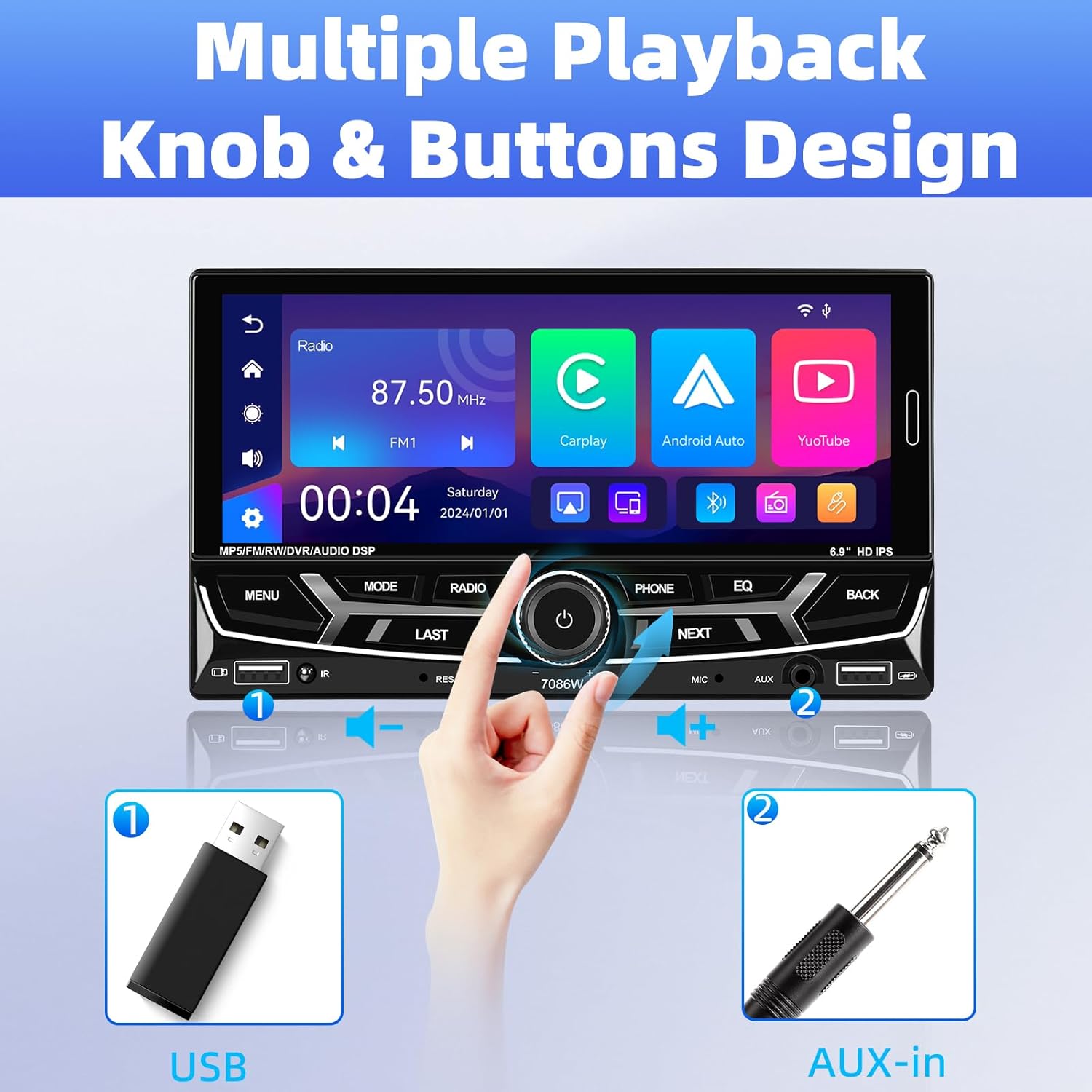
Image 6.1: Front panel controls and connectivity options.
6.2 ระบบ Apple CarPlay และ Android Auto แบบไร้สาย
Connect your smartphone wirelessly via Bluetooth to access Apple CarPlay or Android Auto. This allows you to use navigation, make calls, send messages, and listen to music directly from your phone's interface displayed on the stereo screen.
- ตรวจสอบให้แน่ใจว่าได้เปิดใช้งาน Bluetooth บนสมาร์ทโฟนของคุณแล้ว
- On the car stereo, navigate to the Bluetooth settings and pair with your phone.
- Once paired, select the CarPlay or Android Auto icon on the stereo's main menu.
- Follow any on-screen prompts on your phone to grant necessary permissions.

Image 6.2: Wireless Apple CarPlay and Android Auto interfaces.
6.3 Bluetooth 5.2 Hands-free Calling and Audio Streaming
The built-in Bluetooth 5.2 module allows for stable hands-free calling and high-quality audio streaming.
- การจับคู่: Go to the Bluetooth menu on the stereo, search for your phone, and pair.
- โทรแบบแฮนด์ฟรี: Once paired, you can dial numbers, answer, or end calls directly from the stereo's touchscreen or via voice commands (e.g., Siri). The external microphone ensures clear communication.
- การสตรีมเสียง: เล่นเพลงจากโทรศัพท์ของคุณผ่านลำโพงในรถยนต์โดยใช้บลูทูธ

Image 6.3: Bluetooth 5.2 hands-free and audio features.
6.4 ฟังก์ชันการเชื่อมโยงกระจก
The Mirror Link function allows you to display your smartphone's screen directly onto the car stereo. This is compatible with iOS devices up to version 13.4 and Android devices up to version 10.1.
- เชื่อมต่อสมาร์ทโฟนของคุณกับสเตอริโอผ่านสาย USB
- เลือกตัวเลือก 'Mirror Link' บนสเตอริโอ
- ทำตามคำแนะนำบนหน้าจอเพื่อทำการเชื่อมต่อ
6.5 วิทยุ FM/AM/RDS
Access local radio stations with the built-in FM/AM/RDS tuner.
- จูน: ใช้หน้าจอสัมผัสเพื่อค้นหาสถานี หรือปรับจูนไปยังความถี่ที่ต้องการด้วยตนเอง
- สถานีที่ตั้งไว้ล่วงหน้า: Save up to 30 of your favorite stations for quick access.
- RDS (ระบบข้อมูลวิทยุ): Displays station information such as song title or program type where available.
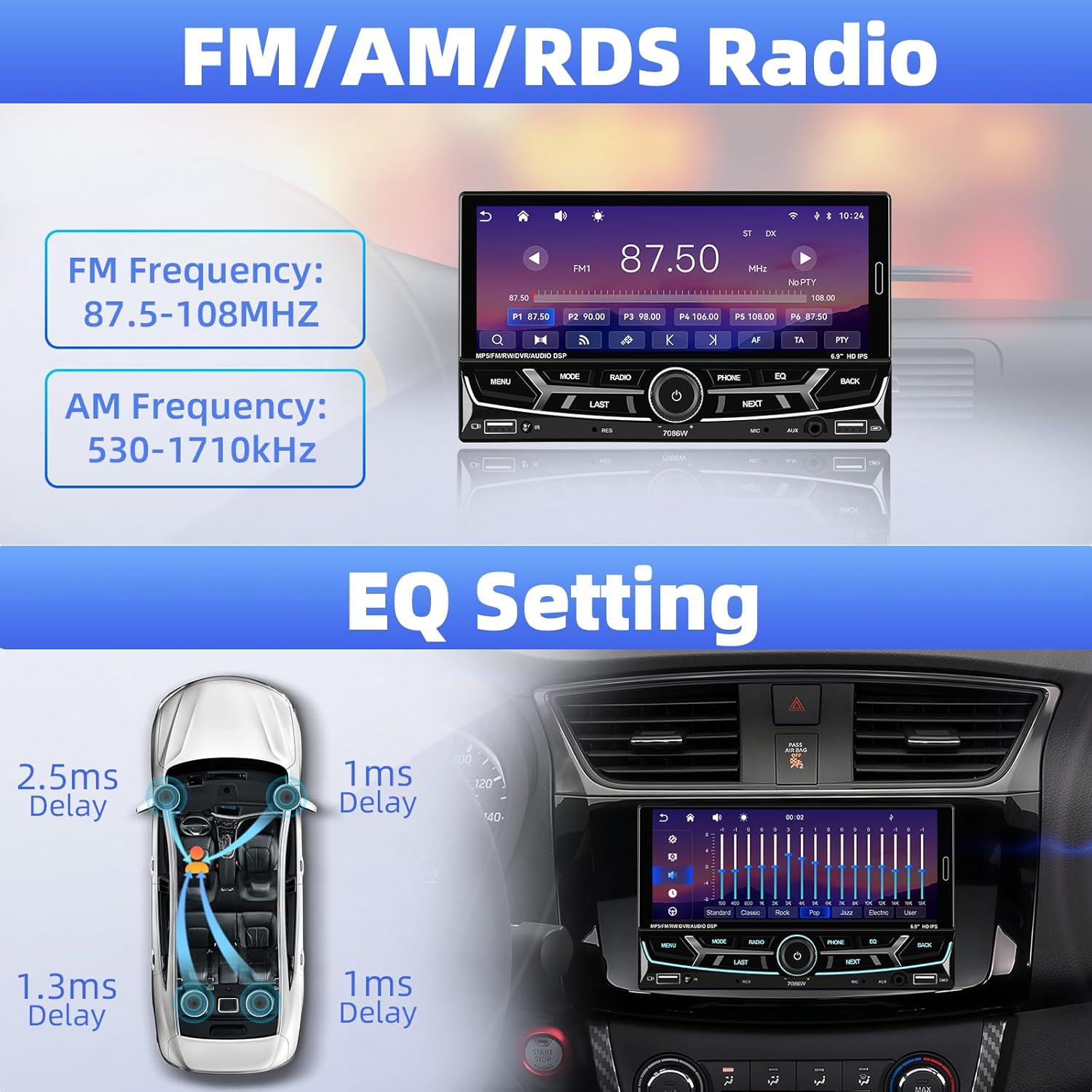
Image 6.4: FM/AM/RDS Radio interface and EQ settings.
6.6 DSP/EQ Audio Setting
Customize your audio experience with the Digital Sound Processor (DSP) and Equalizer (EQ) settings. Choose from preset sound styles like Pop, Rock, Classic, Jazz, or create your own custom profile.
6.7 USB Playback and Charging / Auxiliary Audio Input
- ยูเอสบี: Insert a USB drive into one of the USB ports for media playback (audio/video/pictures) or to charge your devices.
- ช่องเสริม: Connect external audio devices (e.g., MP3 players) to the 3.5mm AUX input on the front panel.
6.8 ด้านหลัง View กล้อง
When the vehicle is shifted into reverse gear, the stereo automatically displays the feed from the connected backup camera. The included camera features 12 LEDs, a 170° wide angle, and night vision for clear visibility, along with parking guidelines.

ภาพที่ 6.5: ด้านหลัง view camera display and features.
6.9 ระบบควบคุมพวงมาลัย (SWC)
If your vehicle supports steering wheel controls, connect the SWC wires to the stereo. This allows you to control functions like volume, track skipping, and mode switching directly from your steering wheel for convenience and safety.
Image 6.6: Steering wheel control functionality.
6.10 6.9-Inch IPS Touchscreen and 7-Color Backlight Display
The high-definition IPS touchscreen offers clear visuals and responsive touch control. You can customize the backlight color of the physical buttons to match your vehicle's interior or personal preference, choosing from 7 available colors.

Image 6.7: IPS Touchscreen and 7-color backlight display.
7. การบำรุงรักษา
- การทำความสะอาดหน้าจอ: ใช้ผ้านุ่มไม่เป็นขุยเช็ดหน้าจอสัมผัสเบาๆ อย่าใช้น้ำยาทำความสะอาดหรือตัวทำละลายที่มีฤทธิ์กัดกร่อน
- การทำความสะอาดทั่วไป: Keep the unit free from dust and debris. Use a soft, dry cloth for cleaning the exterior.
- หลีกเลี่ยงอุณหภูมิที่สูงหรือต่ำเกินไป: อย่าวางเครื่องไว้ในที่ที่มีแสงแดดส่องโดยตรงเป็นเวลานาน หรือในที่ที่มีอากาศหนาวจัด เพราะอาจส่งผลต่อประสิทธิภาพและอายุการใช้งานได้
8 การแก้ไขปัญหา
| ปัญหา | สาเหตุที่เป็นไปได้ | สารละลาย |
|---|---|---|
| ไม่มีไฟฟ้า | เดินสายไฟผิด ฟิวส์ขาด | Check power cable connections; Inspect and replace fuse if necessary. |
| ไม่มีเสียง | Speaker wires disconnected; Volume too low; Incorrect audio source | Verify speaker connections; Increase volume; Select correct audio input. |
| บลูทูธไม่เชื่อมต่อ | Bluetooth off on phone/stereo; Incorrect pairing process | Ensure Bluetooth is active on both devices; Re-attempt pairing process. |
| CarPlay/Android Auto ไม่เริ่มทำงาน | Phone not compatible; Incorrect connection; App issues | Check phone compatibility; Ensure proper Bluetooth connection; Restart phone and stereo. |
| กล้องสำรองไม่แสดงผล | Camera wiring incorrect; Reverse trigger wire not connected | Check camera power and video signal cables; Ensure reverse trigger wire is connected to vehicle's reverse light. |
| Steering Wheel Control not working | SWC wires not connected; Incorrect configuration | Verify SWC wiring; Refer to vehicle-specific instructions for SWC setup. |
หากปัญหายังคงมีอยู่ โปรดติดต่อฝ่ายสนับสนุนลูกค้า
9. การรับประกันและการสนับสนุน
UNITOPSCI is committed to providing high-quality products and customer satisfaction.
- การทดแทน: Replacement available within 24 months of purchase.
- การส่งคืน: 60-day no-worry return policy.
- การสนับสนุนด้านเทคนิค: Lifetime after-sales consultation and technical support.
- เวลาตอบสนอง: ตอบข้อซักถามอย่างรวดเร็วภายใน 16 ชั่วโมง
หากต้องการความช่วยเหลือ โปรดติดต่อเราได้ที่: UNITOPSCI@126.com