
1. บทนำ
The HUAWEI WATCH FIT 4 is a versatile smartwatch designed for fitness tracking and daily convenience. It features an ultra-thin design, a vibrant 1.82-inch AMOLED display, and comprehensive health monitoring capabilities. This manual provides essential information for setting up, operating, and maintaining your device.
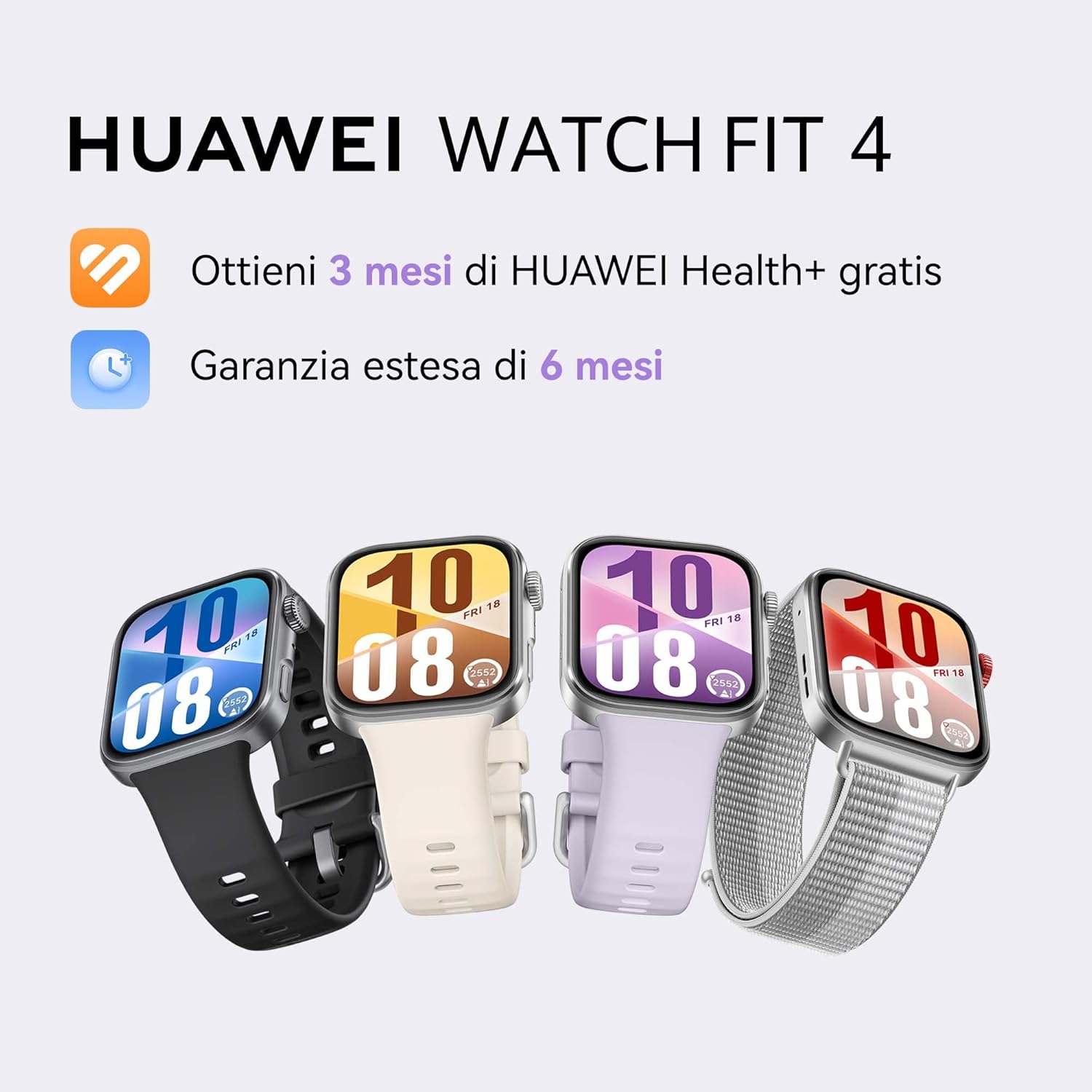
Image: HUAWEI WATCH FIT 4 smartwatches in various colors.
2. การตั้งค่า
2.1 การแกะกล่องและการตรวจสอบเบื้องต้น
Carefully unbox your HUAWEI WATCH FIT 4. Ensure all components are present:
- HUAWEI WATCH FIT 4 Smartwatch
- สายชาร์จ
- คู่มือเริ่มต้นอย่างรวดเร็ว
- บัตรรับประกัน
Video: Unboxing and initial setup of the HUAWEI WATCH FIT 4. This video demonstrates opening the box, removing the watch, and showing the included accessories.
2.2 การชาร์จอุปกรณ์
Before first use, fully charge your smartwatch. Connect the charging cable to the watch and a power source. A full charge takes approximately 75 minutes. A 10-minute charge can provide up to one day of typical use.
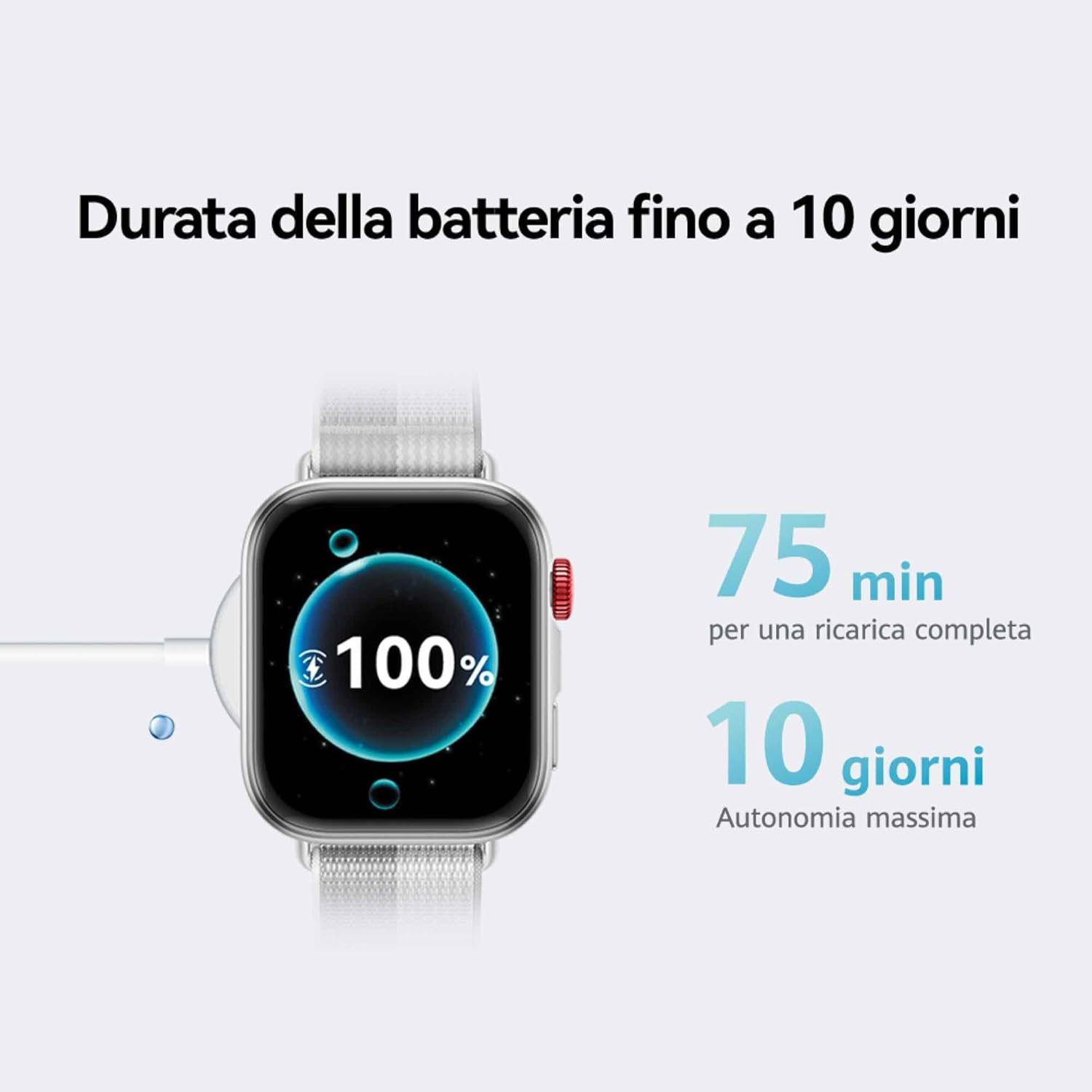
Image: The HUAWEI WATCH FIT 4 connected to its charging cable, displaying a full battery.
2.3 การจับคู่กับสมาร์ทโฟนของคุณ
The HUAWEI WATCH FIT 4 is compatible with both iOS and Android devices. To pair your watch:
- ขั้นตอนที่ 1: ดาวน์โหลด the HUAWEI Health app from your device's app store.
- ขั้นตอนที่ 2: จับคู่ เปิดแอป HUAWEI Health ไปที่ Devices > Add > Smartwatchและเลือกอุปกรณ์ของคุณ
- ขั้นตอนที่ 3: อัปเดต In the HUAWEI Health app, go to Personal > Check for Updates to ensure your watch has the latest software.
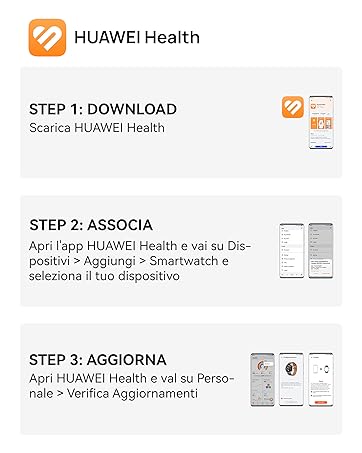
Image: Visual guide for connecting the HUAWEI WATCH FIT 4 to your smartphone using the HUAWEI Health app.

Image: HUAWEI WATCH FIT 4 successfully paired with a smartphone running the HUAWEI Health app.
3. การดำเนินการ
3.1 การแสดงผลและการนำทาง
The HUAWEI WATCH FIT 4 features a 1.82-inch AMOLED display with a maximum brightness of 2000 nits, ensuring clear visibility in various lighting conditions. Navigate the watch using its touchscreen and physical buttons.

Image: The bright 1.82-inch AMOLED display of the HUAWEI WATCH FIT 4.
3.2 การปรับแต่งหน้าปัดนาฬิกา
Personalize your watch with a variety of watch faces available through the HUAWEI Health app. You can choose from different styles including personalized, geometric, animal, and emoji themes.
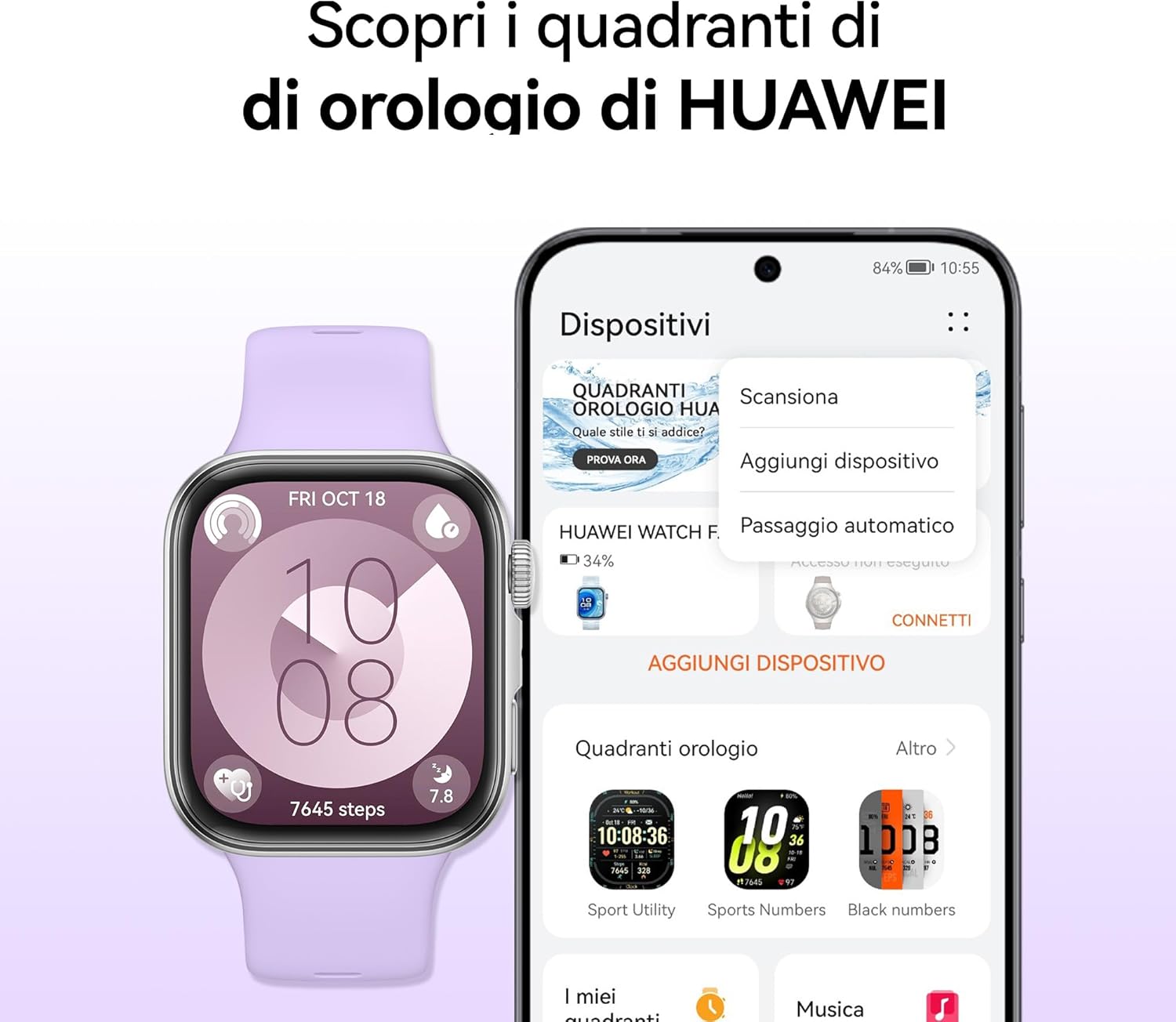
Image: Customizing watch faces on the HUAWEI WATCH FIT 4 via the HUAWEI Health app.
3.3 โหมดกีฬาและการติดตามด้วย GPS
The watch supports over 100 workout modes, including mountaineering, hiking, skiing, climbing, trail running, walking, running, and cycling. It provides high-level data such as altitude, accumulated ascent, and air pressure, supported by a powerful barometer. The HUAWEI Sunflower positioning system offers precise location tracking for outdoor activities.

Image: HUAWEI WATCH FIT 4 tracking outdoor cycling activity with GPS.

Image: Various sports modes available on the HUAWEI WATCH FIT 4.
3.4 การตรวจติดตามสุขภาพ
The Health Insights app provides guidance for a healthier lifestyle, including stress management, sleep improvement, and workout optimization. The watch tracks sleep levels, fatigue, and stress, utilizing HRV metrics and abnormal breathing alerts. It also includes a cycle calendar feature.
- การติดตามการนอนหลับ: ตรวจสอบการนอนหลับtagและคุณภาพ
- การตรวจสอบอัตราการเต้นของหัวใจ: การติดตามอัตราการเต้นของหัวใจอย่างต่อเนื่อง
- การตรวจสอบ SpO2: Blood oxygen saturation levels.
- การจัดการความเครียด: Provides insights and guidance.
- ปฏิทินรอบเดือน: Helps track menstrual cycles.

Image: Health Insights app on HUAWEI WATCH FIT 4 showing sleep score and other health data.

Image: Cycle calendar feature on the HUAWEI WATCH FIT 4.
3.5 Daily Utility Features
The smartwatch offers several features for daily convenience:
- บันทึกเสียง: Record quick voice memos.
- Quick Message Replies: Respond to messages directly from your wrist.
- การโทรผ่านบลูทูธ: Make and receive calls when connected to your phone.
- ชัตเตอร์ระยะไกล: ควบคุมกล้องโทรศัพท์ของคุณจากระยะไกล

ภาพ: เหนือview of daily utility features on the HUAWEI WATCH FIT 4.
4. การบำรุงรักษา
4.1 การจัดการแบตเตอรี่
The HUAWEI WATCH FIT 4 offers up to 10 days of battery life with typical usage. To maximize battery longevity, avoid extreme temperatures and use the provided charging cable.

Image: Battery life and charging details for the HUAWEI WATCH FIT 4.
4.2 ความต้านทานต่อน้ำ
The watch is water-resistant up to 50 meters. It is suitable for shallow-water activities like swimming in a pool or ocean. Avoid using it for diving, hot showers, or high-pressure water activities.
4.3 การทำความสะอาดและการดูแล
ควรทำความสะอาดนาฬิกาและสายนาฬิกาเป็นประจำเพื่อป้องกันการระคายเคืองผิวและรักษาประสิทธิภาพการใช้งาน ใช้ผ้าหรือฟองน้ำเนื้อนุ่มamp cloth to wipe the device. Ensure the watch is dry before charging.
5 การแก้ไขปัญหา
If you encounter issues with your HUAWEI WATCH FIT 4, try the following common solutions:
- อุปกรณ์ไม่เปิด: ตรวจสอบให้แน่ใจว่านาฬิกาชาร์จเต็มแล้ว
- ปัญหาการจับคู่: Check Bluetooth on your phone, restart both devices, and ensure the HUAWEI Health app is updated.
- ข้อมูลไม่ถูกต้อง: Ensure the watch is worn correctly and the sensors are clean. Update the app and watch firmware.
- อายุการใช้งานแบตเตอรี่สั้น: Reduce screen brightness, disable unnecessary notifications, and close background apps on the watch.
- แอปไม่ซิงค์: Check your phone's internet connection and ensure the HUAWEI Health app has all necessary permissions.
สำหรับความช่วยเหลือเพิ่มเติม โปรดดูการสนับสนุนอย่างเป็นทางการของ HUAWEI webเว็บไซต์หรือติดต่อฝ่ายบริการลูกค้า
6. ข้อมูลจำเพาะ
| คุณสมบัติ | รายละเอียด |
|---|---|
| ชื่อรุ่น | เซยะ-บี19เอฟ |
| ระบบปฏิบัติการ | ฮาร์โมนี่โอเอส |
| ขนาดจอแสดงผล | 1.82 นิ้ว |
| ประเภทจอภาพ | OLED (AMOLED) |
| ปณิธาน | 360 x 360 |
| Max Display Brightness | 2000 นิต |
| ความจุหน่วยความจำ | 4GB |
| ความจุของแบตเตอรี่ | 400 มิลลิแอมป์ |
| อายุการใช้งานแบตเตอรี่โดยเฉลี่ย | 10 วัน |
| เวลาในการชาร์จ | 10 Minutes (for a day's use), 75 Minutes (full charge) |
| เทคโนโลยีการเชื่อมต่อ | บลูทูธ |
| จีพีเอส | จีพีเอสแบบบูรณาการ |
| ระดับความต้านทานต่อน้ำ | 50 เมตร |
| วัสดุตัวเรือน | อลูมิเนียม |
| วัสดุของวงดนตรี | ซิลิโคน |
| ขนาด (ลxกxส) | 43P x 38l x 10H mm |
| อุปกรณ์ที่รองรับ | สมาร์ทโฟน แท็บเล็ต (iOS และ Android) |
7. การรับประกันและการสนับสนุน
7.1 การรับประกันสินค้า
The HUAWEI WATCH FIT 4 comes with a การรับประกันจากผู้ผลิต 2 ปี. Additionally, you may be eligible for an extended 30-month warranty through HUAWEI WATCH FIT 4 promotions.
7.2 HUAWEI Health+ Subscription
การซื้อasing a HUAWEI WATCH FIT 4 may include a 3-month subscription to HUAWEI Health+. This subscription provides access to exclusive benefits such as beginner and expert workouts, guided meditations, Stay Fit Plans, and breathing exercises. Terms and conditions apply.
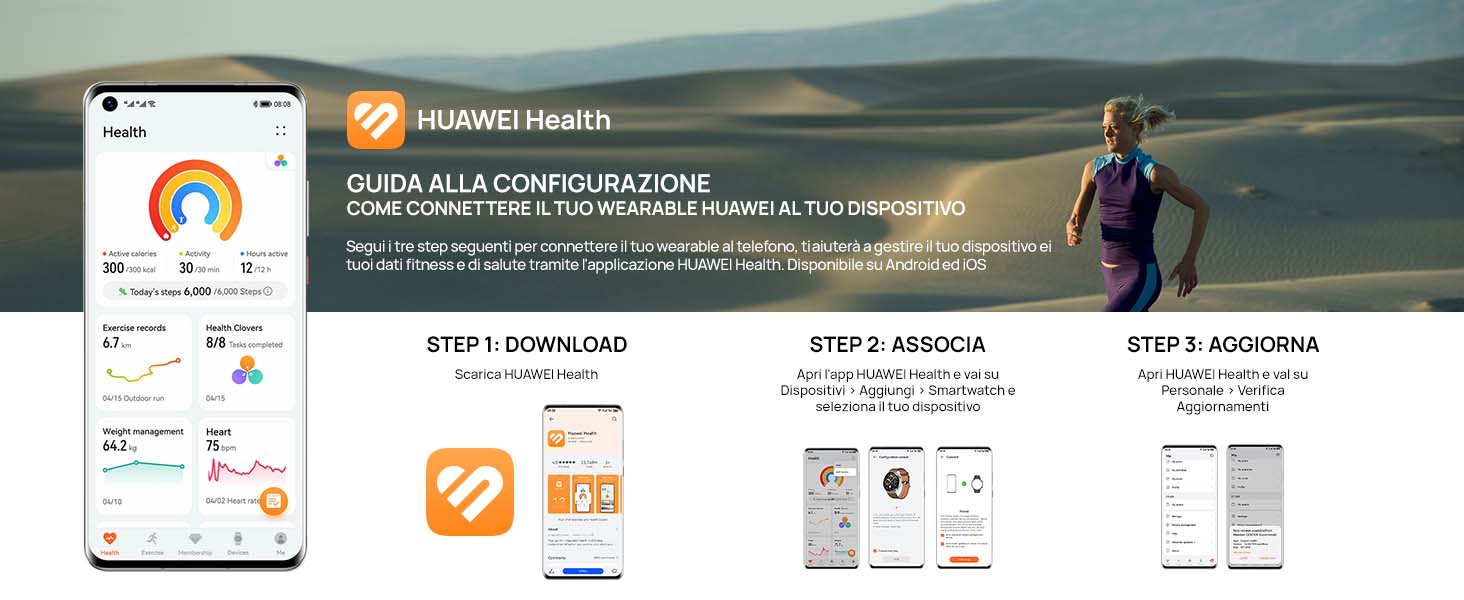
Image: Features of the HUAWEI Health+ app.
7.3 การสนับสนุนลูกค้า
For detailed support, FAQs, and contact information, please visit the official HUAWEI support webเว็บไซต์.


