
1. บทนำ
This manual provides comprehensive instructions for the installation, operation, and maintenance of your Techage CG6E Solar Security Camera. Designed for outdoor use, this wireless camera system offers 2K high-definition video, AI motion detection, color night vision, two-way audio communication, and is built with an IP66 waterproof rating for reliable performance in various weather conditions. The integrated solar panel ensures continuous power, reducing the need for frequent battery recharges.
2. เนื้อหาบรรจุภัณฑ์
ตรวจสอบว่ามีรายการทั้งหมดอยู่ในแพ็คเกจของคุณ:
- Techage Solar Security Camera (2 units)
- Solar Panel (2 units)
- วงเล็บยึดและสกรู
- สายชาร์จ USB
- คู่มือการใช้งาน (เอกสารนี้)

Image: Two Techage CG6E solar security cameras and two solar panels, illustrating the complete product package.
3. สินค้าหมดview
The Techage CG6E camera system is engineered for robust outdoor surveillance. Key features include:
- ความละเอียด 2K Ultra HD: บันทึกวิดีโอได้ชัดเจน footage with 1.5 times the clarity of standard 1080P cameras.
- ประสิทธิภาพพลังงานแสงอาทิตย์: Equipped with an external solar panel for continuous battery charging, ensuring uninterrupted operation.
- การตรวจจับการเคลื่อนไหวด้วย AI: Advanced algorithms identify human movement, reducing false alerts and sending instant notifications.
- การมองเห็นสีกลางคืน: Dual LED spotlights enable full-color video recording even in low-light conditions.
- เสียงสองทาง: ไมโครโฟนและลำโพงในตัวช่วยให้สามารถสื่อสารแบบเรียลไทม์ผ่านกล้องได้
- กันฝนระดับ IP66: ออกแบบมาให้ทนทานต่อฝน หิมะ และอุณหภูมิที่สูงจัด เพื่อการใช้งานกลางแจ้งตลอดทั้งปี
- การจัดเก็บที่ยืดหยุ่น: Supports local storage via a Micro SD card (up to 128GB, not included) and cloud storage options.

ภาพ: โอเวอร์view of the Techage CG6E camera highlighting its main features: long-lasting battery, free 3-day cloud storage, AI motion detection, and full-color night vision.
4. การตั้งค่า
4.1 การติดตั้งแอพ
The Techage CG6E camera operates with the Vicohome app. Download the app from your device's app store:
- For iOS devices, search for "Vicohome" in the Apple App Store.
- For Android devices, search for "Vicohome" in the Google Play Store.
Follow the on-screen instructions to create an account and log in.

Image: A smartphone displaying the Vicohome app interface, indicating where to download the application.
4.2 การจับคู่กล้อง
- ตรวจสอบให้แน่ใจว่าสมาร์ทโฟนของคุณเชื่อมต่อกับเครือข่าย Wi-Fi 2.4GHz กล้องไม่รองรับ Wi-Fi 5GHz
- Open the Vicohome app and tap the "Add Device" or "+" icon.
- Power on the camera. The camera will enter pairing mode, indicated by a specific LED light pattern or voice prompt.
- Follow the app's instructions to scan the QR code on the camera or manually select the device.
- ป้อนรหัสผ่านเครือข่าย Wi-Fi ของคุณเมื่อได้รับแจ้ง
- Once connected, the camera will confirm successful pairing, and you can name your device within the app.
4.3 การติดตั้งทางกายภาพ
The camera and solar panel are designed for wall mounting.
- เลือกตำแหน่ง: เลือกสถานที่กลางแจ้งที่ให้บรรยากาศที่ต้องการ viewมุมการมองและรับ ample direct sunlight for the solar panel. Ensure the camera is within range of your 2.4GHz Wi-Fi network.
- ติดตั้งกล้อง: Use the provided mounting bracket and screws to securely attach the camera to a wall or other stable surface. Adjust the camera angle for optimal coverage.
- ติดตั้งแผงโซลาร์เซลล์: Position the solar panel in a location that maximizes sun exposure throughout the day. Connect the solar panel cable to the camera's charging port.
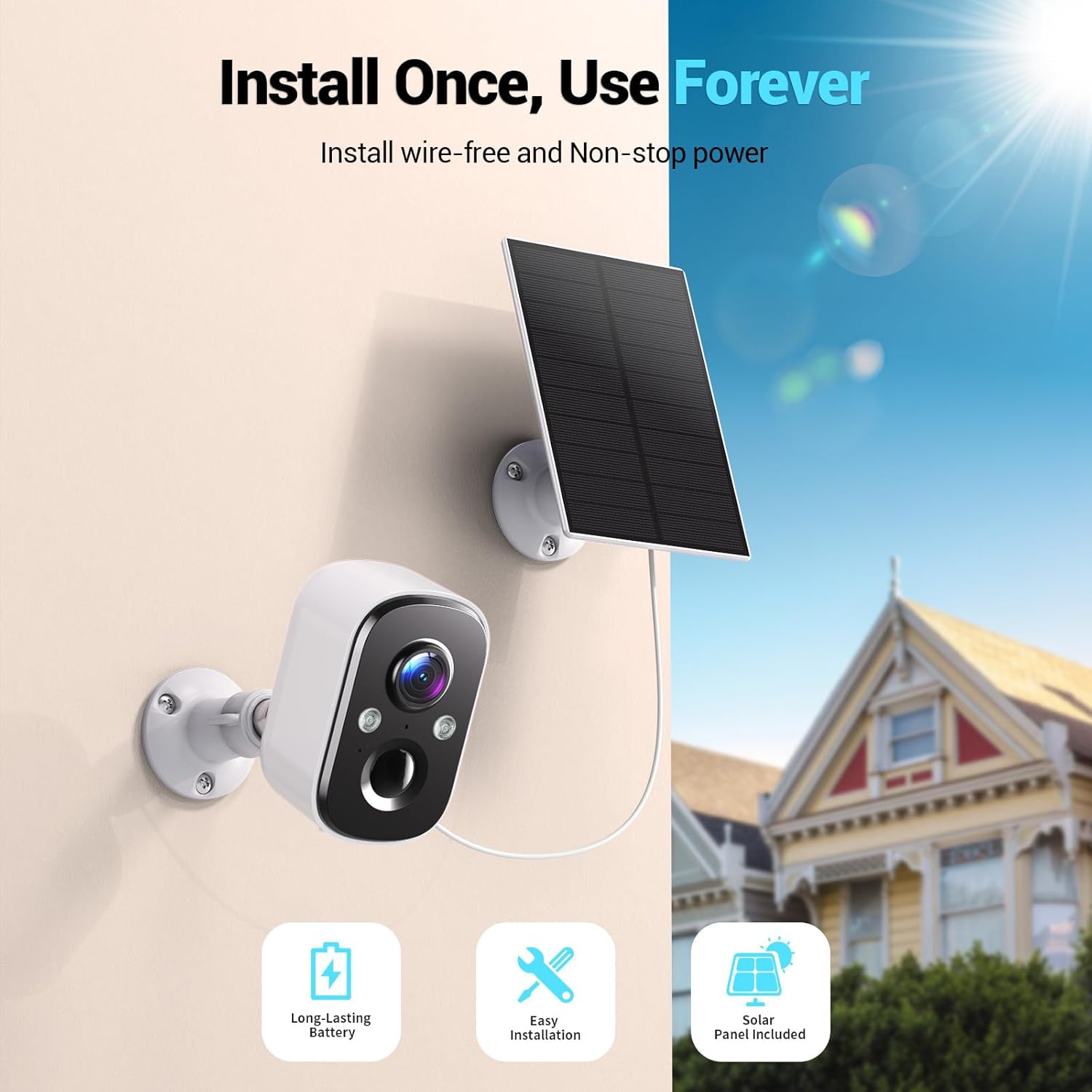
Image: A Techage CG6E camera and its solar panel are shown mounted on an outdoor wall, illustrating a typical installation scenario.
5. คู่มือการใช้งาน
5.1 สด View
Access real-time video feed from your camera through the Vicohome app. Simply select the desired camera from your device list to view its live stream.
5.2 การตั้งค่าการตรวจจับการเคลื่อนไหว
The camera features advanced AI motion detection. You can customize settings within the Vicohome app:
- ความไว: Adjust the detection sensitivity to minimize false alerts.
- โซนกิจกรรม: กำหนดพื้นที่เฉพาะภายในกล้อง view where motion detection should be active, ignoring other areas.
- การจดจำด้วย AI: The camera can differentiate between people, vehicles, packages, and pets, providing more relevant alerts.
- การแจ้งเตือน: Configure push notifications to your smartphone when motion is detected.

Image: A visual representation of the camera detecting motion near a doorway, triggering a spotlight, siren, and sending a notification to the Vicohome app.
5.3 เสียงสองทาง
ใช้ฟีเจอร์เสียงสองทางเพื่อสื่อสารกับบุคคลที่อยู่ใกล้กล้อง แตะไอคอนไมโครโฟนในหน้าจอถ่ายทอดสด view interface of the Vicohome app to speak, and the camera's speaker will broadcast your voice. You can also hear audio from the camera's location.

Image: A person inside a house communicating via the camera with another person outside, demonstrating the two-way audio function.
5.4 โหมดการมองเห็นตอนกลางคืน
กล้องมีโหมดการมองเห็นในเวลากลางคืนสองโหมด:
- การมองเห็นสีกลางคืน: When the built-in spotlights are activated (either manually or by motion detection), the camera captures full-color video in dark environments.
- อินฟราเรดคืนวิสัยทัศน์: With spotlights off, the camera uses infrared LEDs to provide clear black-and-white video in darkness.

Image: A comparison showing the difference between color night vision (spotlight on) and infrared night vision (spotlight off) in a dark setting.
5.5 ตัวเลือกการจัดเก็บข้อมูล
กล้องของคุณรองรับวิธีการจัดเก็บข้อมูลสองวิธี:
- การ์ด Micro SD: เสียบการ์ด Micro SD (สูงสุด 128GB ไม่รวมอยู่ในชุด) ลงในช่องเสียบที่กำหนดไว้บนกล้องเพื่อบันทึกข้อมูลลงในเครื่อง
- การเก็บข้อมูลบนคลาวด์: The Vicohome app offers a free 3-day rolling event recording cloud storage. Optional premium cloud plans are available for extended storage and advanced features.
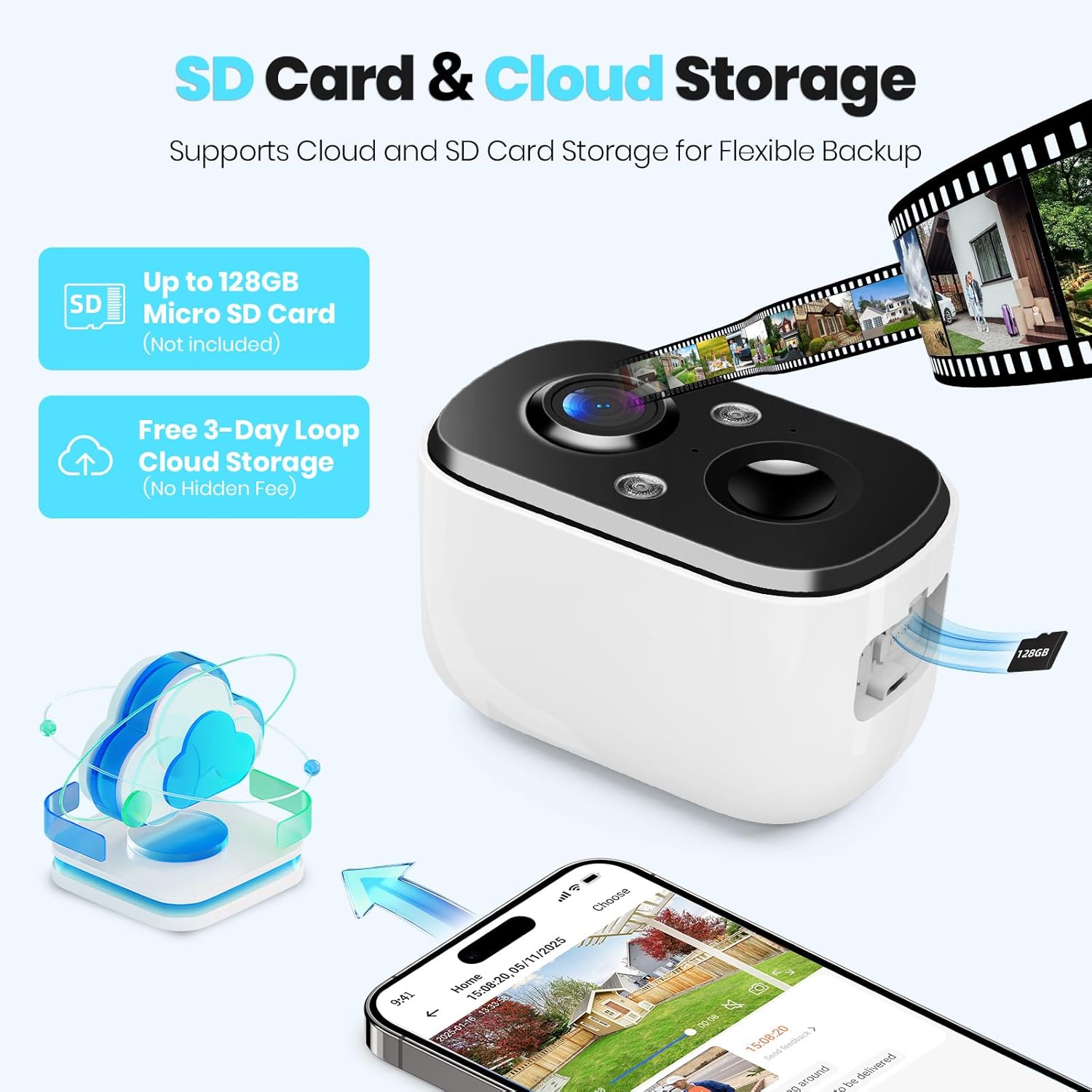
Image: A close-up of the camera highlighting the Micro SD card slot and illustrating cloud storage functionality.
5.6 การแบ่งปันการเข้าถึง
You can share camera access with family members or trusted individuals through the Vicohome app. This allows multiple users to view ฟีดสดและรับการแจ้งเตือน
6. การบำรุงรักษา
6.1 Battery Charging and Solar Panel Placement
The solar panel is designed to keep the camera battery charged. Ensure the solar panel is positioned to receive maximum direct sunlight daily. If the camera's battery level drops significantly due to prolonged cloudy weather or insufficient sunlight, you may need to temporarily charge the camera using the provided USB cable.
6.2 การทำความสะอาด
ควรทำความสะอาดเลนส์กล้องและพื้นผิวของแผงโซลาร์เซลล์เป็นระยะด้วยผ้าเนื้อนุ่มและแห้งamp ใช้ผ้าที่เหมาะสมเพื่อให้ได้ประสิทธิภาพสูงสุด หลีกเลี่ยงการใช้สารเคมีรุนแรงหรือวัสดุที่มีฤทธิ์กัดกร่อน
การอัปเดตเฟิร์มแวร์ 6.3 รายการ
The Vicohome app will notify you of available firmware updates. It is recommended to keep your camera's firmware updated to ensure the latest features, security enhancements, and bug fixes.
7 การแก้ไขปัญหา
- กล้องไม่เชื่อมต่อกับ Wi-Fi: ตรวจสอบให้แน่ใจว่าเครือข่าย Wi-Fi ของคุณเป็น 2.4GHz ตรวจสอบความแรงของสัญญาณ Wi-Fi ณ ตำแหน่งของกล้อง รีสตาร์ทเราเตอร์และกล้อง
- Frequent false alerts: Adjust motion detection sensitivity and configure activity zones within the Vicohome app to focus on relevant areas.
- การมองเห็นตอนกลางคืนไม่ดี: Ensure the camera lens is clean. Check if the spotlights are enabled for color night vision.
- ไม่ชาร์จแบตเตอรี่: Verify the solar panel is connected correctly and receives sufficient direct sunlight. Clean the solar panel surface.
- No cloud recording: Confirm your cloud storage subscription status. The free plan offers 3-day rolling event recording.
หากต้องการความช่วยเหลือเพิ่มเติม โปรดดูส่วนช่วยเหลือในแอป หรือติดต่อฝ่ายบริการลูกค้า
8. ข้อมูลจำเพาะ
| คุณสมบัติ | ข้อมูลจำเพาะ |
|---|---|
| ชื่อรุ่น | CG6E |
| การใช้งานภายใน/ภายนอกอาคาร | กลางแจ้ง |
| แหล่งพลังงาน | พลังงานแสงอาทิตย์ |
| เทคโนโลยีการเชื่อมต่อ | แบบไร้สาย (Wi-Fi 2.4GHz เท่านั้น) |
| ความละเอียดในการจับภาพวิดีโอ | 2K (1440p) |
| ช่วงการมองเห็นตอนกลางคืน | 33 ฟุต |
| ระดับความต้านทานต่อน้ำ | กันน้ำระดับ IP66 |
| ระบบเสียงสองทาง | ใช่ |
| ตัวเลือกการจัดเก็บข้อมูล | การ์ด Micro SD (สูงสุด 128GB), พื้นที่จัดเก็บข้อมูลบนคลาวด์ |
| อุปกรณ์ที่รองรับ | Smartphone (via Vicohome app) |
| ขนาดสินค้า | 6 x 3.49 x 7.5 นิ้ว |
| น้ำหนักสินค้า | 2.09 ปอนด์ |
9. การรับประกันและการสนับสนุน
Techage provides free technical support for its products. For warranty information or to contact support, please refer to the contact details provided within the Vicohome app or visit the official Techage webเว็บไซต์.

Image: A customer support representative, symbolizing the availability of technical assistance.