
การแนะนำ
Thank you for choosing the K&F CONCEPT KF09.158 Carbon Fiber Tripod. This professional-grade tripod is designed for exceptional stability and versatility, making it ideal for both video and still photography. Its lightweight carbon fiber construction, professional fluid head, and convertible monopod design provide reliable support in various environments.

The K&F CONCEPT Carbon Fiber Tripod is presented in its full tripod setup, a detached monopod configuration, and with its included carry bag, highlighting its versatility and portability.
มีอะไรอยู่ในกล่อง
- K&F Concept Camera Tripod x1
การติดตั้งและการประกอบ
1. การกางขาตั้งกล้อง
- Gently release the leg locks and extend the tripod legs to your desired height.
- Adjust the leg angles by pressing the orange buttons at the top of each leg and positioning them into one of the available angle stops.
- Ensure all leg locks are securely fastened before mounting any equipment.
2. Attaching the Fluid Head
The professional fluid head comes pre-attached. If removed, align the head with the 3/8" screw mount on the tripod's center column and rotate clockwise until secure.
3. การติดตั้งกล้องของคุณ
- Attach the Arca-Swiss quick release plate to the bottom of your camera by screwing the 1/4"-20 screw into the camera's tripod socket. Ensure it is tightened securely.
- เปิด cl ปล่อยด่วนamp on the fluid head.
- Slide the camera with the attached plate into the clamp and close the lever to lock it in place. Verify the camera is firmly seated.
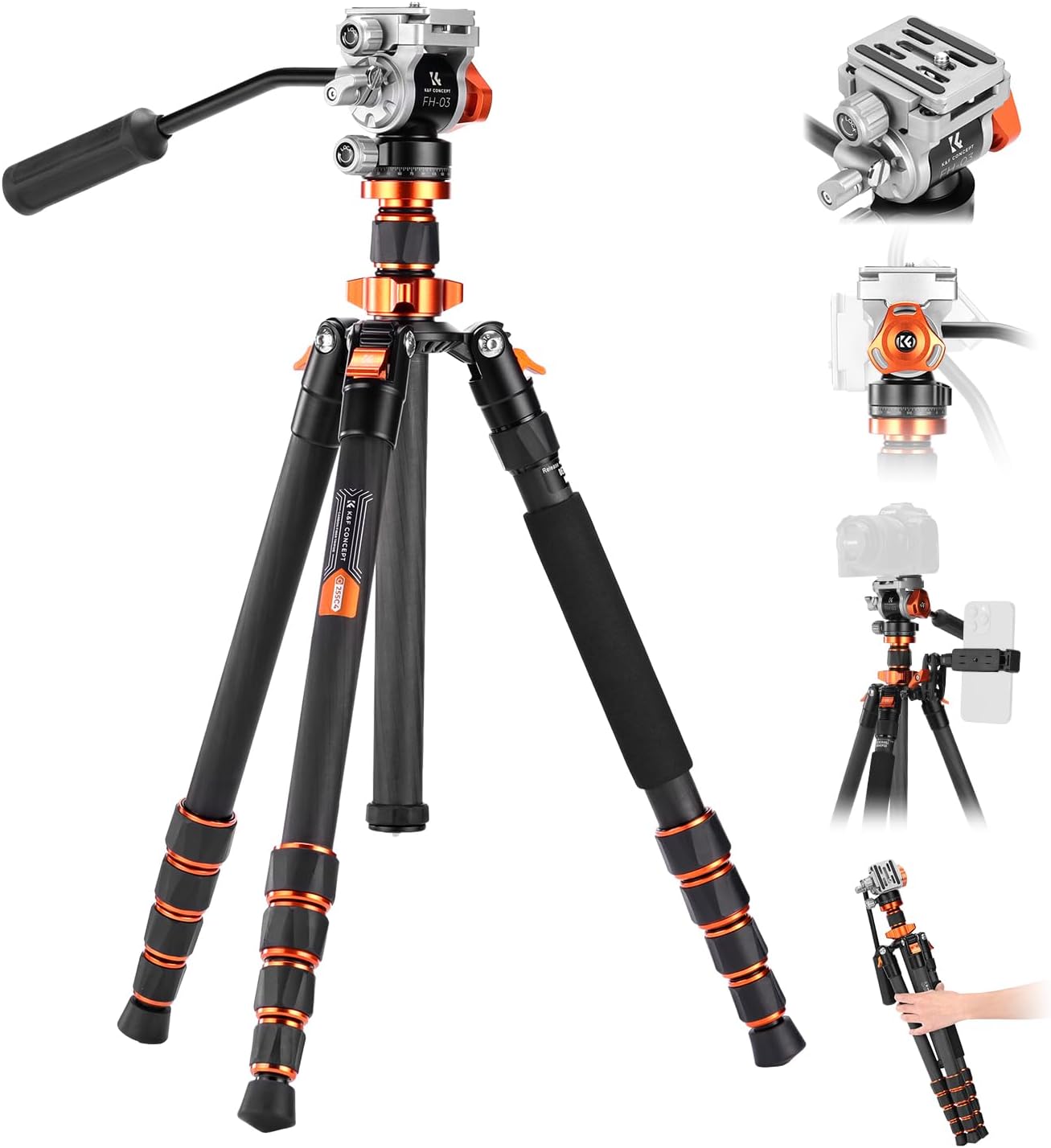
This image displays the tripod with its fluid head, showcasing the Arca-Swiss quick release plate, the fluid head mechanism, and an optional smartphone mount for diverse shooting needs.
This official video from K&F Concept provides a visual guide to the X-Series Carbon Fiber Camera Tripod, showcasing its design, key features, and practical applications for photographers and videographers.
คำแนะนำการใช้งาน
1. การปรับความสูง
- การบริหารกล้ามเนื้อขา: Twist the leg locks counter-clockwise to loosen, extend the leg sections, and then twist clockwise to tighten.
- คอลัมน์กลาง: Loosen the center column locking knob, raise or lower the column, and then tighten the knob to secure.

The tripod offers multiple height configurations, ranging from a compact folded length to a maximum height of 173 cm (68 inches), providing adaptability for different shooting perspectives.
2. Fluid Head Operation
- การปรับเอียง: Loosen the tilt locking knob to adjust the camera's vertical angle (+90°/-90°). Tighten to secure.
- การหมุนภาพพาโนรามา: Loosen the panoramic locking knob at the base of the fluid head to rotate the camera 360° horizontally. Tighten to secure.

The fluid head allows for precise camera positioning with a tilt range from +90° to -90° and a full 360° panoramic rotation, enabling flexible shot composition.
3. Monopod Conversion
- Unscrew the leg with the foam grip from the tripod body.
- Unscrew the center column from the tripod body.
- Attach the detached leg to the bottom of the center column.
- Mount the fluid head onto the top of the assembled monopod.

One of the tripod legs can be detached and combined with the center column to form a monopod, offering a maximum height of 1825mm (71.17 inches) for mobile shooting.
4. การถ่ายภาพมุมต่ำ
To achieve extremely low-angle shots, the center column can be reversed. Loosen the center column locking knob, remove the center column, invert it, and reinsert it into the tripod body. This allows the camera to be positioned very close to the ground.

For capturing subjects from a low perspective, the center column can be inverted, allowing the camera to be positioned very close to the ground while maintaining stability.
การซ่อมบำรุง
- ควรทำความสะอาดขาตั้งกล้องและข้อต่อต่างๆ เป็นประจำด้วยผ้าแห้งเนื้อนุ่ม เพื่อกำจัดฝุ่นและสิ่งสกปรก
- ควรหลีกเลี่ยงการวางขาตั้งกล้องไว้ในที่ที่มีอุณหภูมิสูงหรือต่ำเกินไป หรือสัมผัสกับสารเคมีรุนแรง
- Store the tripod in its carry bag when not in use to protect it from damage.
การแก้ไขปัญหา
- ขาตั้งกล้องไม่มั่นคง: Ensure all leg locks and the center column locking knob are fully tightened. Check that the leg angles are set evenly.
- ส่วนขาแข็ง: Clean any dirt or sand from the leg sections. If necessary, apply a small amount of silicone lubricant to the twist locks.
- Fluid head not smooth: Ensure all locking knobs on the fluid head are loosened for movement. Check for any obstructions.
ข้อมูลจำเพาะ
| คุณสมบัติ | รายละเอียด |
|---|---|
| ชื่อรุ่น | O255C4+FH-03 |
| หมายเลขรุ่นสินค้า | เคเอฟ09.158 |
| วัสดุ | คาร์บอนไฟเบอร์ |
| น้ำหนักสินค้า | 3.61 ปอนด์ (1.64 กิโลกรัม) |
| จำกัด น้ำหนัก | 11 ปอนด์ (5 กก.) |
| ความสูงสูงสุด | 173 เซนติเมตร (68 นิ้ว) |
| ประเภทหัวขาตั้งกล้อง | หัวของเหลว |
| คุณสมบัติพิเศษ | พับได้ |
| อุปกรณ์ที่รองรับ | Fujifilm x100vi, Sony Alpha 7 iii, Sony zv e10, Sony A6400, Canon eos, Canon Rebel, Canon R50, Canon R6, Canon G7x, Nikon D3400, Arca Swiss tripod |

This graphic illustrates the weight advantage of carbon fiber construction, with the K&F CONCEPT tripod weighing 2.42 lbs compared to a 3.08 lbs aluminum equivalent, making it lighter for transport.
การรับประกันและการสนับสนุน
คู่มือนี้ไม่ได้ให้ข้อมูลเกี่ยวกับเงื่อนไขการรับประกันโดยละเอียดและรายละเอียดการติดต่อฝ่ายบริการลูกค้า โปรดดูที่บรรจุภัณฑ์ของผลิตภัณฑ์หรือเอกสารอย่างเป็นทางการของผู้ผลิต website for the most up-to-date warranty and support information.
This video from Hishop illustrates the assembly and various functionalities of a compact DSLR tripod. While the video mentions an aluminum model, the demonstrated setup and usage principles are applicable to the K&F CONCEPT Carbon Fiber Tripod.