
1. บทนำ
This manual provides essential information for the safe and effective operation of your QWORK AC Motor Speed Controller, Model QS35380. This device is designed to efficiently manage the speed of AC motors and control the power supplied to various resistive and inductive loads by adjusting the output voltage.
โปรดอ่านคู่มือนี้อย่างละเอียดก่อนการติดตั้งและการใช้งาน และเก็บรักษาไว้เพื่อใช้อ้างอิงในอนาคต
2. คำแนะนำด้านความปลอดภัย
To prevent injury or damage to the device, always observe the following safety precautions:
- ตรวจสอบให้แน่ใจปริมาณอินพุตtage is within the specified range of 110-120V AC.
- Do not exceed the maximum current rating of 15A. The device features an automatic power cutoff for overload protection.
- Connect a load to the output before attempting to regulate voltagอี ปริมาณการส่งออกtage display requires a connected load to show accurate readings.
- อุปกรณ์นี้มีไว้สำหรับใช้ภายในอาคารเท่านั้น
- เก็บอุปกรณ์ให้ห่างจากน้ำ ความชื้น และอุณหภูมิที่สูงเกินไป
- ห้ามเปิดหรือดัดแปลงอุปกรณ์ด้วยตนเอง โปรดส่งต่ออุปกรณ์ดังกล่าวให้ช่างผู้ชำนาญการเป็นผู้ดำเนินการซ่อมแซม
- Always unplug the device from the power source before making any connections or disconnections.
- Ensure the connected load's power consumption does not exceed 4000W for resistive loads or 1500W for inductive loads.
3. สินค้าหมดview
The QWORK AC Motor Speed Controller is designed for ease of use and reliability. Familiarize yourself with its components:

รูปที่ 3.1: ด้านหน้า view of the QWORK AC Motor Speed Controller, showing the ON/OFF switch, overload protection, output voltage display, and rotary control knob.
- ON/OFF Switch with Reset: Controls the main power to the unit. Includes a reset button for the overload protection.
- 15A Overload Protection: Automatically cuts power if the current exceeds 15A, protecting the device and connected equipment.
- ปริมาณการส่งออกtagอี แสดงผล: A digital display showing the current output voltage. Requires a connected load to function accurately.
- ปุ่มหมุนควบคุม: Used to precisely adjust the output voltage and, consequently, the speed of a motor or power to a load. Marked with percentagอีพาวเวอร์
- สายไฟเข้า: Connects the controller to a standard 110-120V AC power outlet (Type A/B plug compatible).
- ช่องเสียบขาออก: A standard Type A/B socket for connecting your AC motor or other electrical load.
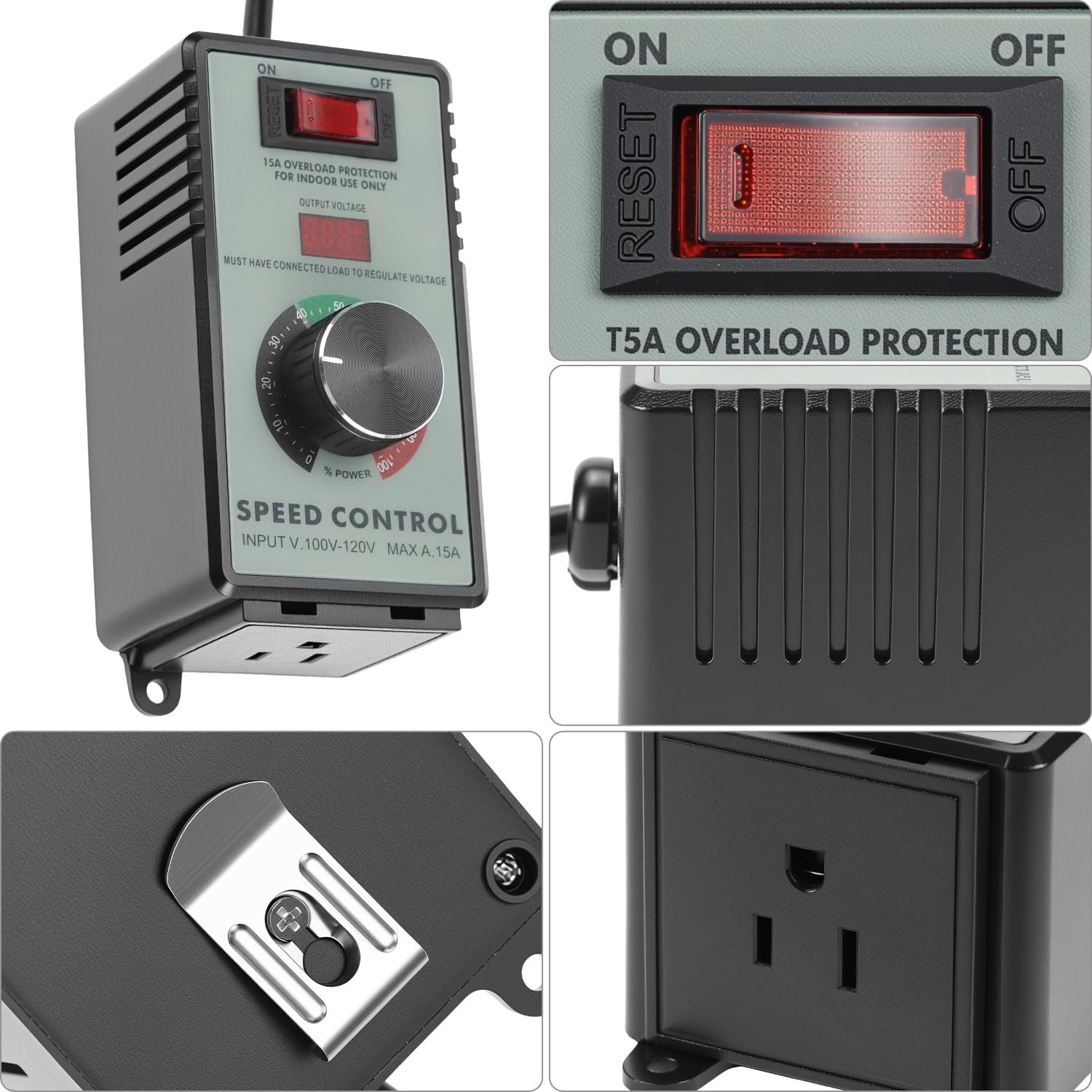
รูปที่ 3.2: รายละเอียด view of the control panel and the integrated mounting bracket on the back.

รูปที่ 3.3: ด้านข้าง view illustrating the output socket for connecting devices.
4. ข้อมูลจำเพาะ
| คุณสมบัติ | ข้อมูลจำเพาะ |
|---|---|
| หมายเลขรุ่น | QS35380 |
| อินพุต Voltage | 110-120V น |
| กระแสไฟสูงสุด | 15เอ |
| โหลดตัวต้านทานสูงสุด | 4000วัตต์ |
| โหลดเหนี่ยวนำสูงสุด | 1500วัตต์ |
| ระบบป้องกันการโอเวอร์โหลด | Automatic 15A cutoff with reset |
| ความเข้ากันได้ของปลั๊ก | Type A and Type B (US standard) |
| ขนาด (กว้าง x ยาว x สูง) | ประมาณ 5.59 x 4.61 x 4.02 นิ้ว |
| น้ำหนักสินค้า | 12.3 ออนซ์ |
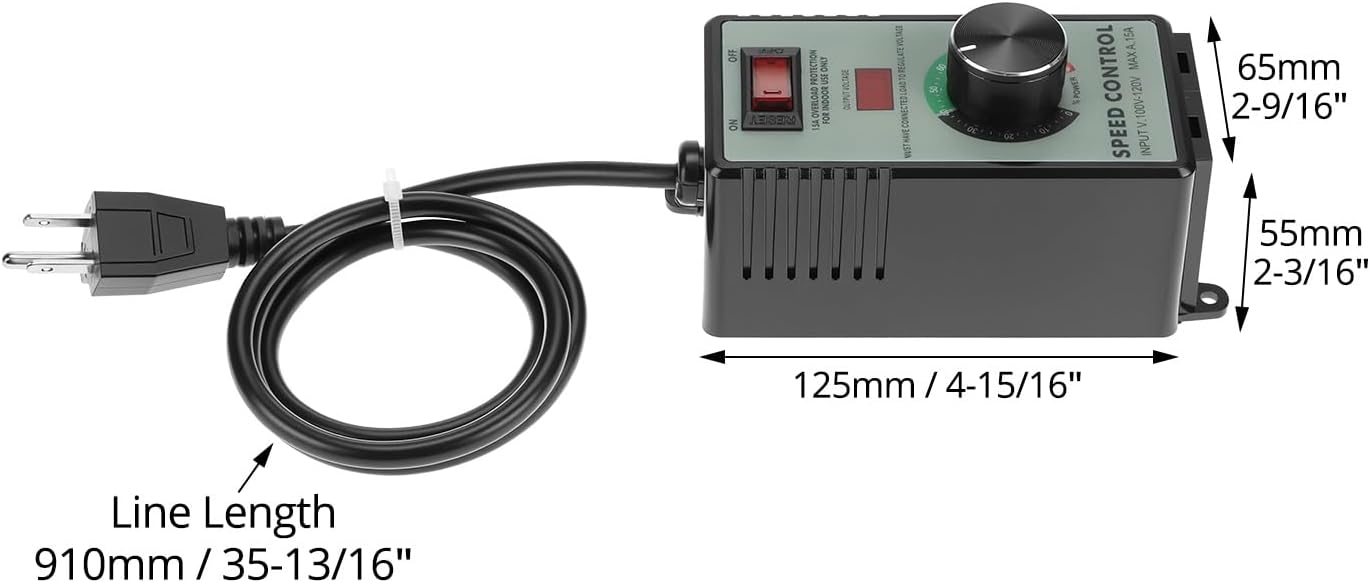
รูปที่ 4.1: Dimensional diagram of the speed controller, showing length, width, and height measurements.
5. การตั้งค่า
- แกะ: Carefully remove the speed controller from its packaging. Inspect for any signs of damage.
- การจัดวาง: Place the controller on a stable, dry surface, away from direct sunlight, heat sources, and moisture. Ensure adequate ventilation around the unit.
- เชื่อมต่อโหลด: Ensure the device you wish to control (e.g., fan, motor, heater) is turned off. Plug the power cord of your device into the output socket of the QWORK AC Motor Speed Controller.
- เชื่อมต่อกับพลังงาน: Plug the QWORK AC Motor Speed Controller's input power cord into a standard 110-120V AC wall outlet.
สำคัญ: Always connect the load first before plugging the controller into the wall outlet. The output voltage display will only show a reading when a load is connected.
6. คู่มือการใช้งาน
- เปิดเครื่อง: Flip the ON/OFF switch to the "ON" position. The output voltage display may illuminate.
- ปรับระดับเสียงtage/Speed: Slowly rotate the control knob clockwise to increase the output voltage and power to the connected device. Rotate counter-clockwise to decrease. The digital display will show the approximate output voltage.
- ประสิทธิภาพการทำงานของจอภาพ: Observe the performance of your connected device. Adjust the knob until the desired speed or power level is achieved.
- หมดแรง: To turn off the connected device, either rotate the control knob fully counter-clockwise to the "0" position or flip the ON/OFF switch to the "OFF" position. For complete power disconnection, unplug the controller from the wall outlet.

รูปที่ 6.1: Adjusting the rotary control knob to set the desired output power or motor speed.
Note on Inductive Loads: When controlling inductive loads like motors, start at a lower voltage and gradually increase to avoid sudden surges. The maximum inductive load is 1500W.

รูปที่ 6.2: The speed controller can be used with various devices such as fans, light bulbs, and small power tools to regulate their operation.
7. การบำรุงรักษา
- การทำความสะอาด: Disconnect the controller from the power outlet before cleaning. Use a soft, dry cloth to wipe the exterior. Do not use liquid cleaners or solvents.
- พื้นที่จัดเก็บ: When not in use, store the controller in a cool, dry place, away from direct sunlight and extreme temperatures.
- การตรวจสอบ: Periodically inspect the power cord and housing for any signs of damage. If damage is found, discontinue use and contact customer support.
8 การแก้ไขปัญหา
| ปัญหา | สาเหตุที่เป็นไปได้ | สารละลาย |
|---|---|---|
| อุปกรณ์ไม่เปิดเครื่อง |
|
|
| ปริมาณการส่งออกtage display shows "0" or no reading. |
|
|
| Connected device does not respond to knob adjustment. |
|
|
| Overload protection trips frequently. |
|
|
9. การรับประกันและการสนับสนุน
QWORK products are manufactured to high-quality standards. For information regarding warranty coverage, technical support, or service, please refer to the warranty card included with your purchase or visit the official QWORK webเว็บไซต์.
For direct assistance, you may contact QWORK customer service through the retailer where the product was purchased or via the contact information provided on the QWORK brand store page: QWORK Amazon Store.