1. บทนำ
This manual provides comprehensive instructions for the installation, operation, and maintenance of your Connect Screen Reversing Camera. Designed specifically for Audi A6 and A6L models from 2012 to 2017, this camera system enhances driving safety by providing a clear view ของพื้นที่ด้านหลังรถของคุณเมื่อถอยหลัง
คุณสมบัติที่สำคัญ ได้แก่:
- การมองเห็นตอนกลางคืน: Equipped with 8 LED lights for improved visibility in low-light and dark conditions.
- มุมกว้าง View: High-quality lens provides a broad viewing angle to minimize blind spots.
- การออกแบบกันน้ำ: Durable, weather-resistant construction ensures reliable performance in various weather conditions.
- การติดตั้งแบบสากล: Adjustable bracket for versatile installation.
- Standard RCA Video Output: Ensures compatibility with most car monitors and display screens.
2. สินค้าหมดview และบรรจุภัณฑ์
ก่อนเริ่มการติดตั้ง โปรดตรวจสอบให้แน่ใจว่าชิ้นส่วนทั้งหมดครบถ้วนและไม่เสียหาย

รูปที่ 2.1: The main camera unit, designed to integrate seamlessly with your vehicle's existing structure.

รูปที่ 2.2: Complete package contents, including the camera unit and the necessary wiring harness for installation.
โดยทั่วไปแพ็คเกจจะประกอบด้วย:
- Reversing Camera Unit
- ชุดสายไฟเฉพาะรุ่นรถ
- สายเคเบิลวิดีโอ (ขั้วต่อ RCA)
- สายไฟ
3. การตั้งค่าและการติดตั้ง
This camera system is designed for a "Plug & Play" installation, requiring no complex programming or software flashing. Professional installation is recommended.
3.1 การติดตั้งเกินview
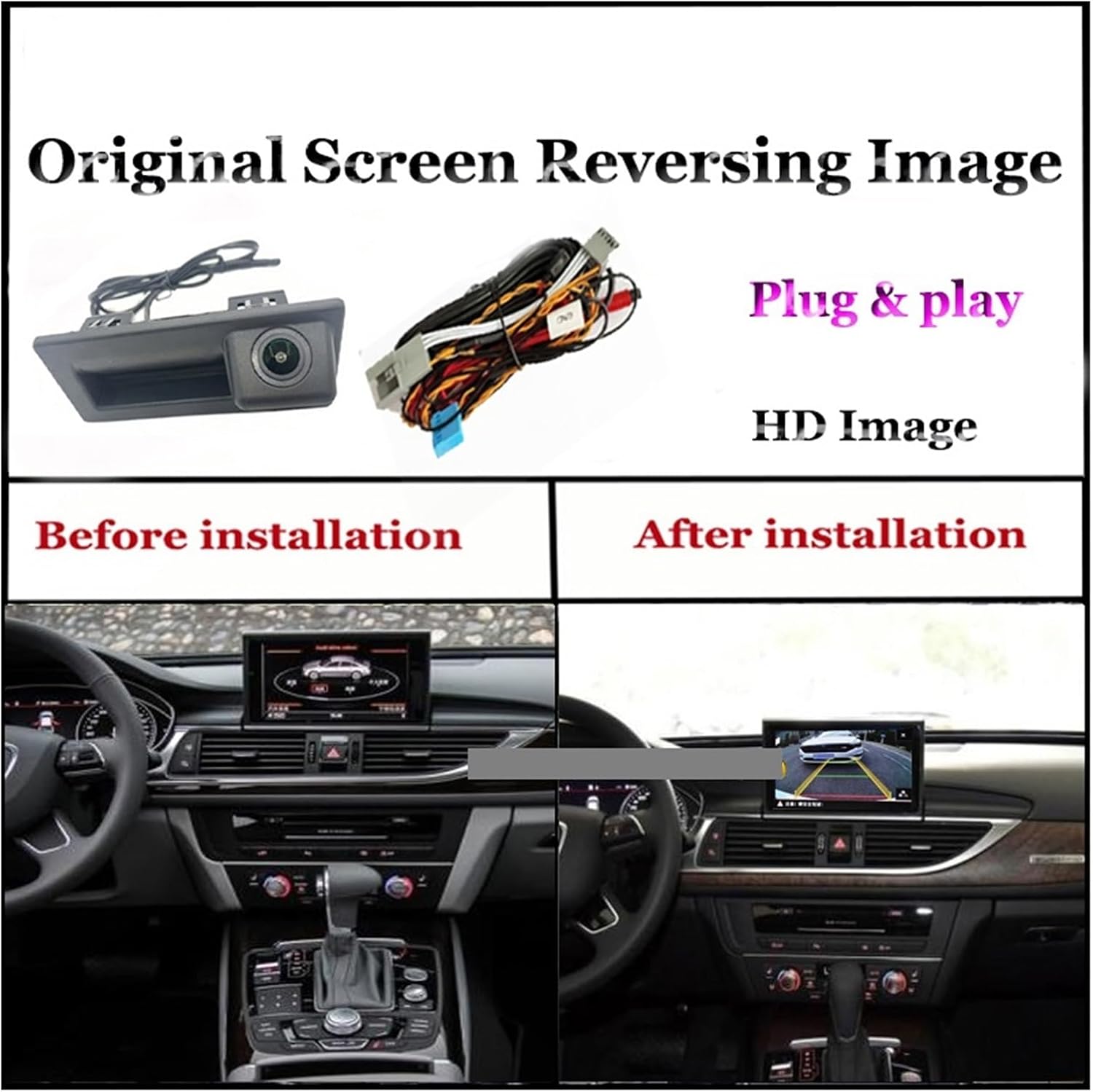
รูปที่ 3.1: Visual comparison showing the car's screen before and after the reversing camera system is installed, displaying the new reversing image.
The installation process involves connecting the camera to the vehicle's existing screen system. The camera is typically mounted near the license plate area or integrated into the trunk handle.
3.2 การเชื่อมต่อสายไฟ

รูปที่ 3.2: Detailed wiring diagram illustrating how to connect the camera system. Key connections include the CNA plug to the original screen, video cable to the original car screen, connection to the negative pole, and power connection (ACC or normal power).
- Connect to Original Screen: Locate the CAN plug of your original screen and connect the corresponding plug from the camera harness.
- สายวิดีโอ: Connect the video cable from the camera to the video input of your original car screen.
- การเชื่อมต่อไฟฟ้า: Connect the power cable to an ACC (Accessory) power source or a normal power supply.
- การต่อสายดิน: Connect the ground wire to the vehicle's negative pole.
Ensure all connections are secure to prevent signal loss or power issues.
3.3 Ease of Installation

รูปที่ 3.3: Visual representation of the straightforward installation process, highlighting the camera's fit and the simple plug-and-play wiring connection.
The system is designed for straightforward installation, often utilizing existing vehicle ports. No programming or software updates are typically required for the vehicle's system.
4. คู่มือการใช้งาน
Once correctly installed, the reversing camera operates automatically.
4.1 การเปิดใช้งานอัตโนมัติ
When the vehicle is shifted into reverse gear, the camera system will automatically activate, displaying the rear view on your car's screen. The image will revert to the original screen display when the vehicle is taken out of reverse.
4.2 คุณสมบัติการแสดงผล

รูปที่ 4.1: Examples of the camera's output displayed on different car screens, demonstrating the clear image quality and dynamic trajectory lines that assist with parking.
- ภาพความละเอียดสูง: ให้ความรู้สึกที่ชัดเจนและคมชัด view ของพื้นที่ด้านหลังรถของคุณ
- Trajectory Lines: Dynamic guidelines may appear on the screen, assisting with parking by indicating the vehicle's projected path.
- การมองเห็นตอนกลางคืน: The integrated 8 LED lights ensure visibility even in very low light conditions, providing a safer reversing experience at night.
5. การบำรุงรักษา
Proper maintenance ensures the longevity and optimal performance of your reversing camera.
- การทำความสะอาดเลนส์: ทำความสะอาดเลนส์กล้องเป็นประจำด้วยผ้านุ่มๆamp ผ้าสำหรับเช็ดทำความสะอาดสิ่งสกปรก ฝุ่น หรือคราบน้ำที่อาจอุดตันทางเดิน viewหลีกเลี่ยงการใช้น้ำยาทำความสะอาดที่มีฤทธิ์กัดกร่อน
- การตรวจสอบการเชื่อมต่อ: ตรวจสอบการเชื่อมต่อสายไฟเป็นระยะ เพื่อให้แน่ใจว่ายังคงแน่นหนาและปราศจากสนิม
- การปกป้องสิ่งแวดล้อม: While the camera has a waterproof design, it is advisable to keep it away from excessively dusty environments to prevent accumulation that could affect performance or lifespan.
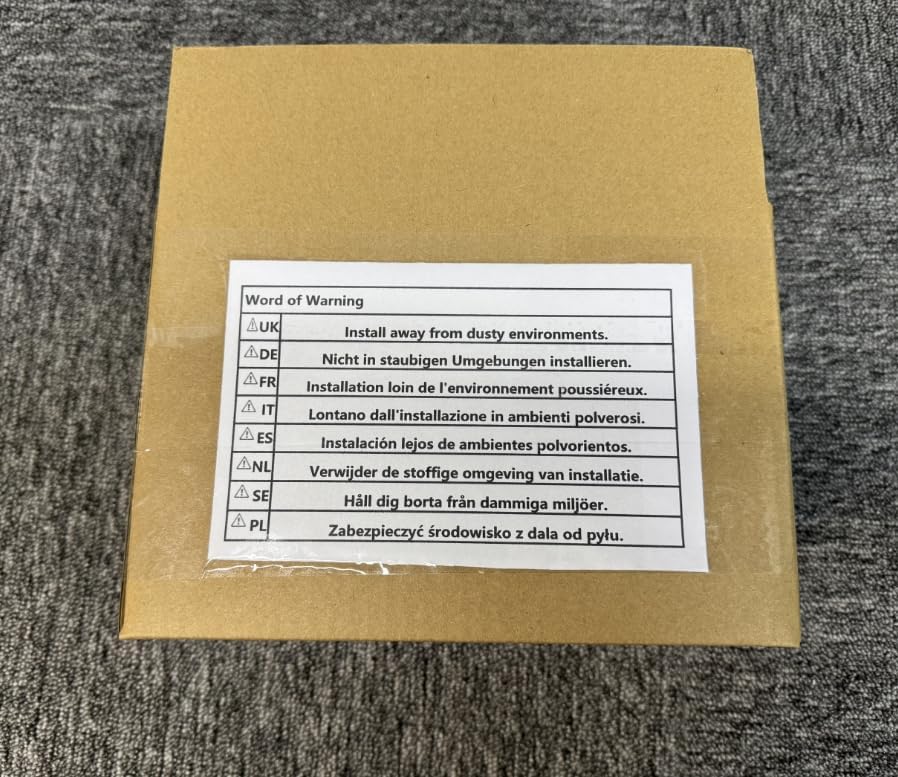
รูปที่ 5.1: A warning label indicating the importance of installing and maintaining the product away from dusty environments to ensure optimal performance and longevity.
6 การแก้ไขปัญหา
If you encounter issues with your reversing camera, refer to the following common problems and solutions:
| ปัญหา | สาเหตุที่เป็นไปได้ | สารละลาย |
|---|---|---|
| ไม่มีภาพปรากฏบนหน้าจอขณะถอยหลัง |
|
|
| ภาพเบลอหรือบิดเบี้ยว |
|
|
| Night vision not working effectively. |
|
|
หากปัญหายังคงมีอยู่หลังจากพยายามแก้ไขปัญหาเหล่านี้แล้ว โปรดติดต่อฝ่ายสนับสนุนลูกค้า
7. ข้อมูลจำเพาะ
| คุณสมบัติ | รายละเอียด |
|---|---|
| ประเภทสินค้า | Connect Screen Reversing Camera |
| ความเข้ากันได้ | Audi A6, A6L (2012-2017 models) |
| หมายเลขรุ่น | 4956421587452 |
| ยี่ห้อ | ทั่วไป |
| การมองเห็นตอนกลางคืน | ไฟ LED 8 ดวง |
| เอาท์พุตวิดีโอ | อาร์ซีเอมาตรฐาน |
| ระดับการกันน้ำ | โครงสร้างทนทานต่อสภาพอากาศ |
| ผู้ผลิต | PUXIAOLI |
| วันที่พร้อมใช้งานครั้งแรก | 18 มีนาคม 2025 |
8. การรับประกันและการสนับสนุน
ผลิตภัณฑ์นี้มาพร้อมการรับประกันมาตรฐานจากผู้ผลิต โปรดเก็บหลักฐานการซื้อไว้เพื่อใช้ในกรณีที่ต้องการเคลมประกัน
For technical support, troubleshooting assistance beyond this manual, or warranty inquiries, please contact the seller directly through the platform where the product was purchased.
รูปที่ 8.1: The product packaging, which may contain additional warranty or support information.