
การแนะนำ
Thank you for choosing the zelotes T80 Ergonomic Gaming Mouse. This wired optical mouse is designed for both gaming and office use, offering adjustable DPI, customizable LED lighting, and a comfortable ergonomic design for extended use. Please read this manual carefully to ensure proper setup and operation of your new mouse.
คุณสมบัติผลิตภัณฑ์
- 7 Buttons & Quick Fire Button: Includes forward, backward, and a rapid fire (double click) button for enhanced control in gaming and productivity.
- ปรับระดับ DPI ได้ 5 ระดับ: Easily switch between 1000/1600/2400/3200/7200 DPI to match your speed and precision needs.
- 7 LED Backlit Modes: Personalize your setup with various lighting effects.
- การออกแบบตามหลักสรีรศาสตร์: Crafted for comfort with skin-friendly material, sweat-resistant, and anti-slip features to prevent fatigue during long sessions.
- ความเข้ากันได้กว้าง: Compatible with Windows 11/10/8/7 and Mac OS, suitable for various applications including MMD, FPS games, and office tasks.
เนื้อหาแพ็คเกจ
- 1 x zelotes T80 Wired Gaming Mouse
- 1 x คู่มือการใช้งาน
การตั้งค่า
- แกะ: Carefully remove the mouse and its accessories from the packaging.
- ถอดฟิล์มป้องกันออก: Before use, please remove the protective film from the mouse's foot pads.
- เชื่อมต่อ: Plug the USB cable of the zelotes T80 Gaming Mouse into an available USB port on your computer (PC or Laptop).
- การติดตั้งไดร์เวอร์: เมาส์ตัวนี้ใช้งานง่าย เพียงแค่เสียบปลั๊กก็ใช้งานได้เลย ระบบปฏิบัติการของคุณจะตรวจจับและติดตั้งไดรเวอร์ที่จำเป็นโดยอัตโนมัติ โดยปกติแล้วไม่จำเป็นต้องติดตั้งซอฟต์แวร์เพิ่มเติมสำหรับการใช้งานพื้นฐาน
คำแนะนำการใช้งาน
คำอธิบายปุ่ม
The zelotes T80 mouse features 7 buttons for versatile control:
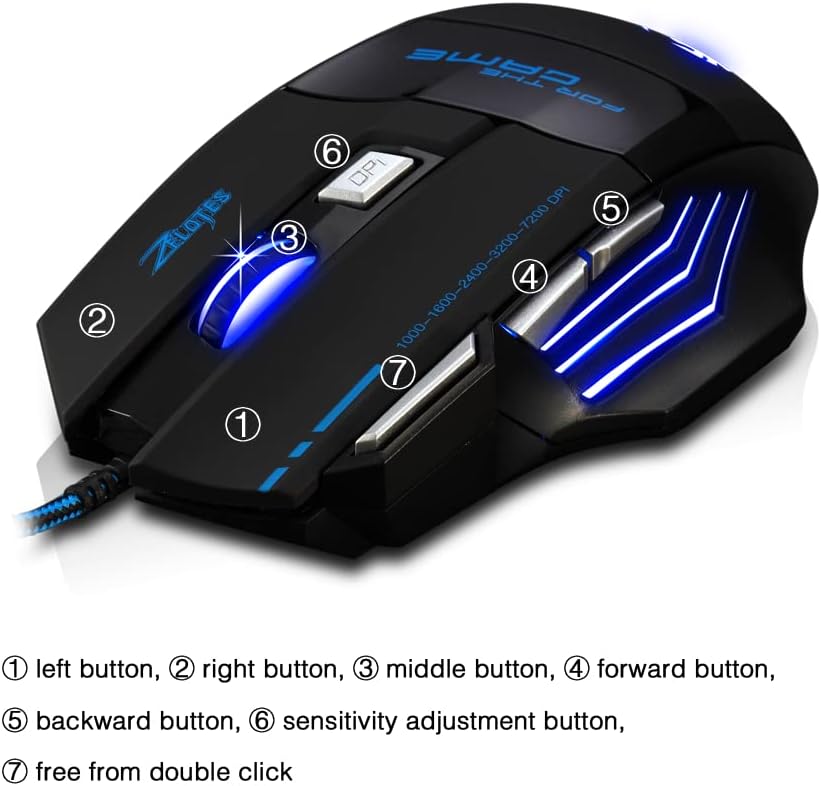
- ปุ่มซ้าย (1): ฟังก์ชั่นคลิกซ้ายมาตรฐาน
- ปุ่มขวา (2): ฟังก์ชั่นคลิกขวามาตรฐาน
- Middle Button / Scroll Wheel (3): Scrolls up/down. Pressing it acts as a middle-click.
- ปุ่มเดินหน้า (4): นำทางไปข้างหน้าใน web เบราว์เซอร์หรือ file นักสำรวจ
- ปุ่มย้อนกลับ (5): นำทางย้อนกลับใน web เบราว์เซอร์หรือ file นักสำรวจ
- ปุ่ม DPI (6): Adjusts mouse sensitivity (DPI) and changes LED colors.
- Rapid Fire Button (7): Functions as a double-click of the left button, useful for continuous firing in games.
การปรับ DPI
The mouse offers 5 adjustable DPI levels to suit different tasks and preferences:
- 1000 จุดต่อนิ้ว
- 1600 จุดต่อนิ้ว
- 2400 จุดต่อนิ้ว
- 3200 จุดต่อนิ้ว
- 7200 จุดต่อนิ้ว
กดปุ่ม ปุ่ม DPI (6) to cycle through these sensitivity levels. Each change will be indicated by a corresponding LED color change.
การควบคุมไฟ LED
The mouse features 7 LED lighting modes. To change the LED color, long press the DPI button (6). The LED will flash rapidly 7 times and then remain constant on the selected color.

การซ่อมบำรุง
- การทำความสะอาด: ใช้ผ้านุ่มและแห้งเช็ดทำความสะอาดพื้นผิวของเมาส์ สำหรับคราบสกปรกฝังแน่น ให้เช็ดเบาๆamp สามารถใช้ผ้าเช็ดทำความสะอาดได้ เพื่อป้องกันไม่ให้ของเหลวเข้าไปในเมาส์
- การดูแลสายเคเบิล: หลีกเลี่ยงการโค้งงออย่างแรงหรือการดึงสาย USB มากเกินไปเพื่อป้องกันความเสียหาย
- พื้นที่จัดเก็บ: เก็บเมาส์ไว้ในที่แห้งและเย็น หลีกเลี่ยงแสงแดดโดยตรงและอุณหภูมิที่สูงหรือต่ำเกินไป
การแก้ไขปัญหา
เมาส์ไม่ตอบสนอง
- ตรวจสอบให้แน่ใจว่าสาย USB เสียบเข้ากับพอร์ต USB ที่ใช้งานได้แน่นดีแล้ว
- ลองเสียบเมาส์เข้ากับพอร์ต USB อื่นบนคอมพิวเตอร์ของคุณ
- ทดสอบเมาส์บนคอมพิวเตอร์เครื่องอื่นเพื่อตรวจสอบว่าปัญหาอยู่ที่เมาส์หรือคอมพิวเตอร์
LED Lights Not Working/Changing
- ตรวจสอบว่าเมาส์เชื่อมต่อกับคอมพิวเตอร์อย่างถูกต้องแล้ว
- Ensure you are long-pressing the DPI button to cycle through colors. A short press changes DPI.
DPI ไม่เปลี่ยนแปลง
- Ensure you are short-pressing the DPI button to cycle through DPI levels.
- หากปัญหายังคงอยู่ ให้ลองเสียบเมาส์ใหม่อีกครั้ง
ข้อมูลจำเพาะ
| คุณสมบัติ | รายละเอียด |
|---|---|
| หมายเลขรุ่น | T80 |
| ปุ่ม | 7 (with scroll wheel) |
| DPI ที่ปรับได้ | 1000/1600/2400/3200/7200 DPI |
| ไฟ LED | โหมดแสงสว่าง 7 โหมด |
| การเชื่อมต่อ | สาย USB |
| ระบบติดตาม | ออฟติคอล |
| การออกแบบตามหลักสรีรศาสตร์ | ใช่ |
| สวิตซ์ชีวิต | 5 ล้านรอบ |
| ขนาด | 130x105x45มม. |
| น้ำหนัก | 160 ± 5 ก |
| ความยาวสาย USB | 1.5ม. |
| ความเข้ากันได้ | วิน11, วิน10, วิน8, วิน7, แมคโอโอเอส |
การรับประกันและการสนับสนุน
For warranty information and technical support, please refer to the product packaging or contact zelotes customer service through the retailer where the product was purchased. Keep your purchase receipt for warranty claims.


