การแนะนำ
This manual provides essential information for the installation, operation, and maintenance of the Generic SDS-G3006-2GTXSFP-T Compact Industrial Full Gigabit Smart Ethernet Switch. This device is designed for industrial environments, offering robust networking capabilities with 4 PoE+ Gigabit Ethernet ports and 2 SFP ports. Please read this manual thoroughly before using the product to ensure proper and safe operation.
ข้อมูลด้านความปลอดภัย
โปรดปฏิบัติตามข้อควรระวังด้านความปลอดภัยต่อไปนี้เพื่อป้องกันความเสียหายต่ออุปกรณ์และเพื่อความปลอดภัยของผู้ใช้งาน:
- ตรวจสอบแหล่งจ่ายไฟ voltage อยู่ในช่วงที่ระบุ
- Do not operate the device in environments exceeding its specified temperature and humidity limits (-40 to 75°C).
- หลีกเลี่ยงการให้เครื่องโดนน้ำหรือความชื้นมากเกินไป
- อย่าเปิดอุปกรณ์casinง. ส่งต่อการบริการทั้งหมดให้กับบุคลากรที่มีคุณสมบัติ
- ควรต่อสายดินอุปกรณ์ให้ถูกต้องเพื่อป้องกันอันตรายจากไฟฟ้า
- Use appropriate cabling for industrial environments.
เนื้อหาแพ็คเกจ
ตรวจสอบว่าแพ็คเกจของคุณมีรายการต่อไปนี้:
- 1 x SDS-G3006-2GTXSFP-T Industrial Gigabit Smart Ethernet Switch
- คู่มือการติดตั้งฉบับย่อ (ถ้ามี)
- ชุดติดตั้ง (ถ้ามี)
- Terminal Block for Power Input (if applicable)
หากมีสินค้าใดสูญหายหรือเสียหาย โปรดติดต่อผู้ขายของคุณทันที
สินค้าเกินview
เค้าโครงแผงด้านหน้า
The front panel of the SDS-G3006-2GTXSFP-T switch features the network ports and LED indicators. Its compact and flexible housing design allows it to fit into confined spaces.
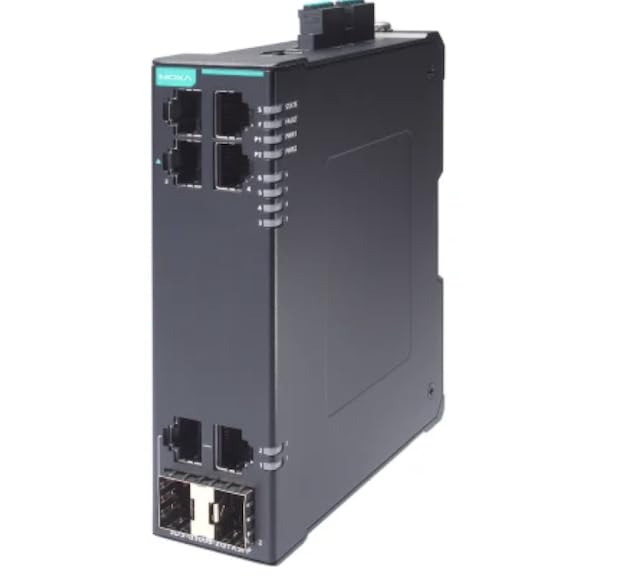
รูปที่ 1: ด้านหน้า view of the SDS-G3006-2GTXSFP-T Industrial Gigabit Smart Ethernet Switch. This image displays the compact design, including the 4 PoE+ Gigabit Ethernet ports and 2 SFP ports, along with status LEDs for power and network activity.
ไฟ LED แสดงสถานะ
- ไฟ LED PWR: แสดงสถานะการทำงานของเครื่อง สีเขียวหมายถึงการทำงานปกติ
- ไฟ LED แสดงข้อผิดพลาด: Indicates system fault. Red for fault condition.
- ไฟ LED LINK/ACT (ต่อพอร์ต): Green for link, blinking for activity.
- PoE LEDs (per PoE+ port): ระบุสถานะพลังงาน PoE
พอร์ต
- พอร์ต Gigabit Ethernet (RJ45): 4 ports supporting 10/100/1000Base-T, IEEE 802.3af/at PoE+.
- พอร์ต SFP: 2 Gigabit SFP slots for fiber optic connections.
- พอร์ตคอนโซล: For local management and configuration.
การติดตั้งและการตั้งค่า
การติดตั้งสวิตช์
The SDS-G3006-2GTXSFP-T switch can be mounted on a DIN-rail or wall-mounted. Ensure adequate space for ventilation and cable routing.
- การติดตั้งรางปีกนก: ติดคลิปยึดราง DIN เข้ากับด้านหลังของสวิตช์ เกี่ยวส่วนบนของคลิปเข้ากับราง DIN แล้วดันส่วนล่างจนกระทั่งล็อคเข้าที่
- การติดตั้งบนผนัง: Use the provided wall-mount bracket (if included) and screws to secure the switch to a solid surface.
การเชื่อมต่อไฟฟ้า
Connect the power source to the terminal block on the switch. Ensure correct polarity and a stable power supply within the specified voltagช่วงอี
- Connect the positive (+) wire to the V+ terminal.
- Connect the negative (-) wire to the V- terminal.
- Connect the ground wire to the ground terminal.
การเชื่อมต่อเครือข่าย
Connect network devices to the RJ45 ports using standard Ethernet cables. For fiber optic connections, insert compatible SFP transceivers into the SFP slots and connect fiber optic cables.
- For PoE+ devices, connect them to the PoE+ enabled RJ45 ports.
- ตรวจสอบให้แน่ใจว่าสายเคเบิลเชื่อมต่ออย่างแน่นหนา
การดำเนินการ
การเปิดเครื่อง
Once the power supply is connected, the switch will power on automatically. Observe the PWR LED to confirm normal operation.
การเชื่อมต่อเครือข่าย
After connecting network devices, the corresponding LINK/ACT LEDs will illuminate, indicating a successful connection. Blinking LEDs signify data transmission.
PoE+ Functionality
The PoE+ ports automatically detect and provide power to compatible Powered Devices (PDs) such as IP cameras or wireless access points. The PoE LEDs will indicate power delivery status, with up to 36 watts output per PoE+ port in high-power mode.
การจัดการและการกำหนดค่า
The SDS-G3006-2GTXSFP-T is a smart Ethernet switch, offering various management options:
- Web- การจัดการตาม: เข้าถึงสวิตช์ web อินเทอร์เฟซผ่านมาตรฐาน web เบราว์เซอร์โดยป้อนที่อยู่ IP
- CLI (อินเทอร์เฟซบรรทัดคำสั่ง): Connect via the console port using a terminal emulator for advanced configuration.
- ส เอ็น เอ็ม พี: Integrate with network management systems using SNMP protocols.
Refer to the detailed software manual for comprehensive configuration instructions.
การซ่อมบำรุง
การทำความสะอาด
ควรทำความสะอาดภายนอกของสวิตช์เป็นประจำด้วยผ้าแห้งเนื้อนุ่ม ห้ามใช้น้ำยาทำความสะอาดหรือสเปรย์ ตรวจสอบให้แน่ใจว่าช่องระบายอากาศปราศจากฝุ่นและสิ่งสกปรก
อัพเดตเฟิร์มแวร์
ตรวจสอบผู้ผลิตเป็นระยะ webเว็บไซต์สำหรับอัปเดตเฟิร์มแวร์ การอัปเดตเฟิร์มแวร์ให้เป็นเวอร์ชันล่าสุดจะช่วยให้มั่นใจได้ถึงประสิทธิภาพและความปลอดภัยสูงสุด
Environmental Checks
ตรวจสอบให้แน่ใจว่าสภาพแวดล้อมการทำงานยังคงอยู่ในช่วงอุณหภูมิและความชื้นที่กำหนดเพื่อป้องกันการเสื่อมสภาพของฮาร์ดแวร์
การแก้ไขปัญหา
| ปัญหา | สาเหตุที่เป็นไปได้ | สารละลาย |
|---|---|---|
| ไม่มีไฟ (ไฟ LED แสดงสถานะ PWR ดับ) | ไม่มีไฟเข้า; แหล่งจ่ายไฟชำรุด; การเดินสายไฟไม่ถูกต้อง | Check power cable connection; verify power source; ensure correct terminal block wiring. |
| No Link (LINK/ACT LED Off) | Faulty cable; incorrect port; connected device is off or faulty. | Replace Ethernet cable; try a different port; ensure connected device is powered on and functional. |
| อุปกรณ์ PoE ไม่เปิดใช้งาน | Device not PoE compatible; excessive power draw; faulty cable. | Verify device PoE compatibility; check total power budget; replace cable. |
| Network Access Issues | Incorrect IP configuration; network loop; software configuration error. | Verify IP settings; check for network loops; consult the software manual for configuration. |
หากปัญหายังคงอยู่ โปรดติดต่อฝ่ายสนับสนุนด้านเทคนิค
ข้อมูลจำเพาะ
| คุณสมบัติ | รายละเอียด |
|---|---|
| แบบอย่าง | SDS-G3006-2GTXSFP-T |
| พอร์ต | 4 x 10/100/1000Base-T (PoE+), 2 x Gigabit SFP |
| PoE มาตรฐาน | IEEE 802.3af / at |
| เอาต์พุต PoE+ | Up to 36 watts per PoE+ port |
| อุณหภูมิในการทำงาน | -40 ถึง 75°C (-40 ถึง 167°F) |
| น้ำหนักสินค้า | 16.99 ปอนด์ (7.71 กก.) |
| ผู้ผลิต | โมกซ่า |
| มีจำหน่ายครั้งแรก | 18 มีนาคม 2025 |
การรับประกันและการสนับสนุน
ข้อมูลการรับประกัน
This product comes with a standard manufacturer's warranty. Please refer to the warranty card included with your product or visit the manufacturer's official webเว็บไซต์สำหรับข้อกำหนดและเงื่อนไขการรับประกันโดยละเอียด
การสนับสนุนด้านเทคนิค
For technical assistance, troubleshooting, or product inquiries, please contact your vendor or the manufacturer's customer support. Have your product model number (SDS-G3006-2GTXSFP-T) and serial number ready when contacting support.
ผู้ผลิต: โมกซ่า
ยี่ห้อ: ทั่วไป


