
1. บทนำ
The SUUNTO Run Sports Watch is a compact and lightweight device designed for runners and sports enthusiasts. It features a vibrant 1.32-inch AMOLED touchscreen with a crown button for easy navigation, dual-band GPS for accurate tracking, and comprehensive health monitoring capabilities. With extended battery life and offline music storage, it's built to support your active lifestyle.
คำอธิบายวิดีโอ: วิดีโอนี้มีเนื้อหาเกี่ยวกับview of the new SUUNTO Run watch, highlighting its lightweight design, run-specific features, navigation capabilities, long battery life, and integration with the Suunto app for tracking progress and sharing runs. It showcases the watch in various running environments.
2. อะไรอยู่ในกล่อง
Upon unboxing your SUUNTO Run Sports Watch, you will find the following components:
- SUUNTO Run Watch (Lime)
- Watch Straps (two sizes: M/L)
- สายชาร์จ
- คู่มือผู้ใช้ / คู่มือเริ่มต้นใช้งานฉบับย่อ
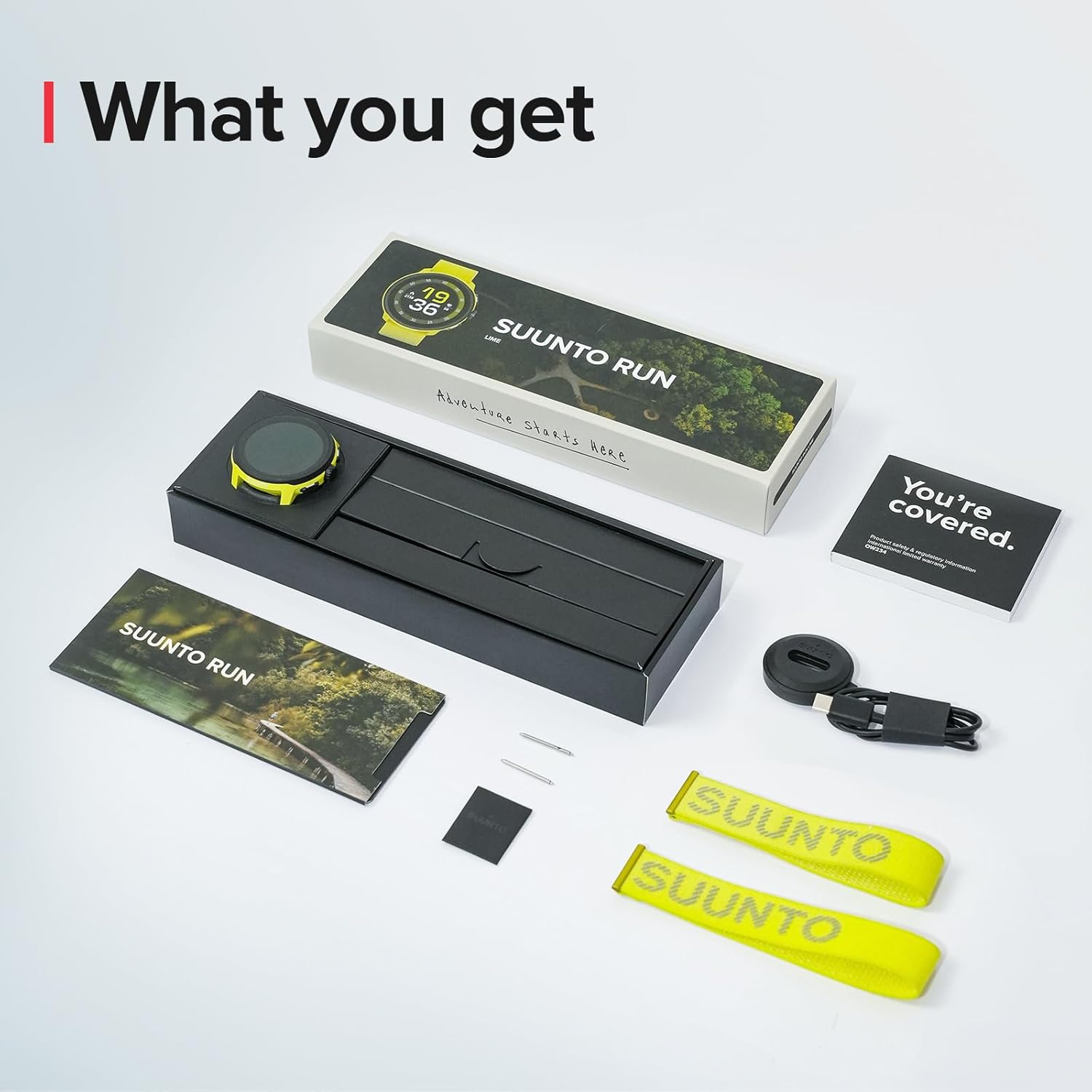
คำอธิบายภาพ: ค่าใช้จ่ายทางอ้อม view of the SUUNTO Run Sports Watch packaging and its contents. The lime-colored watch is visible, along with two matching velcro straps, a black charging cable, and printed user guides, all neatly arranged on a white surface.
3. การตั้งค่า
3.1 การตั้งค่าและการจับคู่เบื้องต้น
Before first use, ensure your watch is fully charged. Connect the charging cable to the watch and a USB power source. Once charged, power on the watch and follow the on-screen instructions to select your language and pair it with the SUUNTO app on your smartphone. The app will guide you through the remaining setup steps, including personalizing settings and syncing data.
3.2 การติดตั้งสายรัด
The SUUNTO Run watch comes with two strap sizes (M/L) to ensure a comfortable fit. To attach a strap:
- Locate the spring bars on the watch case.
- Align one end of the strap's spring bar with a lug hole on the watch.
- Push the other end of the spring bar inwards and slide it into the corresponding lug hole until it clicks into place.
- ทำซ้ำขั้นตอนเดียวกันสำหรับอีกด้านของสายรัด
คำอธิบายวิดีโอ: This short video demonstrates the unboxing process of the SUUNTO Run watch, including removing the watch from its packaging, peeling off the screen protector, powering it on, and attaching the velcro strap. It also shows the initial pairing process with a smartphone app.
4. การใช้งานนาฬิกา
4.1 การแสดงผลและการควบคุม
The SUUNTO Run features a 1.32-inch AMOLED touchscreen for clear visibility and intuitive interaction. Navigation is also supported by a crown button and additional physical buttons on the side, allowing for easy browsing in various conditions.

คำอธิบายภาพ: This image showcases the SUUNTO Run watch, emphasizing its 1.32-inch AMOLED touchscreen and lightweight build (35g, 11.5mm thinness). It also highlights the easy-fasten velcro textile strap.
ไม่เคยปรับแต่ง
Personalize your watch experience by customizing watch faces and setting different widgets. This allows for quick access to your preferred information directly from the watch face.

คำอธิบายภาพ: A close-up of the SUUNTO Run watch on a wrist, showing its customizable watch face with various widgets like battery status, weather, heart rate, calories, sleep, and steps, demonstrating the personalized display options.
โหมดกีฬา 4.3 โหมด
The watch offers over 34 preset sports modes, including running, cycling, swimming, and marathon. Select the appropriate mode to accurately record your activities and gain professional insights into your performance.

คำอธิบายภาพ: This image illustrates the SUUNTO Run watch's capability to track over 34 multi-sports modes. It shows the watch displaying training volume and recovery metrics, with background images of people engaged in running, cycling, and swimming.
4.4 GPS และระบบนำทาง
Benefit from superior tracking accuracy with dual-band GPS. The watch supports route navigation, POI (Point of Interest) setting, breadcrumb trails, and find-back functions, ensuring you stay on track during your adventures.

คำอธิบายภาพ: The image highlights the accurate navigation and GPS tracking features of the SUUNTO Run watch. It shows the watch displaying a map with a route, distance, and current location, set against a background of runners in a natural outdoor environment.
4.5 การติดตามสุขภาพ
The SUUNTO Run provides 24/7 daily health monitoring, including wrist heart-rate tracking, sleep analysis, calorie burn, and step count. It also introduces training volume tracking to help you understand your physical condition, progress, and recovery.

คำอธิบายภาพ: This image showcases the 24/7 health tracking capabilities of the SUUNTO Run watch, displaying metrics such as steps, average heart rate, calories burned, and sleep duration. The watch face shows a detailed sleep tracking graph.
4.6 Offline Music
With 4GB of internal storage, the SUUNTO Run allows you to store and play offline music. Connect your Bluetooth headphones to the watch and enjoy your favorite tunes during runs or workouts without needing your phone.

คำอธิบายภาพ: The image highlights the offline music feature of the SUUNTO Run watch, showing a woman running while listening to music through Bluetooth headphones. The watch is on her wrist, and text indicates 4GB of offline music storage and the breathing exercise function.
4.7 Breathing Exercises
The watch includes a dedicated
Ask a question about this manual
Ask about setup, troubleshooting, compatibility, parts, safety, or missing instructions. Manuals+ will review the question and use this page’s manual context to help answer it.