1. บทนำ
Thank you for choosing the Generic M100 Clip on Ear Headphones. These open-ear earbuds are designed to provide a comfortable audio experience with advanced features. This manual will guide you through the setup, operation, and maintenance of your new headphones.
คุณสมบัติหลัก:
- เทคโนโลยีการนำเสียงทางกระดูก: Delivers sound through cheekbones, maintaining environmental awareness.
- หน้าจอสัมผัส LCD: ควบคุมเพลงและการโทรได้อย่างง่ายดายและใช้งานง่าย
- Bluetooth 5.4: Fast and stable wireless connection.
- การตัดเสียงรบกวน: Minimizes background noise for clear audio.
- กันน้ำ & กันเหงื่อ: Durable design for active use.
2. สินค้าหมดview
The M100 Clip on Ear Headphones come with a charging case that features an LCD touch screen. The package includes the M100 Clip on Ear Headphones themselves.

Image: The M100 Clip on Ear Headphones shown with their charging case, highlighting the sleek design.

Image: Close-up of the M100 charging case's LCD touch screen, displaying various control options.
3. การตั้งค่า
3.1 การชาร์จหูฟังและเคส
Before first use, fully charge the headphones and the charging case. The charging case has a capacity of 500mAh, and each headphone has a 30mAh capacity. A full charge for the headphones typically takes 1 hour, providing approximately 5 hours of battery life.
- Place the headphones into the charging case. Ensure they are correctly seated to initiate charging.
- Connect the charging case to a power source using a compatible USB-C cable (not always included).
- The LCD screen on the charging case will display the charging status.

Image: Diagram illustrating the ultra-long battery life of the M100 headphones, showing headphone usage time (4-5h), shutdown standby time (2000h), and charging time of charging case (2-3h).
3.2 การจับคู่บลูทูธ
The M100 headphones utilize Bluetooth 5.4 for a stable and efficient connection.
- เปิดกล่องชาร์จ หูฟังจะเข้าสู่โหมดจับคู่โดยอัตโนมัติ
- On your device (e.g., smartphone, tablet), go to Bluetooth settings.
- ค้นหา ตรวจสอบอุปกรณ์ที่มีอยู่และเลือก "M100" จากรายการ
- Once connected, the LCD screen on the case may indicate a successful pairing.
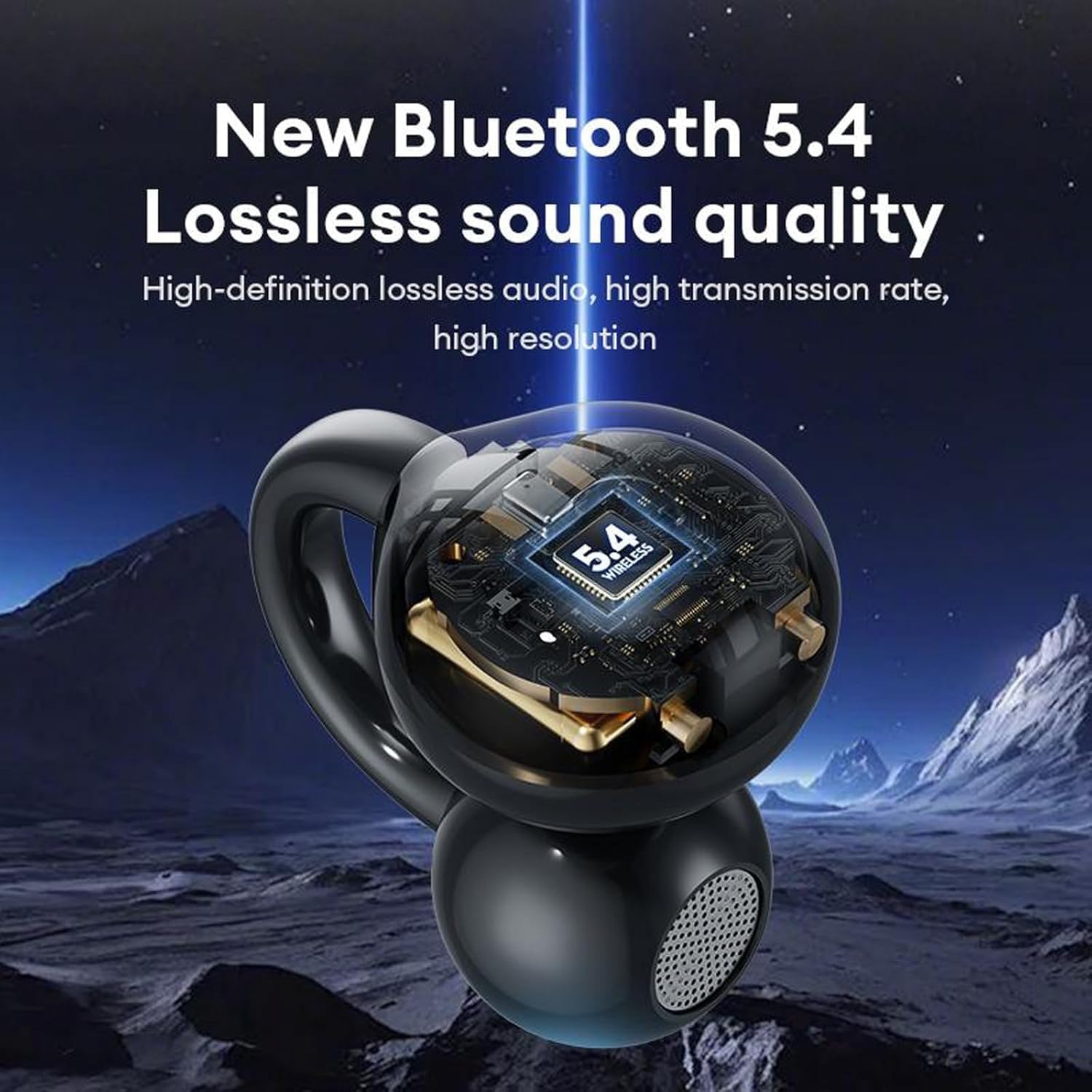
Image: A visual representation of the M100 headphone's internal structure, highlighting the Bluetooth 5.4 chip for lossless sound quality.
4. คู่มือการใช้งาน
4.1 การควบคุมแบบสัมผัสพื้นฐาน
The M100 headphones feature touch-sensitive controls on each earbud.
- เล่น/หยุดชั่วคราว: Single click on either earbud.
- เพลงถัดไป: ดับเบิ้ลคลิกที่หูฟังข้างขวา
- เพลงก่อนหน้า: ดับเบิ้ลคลิกที่หูฟังข้างซ้าย
- ปรับระดับเสียงขึ้น: กดสามครั้งที่หูฟังข้างขวา
- ลดเสียงลง: กดสามครั้งที่หูฟังข้างซ้าย
- รับ/วางสาย: ดับเบิ้ลคลิกที่หูฟังข้างใดข้างหนึ่ง
- ปฏิเสธสายเรียกเข้า: กดค้างที่หูฟังข้างใดข้างหนึ่งเป็นเวลา 2 วินาที
- เปิดใช้งาน Voice Assistant: กดที่หูฟังข้างใดข้างหนึ่งค้างไว้

Image: A diagram illustrating the various touch operations for the M100 headphones, including song switching, call management, volume control, and voice assistant activation.
4.2 ฟังก์ชั่นหน้าจอสัมผัส LCD
The charging case's LCD touch screen provides additional control and information.

Image: A grid of icons and screens demonstrating the various functions accessible via the M100's LCD touch screen, such as music control, volume, noise reduction, equalizer, alarm, screen brightness, language, wallpaper, find headphones, time settings, flashlight, and camera features.
- การควบคุมเพลง: Play, pause, skip tracks directly from the screen.
- การควบคุมระดับเสียง: ปรับระดับเสียง
- โหมดลดเสียงรบกวน: สลับระหว่างโหมดลดเสียงรบกวนและโหมดโปร่งใส
- โหมดอีควอไลเซอร์: เลือกการตั้งค่าอีควอไลเซอร์เสียงที่แตกต่างกัน
- การตั้งค่าสัญญาณเตือน: ตั้งค่าสัญญาณเตือน
- การปรับความสว่างหน้าจอ: Modify the screen's luminosity.
- การสลับภาษา: เปลี่ยนภาษาที่แสดง
- ตัวสลับวอลเปเปอร์: ปรับแต่งพื้นหลังหน้าจอ
- ค้นหาหูฟัง: Locate misplaced earbuds (if supported).
- การตั้งเวลา: ปรับวันที่และเวลา
- ฟังก์ชั่นไฟฉาย: Activate a small light.
- คุณสมบัติกล้อง: Potentially control a connected device's camera (functionality may vary).
4.3 การสวมหูฟัง
The M100 headphones are designed for open-ear wear, providing comfort and situational awareness.
- Gently clip each earbud onto your ear, ensuring the sound outlet is positioned near your ear canal without blocking it.
- Adjust for a secure and comfortable fit. The bone conduction technology allows sound to transmit effectively without needing to be inserted into the ear canal.

Image: A composite image detailing the M100's features, including high-resolution sound quality, noise reduction, open-ear design, HD Voice, and Bluetooth 5.4 version.
วิดีโอ: วิดีโอแสดงผลิตภัณฑ์อย่างเป็นทางการasing the M100 Clip on Ear Headphones, demonstrating their design and smart screen touch functionality.
5. การบำรุงรักษา
5.1 การทำความสะอาด
การทำความสะอาดเป็นประจำจะช่วยรักษาประสิทธิภาพและยืดอายุการใช้งานของหูฟังของคุณได้
- Use a soft, dry, lint-free cloth to wipe the headphones and charging case.
- ห้ามใช้สารทำความสะอาดที่มีฤทธิ์กัดกร่อน ตัวทำละลาย หรือสเปรย์แอโรซอล
- หลีกเลี่ยงไม่ให้ความชื้นเข้าไปในช่องเปิดต่างๆ
5.2 ความทนทานต่อน้ำและเหงื่อ
The M100 headphones are designed to be waterproof and sweatproof, making them suitable for sports and outdoor activities.

Image: A visual demonstrating the waterproof and sweatproof capabilities of the M100 headphones, showing them in a water environment.
- While resistant to water and sweat, they are not intended for submersion.
- ตรวจสอบให้แน่ใจว่าพอร์ตการชาร์จแห้งก่อนชาร์จเพื่อป้องกันความเสียหาย
5.3 พื้นที่จัดเก็บ
ควรเก็บหูฟังไว้ในกล่องชาร์จเมื่อไม่ใช้งาน เพื่อป้องกันความเสียหายและรักษาระดับประจุไฟ
6 การแก้ไขปัญหา
If you encounter issues with your M100 headphones, refer to the following common solutions:
| ปัญหา | วิธีแก้ปัญหาที่เป็นไปได้ |
|---|---|
| หูฟังไม่จับคู่ |
|
| ไม่มีเสียง |
|
| ปัญหาการชาร์จ |
|
| ระบบควบคุมแบบสัมผัสไม่ตอบสนอง |
|
7. ข้อมูลจำเพาะ
Key technical specifications for the M100 Clip on Ear Headphones:
- ชื่อรุ่น : M100 Clip on Ear Headphones
- เทคโนโลยีการเชื่อมต่อ: ไร้สาย (Bluetooth)
- เวอร์ชันบลูทูธ: 5.4
- ประเภทไดรเวอร์เสียง: ไดรเวอร์การนำกระดูก
- วิธีการควบคุม: สัมผัส
- การควบคุมเสียงรบกวน: ระบบตัดเสียงรบกวนแบบแอคทีฟ
- ระดับการต้านทานน้ำ: กันน้ำ
- อายุการใช้งานแบตเตอรี่: 5 Hours (Headphones)
- เวลาในการชาร์จ: 1 Hour (Headphones)
- ความจุเคสชาร์จ: 500mAh
- ความจุหูฟัง: 30mAh
- วัสดุ: พลาสติกหรือซิลิโคน
- อุปกรณ์ที่รองรับ: โทรศัพท์มือถือ
- ส่วนประกอบที่รวมอยู่: M100 Clip on Ear Headphones
8. การรับประกันและการสนับสนุน
สำหรับข้อมูลการรับประกันและการสนับสนุนลูกค้า โปรดดูเอกสารประกอบที่ให้มาพร้อมกับสินค้าที่คุณซื้อ หรือติดต่อตัวแทนจำหน่าย โปรดเก็บหลักฐานการซื้อไว้เพื่อใช้ในกรณีที่ต้องการเคลมประกัน


