
1. บทนำ
This manual provides detailed instructions for the Symcode Wearable Glove Barcode Scanner. This device is designed for efficient, hands-free barcode scanning, featuring dual wireless connectivity (Bluetooth 6.0 & 2.4G) and a long-lasting battery. It is suitable for various applications including warehouses, retail, and logistics, offering fast decoding of 1D, 2D, and QR codes.
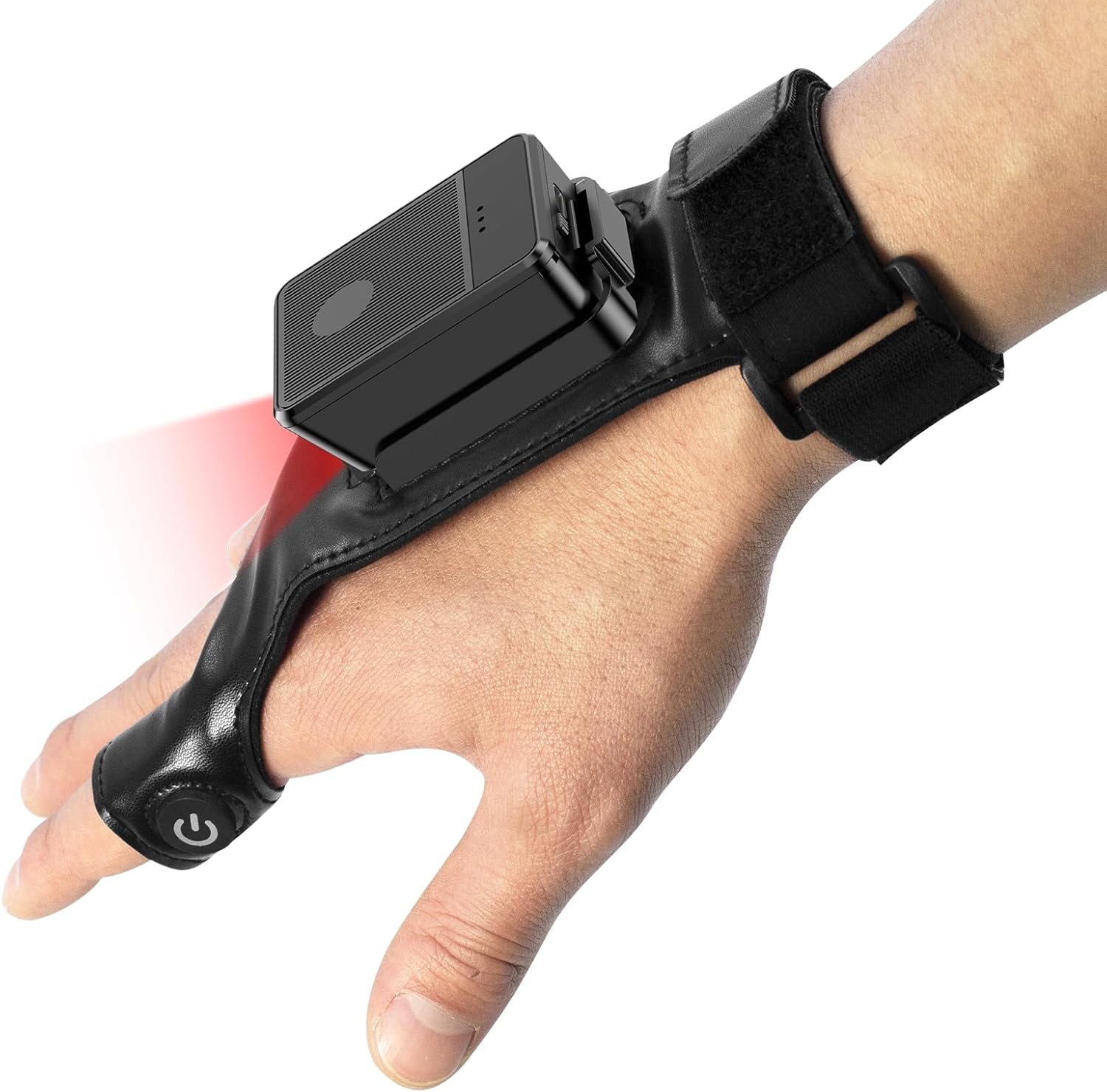
This image shows the Symcode Wearable Glove Barcode Scanner attached to a user's hand, demonstrating its ergonomic, hands-free design. The scanner unit is positioned on the back of the hand, with the scanning beam visible.
2. ข้อมูลด้านความปลอดภัย
- อย่าวางอุปกรณ์ไว้ในที่ที่มีอุณหภูมิสูงหรือต่ำเกินไป ความชื้น หรือสารกัดกร่อน
- หลีกเลี่ยงการสบตาโดยตรงกับแสงไฟสแกน
- อย่าพยายามถอดประกอบหรือซ่อมแซมอุปกรณ์ด้วยตนเอง โปรดติดต่อช่างผู้ชำนาญการเพื่อขอรับบริการ
- เพื่อป้องกันความเสียหาย ควรใช้เฉพาะสายชาร์จและอะแดปเตอร์ที่ให้มาเท่านั้น
3. เนื้อหาบรรจุภัณฑ์
โปรดตรวจสอบสิ่งของในกล่องเมื่อได้รับสินค้า หากมีสิ่งใดขาดหายหรือเสียหาย โปรดติดต่อผู้ขาย
- Symcode Wearable Glove Barcode Scanner
- สายชาร์จ USB
- ดองเกิลไร้สาย 2.4G
- คู่มือการใช้งาน
4. สินค้าหมดview
The Symcode Wearable Glove Barcode Scanner consists of a compact scanning unit and an adjustable glove-style strap. The scanning unit features a durable trigger button, indicator lights, and a charging port. The glove is designed for comfort and secure fit, allowing for hands-free operation.

ภาพระยะใกล้ view of the scanner on a hand, highlighting the red scanning beam and the durable resin material of the trigger button located on the index finger. The image also shows a roll of barcode labels, indicating its primary function.
5. การตั้งค่า
5.1 การชาร์จอุปกรณ์
Before first use, fully charge the scanner. Connect the USB charging cable to the scanner's charging port and to a power source (e.g., computer USB port or USB wall adapter). The charging indicator light will show charging status. A full charge takes approximately 5 hours.
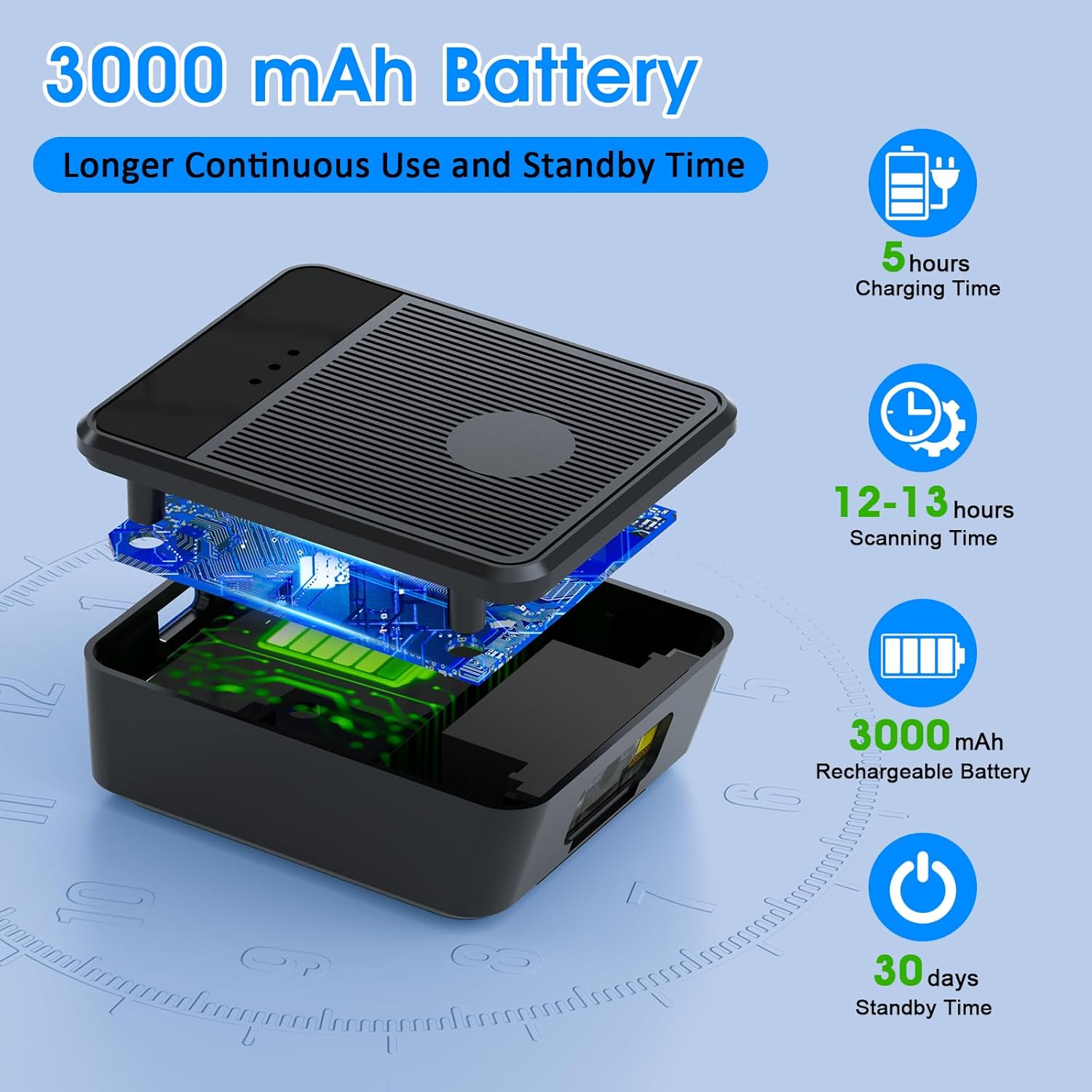
เกิดการระเบิดขึ้น view diagram of the scanner unit, emphasizing its 3000 mAh rechargeable battery. Accompanying text indicates a 5-hour charging time, 12-13 hours of continuous scanning, and 30 days of standby time.
5.2 การสวมใส่เครื่องสแกน
Slide your hand into the glove, ensuring the scanner unit is positioned comfortably on the back of your hand. Adjust the strap for a secure fit. The trigger button should align with your index finger for easy access.

Two workers are shown in a warehouse environment, handling boxes. One worker is actively using the wearable barcode scanner on their hand to scan a package, demonstrating the hands-free benefit of the device during logistics operations.
5.3 การเชื่อมต่อกับอุปกรณ์
The scanner supports two wireless connection methods:
5.3.1 2.4G Wireless Dongle Connection
- Plug the 2.4G wireless dongle into a USB port on your computer or compatible device.
- เปิดเครื่องสแกนเนอร์ ระบบจะเชื่อมต่อกับดองเกิลโดยอัตโนมัติ
- A successful connection is indicated by a specific light pattern or sound (refer to device indicators).
5.3.2 การเชื่อมต่อบลูทูธ 6.0
- เปิดเครื่องสแกนเนอร์
- เปิดใช้งานบลูทูธบนอุปกรณ์โฮสต์ของคุณ (เช่น สมาร์ทโฟน แท็บเล็ต คอมพิวเตอร์)
- ค้นหา available Bluetooth devices and select the Symcode scanner from the list.
- Pairing may require a confirmation or a default PIN (check device documentation for specific PIN if required).
6. คู่มือการใช้งาน
6.1 การสแกนพื้นฐาน
To scan a barcode, point the scanner's beam at the barcode and press the trigger button located on your index finger. A successful scan will typically be indicated by a beep, a vibration, or a change in the indicator light.
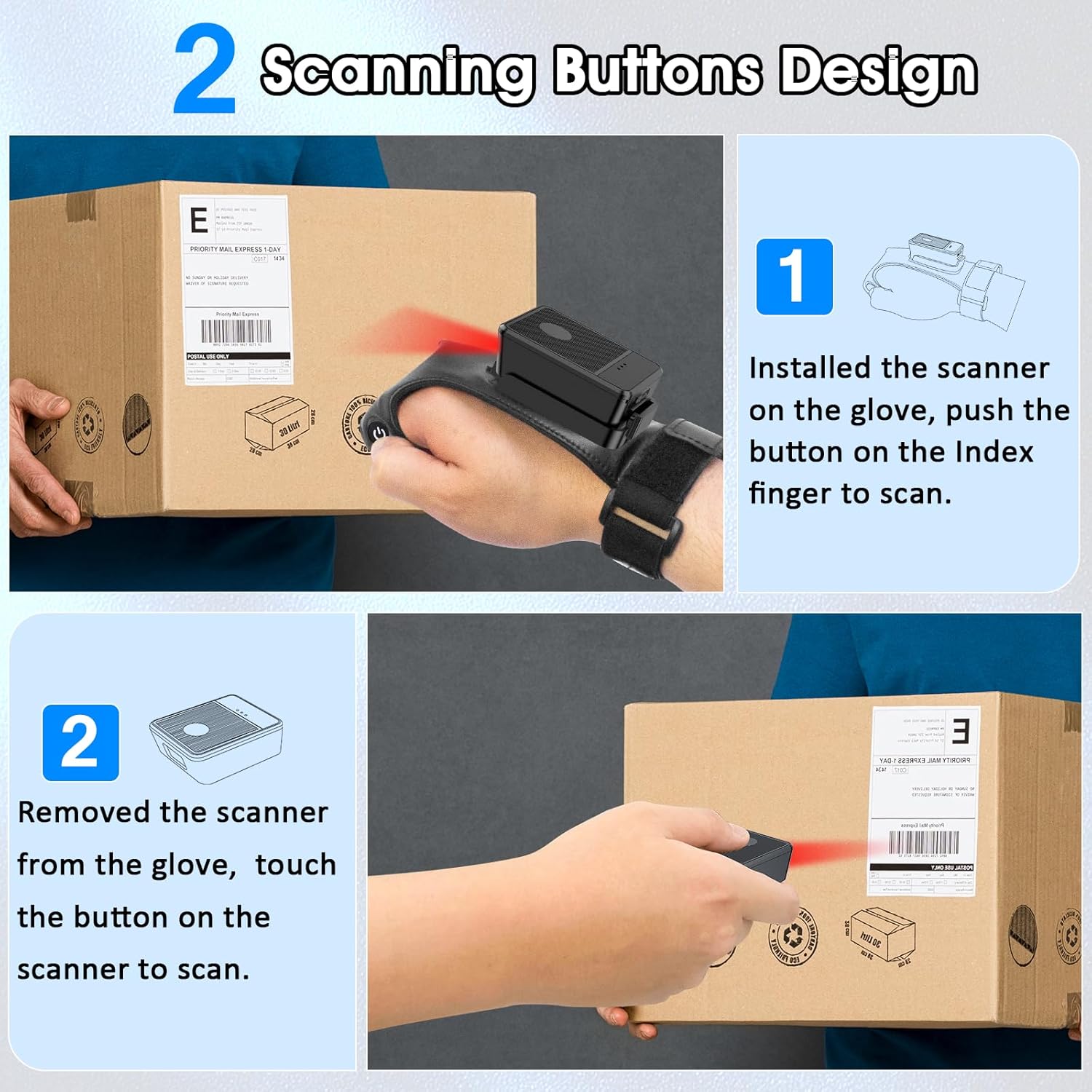
This diagram illustrates two ways to use the scanner: 1) installed on the glove, scanning with the index finger button, and 2) removed from the glove, scanning by touching the button directly on the scanner unit. Both methods are shown with the scanner pointed at a package.
6.2 โหมดการทำงาน
The scanner supports two operational modes:
6.2.1 โหมดอัปโหลดทันที
In this mode, scanned barcode data is immediately transmitted to the connected host device. This is ideal for real-time inventory updates or point-of-sale transactions.
6.2.2 Offline Storage Mode
This mode allows the scanner to store up to 50,000 barcodes internally when not connected to a host device or when connectivity is intermittent. Data can then be uploaded to a computer or POS system at a later time.
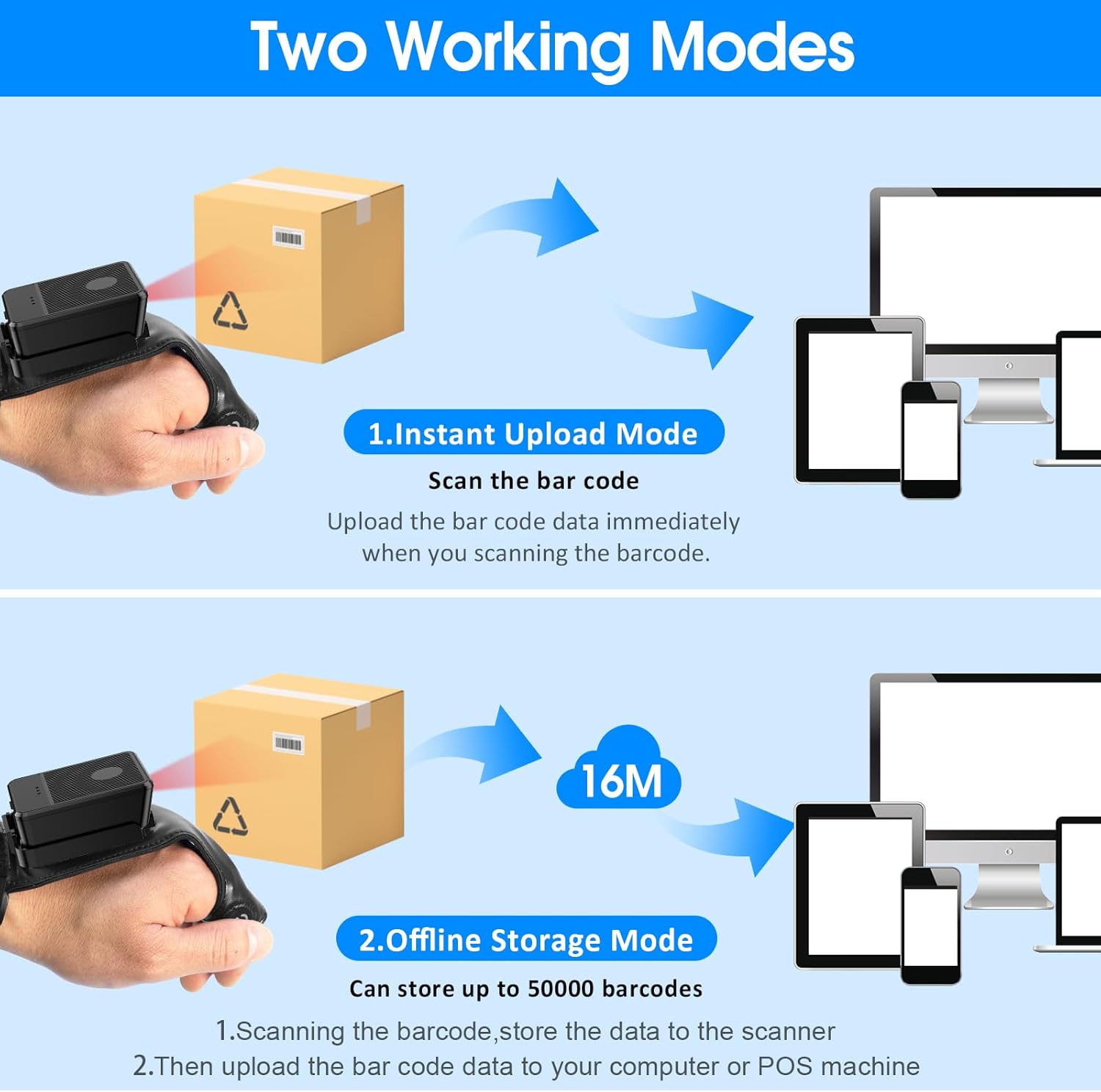
This image explains the two operational modes: Instant Upload Mode, where scanned data is immediately sent to a connected device, and Offline Storage Mode, which allows storing up to 50,000 barcodes internally before uploading them to a computer or POS system.
6.3 การปรับแต่งการตั้งค่า
The scanner allows for customization of various settings, including:
- เสียง: Enable or disable the audible beep for successful scans.
- การสั่นสะเทือน: Enable or disable vibration alerts for successful scans, useful in quiet environments.
- ฟังก์ชั่นคีย์บอร์ด: Add keyboard functions such as TAB or Enter after each scan for seamless data entry into applications.
Refer to the quick setup guide or manufacturer's website for specific programming barcodes to adjust these settings.
7. การบำรุงรักษา
- การทำความสะอาด: Use a soft, dry cloth to clean the scanner's exterior. For stubborn dirt, slightly dampชุบผ้าด้วยน้ำ ห้ามใช้สารเคมีรุนแรงหรือน้ำยาทำความสะอาดที่มีฤทธิ์กัดกร่อน
- พื้นที่จัดเก็บ: ควรเก็บเครื่องสแกนไว้ในที่แห้งและเย็น หลีกเลี่ยงแสงแดดโดยตรงและอุณหภูมิที่สูงหรือต่ำเกินไปเมื่อไม่ได้ใช้งาน
- การดูแลแบตเตอรี่ เพื่อยืดอายุการใช้งานแบตเตอรี่ ควรหลีกเลี่ยงการคายประจุแบตเตอรี่จนหมดบ่อยๆ ควรชาร์จอุปกรณ์เป็นประจำ แม้ว่าจะไม่ได้ใช้งานอย่างต่อเนื่องก็ตาม
8 การแก้ไขปัญหา
8.1 เครื่องสแกนไม่เปิดใช้งาน
- Ensure the battery is charged. Connect the scanner to a power source and allow it to charge for at least 30 minutes before attempting to turn it on again.
8.2 Unable to Connect Wirelessly
- การเชื่อมต่อ 2.4G: Verify the 2.4G dongle is securely plugged into the host device. Try plugging it into a different USB port. Ensure the scanner is within range of the dongle.
- การเชื่อมต่อบลูทู ธ : Ensure Bluetooth is enabled on your host device. Delete any previous pairings for the scanner and attempt to pair again. Ensure the scanner is in pairing mode (refer to device indicators).
- Restart both the scanner and the host device.
8.3 สแกนเนอร์ไม่สามารถอ่านบาร์โค้ดได้
- ตรวจสอบให้แน่ใจว่าบาร์โค้ดสะอาด ไม่ชำรุด และพิมพ์ชัดเจน
- ปรับระยะห่างและมุมระหว่างเครื่องสแกนกับบาร์โค้ด
- Check if the scanner is in the correct working mode (Instant Upload or Offline Storage).
- Verify that the barcode type is supported by the scanner (1D, 2D, QR codes are supported).
9. ข้อมูลจำเพาะ
| ยี่ห้อ | สัญลักษณ์ |
| แบบอย่าง | Wearable Glove Barcode Scanner (B0F1FSMWCD) |
| เทคโนโลยีการเชื่อมต่อ | 2.4G, บลูทูธ 6.0 |
| อุปกรณ์ที่รองรับ | Desktop, Laptop, Tablet, Smartphone (Windows XP/7/8/10, Android, iOS) |
| แหล่งพลังงาน | ใช้พลังงานจากแบตเตอรี่ |
| ประเภทแบตเตอรี่ | แบตเตอรี่ลิเธียมโพลิเมอร์ 1 ก้อน (รวมอยู่ด้วย) |
| ความจุของแบตเตอรี่ | 1100mAh (Product Description) / 3000mAh (Image) - Note: Discrepancy in source data, refer to product packaging for accurate capacity. |
| เวลาทำงานต่อเนื่อง | Up to 10 hours (Product Description) / 12-13 hours (Image) - Note: Discrepancy in source data, refer to product packaging for accurate time. |
| เวลาในการชาร์จ | ประมาณ 5 ชั่วโมง |
| เวลาสแตนด์บาย | นานถึง 30 วัน |
| ความเร็วในการสแกน | สแกนได้สูงสุด 300 ครั้งต่อวินาที |
| ช่วงการสแกน | 2 ถึง 4.9 ฟุต |
| ความจุในการจัดเก็บข้อมูลแบบออฟไลน์ | บาร์โค้ดสูงสุด 50,000 รายการ |
| น้ำหนักสินค้า | 5 ออนซ์ |
| ขนาดแพ็คเกจ | 7.48 x 3.74 x 2.44 นิ้ว |
10. ข้อมูลการรับประกัน
This Symcode product is covered by a manufacturer's warranty. For specific warranty terms, duration, and conditions, please refer to the warranty card included with your product or visit the official Symcode webไซต์นี้ โปรดเก็บหลักฐานการซื้อไว้เพื่อใช้ยืนยันการรับประกัน
11. การสนับสนุนลูกค้า
If you encounter any issues or have questions regarding your Symcode Wearable Glove Barcode Scanner, please contact Symcode customer support. Contact details can typically be found on the product packaging, the official Symcode webไซต์หรือผ่านผู้ค้าปลีกของคุณ