
การแนะนำ
Thank you for choosing the Belkin Portable 20,000 mAh Power Bank. This device is designed to provide reliable and fast charging for your mobile devices, featuring an integrated USB-C cable and 30W Power Delivery. Its compact and lightweight design makes it ideal for travel, ensuring your devices stay powered wherever you go. This manual provides essential information on how to set up, operate, maintain, and troubleshoot your power bank.

Image: The Belkin Portable 20,000 mAh Power Bank in blue, showcasing การออกแบบที่เพรียวบาง
คุณสมบัติหลัก
- สาย USB-C ในตัว: For convenient charging on the go.
- กำลังส่ง 30W: Enables fast charging for smartphones, tablets, and even some laptops like the MacBook Air.
- ความจุ 20,000 mAh: Provides up to 87 hours of additional battery life for an iPhone 16 Pro, charging 0-50% in approximately 25 minutes.
- การชาร์จพร้อมกัน: Charge up to three devices concurrently using the integrated USB-C cable, USB-C port, and USB-A port, with a shared output of 30W.
- ไฟแสดงสถานะ LED: Displays the power bank's charging status.
- การชาร์จแบบพาสทรู: Charge your devices while the power bank itself is being recharged.
- Lightweight and Travel-Friendly: Weighing less than 395 grams, it meets aviation safety standards for carry-on luggage.
- การออกแบบที่ยั่งยืน: Made from 72% post-consumer recycled materials with 100% plastic-free packaging.
การตั้งค่า
การชาร์จพาวเวอร์แบงค์ครั้งแรก
Before first use, fully charge your Belkin Power Bank. Connect the power bank to a wall charger using a compatible USB-C cable (not included for recharging the power bank itself, only the integrated cable is for output). The LED indicators will show the charging progress. A full charge typically takes up to 12 hours.

Image: The power bank connected to a wall outlet for recharging, simultaneously charging a smartphone via its integrated cable. This illustrates pass-through charging.
คำแนะนำการใช้งาน
การชาร์จอุปกรณ์ของคุณ
- การใช้งานสาย USB-C ในตัว: Extend the integrated USB-C cable from the power bank and connect it directly to your USB-C compatible device.
- การใช้พอร์ต USB-C: Connect your device's USB-C charging cable to the power bank's USB-C output port.
- การใช้พอร์ต USB-A: Connect your device's USB-A charging cable to the power bank's USB-A output port.

Image: The Belkin power bank connected to an iPhone via its integrated USB-C cable, demonstrating seamless high-speed charging.
ชาร์จอุปกรณ์หลายเครื่อง
The power bank supports charging up to three devices simultaneously with a combined output of 30W. You can use the integrated USB-C cable, the USB-C port, and the USB-A port at the same time.
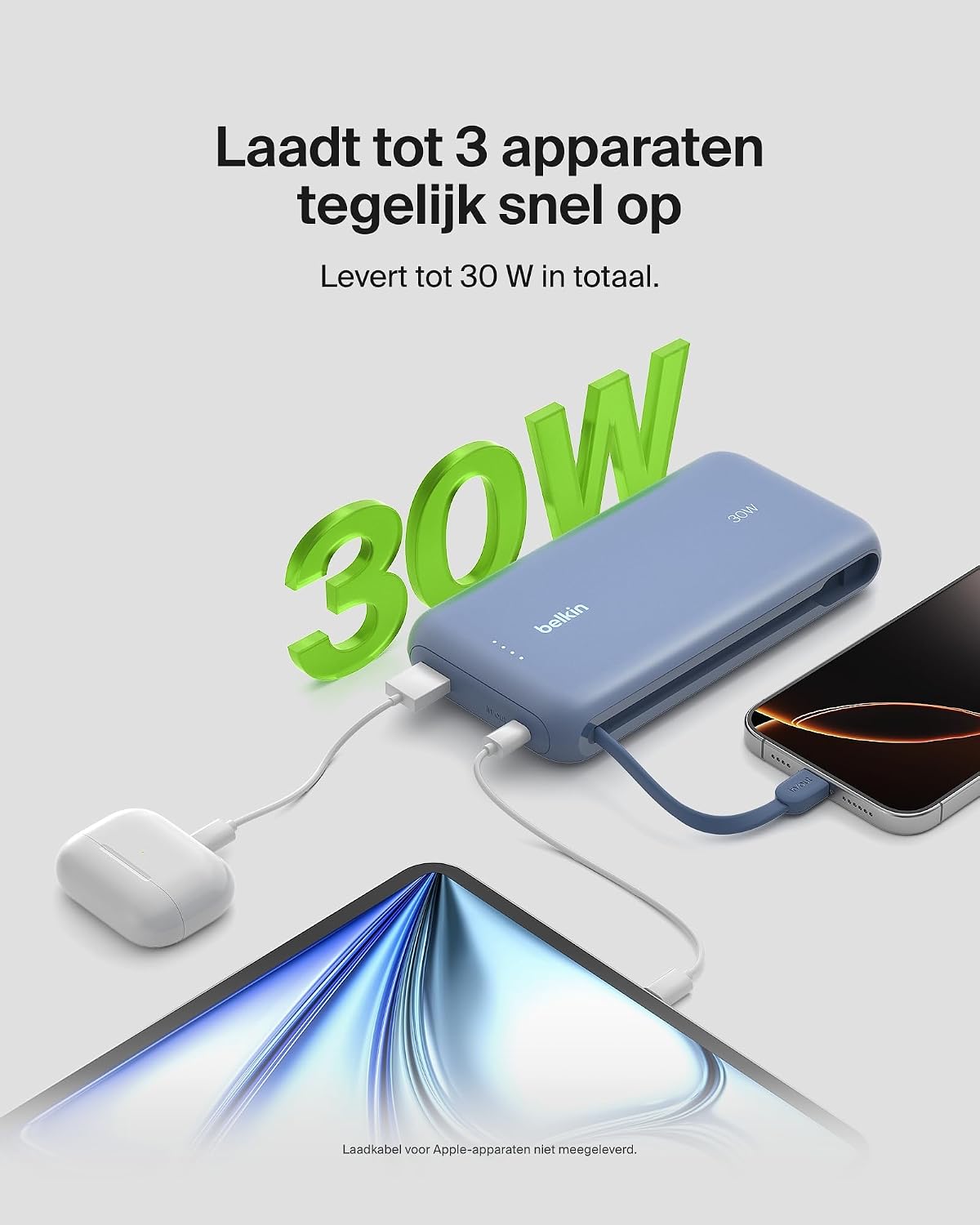
Image: The power bank simultaneously charging a smartphone, a tablet, and wireless earbuds, illustrating its capability to charge up to three devices with a total output of 30W.
ไฟ LED แสดงสถานะแบตเตอรี่
The power bank features LED lights that indicate the remaining battery level and charging status. Refer to the table below for interpretation:
| สถานะ LED | ความหมาย |
|---|---|
| ไฟ LED ทั้งหมดติดสว่าง | ชาร์จเต็มแล้ว |
| LEDs blinking sequentially | กำลังชาร์จอยู่ |
| Fewer LEDs solid | ความจุแบตเตอรี่ที่เหลืออยู่ |
การซ่อมบำรุง
- การทำความสะอาด: ใช้ผ้านุ่มและแห้งเช็ดทำความสะอาดพาวเวอร์แบงค์ หลีกเลี่ยงการใช้สารเคมีรุนแรงหรือวัสดุที่มีฤทธิ์กัดกร่อน
- พื้นที่จัดเก็บ: เก็บพาวเวอร์แบงค์ไว้ในที่แห้งและเย็น หลีกเลี่ยงแสงแดดโดยตรงและอุณหภูมิที่สูงหรือต่ำเกินไป
- การดูแลแบตเตอรี่ To prolong battery life, avoid fully discharging the power bank regularly. Recharge it when the battery level is low.
- Integrated Cable Care: When not in use, ensure the integrated USB-C cable is properly stowed to prevent damage.
การแก้ไขปัญหา
ปัญหาทั่วไปและแนวทางแก้ไข
- อุปกรณ์ไม่ชาร์จ:
- Ensure the power bank is charged. Check the LED indicators.
- ตรวจสอบว่าสายชาร์จเชื่อมต่อกับพาวเวอร์แบงค์และอุปกรณ์ของคุณอย่างแน่นหนาแล้ว
- ลองใช้สายชาร์จอื่นหรือพอร์ตอื่นบนพาวเวอร์แบงค์ดู
- ตรวจสอบให้แน่ใจว่าอุปกรณ์ของคุณใช้งานร่วมกับข้อกำหนดการชาร์จของพาวเวอร์แบงค์ได้
- การชาร์จช้า:
- Ensure your device supports fast charging (Power Delivery) to utilize the 30W output.
- If charging multiple devices, the total 30W output is shared, which may result in slower charging for individual devices.
- Check if the cable used supports fast charging.
- พาวเวอร์แบงค์ไม่ชาร์จ:
- Ensure the wall adapter and cable used for recharging the power bank are functional and properly connected.
- Try a different wall adapter or cable.
Belkin SmartProtect Safety Features
The Belkin Power Bank is equipped with SmartProtect technology, which includes multiple safety features to protect your devices and the power bank itself:
- การป้องกันการชาร์จไฟเกิน
- ระบบป้องกันกระแสไฟเกิน
- การป้องกันพลังเกิน
- ระบบป้องกันไฟฟ้าลัดวงจร
- เอาท์พุท Overvoltagการป้องกันอี
- Output High/Low Temperature Protection
- Input High/Low Temperature Protection
- Signal Interference Protection
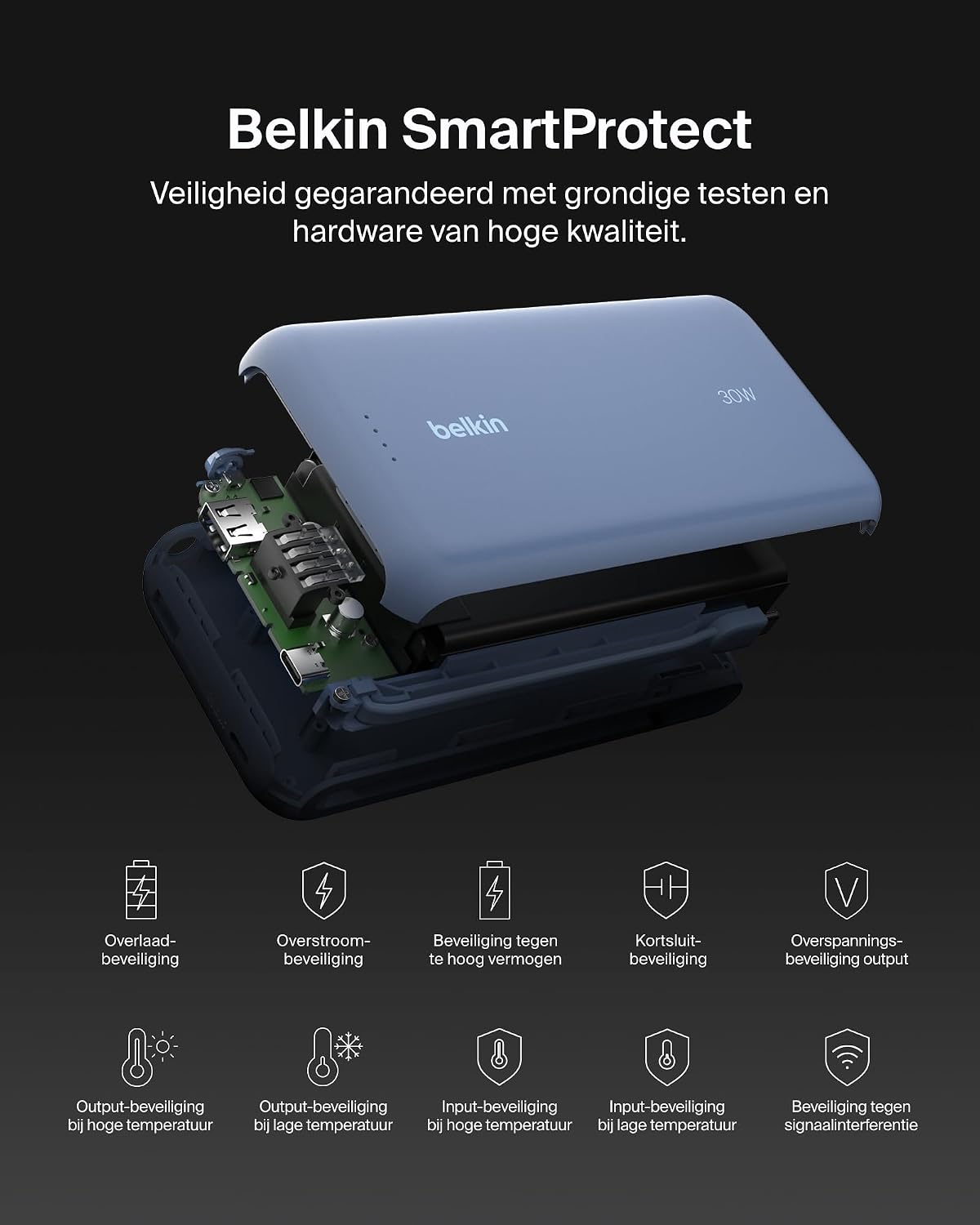
ภาพ: ระเบิด view of the Belkin Power Bank, highlighting its internal components and the comprehensive Belkin SmartProtect safety features, including protection against overcharge, overcurrent, and short-circuits.
ข้อมูลจำเพาะ
| คุณสมบัติ | รายละเอียด |
|---|---|
| หมายเลขรุ่น | BPB024hqBL |
| ความจุของแบตเตอรี่ | 20,000 มิลลิแอมป์ |
| กำลังขับ | Up to 30W Power Delivery (shared) |
| ประเภทขั้วต่อ | Integrated USB-C cable, 1x USB-C port, 1x USB-A port |
| เล่มที่tage | 5 โวลต์ |
| Ampอีเรจ | 3 Ampที่นั่น |
| เวลาในการชาร์จ (พาวเวอร์แบงค์) | ประมาณ 12 ชั่วโมง |
| ขนาดสินค้า | 15.4 x 7.62 x 2.51 ซม. |
| น้ำหนักสินค้า | 395 กรัม |
| ส่วนประกอบของเซลล์แบตเตอรี่ | ลิเธียมไอออน |
| อุปกรณ์ที่รองรับ | Apple iPhone 16 series, iPhone 15 series, iPhone 14 series, iPhone 13 series, Samsung Galaxy S22/S23/S24/S25 series, iPad Pro, iPad Air, iPad, iPad Mini, and other USB-C/USB-A compatible devices. |
การรับประกันและการสนับสนุน
ข้อมูลการรับประกัน
This Belkin Portable Power Bank comes with a การรับประกันจากผู้ผลิต 2 ปี. Additionally, it includes a Connected Equipment Warranty, providing peace of mind for your connected devices. Please retain your proof of purchase for warranty claims.
การสนับสนุนลูกค้า
หากต้องการความช่วยเหลือเพิ่มเติม การสนับสนุนทางเทคนิค หรือสอบถามเกี่ยวกับการรับประกัน โปรดไปที่เว็บไซต์ฝ่ายสนับสนุนอย่างเป็นทางการของ Belkin webหรือติดต่อฝ่ายบริการลูกค้า คุณสามารถดูข้อมูลเพิ่มเติมได้ที่ www.belkin.com/support.