
บทนำและโอเวอร์view
The LawnMaster OcuMow™ VBRM701YAMIDR is a perimeter wire-free robot lawn mower designed for efficient and autonomous lawn maintenance. Utilizing advanced optical navigation and obstacle avoidance technology, this mower can cut lawns up to 1/6 acre without the need for complex boundary wire installations. It features an auto-charging station, 'No Go' function with magnetic strips, and convenient WiFi & Bluetooth app control for remote operation and scheduling. Enjoy a beautifully maintained lawn with minimal effort.
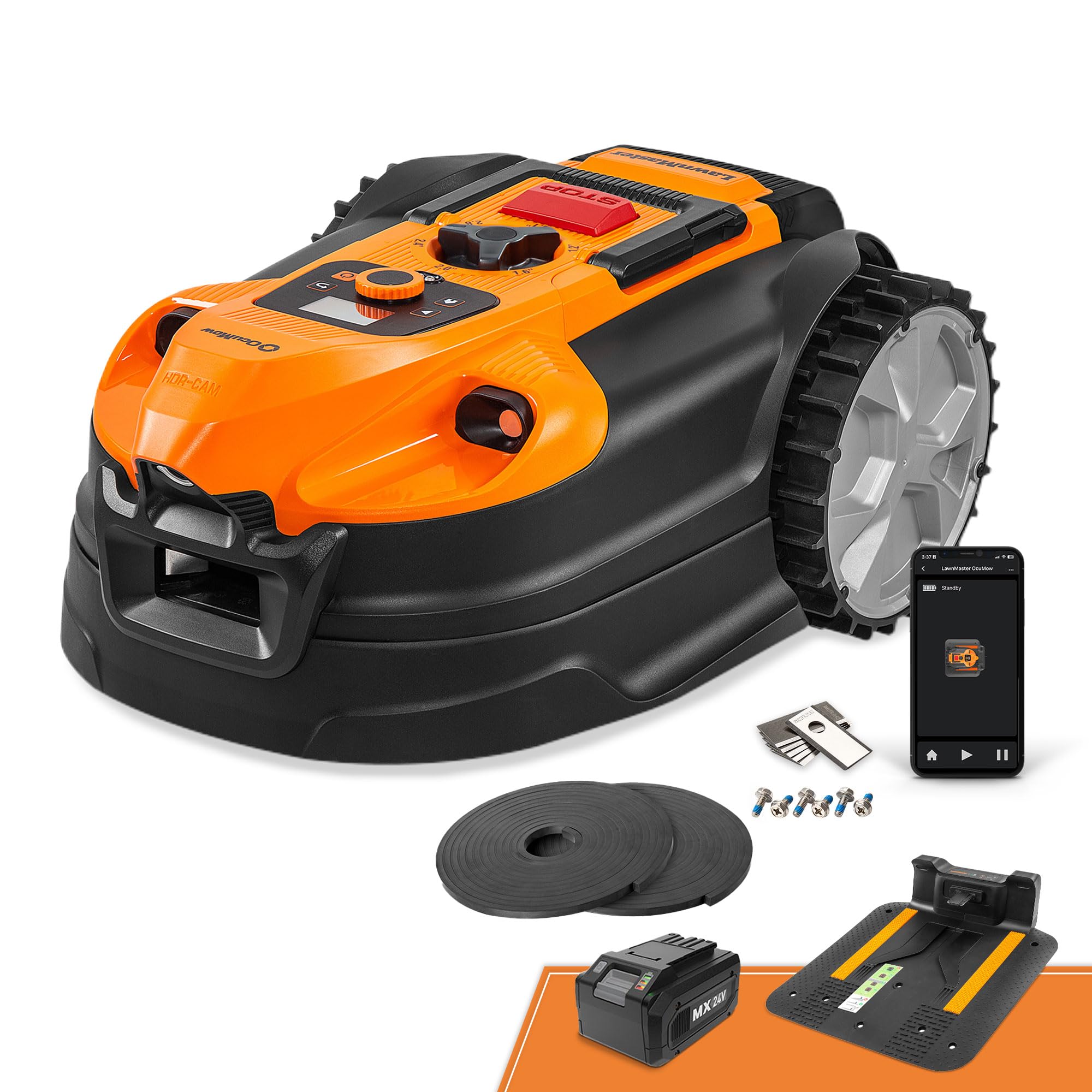
Image: The LawnMaster OcuMow robot lawn mower positioned on a lush green lawn, ready for operation.
มีอะไรอยู่ในกล่อง
Your LawnMaster OcuMow™ VBRM701YAMIDR package includes all the essential components for immediate setup and operation:
- หุ่นยนต์ตัดหญ้า
- MX 24V 4.0Ah battery
- สถานีชาร์จแบต
- 32-feet of magnetic strip
- 12 x magnetic strip pegs
- 6 x blades and 6 x screws

Image: A visual representation of all items included in the LawnMaster OcuMow package, including the mower, battery, charging station, magnetic strip, pegs, and spare blades.

Image: Close-up of the replacement blades and screws provided for the LawnMaster OcuMow.
การติดตั้งและการตั้งค่า
The LawnMaster OcuMow™ is designed for easy, nearly 0-installation setup. Follow these steps to get your mower ready:
- Prepare Your Lawn: Ensure a clearly defined edge around the full perimeter of your lawn to prevent the mower from leaving the designated area. Adjustments to lawn edges may be required for optimal performance.
- จัดวางตำแหน่งสถานีชาร์จ: Place the charging dock in a suitable position within your mowing area and connect it to a power source.
- การเริ่มต้นใช้งานครั้งแรก: Start the machine from the charging dock. It will directly begin operation. No perimeter wire or antenna installation is required for basic operation.
- Set Up 'No Go' Areas (Optional): Easily define virtual fences within your yard using the included 32-feet of magnetic strips and pegs. This requires no digging or external power source.
Video: A demonstration of the initial setup process for the LawnMaster OcuMow, highlighting its wire-free installation and ease of use.

Image: The robot mower automatically returning to its charging station, illustrating the auto-return and charge feature.

Image: A person installing magnetic strips with pegs to create a virtual fence, designating a 'No Go' area for the robot mower.
คำแนะนำการใช้งาน
The LawnMaster OcuMow™ offers flexible operating modes to suit your lawn care needs:
- Auto Charge Mode: Designed for lawns up to 1/6 acre. The robot mower automatically returns to the charging station when the battery is low, then resumes mowing after a quick 2-hour charge time. This mode leaves fine grass clippings to nourish your lawn.
- Drop-N-Mow Mode: For secondary small areas up to 1,600 sq. ft. that may not have an outdoor power supply. In this mode, the mower does not require the charging dock to be installed and can work for up to 3 hours. Simply place the mower in the desired area, select Drop-N-Mow, and let it work until the battery depletes.
- การปรับความสูงของการตัด: Adjust the cutting height using the manual dial on top of the machine. Choose from 8 positions, ranging from 1.2 inches to 3.1 inches, to achieve your desired lawn length.
- การควบคุมแอพ: Use the dedicated app to remotely control the mower, check its status in real-time, set schedules, and receive OTA updates.

Image: A hand adjusting the height adjustment knob on the LawnMaster OcuMow, showing the range of cutting heights available.
Image: The robot mower automatically returning to its charging station, illustrating the hands-free recharging process.
คุณสมบัติหลัก
- Optical Navigation Technology: Advanced sensors and a wide-angle camera efficiently identify grass and guide the mower, even in tricky lighting conditions. This technology helps protect nocturnal wildlife by operating only during daylight hours.
- การหลีกเลี่ยงอุปสรรค: Ultrasonic sensors detect and steer clear of objects as small as 6 inches for a smooth mowing experience, preventing collisions and damage.
- 'No Go' Function: Easily set up virtual fences within your yard using the included 32-feet of magnetic strips, requiring no digging or power source. This allows you to exclude specific areas from mowing.
- Climbs Up to 35% Slope: Deep tread wheels and a robust drive system enable the mower to climb slopes up to 19° (35%) effortlessly, handling complex terrains.
- WiFi & Bluetooth App Control: The app allows for remote control, real-time status checks, scheduling, and over-the-air (OTA) updates.
- การทำงานที่เงียบเป็นพิเศษ: Operates at only 68dB, making it 28% quieter than average gas mowers, allowing for peaceful enjoyment of your backyard.

Image: The robot mower utilizing its optical navigation technology to detect and mow grass efficiently.

Image: The robot mower's obstacle avoidance system detecting a soccer ball and redirecting its path to prevent collision.
Image: A person installing magnetic strips with pegs to create a virtual fence, designating a 'No Go' area for the robot mower.

Image: The robot mower demonstrating its ability to climb a sloped section of a lawn.

Image: A smartphone screen showing the user interface of the LawnMaster OcuMow app, with options for scheduling and device control.
การซ่อมบำรุง
Regular maintenance ensures optimal performance and longevity of your LawnMaster OcuMow™:
- การเปลี่ยนใบมีด: Periodically inspect the cutting blades for wear or damage. Replace them as needed using the included spare blades and screws.
- Clean the Mower: Keep the mower's exterior and underside free from grass clippings and debris to ensure proper function of sensors and wheels.
- การดูแลแบตเตอรี่ Ensure the MX 24V 4.0Ah battery is properly charged and stored according to the battery's instructions. Extra batteries can extend running time (sold separately).
การแก้ไขปัญหา
If you encounter issues with your LawnMaster OcuMow™, consider the following:
- Mower leaving designated area: Ensure your lawn has a clearly defined edge around its full perimeter. Adjustments to lawn edges may be required.
- Mower getting stuck or missing spots: Check for small obstacles (under 6 inches) that ultrasonic sensors might miss or areas with uneven terrain. Ensure the cutting height is appropriate for the grass length.
- ประสิทธิภาพการตัดที่ไม่ดี: Inspect blades for sharpness and replace if dull or damaged. Adjust cutting height for optimal results.
- ปัญหาการเชื่อมต่อแอป: Verify your mower's WiFi and Bluetooth connection. Refer to the app's troubleshooting guide for specific connectivity steps.
ข้อมูลจำเพาะ
| ข้อมูลจำเพาะ | รายละเอียด |
|---|---|
| ยี่ห้อ | ลอว์นมาสเตอร์ |
| หมายเลขรุ่น | VBRM701YAMIDR |
| แหล่งพลังงาน | Battery Powered (MX 24V 4.0Ah) |
| โหมดการทำงาน | อัตโนมัติ |
| ความกว้างในการตัด | 7 นิ้ว |
| ความสูงในการตัดปรับได้ | 1.2" - 3.1" (8 positions) |
| ความสามารถในการรับแรงลาดชันสูงสุด | 35% (19°) |
| น้ำหนักสินค้า | 31.5 ปอนด์ |
| ขนาดสินค้า | ลึก 21.65 นิ้ว x กว้าง 9.65 นิ้ว x สูง 14.88 นิ้ว |
| วัสดุ | โลหะ, พลาสติก |
| ความเข้ากันได้ของสมาร์ทโฮม | Smart Home Compatible (WiFi & Bluetooth App Control) |
การรับประกันและการสนับสนุน
The LawnMaster OcuMow™ VBRM701YAMIDR comes with a รับประกันจำกัด 2 ปี. For any support needs, including technical assistance, spare parts, or warranty claims, please refer to the contact information provided in your product packaging or visit the official LawnMaster website. LawnMaster offers local support and readily available spare parts to ensure a seamless user experience.


