
ATTACK SHARK X68HE
ATTACK SHARK X68PRO HE Rapid Trigger Wireless Keyboard User Manual
Model: X68HE
การแนะนำ
This manual provides detailed instructions for the setup, operation, and maintenance of your ATTACK SHARK X68PRO HE Rapid Trigger Wireless Keyboard. Designed for high-performance gaming, this keyboard features magnetic switches, adjustable actuation, and multi-mode connectivity.
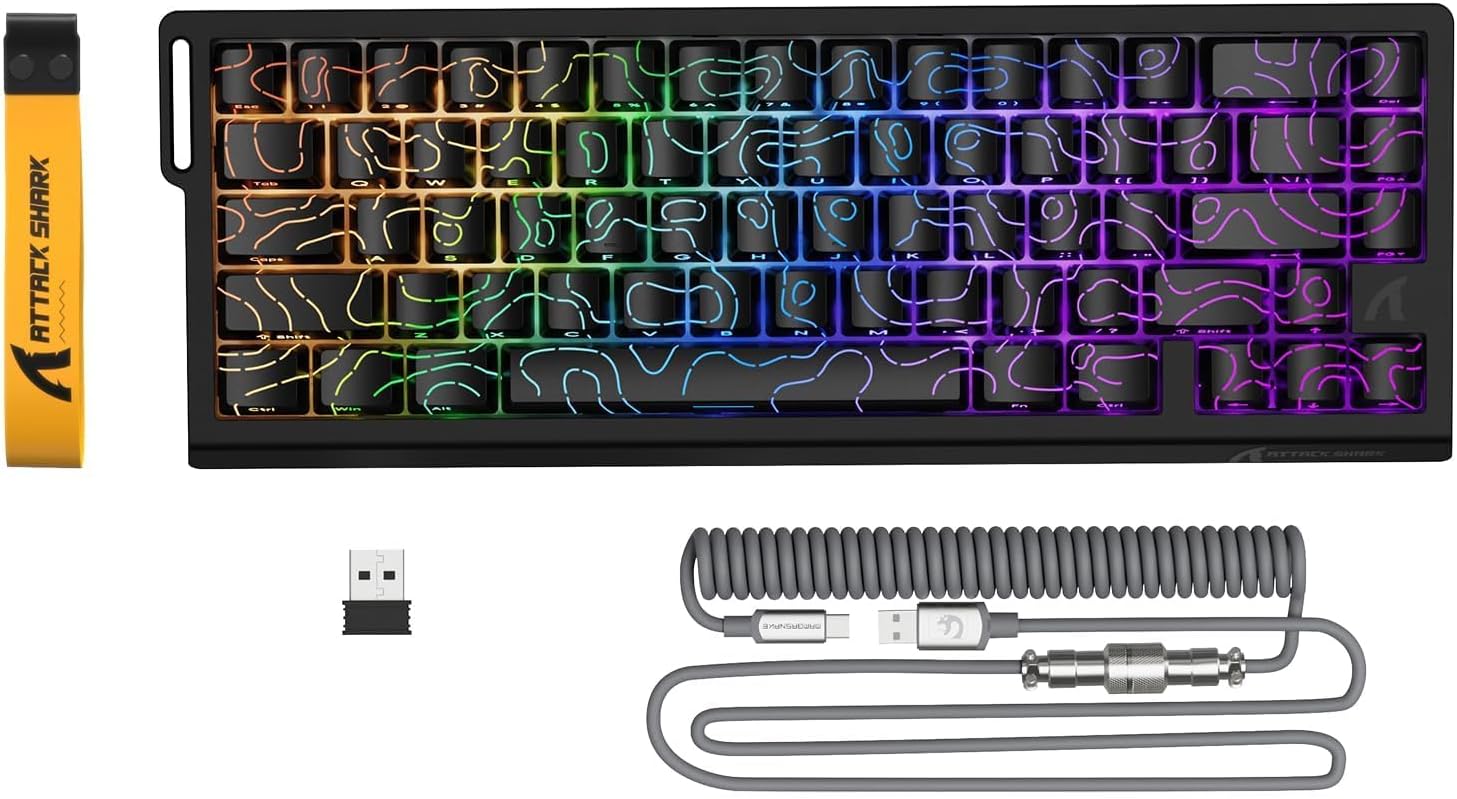
Image: The ATTACK SHARK X68PRO HE keyboard, showing its compact layout, along with the USB receiver and coiled USB-C cable.
เนื้อหาแพ็คเกจ
- คีย์บอร์ด ATTACK SHARK X68PRO HE
- USB-C Coiled Cable
- ตัวรับสัญญาณไร้สาย 2.4GHz
- ตัวดึงกุญแจ
- คู่มือการใช้งาน (เอกสารนี้)
การตั้งค่า
ตัวเลือกการเชื่อมต่อ
The X68PRO HE keyboard supports three connectivity modes: 2.4GHz wireless, Bluetooth, and USB-C wired.

Image: The keyboard connected to a laptop via USB-C, with icons indicating 2.4G wireless and Bluetooth connectivity options.
1. การเชื่อมต่อผ่านสาย USB-C
- เชื่อมต่อสาย USB-C แบบขดที่ให้มากับพอร์ต USB-C ของคีย์บอร์ด
- เชื่อมต่อปลายอีกด้านของสายเคเบิลเข้ากับพอร์ต USB ที่มีอยู่ในคอมพิวเตอร์ของคุณ
- The keyboard will automatically be detected and ready for use. This mode supports an 8000Hz polling rate.
2. การเชื่อมต่อไร้สาย 2.4GHz
- Locate the 2.4GHz wireless receiver (dongle) included in the package.
- เสียบตัวรับสัญญาณเข้ากับพอร์ต USB ที่มีอยู่ในคอมพิวเตอร์ของคุณ
- On the keyboard, switch to 2.4G wireless mode using the side button or by pressing FN + อาร์.
- The keyboard will connect automatically. This mode supports a 1000Hz polling rate.
3. การเชื่อมต่อบลูทู ธ
- On the keyboard, switch to Bluetooth mode by pressing เอฟเอ็น + คิว, FN + ว, หรือ FN + อี to select one of three available Bluetooth channels.
- ไฟแสดงสถานะบนแป้นพิมพ์จะกะพริบ แสดงว่าอยู่ในโหมดจับคู่
- On your device (computer, tablet, etc.), open Bluetooth settings and search for "ATTACK SHARK X68PRO HE".
- เลือกแป้นพิมพ์ที่ต้องการจับคู่ เมื่อจับคู่เสร็จแล้ว ไฟแสดงสถานะจะติดสว่างค้าง
- คุณสามารถสลับระหว่างอุปกรณ์บลูทูธที่จับคู่ไว้ได้โดยใช้ FN + Q/W/E. This mode supports a 1000Hz polling rate.
คำแนะนำการใช้งาน
ไกปืนแบบรวดเร็วและการปรับการทำงานได้
The X68PRO HE features Hall Effect magnetic switches with 0.01mm trigger accuracy and adjustable actuation from 0.1mm to 3.4mm. This allows for precise control and rapid key presses, ideal for gaming.

Image: A visual comparison illustrating the difference between a regular switch and a rapid trigger switch, highlighting the instant reset capability of the latter for improved accuracy in games.

ภาพ: รายละเอียด view of the adjustable magnetic switch, showing its linear type, 100 million click lifespan, 0.1-3.4mm actuation range, and support for N-pole-down magnetic switches.
Adjustments for Rapid Trigger sensitivity, Dynamic Keystrokes (DKS), Mod-Tap (MT), and Toggle Key (TGL) can be made via the dedicated QMK web driver. Refer to the "Driver Customization" section for more details.
Polling Rate and Latency
The keyboard offers an 8000Hz polling rate in wired mode and 1000Hz in wireless modes, ensuring ultra-low latency of 0.125ms for quick response times.

Image: The keyboard with a graphic illustrating the 8000Hz polling rate and 0.125ms response time, emphasizing its speed.
การควบคุมแสง RGB
The X68PRO HE features south-facing RGB lighting with 16.8 million color options and over 20 dynamic effects. You can customize these effects using the following key combinations:
- เอฟเอ็น + \|: สลับโหมดไฟ
- FN + แบ็คสเปซ: Light on/off
- FN + -/=: Backlit Speed +/-
- FN + ป้อน: เปลี่ยนสีไฟ
- FN + แท็บ: แสงสีขาว
- เอฟเอ็น + ↑/↓: Backlit Brightness +/-

Image: The keyboard displaying its dynamic RGB lighting effects, with a diagram showing the key combinations for controlling light modes, colors, speed, and brightness.
Driver Customization (QMK Web คนขับ)
The keyboard supports customization via a QMK web driver, allowing you to adjust key functions, macros, RGB effects, and more without software downloads. The hot-swappable PCB also allows for changing magnetic switches.
To access the driver, visit: bit.ly/X68HESOFT

Image: Screenshots of the QMK web driver interface, demonstrating options for key settings, stroke settings, shaft settings, macros, and RGB lighting customization.
การซ่อมบำรุง
- การทำความสะอาด: Use a soft, dry cloth to wipe down the keyboard. For deeper cleaning, use a keycap puller to remove keycaps and compressed air to clear debris.
- พื้นที่จัดเก็บ: เก็บแป้นพิมพ์ไว้ในที่แห้งและเย็น หลีกเลี่ยงแสงแดดโดยตรงและอุณหภูมิที่สูงหรือต่ำเกินไป
- การดูแลแบตเตอรี่ The keyboard is powered by a 3000mAh battery. For optimal battery life, avoid fully discharging the battery frequently. Charge it regularly using the provided USB-C cable.
- การเปลี่ยนสวิตช์: The keyboard is hot-swappable. If a switch needs replacement, gently pull it out using a switch puller and insert a new compatible magnetic switch.
การแก้ไขปัญหา
| ปัญหา | สาเหตุที่เป็นไปได้ | สารละลาย |
|---|---|---|
| แป้นพิมพ์ไม่ตอบสนอง (มีสาย) | การเชื่อมต่อสายเคเบิลหลวม; พอร์ต USB ผิดพลาด; ปัญหาไดรเวอร์ | ตรวจสอบให้แน่ใจว่าสาย USB-C เชื่อมต่อแน่นดีแล้ว ลองเปลี่ยนพอร์ต USB รีสตาร์ทคอมพิวเตอร์ |
| แป้นพิมพ์ไม่ตอบสนอง (ไร้สาย) | Low battery; Receiver not plugged in; Incorrect mode selected; Pairing issue. | Charge the keyboard. Ensure 2.4GHz receiver is plugged in or Bluetooth is paired. Switch to the correct mode (FN+R for 2.4G, FN+Q/W/E for Bluetooth). Re-pair if necessary. |
| ไฟ RGB ไม่ทำงาน | ไฟดับ; ซอฟต์แวร์ขัดแย้งกัน | กด FN + แบ็คสเปซ to toggle lighting. Check driver settings for RGB customization. |
| กุญแจไม่ลงทะเบียนหรือพิมพ์ซ้ำ | Debris under keycap; Faulty switch; Software calibration issue. | Clean under the keycap. If hot-swappable, try replacing the switch. Recalibrate actuation points via the QMK web คนขับรถ |
| Poor wireless range/connection | Interference; Distance from receiver. | Move closer to the receiver. Remove obstacles between keyboard and receiver. Avoid placing near other wireless devices. |
ข้อมูลจำเพาะ

Image: The back of the product packaging, displaying key specifications and manufacturer information.
| คุณสมบัติ | รายละเอียด |
|---|---|
| แบบอย่าง | X68PRO HE |
| เค้าโครง | 60% ANSI, 66 คีย์ |
| ประเภทสวิตซ์ | Hall Effect Amber Magnetic Switches |
| ช่วงการทำงาน | 0.1 มม. - 3.4 มม. (ปรับได้) |
| Trigger Accuracy | 0.01มม. |
| อัตราการสำรวจ (แบบมีสาย) | 8000เฮิรตซ์ |
| อัตราการสำรวจ (ไร้สาย) | 1000Hz (2.4GHz & Bluetooth) |
| ความหน่วงเวลา | 0.125มิลลิวินาที |
| การเชื่อมต่อ | USB-C Wired, 2.4GHz Wireless, Bluetooth |
| ความจุของแบตเตอรี่ | 3000mAh |
| การแบ็คไลท์ | RGB (16.8 ล้านสี, เอฟเฟกต์มากกว่า 20 แบบ) |
| ปุ่มกด | PBT ซับย้อมสี |
| ขนาด | 32.5 x 11.8 x 4 ซม. |
| น้ำหนัก | 1.12 กก. |
| ระบบปฏิบัติการที่รองรับ | วินโดวส์, แมคโอเอส |
การรับประกันและการสนับสนุน
ATTACK SHARK products come with a standard manufacturer's warranty. For specific warranty terms and conditions, please refer to the warranty card included with your product or visit the official ATTACK SHARK webเว็บไซต์.
For technical support, troubleshooting assistance, or warranty claims, please contact ATTACK SHARK customer service through their official channels. You can find contact information on the product packaging or their webเว็บไซต์.
Manufacturer: ATTACK SHARK
Item Model Number: X68HE
ASIN: B0DZSY3HW4
Ask a question about this manual
Ask about setup, troubleshooting, compatibility, parts, safety, or missing instructions. Manuals+ will review the question and use this page’s manual context to help answer it.