
1. บทนำ
Welcome to the DESLOC B200L Fingerprint Smart Lock. This manual provides detailed instructions for the installation, operation, and maintenance of your new smart lock. The DESLOC B200L offers advanced security features and multiple convenient unlocking methods to enhance your home's safety and accessibility.
คำอธิบายวิดีโอ: วิดีโอนี้ให้ข้อมูลทั่วไปเกี่ยวกับview of the DESLOC B200L Fingerprint Smart Lock with Handle, showcasing การออกแบบและคุณสมบัติหลัก
2. เนื้อหาบรรจุภัณฑ์
ตรวจสอบให้แน่ใจว่ามีอุปกรณ์ครบทุกชิ้นก่อนเริ่มการติดตั้ง:
- 1 x ล็อกภายนอก
- 1 x ล็อกภายใน
- 1 x แผ่นติดตั้ง
- 1 x จาน Strike
- 1 x เดดโบลต์
- 2 x คีย์เครื่องกล
- พวงกุญแจ 2 อัน
- แบตเตอรี่ AA 4 ก้อน
- สกรูเดดโบลต์/แผ่นยึด
- สกรูยึดแผ่น
- สกรูล็อคภายใน
- คู่มือการติดตั้ง
- คู่มือแอพ
3. ข้อมูลจำเพาะ
| คุณสมบัติ | คำอธิบาย |
|---|---|
| ยี่ห้อ | เดสล็อค |
| หมายเลขรุ่น | บี200แอล |
| ประเภทล็อค | ไบโอเมตริกซ์ |
| วัสดุ | อลูมิเนียม |
| สี | สีดำ |
| การเชื่อมต่อ | Bluetooth (G2 Gateway for Wi-Fi, sold separately) |
| วิธีการปลดล็อค | Fingerprint (up to 50), PIN Code (up to 250), Mobile App, Key Fobs, Physical Key |
| อายุการใช้งานแบตเตอรี่ | Up to 12 months (4 AA batteries) |
| ไฟฟ้าฉุกเฉิน | พอร์ต USB-C |
| ทนทานต่อสภาพอากาศ | IP54 Waterproof, -22°F to 158°F (-30°C to 70°C) |
| ความหนาของประตู | 1-3/8" ถึง 2" (35 มม. ถึง 50 มม.) |
| Cross-bore Diameter | 2-1/8 นิ้ว (54 มม.) |
| เจาะตลับกุญแจ | 2-3/8" หรือ 2-3/4" (60 มม. หรือ 70 มม.) |

คำอธิบายภาพ: The DESLOC B200L smart lock is shown with a protective shield icon, highlighting its enhanced durability and robust construction from dual-sided aluminum alloy.
4. คู่มือการติดตั้ง
Installation typically takes about 15 minutes with a screwdriver. No drilling is required for standard door preparations.
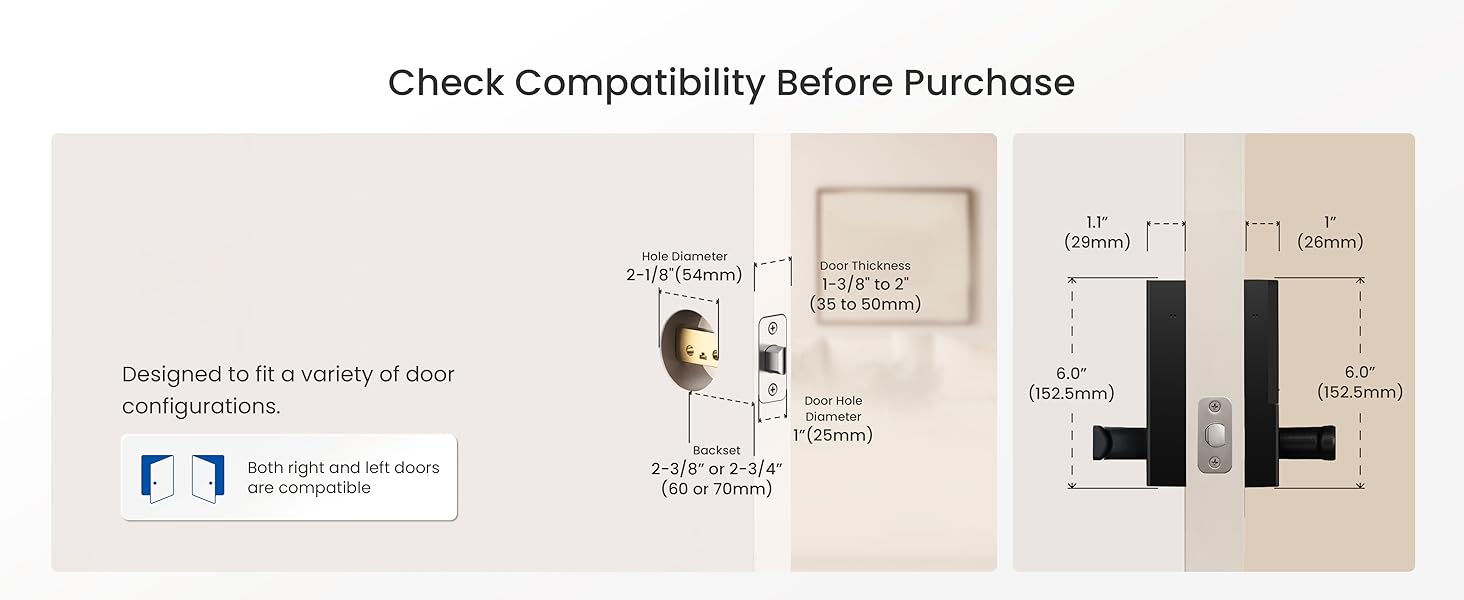
คำอธิบายภาพ: A detailed diagram shows the necessary door measurements for compatibility, including door thickness (1-3/8" to 2"), cross-bore diameter (2-1/8"), and backset (2-3/8" or 2-3/4").
ขั้นตอนการติดตั้ง:
- Measure the Door Size: Verify your door's thickness, cross-bore diameter, and backset against the specifications. Ensure the door is compatible.
- ติดตั้งสลัก: Insert the deadbolt latch into the door edge and secure it with screws. Adjust the backset if necessary by rotating the faceplate 180 degrees.
- Adjust the Lock Handle's Direction: Ensure the exterior and interior handles are oriented correctly for your door's swing (left-hand or right-hand). The manual provides diagrams for proper orientation.
- Install the Front Panel and Mounting Plate: Carefully feed the cable through the door hole. Position the exterior lock panel and then attach the interior mounting plate, securing it with screws.
- Connect the Wire Connector: Connect the wire from the exterior panel to the corresponding port on the interior assembly.
- ติดตั้งแผงด้านหลัง: Attach the interior lock panel to the mounting plate, ensuring the spindle is correctly aligned. Secure with screws.
- Install the Batteries and Battery Cover: Insert 4 AA batteries into the battery compartment. Replace the battery cover.
- Insert the Key and Test the Installation: Use the mechanical key to test the lock and unlock function. Ensure smooth operation.
คำอธิบายวิดีโอ: This official DESLOC video demonstrates the step-by-step installation process for the B200L smart lock, from measuring the door to final testing.
5. คู่มือการใช้งาน
The DESLOC B200L offers multiple ways to unlock your door, providing flexibility and convenience.
วิธีการปลดล็อค:
- ปลดล็อคลายนิ้วมือ: Simply grab the handle and place your finger on the integrated sensor. The lock will recognize your fingerprint in as fast as 0.3 seconds. The self-learning AI algorithm improves accuracy with each use.
- รหัส PIN: Enter your programmed PIN code on the touchscreen keypad.
- แอปมือถือ: Use the TTLock app on your smartphone to unlock the door via Bluetooth (within 2 meters) or remotely with a G2 Gateway (sold separately).
- พวงกุญแจ: Tap the provided key fob against the keypad to unlock.
- คีย์ทางกายภาพ: ในกรณีฉุกเฉินหรือแบตเตอรี่หมด ให้ใช้กุญแจแบบกลไกเพื่อปลดล็อกประตู

คำอธิบายภาพ: This image displays the diverse unlocking options available for the DESLOC B200L, such as physical keys, key fobs, mobile app control, fingerprint recognition, and PIN codes.
คุณสมบัติความปลอดภัย:
- ล็อคอัตโนมัติ: The lock can be configured to automatically lock after a set period of time.
- ฟังก์ชั่นป้องกันการแอบมอง: To prevent others from guessing your PIN code, you can enter random digits before or after your actual code. The lock will still recognize the correct sequence within the longer entry.
- High-Security Vane Lock: The B200L features an advanced vane lock, designed to prevent key replication and tampering, offering elevated protection compared to traditional pin tumbler locks.

คำอธิบายภาพ: This image illustrates the anti-peeping feature, showing how users can input extra random numbers before or after their actual PIN to obscure it from onlookers.
6. TTLock App Features
The TTLock app provides comprehensive control and management of your DESLOC B200L smart lock.
- การควบคุมบลูทู ธ : Manage your lock directly from your smartphone when within 2 meters via Bluetooth.
- การเข้าถึงระยะไกล: Pair with a G2 Gateway (sold separately) for remote access from anywhere. This allows you to generate temporary or scheduled passcodes, receive real-time alerts, and review detailed access records.
- การจัดการผู้ใช้: Easily add, delete, or modify user profiles, including fingerprints and PIN codes.
- การแจ้งเตือนแบบเรียลไทม์: Receive instant alerts on your smartphone for any lock activity.
- เข้าถึงบันทึกข้อมูล: View a detailed history of who accessed your door and when.
- การควบคุมด้วยเสียง: Integrate your lock with Amazon Alexa or Google Assistant for hands-free voice commands (G2 Gateway required).
คำอธิบายวิดีโอ: This official DESLOC video demonstrates how to set up and connect the B200L smart lock with Amazon Alexa and Google Assistant for voice control.
7. การบำรุงรักษา
การเปลี่ยนแบตเตอรี่:
The DESLOC B200L is powered by 4 AA batteries, offering up to 12 months of battery life. A low-battery indicator will alert you when it's time for replacement.
- When the low-battery indicator appears, replace all 4 AA batteries promptly.
- To replace, remove the interior battery cover, swap out the old batteries with new ones, and reattach the cover.
ไฟฉุกเฉิน:
In case the batteries completely drain, the lock is equipped with a USB-C emergency power port. Connect a power bank to this port to temporarily power the lock and gain access.

คำอธิบายภาพ: The DESLOC B200L smart lock is depicted with a USB-C cable plugged into its emergency power port, connected to a portable power bank, ensuring access even if the internal batteries are depleted.
8 การแก้ไขปัญหา
- ล็อคไม่ตอบสนอง: Check battery levels and replace if necessary. Use the emergency USB-C port if batteries are completely dead.
- ไม่รู้จักลายนิ้วมือ: โปรดตรวจสอบให้แน่ใจว่านิ้วของคุณสะอาดและแห้ง จากนั้นลองลงทะเบียนลายนิ้วมือของคุณในแอปอีกครั้ง
- รหัส PIN ไม่ทำงาน: Double-check the entered code. Ensure the anti-peeping function is not causing issues by trying the exact code without extra digits.
- ปัญหาการเชื่อมต่อแอป: Ensure Bluetooth is enabled on your phone and you are within range. If using remote access, verify your G2 Gateway is properly connected to Wi-Fi and the lock.
- Handle turns but door remains locked: This may indicate an issue with the internal mechanism or spindle alignment during installation. Refer to the installation guide or contact support.
9. การรับประกันและการสนับสนุน
The DESLOC B200L Fingerprint Smart Lock comes with a 12-month warranty from the date of purchase.
For any questions, technical assistance, or warranty claims, please contact our 24/7 professional customer support team:
- โทรศัพท์: +1 (888) 572-6136
- อีเมล: [โปรดดูจากบรรจุภัณฑ์ของผลิตภัณฑ์หรือเอกสารอย่างเป็นทางการ] website for email address]
- แชทออนไลน์: Available on the official DESLOC webเว็บไซต์.
Please have your product model number (B200L) and purchase information ready when contacting support.