
การแนะนำ
This manual provides essential information for setting up, operating, and maintaining your UPERFECT 15.6-inch FHD Portable Touchscreen Monitor. Please read it thoroughly before using the product to ensure optimal performance and longevity. This monitor is designed to enhance your productivity and entertainment experience with its versatile connectivity and intuitive touchscreen functionality.
เนื้อหาแพ็คเกจ
กรุณาทำเครื่องหมายในช่องสำหรับรายการต่อไปนี้:
- จอภาพแบบพกพาขนาด 15.6 นิ้ว
- Smart Cover (doubles as a stand)
- สาย USB-C ถึง USB-C
- สาย USB-A ถึง USB-C
- สายมินิ HDMI เป็น HDMI
- อะแดปเตอร์ไฟฟ้า (5V 3A)
- M3*5mm VESA Screws (4 pcs)

คุณสมบัติผลิตภัณฑ์
- 10-Point Capacitive Touchscreen: Provides precise and fluid interaction for various tasks.
- จอแสดงผล IPS ขนาด 15.6 นิ้ว ความละเอียด Full HD (1920x1080 พิกเซล): Offers clear images, vivid colors, and a wide 178-degree viewมุมอิง
- รองรับ HDR: Enhances contrast and color range for a more immersive visual experience.
- เทคโนโลยีการดูแลดวงตา: Includes a blue light filter to reduce eye strain during prolonged use.
- การออกแบบที่พกพาสะดวกเป็นพิเศษ: With only 0.4 inches thickness and 1.5 lbs weight, it is ideal for travel and remote work.
- Integrated Smart Cover: Protects the screen and functions as a stable stand for desktop use.
- ติดตั้ง VESA เข้ากันได้: Supports 75x75mm VESA mounting for fixed installations or multi-monitor setups.
- การเชื่อมต่อที่หลากหลาย: Features two full-function USB-C ports, one Mini HDMI port, and a 3.5mm audio jack for wide device compatibility.
- Dual Integrated Speakers: Delivers clear and balanced audio for an enhanced multimedia experience.
- โหมดการแสดงผลหลายโหมด: Supports Mirror, Extend, and Second Monitor modes, as well as horizontal and vertical display orientations.


การตั้งค่าและการเชื่อมต่อ
The UPERFECT portable monitor offers flexible connectivity options. No drivers are required for most connections.
Understanding the Ports

- พอร์ตมินิ HDMI: For video and audio input from devices with HDMI output.
- Type C 3.1 Ports (x2): Full-function ports for power, video, audio, and touch signal transmission.
- แจ็คเสียงขนาด 3.5 มม.: สำหรับเชื่อมต่อหูฟังหรือลำโพงภายนอก
- ปุ่มลูกรอก: Used to navigate the On-Screen Display (OSD) menu and adjust settings.
- ปุ่มเปิด/ปิด/ย้อนกลับ: Used to power the monitor on/off and to go back in the OSD menu.
การเชื่อมต่อกับอุปกรณ์
Refer to the diagram below for common connection methods:
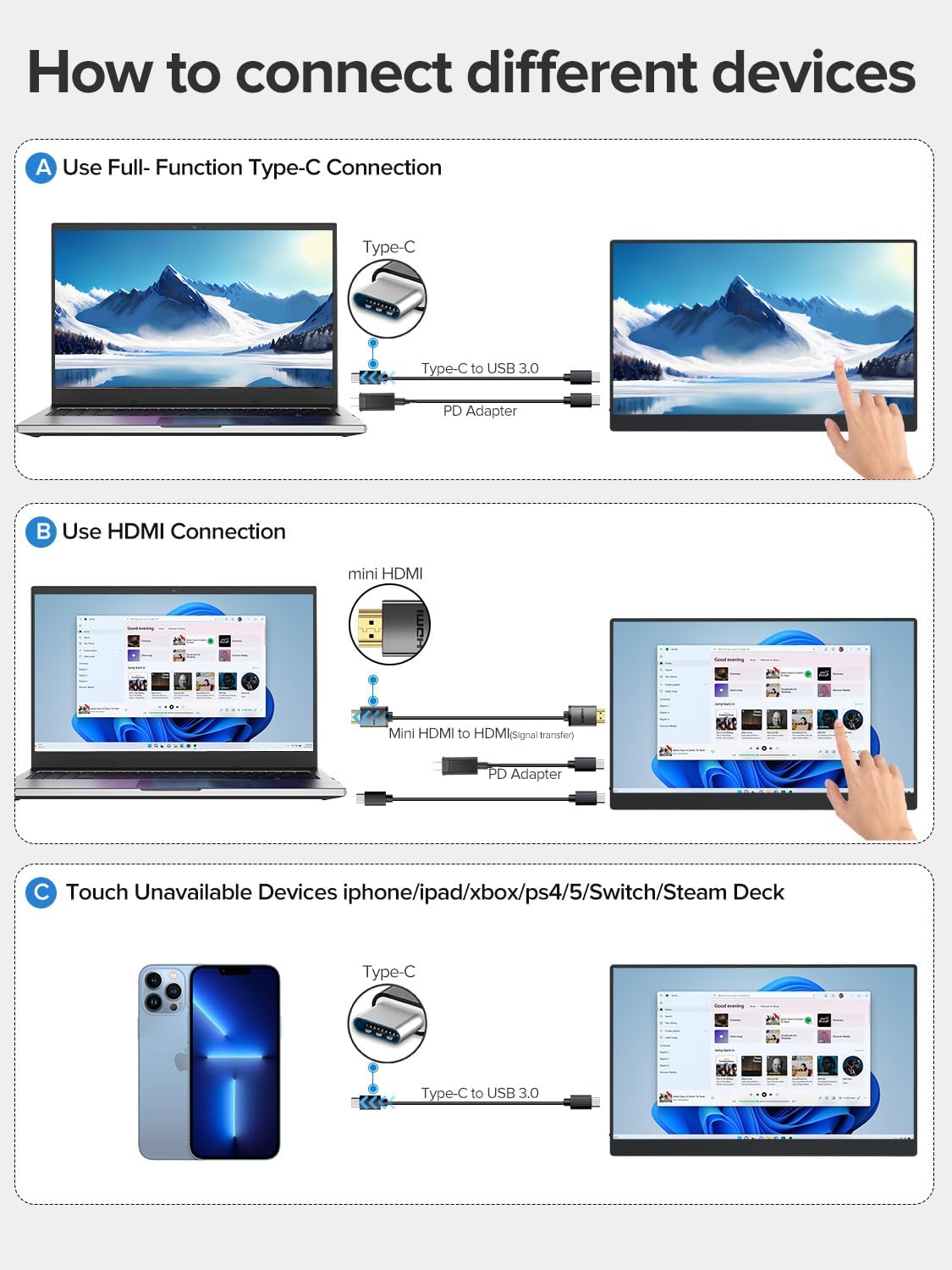
- Using a Full-Function USB-C Cable: Connect one end of the USB-C to USB-C cable to your device's full-function USB-C port and the other end to one of the monitor's Type C 3.1 ports. This single cable can transmit power, video, audio, and touch signals. An additional power adapter may be needed for some devices or if the monitor requires more power.
- Using HDMI and USB-A to USB-C Cables: Connect the Mini HDMI to HDMI cable from your device's HDMI port to the monitor's Mini HDMI port for video and audio. Then, connect the USB-A to USB-C cable from your device's USB-A port to one of the monitor's Type C 3.1 ports for power and touch functionality. An additional power adapter may be required.
- Devices Without Touch Support: For devices like iPhones, iPads, Xbox, PS5, Nintendo Switch, or Steam Deck, you can connect for display and audio using the appropriate cables (e.g., USB-C for video/power or HDMI for video/audio). Touch functionality will not be available for these devices.
Using the Protective Case as a Stand
The included smart cover can be folded to create a stable stand for your monitor. Watch the video below for a demonstration.
คำแนะนำการใช้งาน
เปิด/ปิดเครื่อง
- To power on the monitor, press the ปุ่มเปิด/ปิด/ย้อนกลับ.
- To power off the monitor, press and hold the ปุ่มเปิด/ปิด/ย้อนกลับ for a few seconds until the screen turns off.
เมนูที่แสดงบนหน้าจอ (OSD)
The OSD menu allows you to adjust various display settings. Use the ปุ่มลูกรอก to navigate and select options, and the ปุ่มเปิด/ปิด/ย้อนกลับ to exit or go back.
- กดปุ่ม ปุ่มลูกรอก เพื่อเปิดเมนู OSD
- หมุน ปุ่มลูกรอก up or down to navigate through menu options.
- กดปุ่ม ปุ่มลูกรอก เพื่อเลือกตัวเลือกหรือยืนยันการตั้งค่า
- กดปุ่ม ปุ่มเปิด/ปิด/ย้อนกลับ เพื่อกลับไปยังเมนูก่อนหน้าหรือออกจากเมนู OSD
ฟังก์ชั่นสัมผัส
The monitor features a 10-point capacitive touchscreen for intuitive interaction. Touch functionality depends on the connected device.

- รองรับมัลติทัช: Fully supported for Windows PCs, Android phones, and tablets, allowing for gestures like pinch-to-zoom, scrolling, and swiping.
- Single-Touch Support: For Mac devices (MacBook, iMac, Mac mini), single-touch gestures are supported.
- No Touch Support: Devices such as iPhones, iPads, Xbox, PS5, Nintendo Switch, and Steam Deck do not support touch input on this monitor. The monitor will function as a non-touch display for these devices.

โหมดการแสดงผล
The monitor supports various display configurations to suit your needs:

- โหมดมิเรอร์: คัดลอกเนื้อหาจากหน้าจอหลักของคุณไปยังจอภาพพกพา
- โหมดขยาย: Extends your desktop across both screens, providing more workspace. You can set the portable monitor as your main screen.
- โหมดหน้าจอที่สอง: Uses the portable monitor as a secondary display. Note that touch functionality may be limited or unavailable in this mode for certain operating systems or devices.
- ปฐมนิเทศ: The monitor supports both horizontal (landscape) and vertical (portrait) orientations. Adjust settings on your connected device as needed.
การซ่อมบำรุง
- การทำความสะอาดหน้าจอ: ใช้ผ้านุ่มไม่เป็นขุยเช็ดเล็กน้อยampล้างด้วยน้ำหรือน้ำยาทำความสะอาดหน้าจอ หลีกเลี่ยงสารเคมีรุนแรงหรือวัสดุที่มีฤทธิ์กัดกร่อน
- ทำความสะอาดร่างกาย: เช็ดตัวจอภาพด้วยผ้าแห้งนุ่มๆ
- พื้นที่จัดเก็บ: When not in use, store the monitor in its protective case in a cool, dry place away from direct sunlight and extreme temperatures.
- การจัดการ: ควรหลีกเลี่ยงการทำจอภาพตกหรือการกระแทกอย่างแรง และอย่าวางสิ่งของหนักทับจอภาพ
การแก้ไขปัญหา
| ปัญหา | สาเหตุที่เป็นไปได้ | สารละลาย |
|---|---|---|
| ไม่มีภาพแสดง/ไม่มีสัญญาณ | ต่อสายเคเบิลไม่ถูกต้อง; พลังงานไม่เพียงพอ; เลือกแหล่งสัญญาณเข้าไม่ถูกต้อง | Ensure cables are securely connected. Connect the power adapter. Check your device's display settings. Use the OSD menu to select the correct input source. |
| ฟังก์ชั่นสัมผัสไม่ทำงาน | Incorrect cable connection; Device does not support touch; Operating system limitations. | Ensure the USB-C cable (or USB-A to USB-C for HDMI) is connected and supports touch data. Verify your device's compatibility with touch input. Some devices/OS configurations may limit touch functionality. |
| หน้าจอกะพริบ | ปัญหาเกี่ยวกับสายเคเบิล; กระแสไฟไม่เสถียร | Try a different cable. Ensure the monitor is receiving stable power, especially if using a single USB-C connection. Connect the dedicated power adapter. |
| ไม่มีเสียง | Volume too low; Incorrect audio output selected on device; Faulty cable. | Adjust monitor volume via OSD. Check your device's audio output settings. Ensure cables are properly connected. |
ข้อมูลจำเพาะ
| คุณสมบัติ | ข้อมูลจำเพาะ |
|---|---|
| หมายเลขรุ่น | ยูพี15605 |
| ขนาดหน้าจอ | 15.6 นิ้ว |
| ปณิธาน | ความละเอียด Full HD 1080p (1920 x 1080 พิกเซล) |
| ประเภทแผง | จอ LCD ไอพีเอส |
| อัตราการรีเฟรช | 60 เฮิรตซ์ |
| เวลาตอบสนอง | 1 มิลลิวินาที |
| อัตราส่วนภาพ | 16:9 น. |
| อัตราส่วนคอนทราสต์ | 2000:1 น. |
| ความสว่าง | 300 ลูเมน (นิต) |
| Viewอิงแองเกิล | 178 องศา |
| พื้นผิวหน้าจอ | แมทต์ |
| ค่าขอบเขตสี | 125% |
| คุณสมบัติพิเศษ | USB Hub, Touchscreen, Portable, Flicker-Free, Ultra-Thin, HDR, Eye Care, Contrast Enhancement, G-Sync Compatible |
| ฮาร์ดแวร์อินเตอร์เฟซ | Mini HDMI, USB-C (x2) |
| ขนาดสินค้า (ลxกxส) | 35 x 22 x 1 ซม. |
| น้ำหนัก | 2 กิโลกรัม (ประมาณ 1.5 ปอนด์) |
| อุปกรณ์ที่รองรับ | Desktop PC, Laptop, Smartphone, Tablet, Game Consoles |
การรับประกันและการสนับสนุน
Your UPERFECT monitor comes with a รับประกันหนึ่งปี นับจากวันที่ซื้อ โดยครอบคลุมถึงข้อบกพร่องจากการผลิต โปรดเก็บหลักฐานการซื้อไว้เพื่อขอรับสิทธิ์การรับประกัน
For technical support, warranty inquiries, or any questions regarding your product, please contact UPERFECT customer service through the retailer's platform or the official UPERFECT webเว็บไซต์ ทีมสนับสนุนของเราพร้อมให้ความช่วยเหลือคุณในทุกปัญหาที่คุณอาจพบเจอ