
1. บทนำ
The Losfom WD1 Body Camera is a compact and versatile recording device designed for various applications, including law enforcement, security patrols, and outdoor monitoring. It features a 2100mAh battery for extended recording times, clear night vision capabilities, and supports external memory for flexible storage management. This manual provides detailed instructions for the proper setup, operation, and maintenance of your WD1 body camera.
2. เนื้อหาบรรจุภัณฑ์
ก่อนดำเนินการต่อ โปรดตรวจสอบว่าสินค้าทั้งหมดมีอยู่ในแพ็คเกจของคุณ:
- WD1 Body Camera
- Long Clip (180° Rotatable)
- Short Clip (360° Rotatable)
- สาย USB
- คู่มือการใช้งาน

Figure 2.1: Package contents of the Losfom WD1 Body Camera.
3. อุปกรณ์โอเวอร์view
Familiarize yourself with the main components and controls of the WD1 body camera.

รูปที่ 3.1: ด้านหน้าและด้านหลัง views of the WD1 Body Camera.
4. การตั้งค่า
4.1 การชาร์จแบตเตอรี่
The WD1 body camera is equipped with a 2100mAh battery. For optimal performance, fully charge the device before first use.
- Connect the provided USB cable to the camera's charging port (Type-C).
- เชื่อมต่อปลายอีกด้านหนึ่งของสาย USB เข้ากับอะแดปเตอร์ไฟ USB ที่ใช้งานร่วมกันได้ (ไม่รวมอยู่ด้วย) หรือพอร์ต USB ของคอมพิวเตอร์
- The charging indicator light will illuminate. Once fully charged, the light will turn off.
บันทึก: A full charge provides up to 10 hours of continuous 1080P video recording (with screen and IR off). Use the supplied USB cable and a compatible charging block for proper charging.
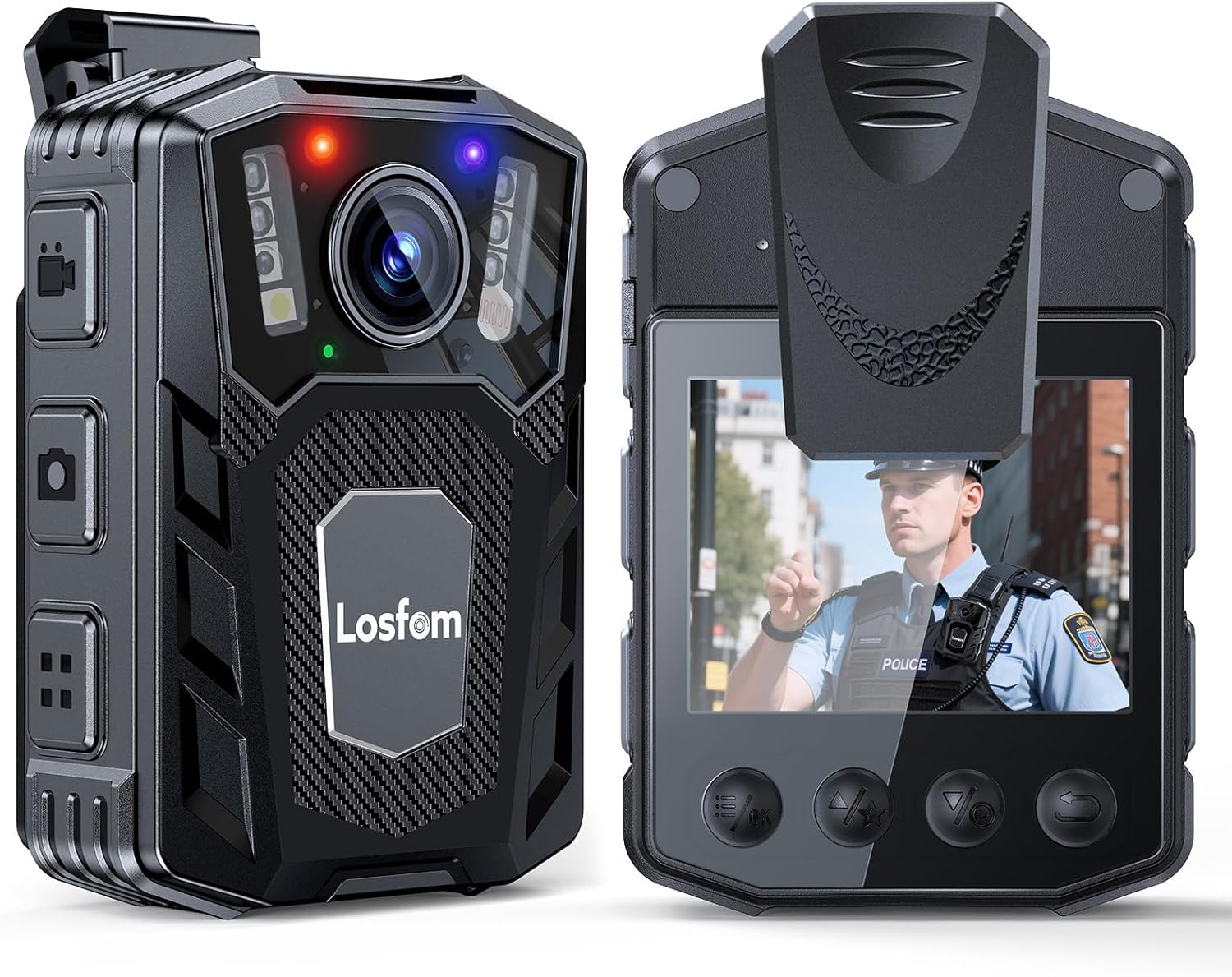
Figure 4.1: Charging the WD1 Body Camera.
4.2 Inserting/Replacing the Memory Card
The WD1 body camera supports external Micro SD cards for storage. A Micro SD card is included.
- หาช่องเสียบการ์ด Micro SD ที่ด้านข้างของกล้อง
- ค่อยๆ เสียบการ์ด Micro SD ลงในช่องเสียบ โดยให้ด้านที่เป็นขั้วสีทองหันลง จนกระทั่งได้ยินเสียงคลิกเข้าที่
- ในการถอดออก ให้ดันการ์ดเข้าไปด้านในจนกระทั่งการ์ดเด้งออกมา
สำคัญ: Ensure the camera is powered off before inserting or removing the memory card to prevent data loss or damage. The camera supports up to 256GB Micro SD cards.

Figure 4.2: Inserting a Micro SD card.
4.3 การติดคลิป
The camera comes with two types of clips for versatile attachment: a long clip (180° rotatable) and a short clip (360° rotatable).
- Select the appropriate clip for your intended use (e.g., long clip for uniform pockets, short clip for lapels or straps).
- Align the clip with the mounting slot on the back of the camera and slide it in until it securely locks.
- Ensure the clip is firmly attached before wearing the camera.

Figure 4.3: Attaching the short and long clips.
5. คู่มือการใช้งาน
5.1 การเปิด/ปิดเครื่อง
- เปิดเครื่อง: กดปุ่มเปิด/ปิดค้างไว้สองสามวินาทีจนกระทั่งหน้าจอสว่างขึ้น
- หมดแรง: กดปุ่มเปิด/ปิดค้างไว้สองสามวินาทีจนกว่าอุปกรณ์จะปิดลง
5.2 การบันทึกวิดีโอ
The WD1 body camera features one-button control for quick recording activation.
- ตรวจสอบให้แน่ใจว่ากล้องเปิดอยู่
- Press the dedicated Record button once to start video recording. A red indicator light will typically flash, and a recording icon will appear on the screen.
- กดปุ่มบันทึกอีกครั้งเพื่อหยุดการบันทึก
บันทึก: The camera supports continuous recording with adjustable video segment lengths (e.g., 5, 10, 15, 20 minutes). Refer to the on-screen menu for settings.

Figure 5.1: WD1 Body Camera in use for various activities.
5.3 การมองเห็นตอนกลางคืน
The camera is equipped with infrared (IR) 6 LED lights for clear night vision recording up to 10 meters.
- Night vision mode can typically be activated or set to automatic via the camera's menu settings.
- When active, the IR lights will illuminate, allowing the camera to capture footage in low-light or total darkness.

Figure 5.2: Night vision feature in operation.
5.4 การบันทึกแบบวนซ้ำ
The loop recording function ensures continuous recording by automatically overwriting the oldest fileเมื่อการ์ดหน่วยความจำเต็ม ระบบจะแจ้งเตือนเพื่อป้องกันไม่ให้การบันทึกหยุดลงเนื่องจากการ์ดเต็ม
- This feature is typically enabled by default. You can adjust settings for loop recording duration in the camera's menu.

รูปที่ 5.3: ฟังก์ชันการบันทึกแบบวนซ้ำ
5.5 การเชื่อมต่อกับคอมพิวเตอร์
ถึง view หรือบันทึกการโอน fileเชื่อมต่อกล้องเข้ากับคอมพิวเตอร์โดยใช้สาย USB ที่ให้มา
- เปิดกล้อง
- เชื่อมต่อกล้องเข้ากับคอมพิวเตอร์โดยใช้สาย USB
- กล้องควรปรากฏเป็นไดรฟ์แบบถอดได้บนคอมพิวเตอร์ของคุณ
- Navigate to the camera's storage to access video and audio files.
เคล็ดลับ: If files are not playing correctly on your computer's default player, try using a universal media player like VLC.
6. การบำรุงรักษา
6.1 การทำความสะอาดกล้อง
- ใช้ผ้าแห้งนุ่มๆ เช็ดทำความสะอาดตัวกล้อง
- สำหรับเลนส์ ให้ใช้ผ้าเช็ดเลนส์และน้ำยาเฉพาะทางเพื่อป้องกันรอยขีดข่วน
- อย่าใช้สารเคมีรุนแรงหรือน้ำยาทำความสะอาดที่มีฤทธิ์กัดกร่อน
6.2 พื้นที่จัดเก็บ
- เก็บกล้องไว้ในที่แห้งและเย็น หลีกเลี่ยงแสงแดดโดยตรงและอุณหภูมิที่สูงหรือต่ำเกินไป
- หากเก็บรักษาเป็นเวลานาน ควรตรวจสอบให้แน่ใจว่าแบตเตอรี่มีประจุอยู่บ้าง (ประมาณ 50%) เพื่อยืดอายุการใช้งาน
7 การแก้ไขปัญหา
- กล้องไม่สามารถเปิดได้:
- Ensure the battery is charged. Connect the camera to a power source using the provided USB cable and charging block.
- If the camera freezes, locate the reset button (if available, often a small pinhole) and use a thin object to press it.
- ไม่สามารถโอนได้ fileกับคอมพิวเตอร์:
- Ensure the camera is powered on and properly connected to the computer via the USB cable.
- ลองใช้พอร์ต USB หรือคอมพิวเตอร์อื่น
- Verify the Micro SD card is correctly inserted.
- วีดีโอ files are unreadable:
- Some video players may have compatibility issues. Try using a different media player, such as VLC Media Player, which supports a wide range of formats.
- คุณภาพวิดีโอไม่ดีในเวลากลางคืน:
- Ensure night vision (IR lights) is enabled in the camera settings.
- ทำความสะอาดเลนส์กล้องเพื่อขจัดสิ่งกีดขวางหรือคราบสกปรกต่างๆ
8. ข้อมูลจำเพาะ
| คุณสมบัติ | ข้อมูลจำเพาะ |
|---|---|
| ยี่ห้อ | ลอฟฟอม |
| หมายเลขรุ่น | WD1 |
| ความละเอียดในการจับภาพวิดีโอ | 1080p |
| เทคโนโลยีโฟโต้เซนเซอร์ | ซีมอส |
| ความจุของแบตเตอรี่ | 2100mAh |
| อายุการใช้งานแบตเตอรี่โดยเฉลี่ย | Up to 10 hours (1080P video recording, screen & IR off) |
| ช่วงการมองเห็นตอนกลางคืน | ระยะสูงสุด 10 เมตร (ด้วยไฟ LED อินฟราเรด 6 ดวง) |
| ประเภทหน่วยความจำแฟลช | ไมโคร SD (รองรับสูงสุด 256GB) |
| รูปแบบการจับภาพวิดีโอ | เอ็มโอวี |
| รูปแบบเสียงที่รองรับ | เอเอซี |
| ขนาดหน้าจอ | 2 นิ้ว |
| เทคโนโลยีการเชื่อมต่อ | ยูเอสบี |
| สี | สีดำ |
| ระดับความต้านทานต่อน้ำ | ไม่ทนน้ำ |
9. การรับประกันและการสนับสนุน
9.1 ข้อมูลการรับประกัน
The Losfom WD1 Body Camera comes with a 2-year warranty from the date of purchase. This warranty covers manufacturing defects and malfunctions under normal use. It does not cover damage caused by misuse, accidents, unauthorized modifications, or natural disasters. Please retain your proof of purchase for warranty claims.
9.2 การสนับสนุนลูกค้า
For technical assistance, troubleshooting, or warranty inquiries, please contact Losfom customer support. Refer to the contact information provided on the official Losfom webสถานที่หรือบรรจุภัณฑ์
10. วิดีโอผลิตภัณฑ์อย่างเป็นทางการ
วิดีโอนี้ให้ภาพที่ชัดเจนview of the Losfom WD1 Body Camera's features and usage scenarios, including its long battery life, one-button control, and various mounting options.