
1. บทนำ
This manual provides essential information for the safe and efficient use of your Motorola Razr 60 Ultra smartphone. Please read this guide thoroughly before operating your device to ensure optimal performance and longevity. The Motorola Razr 60 Ultra is a foldable smartphone designed for advanced mobile computing and communication.
2. อะไรอยู่ในกล่อง
ตรวจสอบว่ามีรายการทั้งหมดอยู่ในบรรจุภัณฑ์ผลิตภัณฑ์ของคุณ:
- Motorola Razr 60 Ultra Smartphone
- สาย USB
- เคสโทรศัพท์
- เครื่องมือถอดซิม
3. อุปกรณ์โอเวอร์view
The Motorola Razr 60 Ultra features an iconic foldable design with premium materials and advanced technology.
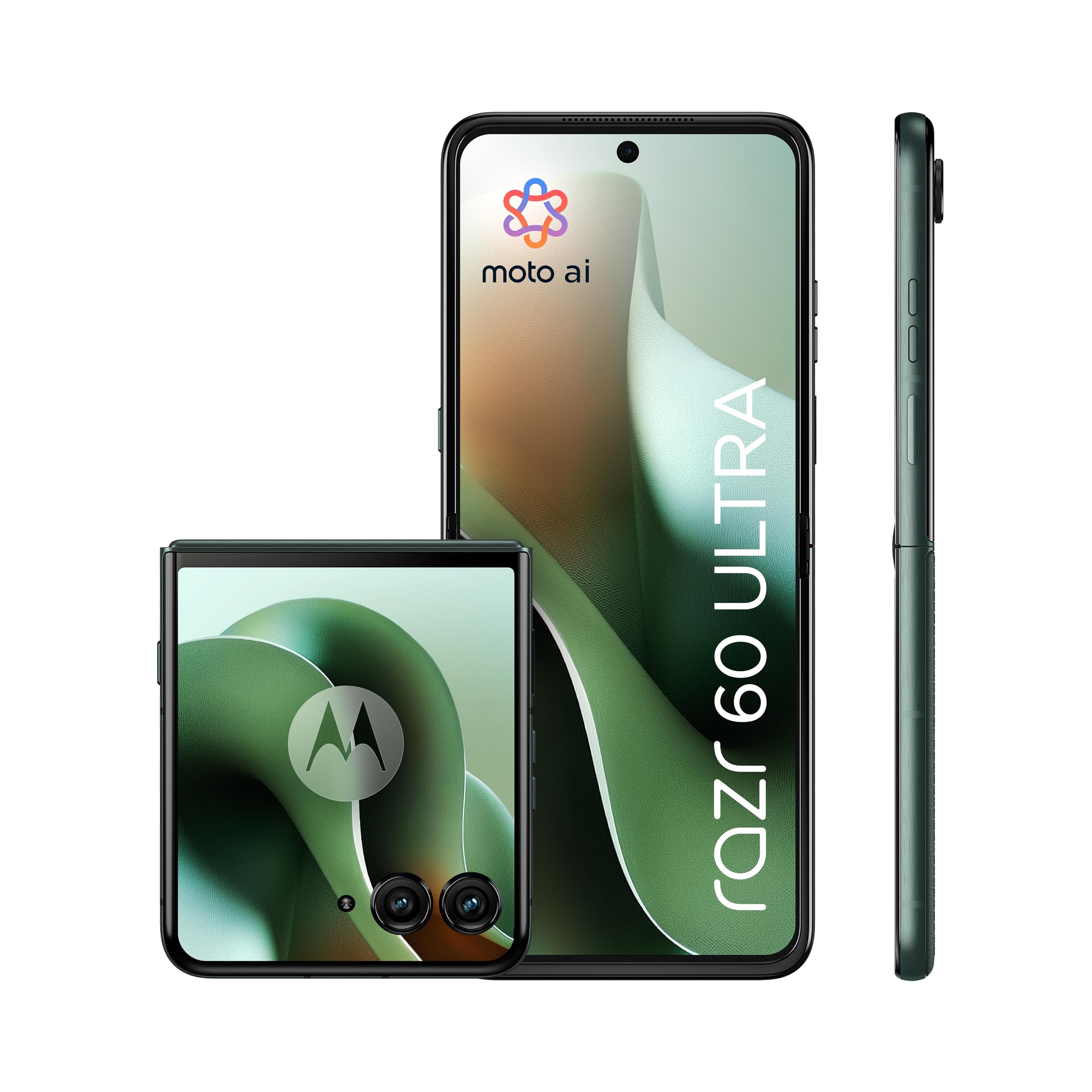
Figure 3.1: Motorola Razr 60 Ultra, folded view.
3.1 การแสดงผล
- จอแสดงผลภายนอก: A 4.0-inch pOLED display with up to 165Hz refresh rate, allowing access to functions without unfolding the phone.
- จอแสดงผลภายใน: A 7.0-inch Super HD pOLED display with 165Hz refresh rate, Dolby Vision, and HDR10+ for an immersive visual experience.

Figure 3.2: External display functionality.

Figure 3.3: Internal display view.
3.2 การออกแบบและความทนทาน
The device features a high-quality Alcantara finish and a durable titanium hinge. It is rated IP48 for dust and water resistance.

Figure 3.4: Design elements and durability features.
4. การตั้งค่า
4.1 การใส่ซิมการ์ด
- ค้นหาถาดใส่การ์ด SIM ที่ด้านข้างของอุปกรณ์
- ใส่เครื่องมือถอดซิมเข้าไปในรูเล็ก ๆ ข้างถาดแล้วกดเบา ๆ จนกว่าถาดจะดีดออกมา
- Place your Nano SIM card(s) into the tray with the gold contacts facing down. This device supports Dual SIM.
- ค่อยๆ ดันถาดกลับเข้าไปในช่องจนกระทั่งล็อคเข้าที่
4.2 การเปิดเครื่องครั้งแรกและการตั้งค่า
- กดปุ่มเปิด/ปิดค้างไว้จนกระทั่งโลโก้ Motorola ปรากฏขึ้น
- ทำตามคำแนะนำบนหน้าจอเพื่อเลือกภาษา เชื่อมต่อกับเครือข่าย Wi-Fi และตั้งค่าบัญชี Google ของคุณ
- You will be guided through setting up security features such as fingerprint recognition and a screen lock (PIN, pattern, or password).
5. การใช้งานอุปกรณ์ของคุณ
5.1 การนำทางพื้นฐาน
- แฉ/พับ: Gently unfold the device to access the main internal display. Fold it to use the external display for quick interactions.
- External Display Usage: The 4.0-inch external display allows you to check notifications, control media, take quick photos, and interact with certain apps without opening the phone.
5.2 Moto AI Features
Your Motorola Razr 60 Ultra is enhanced with Moto AI, offering intelligent assistance and optimized performance. This includes features like Google Gemini for content creation and personalized smartphone experiences.

Figure 5.1: Interacting with Moto AI (Google Gemini) on the external display.
5.3 Quick Gestures
- จับภาพด่วน: Twist your wrist twice quickly to open the camera from any screen.
- ไฟฉายเร็ว: Make two chopping motions with your phone to turn the flashlight on or off.
6. คุณสมบัติของกล้อง
The Motorola Razr 60 Ultra is equipped with a versatile camera system for high-quality photography and videography.

รูปที่ 6.1: เกินview of the camera system.
- กล้องหลังคู่: Two 50MP sensors, including a main camera with OIS (Optical Image Stabilization) and an ultrawide/macro lens.
- กล้องหน้า: A 50MP selfie camera with Quad Pixel technology for enhanced low-light performance.
- Moto AI Integration: Utilizes AI for improved image processing, dynamic range, and detail capture, even in challenging lighting conditions.
- เฟล็กซ์ View & Camcorder: Use the foldable design to position the phone for unique shooting angles and hands-free video recording.
7. แบตเตอรี่และการชาร์จ
The device is powered by a 4700mAh battery, supporting multiple charging methods.

Figure 7.1: Battery and charging capabilities.
- ความจุแบตเตอรี่: 4700 มิลลิวินาทีamper-hour (mAh).
- TurboPower Charging: Supports ultra-fast 68W wired charging, providing significant power in minutes.
- การชาร์จแบบไร้สาย: Supports 30W wireless charging.
- การชาร์จแบบไร้สายแบบย้อนกลับ: Capable of 5W reverse wireless charging to power compatible accessories.
- อายุการใช้งานแบตเตอรี่โดยเฉลี่ย: Up to 36 hours of usage on a single charge, depending on usage patterns.
8. การปฏิบัติงาน
The Motorola Razr 60 Ultra delivers robust performance for demanding applications and multitasking.

Figure 8.1: Performance specifications.
- โปรเซสเซอร์: Qualcomm Snapdragon 8 Elite, providing high-speed processing and intelligent performance.
- แรม : 16GB installed RAM for smooth multitasking.
- พื้นที่เก็บข้อมูลภายใน: 512GB of internal memory for applications, media, and files.
- ระบบปฏิบัติการ: Android 15.0, offering the latest features and security updates.
- การเชื่อมต่อ: Supports 5G for fast downloads and seamless streaming.
9. การบำรุงรักษาและการดูแล
9.1 การทำความสะอาดอุปกรณ์ของคุณ
- ใช้ผ้านุ่มที่ไม่เป็นขุยในการทำความสะอาดหน้าจอและตัวเครื่องโทรศัพท์
- Avoid using harsh chemicals or abrasive materials, which can damage the finish or screen.
- สำหรับรอยเปื้อนฝังแน่น ให้เช็ดเบาๆampชุบผ้าด้วยน้ำหรือน้ำยาทำความสะอาดหน้าจอโดยเฉพาะ
9.2 Screen Care for Foldable Display
- Avoid pressing hard on the screen, especially near the crease.
- Keep the screen free from sharp objects or debris when folding the device.
- Do not apply screen protectors not specifically designed for foldable displays.
9.3 ความทนทานต่อน้ำและฝุ่นละออง
The device has an IP48 rating, indicating resistance to dust and splashes. It is not designed for submersion in water. Avoid exposing the device to pressurized water or liquids.
9.4 การอัปเดตซอฟต์แวร์
Regularly check for and install software updates to ensure your device has the latest features, security patches, and performance improvements. You can usually find this option in the device's Settings menu under "System" or "Software Update."
10 การแก้ไขปัญหา
10.1 ปัญหาทั่วไปและแนวทางแก้ไข
- อุปกรณ์ไม่เปิด: Ensure the battery is charged. Connect the device to the charger for at least 15 minutes, then try powering it on.
- หน้าจอไม่ตอบสนอง: รีสตาร์ทอุปกรณ์โดยกดปุ่มเปิด/ปิดค้างไว้ประมาณ 10-15 วินาที จนกว่าเครื่องจะรีบูต
- แบตเตอรี่หมดเร็ว: Check background app usage, reduce screen brightness, disable unnecessary features like GPS or Bluetooth when not in use. Ensure software is up to date.
- ปัญหาการเชื่อมต่อ (Wi-Fi/5G): Toggle Wi-Fi or mobile data off and on. Restart the device. For Wi-Fi, try forgetting the network and reconnecting.
- แอปขัดข้อง: ล้างแคชและข้อมูลของแอปที่มีปัญหาใน การตั้งค่า > แอป หากปัญหายังคงอยู่ ให้ถอนการติดตั้งและติดตั้งแอปใหม่อีกครั้ง
10.2 รีเซ็ตเป็นค่าโรงงาน
หากเกิดปัญหาซอฟต์แวร์อย่างต่อเนื่อง อาจจำเป็นต้องรีเซ็ตเป็นค่าเริ่มต้นจากโรงงาน คำเตือน: This will erase all data on your device. Back up important data before proceeding. Navigate to Settings > System > Reset options > Erase all data (factory reset).
11. ข้อมูลจำเพาะ
Key technical specifications for the Motorola Razr 60 Ultra:
| คุณสมบัติ | ข้อมูลจำเพาะ |
|---|---|
| ยี่ห้อ | โมโตโรล่า |
| ชื่อรุ่น | Razr 60 Ultra |
| ระบบปฏิบัติการ | แอนดรอยด์ 15.0 |
| ประเภทโปรเซสเซอร์ | วอลคอมม์ สแนปดราก้อน 8 อีลีท |
| ความเร็วซีพียู | 4320 เมกะเฮิรตซ์ |
| ติดตั้งแรมแล้ว | 16GB |
| ความจุในการจัดเก็บข้อมูล | 512GB |
| ขนาดหน้าจอหลัก | 7.0 นิ้ว |
| ขนาดหน้าจอภายนอก | 4.0 นิ้ว |
| ประเภทหน้าจอ | pOLED |
| อัตราการรีเฟรช | 165 เฮิรตซ์ |
| ความจุของแบตเตอรี่ | 4700 มิลลิแอมป์ |
| ชาร์จเร็ว | เทอร์โบพาวเวอร์ 68 วัตต์ |
| การชาร์จแบบไร้สาย | 30วัตต์ |
| การชาร์จไร้สายแบบย้อนกลับ | 5W |
| ความละเอียดกล้องหลัง | 50 MP (Main) + 50 MP (Ultrawide/Macro) |
| ความละเอียดของกล้องหน้า | 50 MP |
| ช่องใส่ซิมการ์ด | ซิมคู่ |
| เทคโนโลยีการเชื่อมต่อ | 5G, GSM, LTE, Wi-Fi |
| ระดับความต้านทานต่อน้ำ | IP48 (ทนน้ำ) |
| ข้อมูลไบโอเมตริกซ์ | การจดจำลายนิ้วมือ |
| น้ำหนักสินค้า | 200 กรัม |
| ขนาดรายการ | 17.1 x 0.7 x 7.4 ซม. (กางออก) |
12. การรับประกันและการสนับสนุน
12.1 การรับประกันสินค้า
The Motorola Razr 60 Ultra comes with a การรับประกันจากผู้ผลิต 2 ปีการรับประกันนี้ครอบคลุมข้อบกพร่องด้านวัสดุและฝีมือการผลิตภายใต้การใช้งานปกติ โปรดเก็บหลักฐานการซื้อไว้เพื่อขอรับสิทธิ์การรับประกัน
12.2 ความพร้อมของชิ้นส่วนอะไหล่
Spare parts for this device are available for a duration of 3 ปี within the EU, ensuring long-term support for repairs and maintenance.
12.3 การสนับสนุนลูกค้า
หากต้องการความช่วยเหลือเพิ่มเติม การสนับสนุนด้านเทคนิค หรือการเรียกร้องการรับประกัน โปรดไปที่ฝ่ายสนับสนุน Motorola อย่างเป็นทางการ website or contact their customer service. Refer to the documentation included with your device for specific contact details in your region.
You can also visit the Motorola store on Amazon for additional product information and support resources: ร้านโมโตโรลา