
1. บทนำ
This manual provides essential instructions for the installation, operation, and maintenance of your Renogy Rover 20A MPPT Charge Controller. Please read this manual thoroughly before installation and use to ensure optimal performance and safety. Keep this manual for future reference.

Figure 1.1: Renogy Rover 20A MPPT Charge Controller
The Renogy Rover 20A MPPT Charge Controller is designed to optimize the charging process from your solar panels to your battery bank. It features Maximum Power Point Tracking (MPPT) technology, ensuring high efficiency even under varying light conditions. This controller is compatible with 12V and 24V battery systems and supports various battery types, including Gel, Sealed, Flooded, and Lithium.
2. ข้อมูลด้านความปลอดภัย
โปรดปฏิบัติตามข้อควรระวังด้านความปลอดภัยต่อไปนี้ในระหว่างการติดตั้งและการใช้งาน:
- ควรเชื่อมต่อแบตเตอรี่เข้ากับตัวควบคุมการชาร์จก่อนเสมอ จากนั้นจึงเชื่อมต่อแผงโซลาร์เซลล์ และสุดท้ายเชื่อมต่อกับโหลด ถอดปลั๊กออกในลำดับย้อนกลับ
- Ensure all wiring is correctly sized and connections are secure to prevent loose connections that can cause excessive heating.
- Install the charge controller in a well-ventilated area, away from flammable materials and direct sunlight.
- Do not disassemble or attempt to repair the charge controller. Contact Renogy support for assistance.
- Wear appropriate personal protective equipment, including eye protection, when working with batteries and electrical systems.
- ตรวจสอบให้แน่ใจว่าระบบมีปริมาตรtage ไม่เกินปริมาณอินพุตสูงสุดtage of the controller (100V).
3. เนื้อหาบรรจุภัณฑ์
ตรวจสอบว่ามีรายการทั้งหมดรวมอยู่ในแพ็คเกจของคุณ:
- Renogy Rover 20A MPPT Solar Charge Controller
- สายเซ็นเซอร์อุณหภูมิ
- คู่มือการใช้งาน (เอกสารนี้)
4. คุณสมบัติของผลิตภัณฑ์
The Renogy Rover 20A MPPT Charge Controller offers advanced features for efficient solar power management:
- Dual-Peak MPPT Technology: Achieves up to 99.9% tracking efficiency and 98% conversion efficiency, optimizing solar harvest even in partial shading or cloudy conditions.
- ความเข้ากันได้ของแบตเตอรี่ที่กว้าง: Supports Gel, Sealed, Flooded, and Lithium battery types.
- การชดเชยอุณหภูมิ: Operates effectively across a wide temperature range (-40°F to 149°F) with automatic charging adjustments to protect batteries.
- การคุ้มครองที่ครอบคลุม: Includes TVS surge protection against lightning strikes, reverse polarity, overcharging, over-discharging, overload, and short-circuit protection.
- 4-สtagอี การชาร์จ: Provides precise Bulk, Absorption, Float, and Equalization charging for lead-acid batteries, extending their lifespan.
- Lithium Battery Reactivation: Safely revives deeply discharged lithium batteries.
- LCD Display & Data Logging: Backlit LCD displays real-time voltage, current, and error information. Stores up to one year of performance data.
- รองรับ Modbus: Integrates Modbus protocol for smart home solar kits and remote monitoring.
- Direct DC Load Output: Can directly power DC appliances and handle capacitive load surges. Features load scheduling via timer.
- App Monitoring (Optional): Compatible with the BT-2 module (sold separately) for monitoring via the Renogy DC Home App.
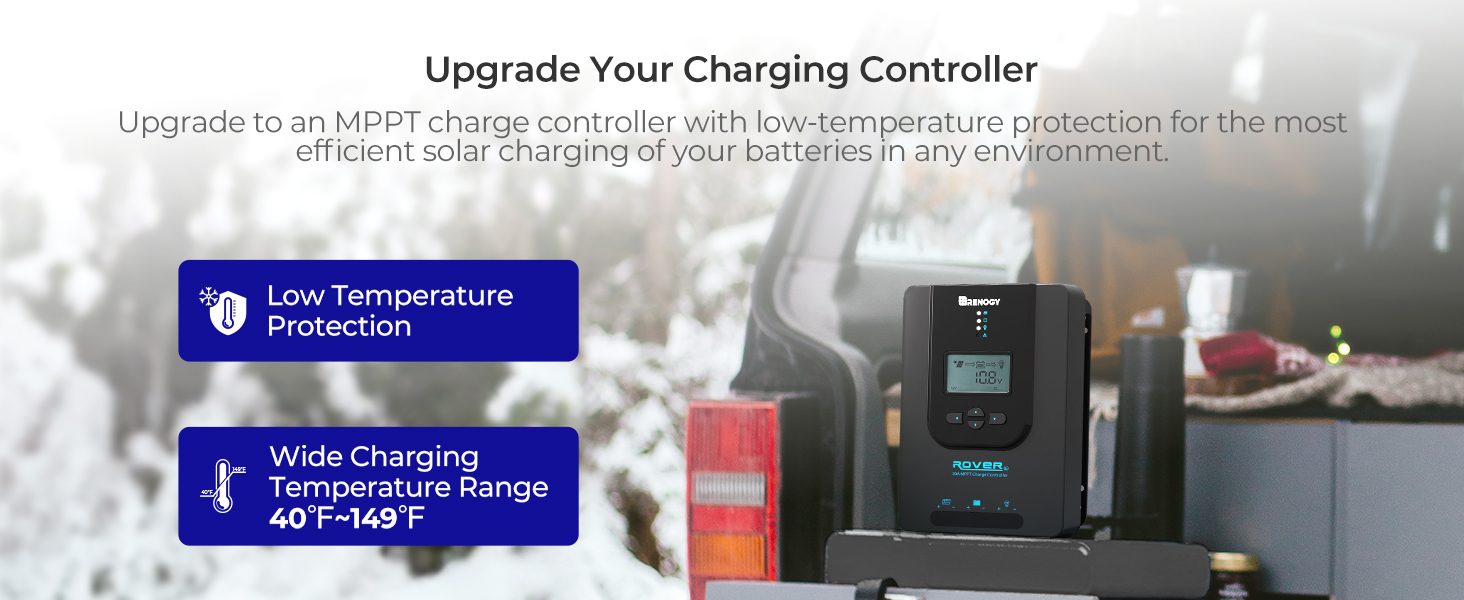
Figure 4.1: Maximizing Solar Harvest with 99% Tracking Efficiency

Figure 4.2: Charge Controller with Wide Temperature Adaptability (-40°F to 149°F)
5. การตั้งค่าและการติดตั้ง
Follow these steps for proper installation of your charge controller:
- การติดตั้ง: Choose a dry, well-ventilated location for mounting the controller. Ensure there is sufficient clearance around the unit for heat dissipation. Mount vertically on a non-flammable surface.
- ลำดับการเดินสายไฟ:
- เชื่อมต่อสายแบตเตอรี่เข้ากับขั้วแบตเตอรี่บนตัวควบคุมการชาร์จ ตรวจสอบให้แน่ใจว่าขั้วถูกต้อง (+ ต่อกับ + และ - ต่อกับ -)
- เชื่อมต่อสายเคเบิลของแผงโซลาร์เซลล์เข้ากับขั้วต่อ PV บนตัวควบคุมการชาร์จ ตรวจสอบให้แน่ใจว่าขั้วถูกต้อง
- Connect the load cables to the load terminals on the charge controller (optional). Ensure correct polarity.
- เซ็นเซอร์อุณหภูมิ: Connect the included temperature sensor cable to the designated port on the controller. Place the sensor near the battery to enable accurate temperature compensation for charging.
- การเพิ่มพลังเริ่มต้น: Once all connections are secure, the controller will power on and display system information on the LCD.
Important: Always connect the battery first and disconnect the battery last to prevent damage to the controller.
6. คู่มือการใช้งาน
The LCD display and buttons allow you to monitor and configure the charge controller.
6.1. ระบบนำทางด้วยจอ LCD
Use the buttons on the front panel to navigate through the display screens and adjust settings. Refer to the on-screen prompts for specific actions like 'Select' or 'Enter'.
6.2. การเลือกประเภทแบตเตอรี่
ตัวควบคุมจะตรวจจับแรงดันไฟระบบ 12V/24V โดยอัตโนมัติtages for non-lithium batteries. For lithium batteries, you must manually adjust the battery voltage setting through the controller's menu to ensure proper charging parameters.
6.3. Lithium Battery Activation
The controller includes a lithium battery activation function. This feature allows charging of deeply discharged lithium batteries that might otherwise be unresponsive.

Figure 6.1: Lithium Activation ON
To prevent over-activation and unnecessary activation, you can turn OFF the lithium activation function. This helps avoid potential damage to the battery if it is not intended for activation.

Figure 6.2: Lithium Activation OFF
6.4. Monitoring and Load Control
The LCD provides real-time data on solar input, battery status, and load output. You can also configure load settings, including timers for scheduled operation of connected DC appliances.
7. การบำรุงรักษา
Regular maintenance ensures the longevity and optimal performance of your charge controller:
- ตรวจสอบการเชื่อมต่อ: ตรวจสอบความแน่นหนาและการกัดกร่อนของสายไฟทุกจุดเป็นระยะๆ ตรวจสอบให้แน่ใจว่าไม่มีสายไฟชำรุดหรือเสียหาย
- ทำความสะอาดตัวควบคุม: Keep the controller clean and free from dust and debris. Use a dry cloth to wipe the surface. Do not use liquids or solvents.
- การระบายอากาศ : ตรวจสอบให้แน่ใจว่าบริเวณที่ติดตั้งมีการระบายอากาศที่ดีเพื่อป้องกันความร้อนสูงเกินไป
- การตรวจสอบแบตเตอรี่: Regularly inspect your batteries for any signs of damage, swelling, or leaks.
8 การแก้ไขปัญหา
If you encounter issues with your charge controller, refer to the following common problems and solutions:
| ปัญหา | สาเหตุที่เป็นไปได้ | สารละลาย |
|---|---|---|
| คอนโทรลเลอร์ไม่เปิดเครื่อง | Loose battery connection, battery voltagอีต่ำเกินไป | Check battery wiring and voltage. Ensure battery is connected first. |
| ไม่มีการชาร์จพลังงานแสงอาทิตย์ | Solar panel not connected, insufficient sunlight, incorrect polarity | Verify solar panel connections and polarity. Check for shading. |
| โหลดไม่ทำงาน | Load disconnected, overload, load timer active | Check load connections. Reduce load. Adjust load timer settings. |
| ปริมาตรไม่ถูกต้องtagการอ่านค่า | Loose connections, faulty sensor | Check all wiring. Ensure temperature sensor is properly connected. |
For persistent issues or error codes not listed, please contact Renogy customer support.
9. ข้อมูลจำเพาะ
| ข้อมูลจำเพาะ | ค่า |
|---|---|
| ยี่ห้อ | เรโนจี |
| แบบอย่าง | Rover 20A MPPT |
| กระแสไฟชาร์จสูงสุด | 20เอ |
| เล่มระบบtage | 12V/24V Auto-Detect (DC) |
| อินพุต PV สูงสุด Voltage | 100โวลต์ |
| ประสิทธิภาพการติดตาม | 99.9% |
| ประสิทธิภาพการแปลง | 98% |
| ประเภทจอภาพ | จอแอลซีดี |
| ช่วงอุณหภูมิในการทำงาน | -40°F ถึง 149°F (-40°C ถึง 65°C) |
| วัสดุ | อะคริโลไนไตรล์บิวทาไดอีนสไตรีน (ABS), พลาสติก |
| น้ำหนักสินค้า | 1.59 กิโลกรัม |
| UPC / GTIN | 840315237445 |
10. การรับประกันและการสนับสนุน
The Renogy Rover 20A MPPT Charge Controller comes with a รับประกันวัสดุและฝีมือการผลิต 3 ปี. This warranty covers defects in materials and manufacturing under normal use.

Figure 10.1: 3-Year Material and Workmanship Warranty
For warranty claims, technical assistance, or any questions regarding your product, please contact Renogy customer support. Keep your purchase receipt as proof of purchase for warranty services.
You can find more information and contact details on the official Renogy webเว็บไซต์: www.renogy.com


