
การแนะนำ
Thank you for choosing the UGREEN 12000mAh 100W Fast Charging Power Bank. This device is designed to provide portable, high-speed charging for a wide range of electronic devices, including laptops, smartphones, and tablets. Please read this manual carefully to ensure safe and optimal use of your power bank.
สินค้าเกินview
The UGREEN 100W Power Bank features a compact design with a digital display for battery status and charging information. It includes multiple ports for versatile charging options.

คำอธิบายภาพ: ด้านหน้า view of the UGREEN 12000mAh 100W Fast Charging Power Bank, showcasing its sleek grey design and digital display.

คำอธิบายภาพ: ภาพระยะใกล้ view of the UGREEN Power Bank's top, highlighting the USB-C (IN/OUT 1) and USB-A (OUT 2) ports, along with the 100W power indicator.

คำอธิบายภาพ: The UGREEN Power Bank being held, illustrating its compact size and lightweight design, suitable for portability.
การตั้งค่า
- ค่าใช้จ่ายเริ่มต้น: Before first use, fully charge the power bank. Connect a USB-C cable to the IN/OUT 1 port and connect the other end to a suitable power adapter (not included). The digital display will show the charging progress.
- ตรวจสอบระดับแบตเตอรี่: กดปุ่มเปิดปิดสั้นๆ เพื่อ view เปอร์เซ็นต์แบตเตอรี่ปัจจุบันtage บนจอแสดงผลดิจิตอล
คำแนะนำการใช้งาน
การชาร์จพาวเวอร์แบงค์
To recharge your UGREEN Power Bank, connect a USB-C cable to the IN/OUT 1 port. The power bank supports fast charging input, allowing for quick replenishment of its internal battery.
การชาร์จอุปกรณ์ของคุณ
- เชื่อมต่ออุปกรณ์: Use a compatible charging cable to connect your device to either the USB-C (IN/OUT 1) or USB-A (OUT 2) port on the power bank.
- เริ่มชาร์จ: พาวเวอร์แบงค์จะตรวจจับอุปกรณ์ที่เชื่อมต่อโดยอัตโนมัติและเริ่มชาร์จ หน้าจอแสดงผลดิจิทัลจะแสดงกำลังไฟที่ส่งออก
- การชาร์จความเร็วสูง: The USB-C port supports up to 100W Power Delivery (PD) for fast charging compatible laptops and other devices.
- อุปกรณ์หลายเครื่อง: You can charge up to two devices simultaneously using both output ports.

คำอธิบายภาพ: The UGREEN Power Bank simultaneously charging a laptop via USB-C and another device via USB-A, demonstrating its multi-device charging capability.
โหมดการชาร์จกระแสต่ำ
For small devices like smartwatches, Bluetooth earbuds, or fitness trackers that require lower charging currents, activate the low current charging mode:
- เปิดใช้งาน: Double-press the power button to enter low current charging mode. An indicator on the display may appear.
- เชื่อมต่อ: เชื่อมต่ออุปกรณ์พลังงานต่ำของคุณเข้ากับพาวเวอร์แบงค์
- ปิดใช้งาน: Double-press the power button again to exit low current charging mode, or it will automatically turn off after a period of inactivity.
คำอธิบายภาพ: The UGREEN Power Bank connected to a smartwatch and wireless earbuds, illustrating its low current charging mode for small electronic accessories.
การซ่อมบำรุง
- การทำความสะอาด: ใช้ผ้าแห้งนุ่มๆ เช็ดทำความสะอาดพาวเวอร์แบงค์ ห้ามใช้น้ำยาทำความสะอาดหรือสเปรย์กระป๋อง
- พื้นที่จัดเก็บ: เก็บพาวเวอร์แบงค์ไว้ในที่แห้งและเย็น หลีกเลี่ยงแสงแดดโดยตรงและอุณหภูมิที่สูงหรือต่ำเกินไป
- การดูแลแบตเตอรี่ เพื่อยืดอายุการใช้งานแบตเตอรี่ ควรชาร์จพาวเวอร์แบงค์ให้เต็มอย่างน้อยทุกๆ สามเดือน หากไม่ได้ใช้งานเป็นประจำ
การแก้ไขปัญหา
- พาวเวอร์แบงค์ไม่ชาร์จ:
- ตรวจสอบให้แน่ใจว่าสายชาร์จและอะแดปเตอร์แปลงไฟใช้งานได้ปกติ
- Check if the cable is securely connected to the IN/OUT 1 port.
- อุปกรณ์ไม่ชาร์จจากพาวเวอร์แบงค์:
- ตรวจสอบให้แน่ใจว่าพาวเวอร์แบงค์มีประจุไฟเพียงพอ
- Ensure the charging cable is compatible with your device and securely connected.
- ลองใช้พอร์ตหรือสายเคเบิลอื่น
- If charging a low-power device, ensure low current charging mode is activated.
- การชาร์จช้า:
- Ensure your cable and device support fast charging protocols (e.g., Power Delivery for 100W output).
- Charging multiple devices simultaneously may reduce individual port output.
ข้อมูลจำเพาะ

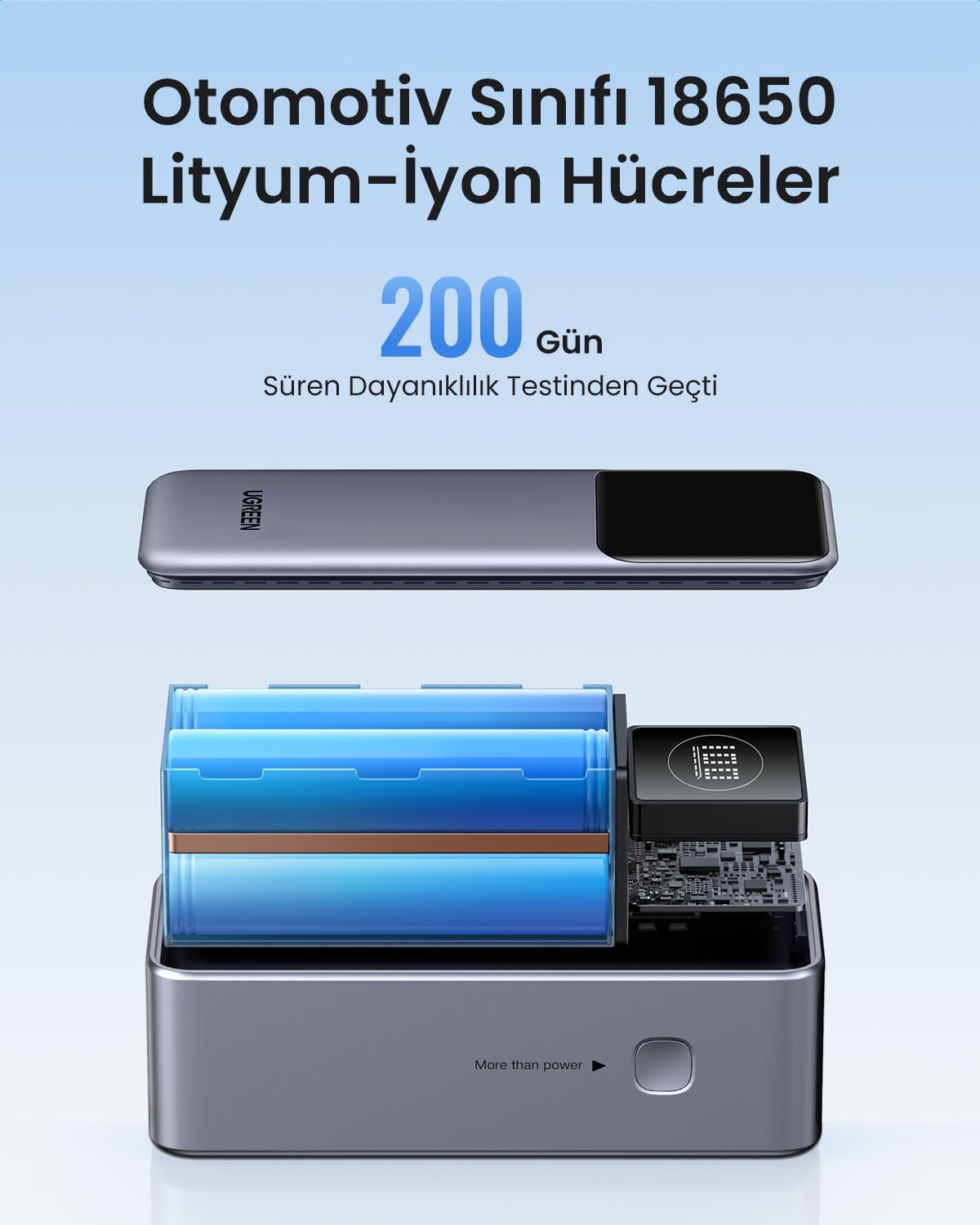
คำอธิบายภาพ: เกิดการระเบิดขึ้น view of the UGREEN Power Bank, revealing its internal structure and the automotive-grade 18650 lithium-ion battery cells.
| คุณสมบัติ | รายละเอียด |
|---|---|
| ยี่ห้อ | ยูกรีน |
| หมายเลขรุ่น | 35526B / AFNUGRNW28 |
| ความจุของแบตเตอรี่ | 12000mAh |
| กำลังขับสูงสุด | 100วัตต์ |
| จำนวนพอร์ต | 3 (1x USB-C In/Out, 1x USB-A Out) |
| ประเภทแบตเตอรี่ | Automotive Grade 18650 Lithium-ion Cells |
| ขนาด | 45.5 x 46 x 115 มม. (โดยประมาณ) |
| น้ำหนัก | 309กรัม (ประมาณ) |
ข้อมูลด้านความปลอดภัย
- ห้ามให้พาวเวอร์แบงค์สัมผัสกับอุณหภูมิที่สูงหรือต่ำเกินไป แสงแดดโดยตรง หรือเปลวไฟ
- หลีกเลี่ยงการทำตก เจาะ หรือถอดประกอบอุปกรณ์
- เก็บให้พ้นจากมือเด็ก
- ห้ามใช้หากพาวเวอร์แบงค์ชำรุดหรือบวม
- กำจัดผลิตภัณฑ์ด้วยความรับผิดชอบตามข้อบังคับท้องถิ่น
การรับประกันและการสนับสนุน
พาวเวอร์แบงค์ UGREEN รุ่นนี้มาพร้อมกับ... รับประกัน 90 วัน นับจากวันที่ซื้อ โดยครอบคลุมถึงข้อบกพร่องจากการผลิต โปรดเก็บหลักฐานการซื้อไว้เพื่อขอรับสิทธิ์การรับประกัน
For technical support, warranty inquiries, or further assistance, please contact UGREEN customer service through the official UGREEN webเว็บไซต์หรือช่องทางการสนับสนุนของร้านค้าปลีกของคุณ
UGREEN อย่างเป็นทางการ Webเว็บไซต์: www.ugreen.com