
การแนะนำ
Thank you for choosing the Alomejor Wireless Translation Earbuds. These earbuds are designed to provide real-time language translation, enabling seamless communication across different languages. Featuring noise-canceling technology and a comfortable design, they are suitable for various environments, from business meetings to travel. This manual provides essential information for the proper setup, operation, maintenance, and troubleshooting of your device.

Image: Alomejor Wireless Translation Earbuds and their charging case, shown with individuals engaged in conversation in the background, illustrating their use in communication settings.
การตั้งค่า
1. การชาร์จหูฟังและเคส
Before first use, fully charge the earbuds and the charging case. Place the earbuds into the charging case. Connect the charging case to a power source using the provided USB cable. The indicator lights on the case will show the charging status. A full charge typically takes approximately 1-2 hours.

Image: The Alomejor Wireless Translation Earbuds securely placed within their open charging case, ready for charging or storage.
2. การจับคู่บลูทู ธ
- ตรวจสอบให้แน่ใจว่าหูฟังชาร์จไฟเต็มแล้วและนำออกจากกล่องชาร์จแล้ว หูฟังจะเข้าสู่โหมดจับคู่โดยอัตโนมัติ
- บนอุปกรณ์มือถือของคุณ เปิดใช้งาน Bluetooth และค้นหาอุปกรณ์ที่มีอยู่
- Select "Alomejor Earbuds" (or similar name) from the list to connect.
- เมื่อเชื่อมต่อแล้ว จะมีเสียงแจ้งเตือนยืนยันการจับคู่สำเร็จ
3. Translation App Installation
For real-time translation functionality, download and install the dedicated translation application on your smartphone. Refer to the separate software manual included in your package for specific app details and setup instructions. Ensure your phone has an active internet connection for optimal translation performance.
คำแนะนำการใช้งาน
1. เปิด/ปิดเครื่อง
- เปิดเครื่อง: นำหูฟังออกจากกล่องชาร์จ หูฟังจะเปิดใช้งานโดยอัตโนมัติ
- หมดแรง: ใส่หูฟังกลับเข้าไปในกล่องชาร์จ หูฟังจะปิดเครื่องโดยอัตโนมัติและเริ่มการชาร์จ
2. การแปลแบบเรียลไทม์
Once paired with your device and the translation app is running:
- Open the translation application on your smartphone.
- Select the desired translation mode (e.g., conversation mode, simultaneous interpretation).
- Speak into the earbud's microphone, and the translated audio will be played through the other earbud or your connected device, depending on the app's settings.
- Ensure clear speech and a stable internet connection for accurate translation.

ภาพ: รายละเอียด view of an earbud positioned on an ear, highlighting the directional sound transfer technology designed for clear audio and privacy.
3. การเล่นเสียงและการโทร
The earbuds can also be used for standard audio playback and phone calls:
- เล่น/หยุดชั่วคราว: แตะที่พื้นที่ควบคุมแบบสัมผัสบนหูฟังข้างใดข้างหนึ่งหนึ่งครั้ง
- รับ/วางสาย: Tap the touch control area on either earbud once during an incoming call.
- ปฏิเสธสาย: กดปุ่มควบคุมแบบสัมผัสบนหูฟังข้างใดข้างหนึ่งค้างไว้ 2 วินาที
- ระบบตัดเสียงรบกวน: The earbuds feature integrated noise-canceling technology to enhance audio clarity during calls and translation. This feature is typically active by default or managed through the connected app.
การซ่อมบำรุง
1. การทำความสะอาด
- เช็ดหูฟังและกล่องชาร์จเบาๆ ด้วยผ้าแห้งนุ่มที่ไม่เป็นขุย
- ห้ามใช้สารทำความสะอาดที่มีฤทธิ์กัดกร่อน ตัวทำละลาย หรือสเปรย์แอโรซอล
- หลีกเลี่ยงไม่ให้ความชื้นเข้าไปในช่องเปิดต่างๆ

Image: A detailed close-up of the Alomejor Wireless Translation Earbuds, highlighting their ergonomic design and the various components.
2. การดูแลแบตเตอรี่
- เพื่อยืดอายุการใช้งานแบตเตอรี่ ควรหลีกเลี่ยงการปล่อยให้หูฟังและเคสชาร์จหมดเกลี้ยงบ่อยๆ
- เก็บอุปกรณ์ไว้ในที่แห้งและเย็นเมื่อไม่ใช้งาน
- ห้ามสัมผัสกับอุณหภูมิที่สูงหรือต่ำเกินไป
3. การจัดเก็บ
Always store the earbuds in their charging case to protect them from dust, damage, and to keep them charged.
การแก้ไขปัญหา
- หูฟังไม่เปิด/ไม่ชาร์จ: Ensure the charging case is charged. Check that the earbuds are correctly seated in the case. Clean the charging contacts if necessary.
- ปัญหาการจับคู่บลูทูธ: Make sure Bluetooth is enabled on your device. Turn off and on the earbuds. Forget the device in your phone's Bluetooth settings and try pairing again. Ensure earbuds are not connected to another device.
- No sound/poor sound quality: Check the volume levels on both your device and the earbuds. Ensure the earbuds are properly seated in your ears. If using for translation, verify internet connection and app settings.
- การแปลไม่สำเร็จ: Confirm the translation app is open and correctly configured. Check your internet connection. Ensure the correct languages are selected in the app. Speak clearly and at a moderate pace.
- หูฟังหลุดการเชื่อมต่อบ่อยครั้ง: Ensure your device is within the Bluetooth range (typically 10 meters/33 feet) and there are no significant obstructions.
ข้อมูลจำเพาะ
| คุณสมบัติ | ข้อมูลจำเพาะ |
|---|---|
| ประเภทสินค้า | หูฟังแปลภาษา |
| วัสดุ | อะคริโลไนไตรล์ บิวทาไดอีน สไตรีน (ABS) |
| ประเภทแบตเตอรี่เคสชาร์จ | แบตเตอรี่ Li |
| ความจุแบตเตอรี่ของเคสชาร์จ | 300mAh |
| ความจุแบตเตอรี่หูฟังข้างเดียว | 90mAh |
| เวอร์ชันบลูทูธ | เวอร์ชัน 5.3+EDR |
| ความถี่ไร้สาย | 2.4กิกะเฮิร์ตซ์ |
| โปรโตคอลที่รองรับ | HFP, HSP, AVRCP, A2DP, AVTCP |
| อุณหภูมิในการทำงาน | -10-45 องศาเซลเซียส |
| ขนาดแพ็คเกจ | 4.72 x 3.94 x 1.57 นิ้ว |
| น้ำหนักสินค้า | 4.1 ออนซ์ |
| หมายเลขรุ่น | Alomejor613a7dbh4g-12 |
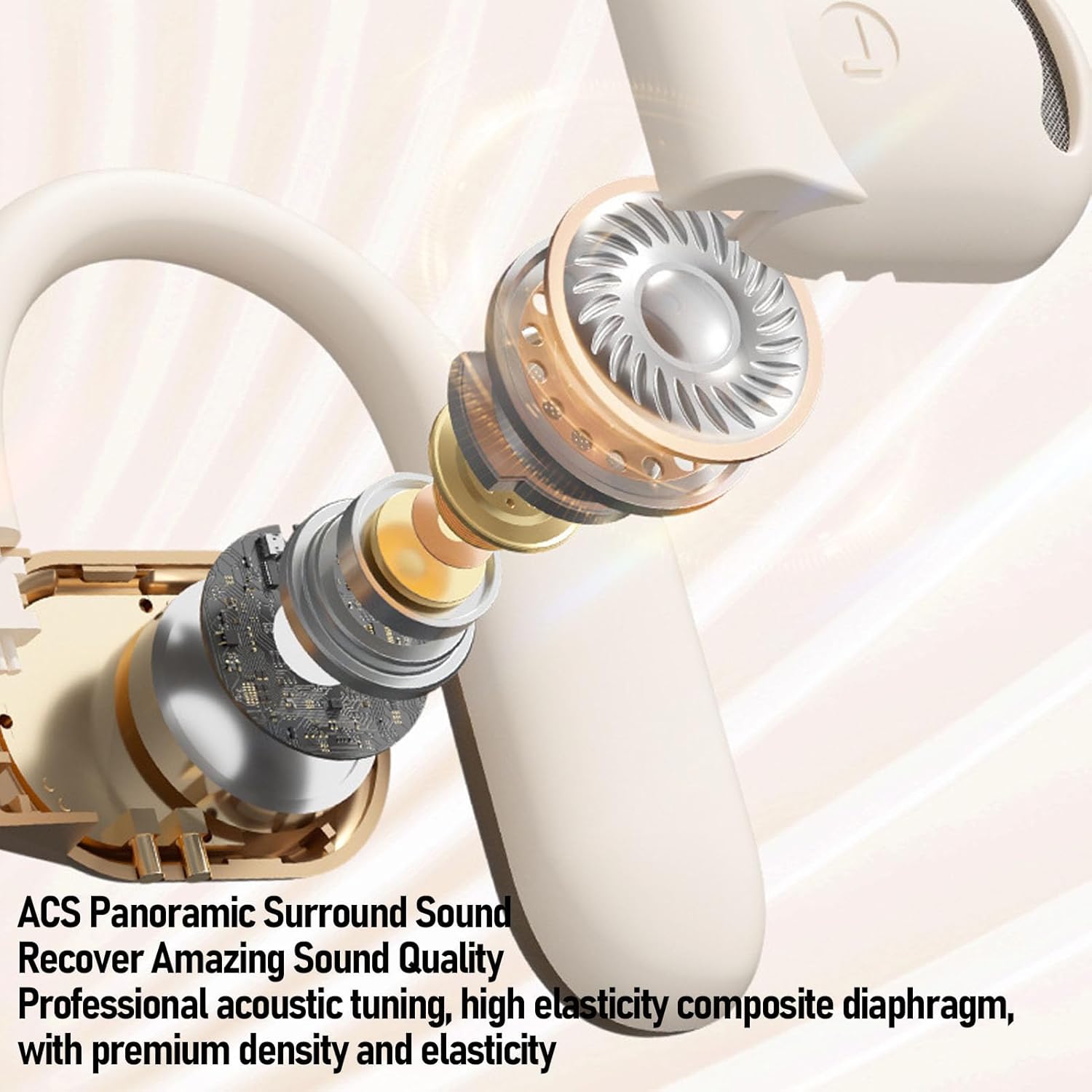
ภาพ: ระเบิด view of an Alomejor earbud, showcasing its internal acoustic components and the "ACS Panoramic Surround Sound" technology.
การรับประกันและการสนับสนุน
For warranty information, please refer to the documentation provided at the time of purchase or contact your retailer. For technical support or further assistance, please visit the official Alomejor website or contact their customer service department using the contact details provided with your product packaging.