
1. บทนำ
Welcome to the world of boAt Nirvana Zenith Pro TWS Earbuds. These earbuds are designed to provide a superior audio experience with advanced features such as Hybrid Adaptive Active Noise Cancellation, Spatial Audio, and Hi-Res Audio with LDAC support. This manual will guide you through the setup, operation, and maintenance of your new earbuds.
2. อะไรอยู่ในกล่อง
- boAt Nirvana Zenith Pro TWS Earbuds
- เคสชาร์จไฟ
- Additional Earbuds (various sizes)
- สายชาร์จแบบ USB Type-C
- คู่มือการใช้งาน

Image: boAt Nirvana Zenith Pro TWS Earbuds and Charging Case in Platinum Gold.
3. การตั้งค่าและการใช้งานครั้งแรก
3.1 การชาร์จเริ่มต้น
Before first use, fully charge your earbuds and charging case. Connect the USB Type-C cable to the charging port on the case and a power source. The LED indicator on the case will show charging status.
3.2 การจับคู่กับอุปกรณ์ของคุณ
- เปิดกล่องชาร์จ หูฟังจะเข้าสู่โหมดจับคู่โดยอัตโนมัติ
- บนสมาร์ทโฟนหรืออุปกรณ์ที่รองรับบลูทูธ ให้ไปที่การตั้งค่าบลูทูธ
- ค้นหา 'boAt Nirvana Zenith Pro' in the list of available devices.
- Select it to connect. Once connected, you will hear an audio prompt.

Image: Earbuds resting in their open charging case, indicating readiness for Bluetooth pairing.
4. คู่มือการใช้งาน
4.1 ระบบควบคุมแบบสัมผัส
The boAt Nirvana Zenith Pro features intuitive touch controls on each earbud. Specific functions can be customized via the boAt Hearables App.
| การกระทำ | การทำงาน |
|---|---|
| แตะครั้งเดียว (ซ้าย/ขวา) | เล่น/หยุดเพลง, รับ/วางสาย |
| แตะสองครั้ง (ขวา) | เพลงถัดไป |
| แตะสองครั้ง (ซ้าย) | เพลงก่อนหน้า |
| แตะสามครั้ง (ซ้าย/ขวา) | เปิดใช้งานผู้ช่วยเสียง |
| กดยาว (ซ้าย/ขวา) | สลับโหมดตัดเสียงรบกวน (ANC)/โหมดเสียงรอบข้าง |
4.2 ระบบตัดเสียงรบกวนแบบแอคทีฟ (ANC) และโหมดเสียงรอบข้าง
The earbuds feature 50dB Hybrid Adaptive ANC to minimize external noise, allowing for an immersive listening experience. Ambient Mode allows you to hear your surroundings while still enjoying your audio.

Image: Graphic demonstrating the effectiveness of 50dB Hybrid Adaptive Noise Cancellation.
4.3 เสียงเชิงพื้นที่
Experience a theater-like sound from all directions with boAt Spatial Audio, co-tuned by filmmaker Imtiaz Ali. This feature provides a 360-degree immersive audio experience.
Video: Filmmaker Imtiaz Ali discussing the co-tuning of Spatial Audio for an immersive experience.

Image: Visual representation of Spatial Audio creating a 360-degree sound field around the listener.
ระบบเสียงความละเอียดสูง 4.4 พร้อม LDAC
The Nirvana Zenith Pro supports Hi-Res Audio powered by the LDAC codec, ensuring high-quality sound transmission and a rich listening experience through its 12mm drivers.

ภาพ: รายละเอียด view of the 12mm audio drivers, highlighting Hi-Res Audio and LDAC compatibility.
4.5 boAt Hearables App Compatibility
Unlock Pro Mode and customize your listening experience with the boAt Hearables App. Adjust EQ modes, customize touch functions, control ANC settings, and receive software updates.

Image: Screenshot of the boAt Hearables App, showing various settings and customization options.
ดาวน์โหลดแอปได้ที่นี่: แอป boAt Hearables
4.6 การเชื่อมต่อแบบหลายจุด
Connect and switch seamlessly between two devices simultaneously. For example, watch a movie on your tablet and answer an incoming call on your phone without manually reconnecting.
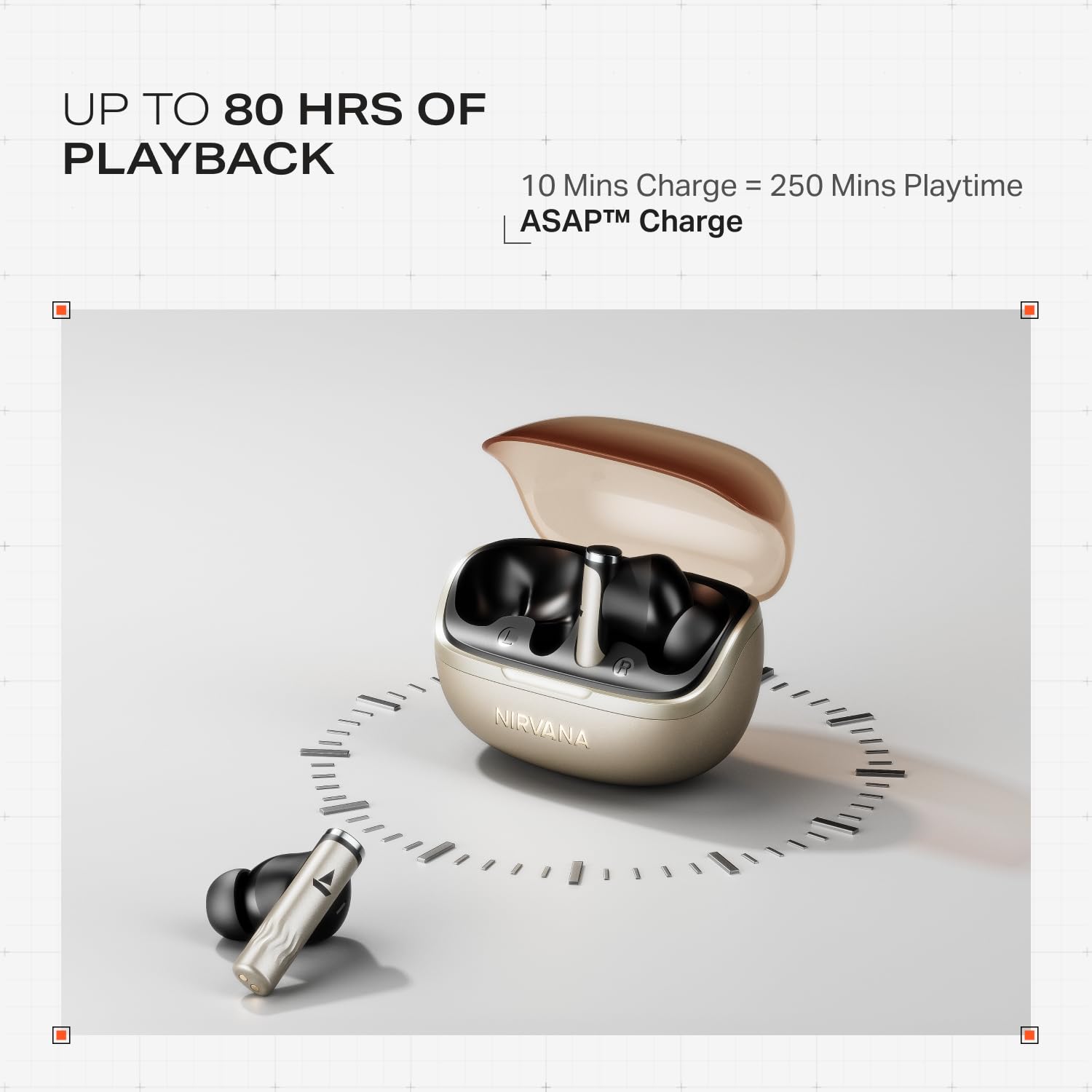
Image: Illustration of multipoint connectivity, with earbuds linked to both a smartphone and a tablet.
4.7 การตรวจจับภายในหู
The earbuds automatically pause playback when removed from your ears and resume when placed back in, providing a seamless listening experience.

Image: Diagram showing an earbud in an ear, with text indicating 'Plug-in to Play' and 'Plug-Out to Pause'.
4.8 Beast Mode (Low Latency)
Activate Beast Mode for an ultra-low latency of 60ms, ideal for gaming to ensure synchronized audio and visuals.

Image: A smartphone displaying a racing game, with earbuds positioned nearby, illustrating the Beast Mode for low-latency gaming.
4.9 Google Fast Pair Service
Enjoy quick and effortless pairing with Android devices using Google Fast Pair Service, allowing for instant connection upon opening the case.

Image: A smartphone displaying a Google Fast Pair notification, prompting connection to the Nirvana Zenith Pro earbuds.
5. การชาร์จและแบตเตอรี่
The earbuds offer up to 80 hours of total playtime with the charging case. The ASAP Charge feature provides 250 minutes of playtime after just 10 minutes of charging.
- อายุการใช้งานแบตเตอรี่: นานถึง 80 ชั่วโมง (พร้อมกล่องชาร์จ)
- การเรียกเก็บเงินโดยเร็วที่สุด: ชาร์จ 10 นาที = เล่นได้ 250 นาที
- เวลาชาร์จเต็ม: Approximately 110 minutes for earbuds and case.

Image: Visual representation of the earbuds and charging case, highlighting 80 hours of playback and ASAP Charge capabilities.
6. การบำรุงรักษาและการดูแล
- การทำความสะอาด: Regularly clean the earbuds and charging contacts with a soft, dry cloth. Avoid using harsh chemicals.
- พื้นที่จัดเก็บ: เก็บหูฟังเอียร์บัดไว้ในกล่องชาร์จเมื่อไม่ได้ใช้งานเพื่อปกป้องและชาร์จอยู่เสมอ
- ความต้านทานน้ำ: The earbuds are IPX4 rated, meaning they are resistant to splashes and sweat. Do not submerge them in water.
Video: A short animation demonstrating the IPX4 water resistance of the earbuds, showing protection against splashes.
7 การแก้ไขปัญหา
7.1 หูฟังไม่จับคู่
- ตรวจสอบให้แน่ใจว่าได้ชาร์จหูฟังเอียร์บัดทั้งสองข้างแล้ว
- ใส่หูฟังกลับเข้าไปในเคส ปิดฝา รอสองสามวินาที แล้วเปิดอีกครั้งเพื่อเข้าสู่โหมดจับคู่
- ลืมอุปกรณ์จากการตั้งค่าบลูทูธของโทรศัพท์ของคุณและลองจับคู่ใหม่อีกครั้ง
7.2 Low Volume/Poor Sound Quality
- ตรวจสอบระดับเสียงทั้งบนอุปกรณ์และหูฟังของคุณ
- ตรวจสอบให้แน่ใจว่าหูฟังสะอาดและไม่มีสิ่งสกปรก
- ลองใช้จุกหูฟังขนาดต่างๆ เพื่อให้ได้การแนบสนิทที่ดีขึ้น
- Disable ANC temporarily to see if it improves sound in certain environments.
7.3 หูฟังไม่ชาร์จ
- ตรวจสอบให้แน่ใจว่าสายชาร์จเชื่อมต่อกับเคสและแหล่งจ่ายไฟอย่างแน่นหนา
- ทำความสะอาดหน้าสัมผัสการชาร์จบนทั้งหูฟังและเคส
- ลองใช้สายชาร์จหรืออะแดปเตอร์ไฟอื่น
8. ข้อมูลจำเพาะ
| คุณสมบัติ | รายละเอียด |
|---|---|
| ชื่อรุ่น | นิพพาน ซีนิธ โปร |
| หมายเลขรุ่น | PP0010 |
| การควบคุมเสียงรบกวน | 50dB Hybrid Adaptive Active Noise Cancellation |
| ตัวแปลงสัญญาณเสียง | LDAC (Hi-Res Audio) |
| ไดรเวอร์ | ไดรเวอร์ไดนามิกขนาด 12 มม. |
| ไมโครโฟน | 6 Mics with AI-ENx Technology |
| อายุการใช้งานแบตเตอรี่ | สูงสุด 80 ชั่วโมง (พร้อมเคส) |
| เวอร์ชันบลูทูธ | 5.4 |
| ความต้านทานต่อน้ำ | IPX4 |
| ความหน่วงต่ำ | 60ms (Beast Mode) |
| น้ำหนัก | 45 กรัม |
9. การรับประกันและการสนับสนุน
Your boAt Nirvana Zenith Pro TWS Earbuds come with a รับประกัน 1 ปี นับจากวันที่ซื้อ โปรดเก็บใบเสร็จรับเงินไว้เพื่อใช้ในการเคลมประกัน
For further assistance, technical support, or warranty claims, please visit the official boAt webหรือติดต่อฝ่ายบริการลูกค้า ข้อมูลการติดต่อมักจะอยู่บนบรรจุภัณฑ์ของผลิตภัณฑ์หรือจากแบรนด์อย่างเป็นทางการ webเว็บไซต์.