
1. บทนำ
The EPEVER XTRA4210N-G3 MPPT Solar Charge Controller is an advanced maximum power point tracking (MPPT) device designed for off-grid photovoltaic systems. It efficiently manages power from solar panels to charge various battery types, including Sealed, Gel (AGM), Flooded, LiFePO4, and Li(NiCoMn)O2 batteries. This controller features a common negative grounding design, ensuring compatibility with diverse applications such as communication base stations, household systems, street lighting, and RV solar setups.
Key features include high tracking efficiency up to 99.5%, peak conversion efficiency of 98%, and an ultra-quiet design. The G3 version introduces independent voltage regulation, allowing direct load connection even without a battery, and enhanced protection mechanisms for system integrity.
รูปที่ 1: เกินview of EPEVER XTRA-N-G3 MPPT Solar Charge Controller features.
2. การตั้งค่าและการติดตั้ง
Proper installation is crucial for the safe and efficient operation of your EPEVER XTRA4210N-G3 controller. Follow the connection sequence carefully.
2.1 Connection Sequence
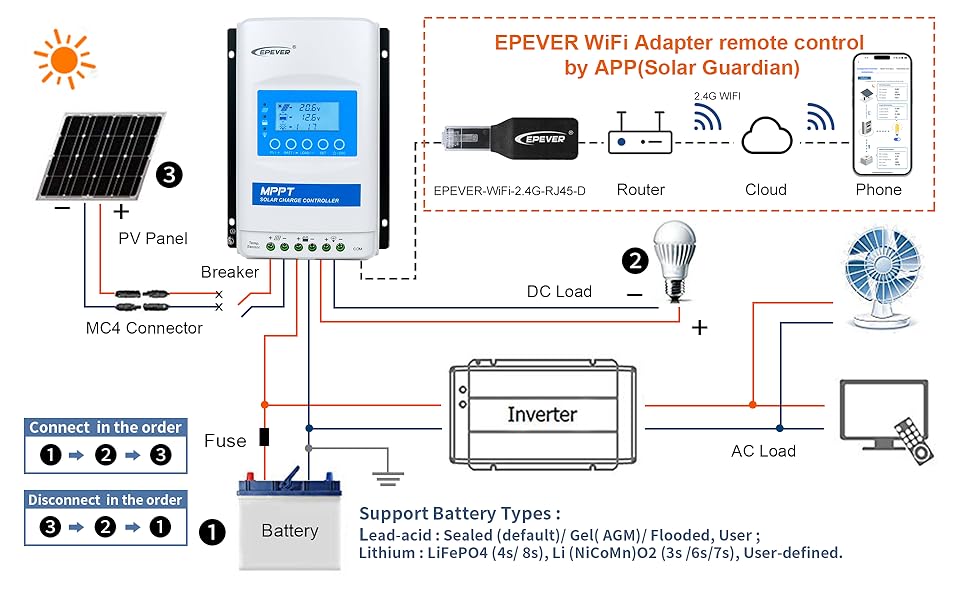
- เชื่อมต่อแบตเตอรี่เข้ากับคอนโทรลเลอร์
- เชื่อมต่อโหลดเข้ากับตัวควบคุม
- Connect the PV array (solar panels) to the controller.
ลำดับการตัดการเชื่อมต่อ: To disconnect the system, reverse the connection order: first disconnect the PV array, then the load, and finally the battery.

Figure 2: Recommended connection and disconnection order for the solar system components.
2.2 Wiring Recommendations
- The cable length for the battery should not exceed 3 meters.
- The recommended cable length for the PV array should not exceed 3 meters. If the PV array cable length is less than 3 meters, the system meets EN/IEC61000-6-3 requirements. If it exceeds 3 meters, the system may not meet these requirements.
- Controller Terminals: #6AWG (16mm²).
- Recommended Wire Cable: #8AWG (10mm²).

Figure 3: Connection diagrams for both No-battery Mode and Battery Mode configurations.
2.3 ระบบสิ้นสุดview
The controller supports 12V/24V DC auto-work for lead-acid batteries and manual selection for lithium battery systems. It can handle a maximum PV input power of 520W for a 12V battery system or 1040W for a 24V battery system, with a maximum PV open circuit voltage of 100V (at minimum operating environment temperature) or 92V (at 25°C environment temperature).

Figure 4: System capabilities including PV input power, supported battery types, and MPPT charging characteristics.
3. คู่มือการใช้งาน
3.1 MPPT Algorithm and Adaptive Charging
The XTRA4210N-G3 utilizes a revolutionary MPPT algorithm that enhances tracking and response speeds, reduces losses, and minimizes downtime. It improves efficiency across various power segments and optimizes energy extraction in all scenarios. The adaptive charging features stages like bulk, boost, equalize, and float, which optimize battery health, lifespan, and overall performance.

Figure 5: MPPT algorithm and adaptive charging stages for optimal battery charging.
3.2 การเลือกประเภทแบตเตอรี่
The controller supports multiple battery types. For Lead-acid batteries (Sealed, Gel, Flooded), you can select the type directly. For Lithium batteries (LiFePO4, Li(NiCoMn)O2), or custom user settings, parameters need to be configured via accessories like MT50 (remote meter), BLE/WiFi Adapter (APP), eLOG01, or PC software via the RS485 interface.

Figure 6: Supported battery types and methods for setting lithium battery parameters.
3.3 Display and Control Interface
The controller features a three-color LED indicator and an LCD display to show PV, Battery, and Load working status intuitively. Five buttons allow for easy adjustment and browsing of system parameters.
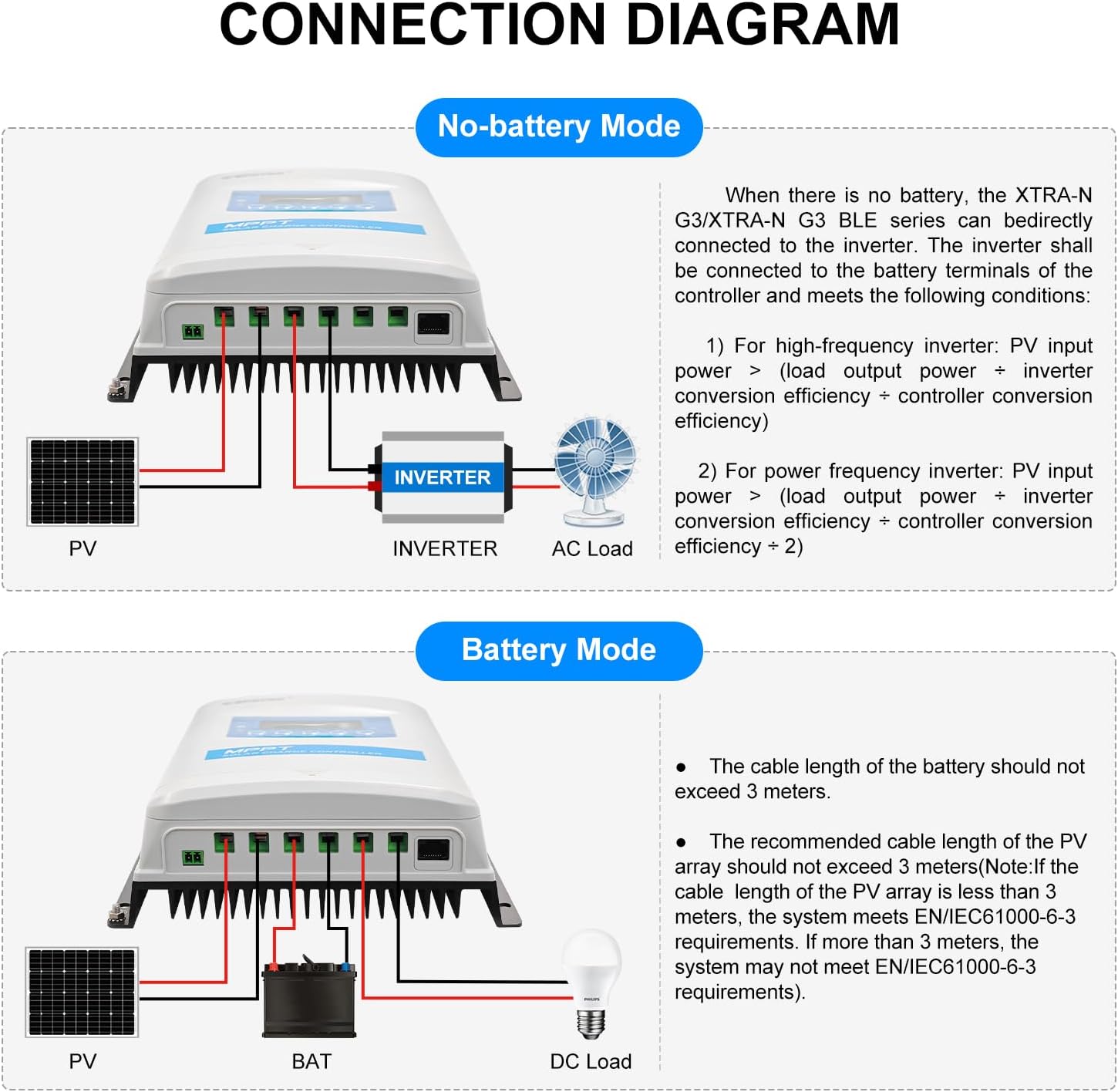
Figure 7: Controller display interface and battery type selection options.
3.4 การโหลดโหมดการทำงาน
The controller offers various load control modes, including Manual, Light ON/OFF, Light ON plus Timer, and User-defined settings. These modes allow for flexible management of connected loads based on user requirements and environmental conditions.

Figure 8: Load working modes for flexible power management.
4. การบำรุงรักษา
Regular maintenance ensures the longevity and optimal performance of your solar charge controller and battery system.
4.1 สุขภาพแบตเตอรี่
The controller's adaptive charging stages (bulk, absorption, float, equalization) are designed to prolong the lifecycle of batteries. Ensure correct battery type selection and parameter settings, especially for lithium batteries, to maintain optimal charging conditions.
4.2 การป้องกันระบบ
The controller includes all-around electronic protection against reverse polarity, overcharging, over-discharging, overload, short-circuiting, and reverse current. These features protect the battery from being over-charged by solar modules and over-discharged by loads. Periodically inspect all connections for tightness and corrosion.
4.3 ข้อพิจารณาด้านสิ่งแวดล้อม
The controller has a dustproof and waterproof design with IP33 enclosure, making it suitable for various environments. However, ensure it is installed in a well-ventilated area, away from direct sunlight and excessive moisture, to prevent overheating and ensure optimal performance.
5 การแก้ไขปัญหา
This section provides guidance on common issues and protective measures.
5.1 การป้องกันกระแสเกินที่เอาต์พุต
The XTRA4210N-G3 controller features intelligent overcurrent detection and dynamic load management. It quickly detects and responds to excessive current, adjusting output in milliseconds to prevent system overload and ensure continuous operation. This protects the solar system from damage due to overcurrent events.

Figure 9: Comparison of overcurrent protection in a typical system versus the XTRA-N G3 controller.
5.2 Battery Management System (BMS) Disconnection
The G3 version's constant voltage output and limited current features ensure the system runs smoothly even if the BMS disconnects the battery. This protects connected equipment and loads from interruption and potential damage.
5.3 ปัญหาการสื่อสาร
If experiencing issues with remote monitoring or parameter adjustment, ensure that communication accessories (e.g., BLE/WiFi Adapter, RS485 cable) are correctly connected and configured. Check the respective mobile app or PC software for error messages or connection status.
6. ข้อมูลจำเพาะ
6.1 พารามิเตอร์ทางกล
| รายการ | เอ็กซ์ตร้า3210N | เอ็กซ์ตร้า3215N เอ็กซ์ตร้า4210N | เอ็กซ์ตร้า3415N เอ็กซ์ตร้า4215N | เอ็กซ์ตร้า4415N |
|---|---|---|---|---|
| มิติ | 230×165×63มม. | 255×185×67.8มม. | 255×187×75.7มม. | 255×189×83.2มม. |
| มิติการติดตั้ง | 173×156มม. | 200×176มม. | 200×178มม. | 200×180มม. |
| ขนาดรูยึด | Φ5มม. | |||
| เทอร์มินัล | 6AWG (16 มม.²) | |||
| สายเคเบิลที่แนะนำ | 8AWG (10 มม.²) | |||
| น้ำหนัก | 1.31กก. | 1.70กก. | 2.07กก. | 2.47กก. |
| การรับรอง | EN/IEC62109-1, EN61000-6-3/EN61000-6-1, 47 CFR Part 15, Subpart B, IEC62509, IEC62321-3-1 | |||

Figure 10: Mechanical parameters and available accessories for the XTRA series.
6.2 Electrical Parameters (XTRA4210N-G3)
| รายการ | เอ็กซ์ตร้า4210N |
|---|---|
| ระบบที่กำหนด voltage | 12/24VDC auto work |
| กระแสไฟชาร์จที่กำหนด | 40เอ |
| กระแสไฟปล่อยที่กำหนด | 40เอ |
| ปริมาตรอินพุตแบตเตอรี่tagช่วงอี | 8~32โวลต์ |
| แม็กซ์ PV วงจรเปิด voltage | 100V (at min operating environment temp); 92V (at 25°C environment temp) |
| MPPT ฉบับที่tagช่วงอี | V(BAT+2V)~72V |
| กำลังไฟฟ้าเข้า PV สูงสุด | 520W/12V; 1040W/24V |
| ประเภทแบตเตอรี่ | Sealed / Gel / Flooded / LiFePO4 / Li-NiCoMn / User Lithium battery (LiFePO4 / Li-NiCoMn / User) |
| มิติ | 255×185×67.8มม. |
| เทอร์มินัล | 6AWG (16 มม.²) |
| น้ำหนักสุทธิ | 1.70กก. |
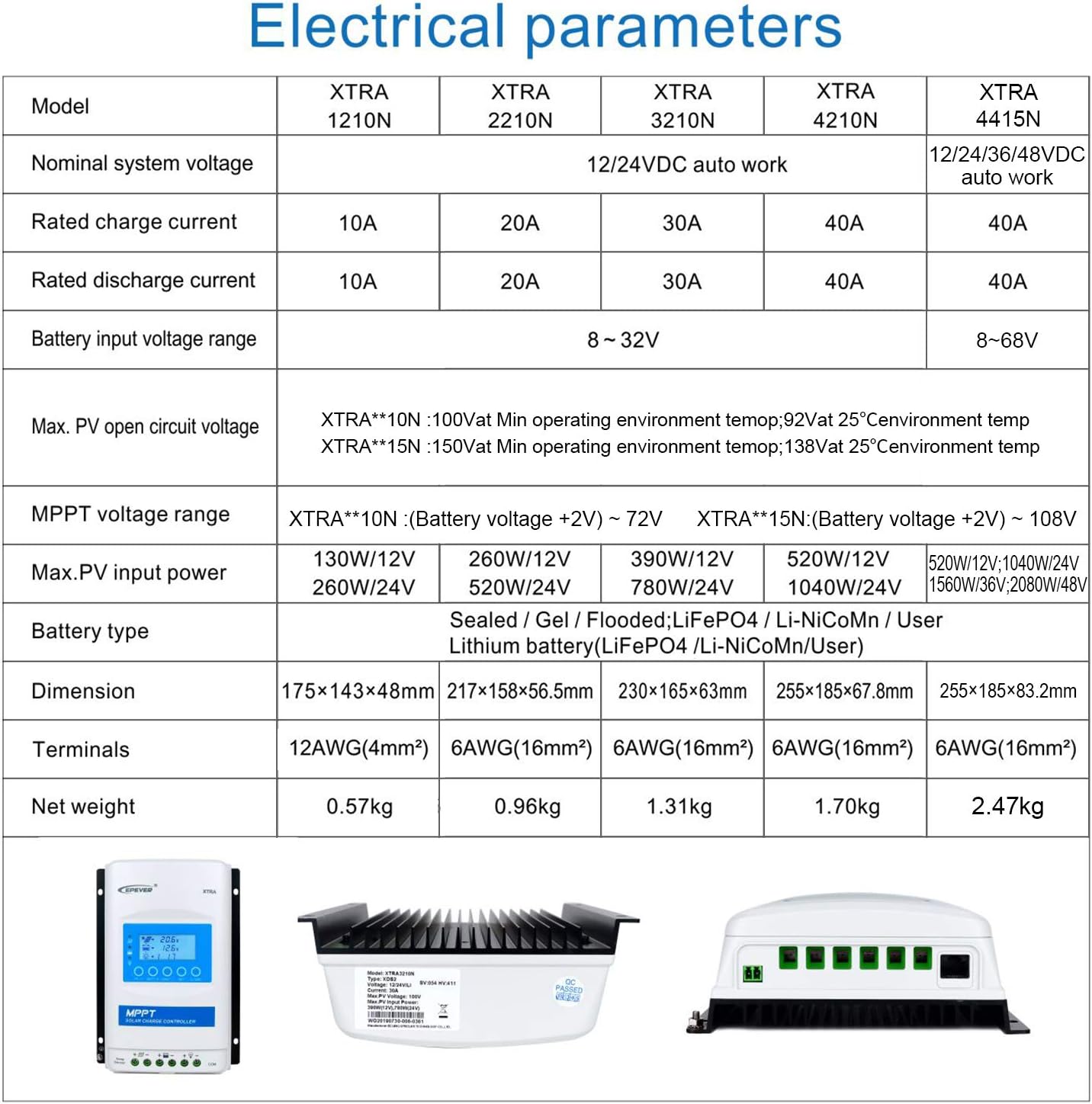
Figure 11: Electrical parameters for the XTRA series solar charge controllers.
7. การรับประกันและการสนับสนุน
For warranty information, please refer to the documentation provided with your purchase or contact the authorized EPEVER seller, Goland Century. The product is CE certified (LVD EN/IEC62109, EMC EN61000-6-1/3).
EPEVER offers various accessories to enhance monitoring and control:
- มิเตอร์ระยะไกล (MT50): For remote monitoring and real-time parameter configuration.
- สายเคเบิล USB to RS485 (CC-USB-RS485-150U): For monitoring and configuration via PC software.
- WiFi 2.4G Adapter (EPEVER-WiFi-2.4G-RJ45-D): Compatible with mobile app or cloud platform for wireless monitoring and parameter configuration via WiFi signal.
- อะแดปเตอร์บลูทูธ (EPEVER-BLE-RJ45-D): Compatible with mobile app for wireless monitoring and parameter configuration via Bluetooth signal.
- Serial Device Server (EPEVER TCP 306): Compatible with mobile app or cloud platform via TCP network communication for remote wireless monitoring. LAN monitoring can be achieved using PC configuration tools and PC software.
- 4G Wireless Data Transmission Terminal (EPEVER RTU 4G HC01): Compatible with mobile app or cloud platform via a GSM or GPRS SIM card for remote wireless monitoring.
- Remote Temperature Sensor (RT-MF58R47K3.81A): For accurate control and protection of charging and discharging by collecting real-time battery temperature.
Video 1: EPEVER MPPT Solar Charge Controller XTRAN G3 Version overview. This video provides a brief introduction to the features and advancements of the G3 series controller.
Video 2: EPEVER MPPT Solar Charge Controller G3 Version XTRAN detailed features. This video offers a more in-depth look at the functionalities and benefits of the G3 series controller.