
1. บทนำ
The MARVO KG955W Shogo 63 is a compact 60% mechanical gaming keyboard designed for versatility and performance. It features tri-mode connectivity (wired, 2.4GHz wireless, and Bluetooth), yellow linear pre-lubed switches, customizable RGB backlighting, and full-key anti-ghosting. This manual provides instructions for setting up, operating, and maintaining your keyboard.
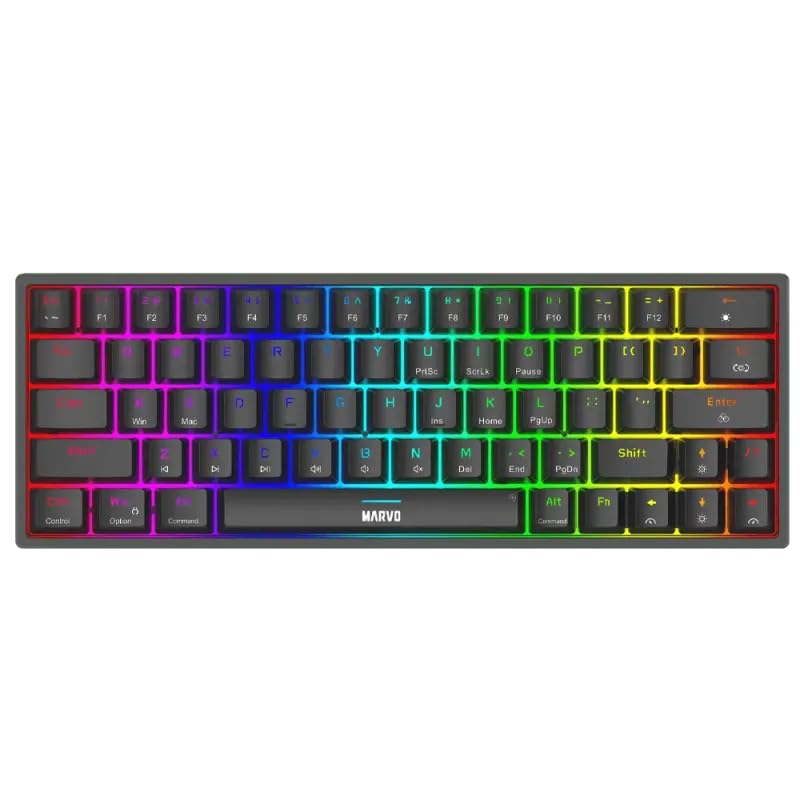
ภาพที่ 1.1: จากบนลงล่าง view of the MARVO KG955W keyboard showcasinด้วยดีไซน์กะทัดรัด 60% และแสงไฟ RGB ที่สดใส
2. เนื้อหาบรรจุภัณฑ์
กรุณาตรวจสอบแพ็คเกจสำหรับรายการต่อไปนี้:
- MARVO KG955W Shogo 63 Wireless Mechanical Gaming Keyboard
- Detachable 1.6m braided Type-C USB Cable
- 2.4GHz Wireless Receiver (USB dongle)
- คู่มือการใช้งาน (เอกสารนี้)
3. การตั้งค่าและการเชื่อมต่อ
The KG955W keyboard offers three connectivity modes: Wired, 2.4GHz Wireless, and Bluetooth.
3.1. การเชื่อมต่อแบบมีสาย
- Connect the detachable Type-C USB cable to the keyboard's USB-C port.
- เชื่อมต่อปลายอีกด้านหนึ่งของสาย USB เข้ากับพอร์ต USB ที่ว่างอยู่บนคอมพิวเตอร์ของคุณ
- The keyboard will automatically be detected and ready for use. The keyboard will also charge in wired mode.
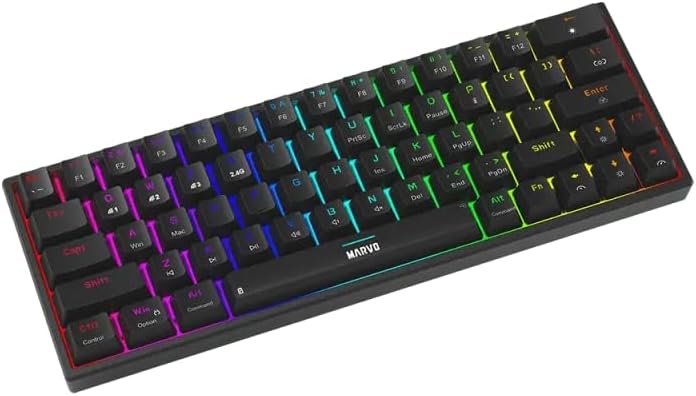
ภาพที่ 3.1: ด้านข้าง view of the keyboard showing the USB-C port for wired connection and charging.
3.2. การเชื่อมต่อไร้สาย 2.4GHz
- ค้นหาตัวรับสัญญาณ USB 2.4GHz (ดองเกิล) ในบรรจุภัณฑ์
- เสียบตัวรับสัญญาณ USB 2.4GHz เข้ากับพอร์ต USB ที่มีอยู่ในคอมพิวเตอร์ของคุณ
- On the keyboard, switch the mode selector (usually on the back or side) to the 2.4G wireless mode.
- แป้นพิมพ์ควรเชื่อมต่อโดยอัตโนมัติ หากไม่เป็นเช่นนั้น ให้กด Fn + ร เพื่อเริ่มการจับคู่
3.3. การเชื่อมต่อบลูทู ธ
- บนแป้นพิมพ์ ให้เปลี่ยนตัวเลือกโหมดไปที่โหมดบลูทูธ
- กดค้างไว้ เอฟเอ็น+คิว, Fn + ว, หรือ Fn + อี กดค้างไว้ 3-5 วินาทีเพื่อเข้าสู่โหมดจับคู่กับอุปกรณ์บลูทูธ 1, 2 หรือ 3 ตามลำดับ ไฟแสดงสถานะจะกะพริบอย่างรวดเร็ว
- บนคอมพิวเตอร์หรืออุปกรณ์ของคุณ เปิดใช้งานบลูทูธและค้นหาอุปกรณ์ใหม่
- Select "MARVO KG955W" (or similar name) from the list of available devices to pair.
- เมื่อจับคู่แล้ว ไฟแสดงสถานะบนแป้นพิมพ์จะหยุดกะพริบและคงสว่างอยู่
The keyboard can store up to three Bluetooth profiles, allowing quick switching between devices using Fn + Q/W/E.
4. คู่มือการใช้งาน
The KG955W is a 60% compact keyboard, meaning some functions are accessed via the Fn การผสมคีย์
4.1. Function Key Combinations (Fn Key)
กดค้างไว้ Fn key and press the corresponding key for secondary functions:
- Fn + 1-0, -, =: F1-F12 functions (check keycaps for specific mappings).
- Fn + พี: บันทึกหน้าจอ, พิมพ์หน้าจอ
- ฟน + [ {: บ้าน
- ฟน + ] }: จบ
- เอฟเอ็น + ; -: เลื่อนหน้าขึ้น
- ฟน + ' ": เลื่อนหน้าลง
- Fn + ปุ่มลูกศร: Media controls (e.g., volume up/down, play/pause, next/previous track). Refer to keycap legends.
- Fn + วิน: ปุ่มล็อก/ปลดล็อก Windows
4.2. การควบคุมไฟแบ็คไลท์ RGB
The keyboard features customizable RGB backlighting. Use the following combinations to control the lighting effects:
- Fn + \ |: Change lighting mode.
- Fn + ↑: เพิ่มความสว่าง
- Fn + ↓ลดความสว่างลง
- เอฟเอ็น + ←: Decrease lighting speed.
- Fn + →: Increase lighting speed.
- Fn + Spacebar: เปลี่ยนสีไฟแบ็คไลท์ (สำหรับโหมดคงที่)
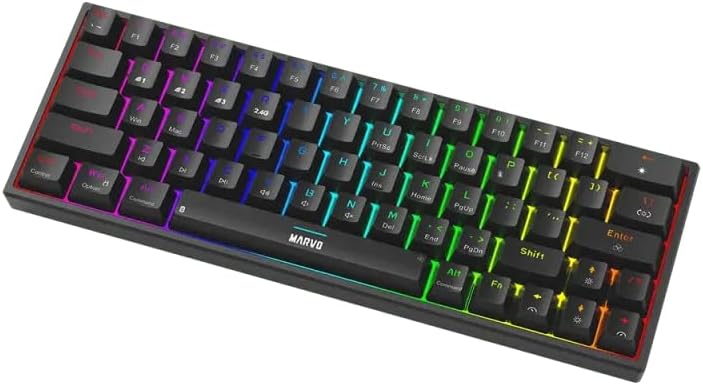
Image 4.1: The keyboard displaying its customizable RGB backlighting in a dynamic pattern.
4.3. สถานะแบตเตอรี่
The keyboard has an integrated battery for wireless operation. An indicator light will typically show low battery status or charging status. Refer to the specific LED indicators on your keyboard for details.
5. การบำรุงรักษา
การบำรุงรักษาอย่างถูกต้องจะช่วยให้แป้นพิมพ์ของคุณมีอายุการใช้งานยาวนานและมีประสิทธิภาพ
- การทำความสะอาด: ใช้ผ้าแห้งเนื้อนุ่มเช็ดทำความสะอาดพื้นผิวแป้นพิมพ์ สำหรับการทำความสะอาดอย่างล้ำลึก ให้ใช้ลมเป่าเพื่อกำจัดฝุ่นและเศษสิ่งสกปรกที่อยู่ระหว่างปุ่มต่างๆ หลีกเลี่ยงการใช้สารเคมีรุนแรงหรือวัสดุที่มีฤทธิ์กัดกร่อน
- พื้นที่จัดเก็บ: เก็บแป้นพิมพ์ไว้ในที่แห้งและเย็น หลีกเลี่ยงแสงแดดโดยตรงและอุณหภูมิที่สูงหรือต่ำเกินไป
- การดูแลสายเคเบิล: Handle the detachable USB-C cable carefully. Avoid bending or twisting it excessively.

Image 5.1: Illustration of a hot-swappable switch, demonstrating the ease of maintenance and customization for individual key switches.
6 การแก้ไขปัญหา
If you encounter issues with your MARVO KG955W keyboard, refer to the following common solutions:
| ปัญหา | สารละลาย |
|---|---|
| แป้นพิมพ์ไม่ตอบสนอง (มีสาย) |
|
| แป้นพิมพ์ไม่ตอบสนอง (ระบบไร้สาย 2.4GHz) |
|
| แป้นพิมพ์ไม่ตอบสนอง (บลูทูธ) |
|
| แสง RGB ไม่ทำงานหรือไม่ถูกต้อง |
|
| ปุ่มกดไม่ทำงานหรือพิมพ์ซ้ำ |
|
7. ข้อมูลจำเพาะ
| คุณสมบัติ | รายละเอียด |
|---|---|
| ชื่อรุ่น | MARVO KG955W Shogo 63 |
| ประเภทแป้นพิมพ์ | Mechanical, 60% TKL (Tenkeyless) |
| สวิตซ์ | Yellow Linear, Pre-lubed, Hot-swappable |
| การเชื่อมต่อ | Wired (USB-C), 2.4GHz Wireless, Bluetooth (Tri-mode) |
| ป้องกันการโดนผีหลอก | Full-key Anti-Ghosting |
| การแบ็คไลท์ | RGB ที่ปรับแต่งได้ |
| สายเคเบิล | Detachable 1.6m braided Type-C USB |
| วัสดุ | พลาสติก |
| น้ำหนัก | 460 กรัม |
| ระบบปฏิบัติการที่รองรับ | Windows (also compatible with other systems via Bluetooth/2.4G) |
| จำนวนคีย์ | 63 |
8. ข้อมูลการรับประกัน
The MARVO KG955W Shogo 63 Wireless Mechanical Gaming Keyboard comes with a รับประกัน 6 เดือน นับจากวันที่ซื้อสินค้า การรับประกันนี้ครอบคลุมถึงข้อบกพร่องจากการผลิตและการทำงานผิดปกติภายใต้การใช้งานปกติ ไม่ครอบคลุมถึงความเสียหายที่เกิดจากการใช้งานผิดวิธี อุบัติเหตุ การดัดแปลงโดยไม่ได้รับอนุญาต หรือการสึกหรอตามปกติ โปรดเก็บหลักฐานการซื้อไว้เพื่อใช้ในการเรียกร้องการรับประกัน
9. การสนับสนุน
For technical support, troubleshooting assistance beyond this manual, or warranty inquiries, please contact MARVO customer service through their official website or the retailer where the product was purchased. Please have your product model number (KG955W) and proof of purchase ready when contacting support.