
1. บทนำ
This manual provides essential instructions for the safe assembly, operation, and maintenance of your isinwheel M10 Electric Bike. Please read this manual thoroughly before your first ride to ensure proper usage and to maximize the lifespan of your e-bike. Retain this manual for future reference.
คำเตือนด้านความปลอดภัย: Always wear a helmet and appropriate safety gear when riding. Familiarize yourself with local traffic laws and regulations. Regular maintenance is crucial for safe operation.
2. เนื้อหาบรรจุภัณฑ์
Upon unpacking, verify that all components listed below are present and undamaged. If any items are missing or damaged, please contact customer support.
- isinwheel M10 Electric Bike Frame (partially assembled)
- ล้อหน้า
- Removable Lithium-Ion Battery (36V 10.4AH)
- 42V 2A Fast Charger
- คันเหยียบ (ซ้ายและขวา)
- Seat with Seatpost
- ไฟหน้า
- แผ่นสะท้อนแสงด้านหลัง
- Toolkit (including Allen wrenches and spanner)
- ปั๊มยาง
- คู่มือการใช้งาน

Image: All components included in the isinwheel M10 Electric Bike package.
3. การติดตั้งและการประกอบ
The isinwheel M10 Electric Bike comes 85% pre-assembled. Follow these steps to complete the assembly:
- แกะกล่อง: Carefully remove all components from the packaging. Keep the packaging materials until assembly is complete and you are satisfied with the product.
- การติดตั้งมือจับ: Attach the handlebar to the stem using the provided Allen wrenches. Ensure the handlebar is centered and tightened securely.
- การติดตั้งล้อหน้า: Secure the front wheel to the front fork. Ensure the brake rotor aligns correctly with the caliper and the quick-release skewer is properly tightened.
- การติดตั้งไฟหน้า: Mount the front headlight onto the designated bracket on the front fork or handlebar, and connect its cable.
- การติดตั้งเหยียบ: Identify the left (L) and right (R) pedals. The left pedal tightens counter-clockwise, and the right pedal tightens clockwise. Use the spanner to secure them firmly.
- การติดตั้งที่นั่ง: Insert the seatpost into the frame's seat tube. Adjust the height for comfortable riding and secure it with the quick-release lever.
- Rear Reflector Installation: Attach the rear reflector to the seatpost or rear rack (if applicable) for increased visibility.
- การติดตั้งแบตเตอรี่: Slide the battery into its designated slot on the frame and lock it with the key.
- การจัดการสายเคเบิล: Ensure all cables are neatly routed and secured, away from moving parts.

Image: Installing the handlebar.
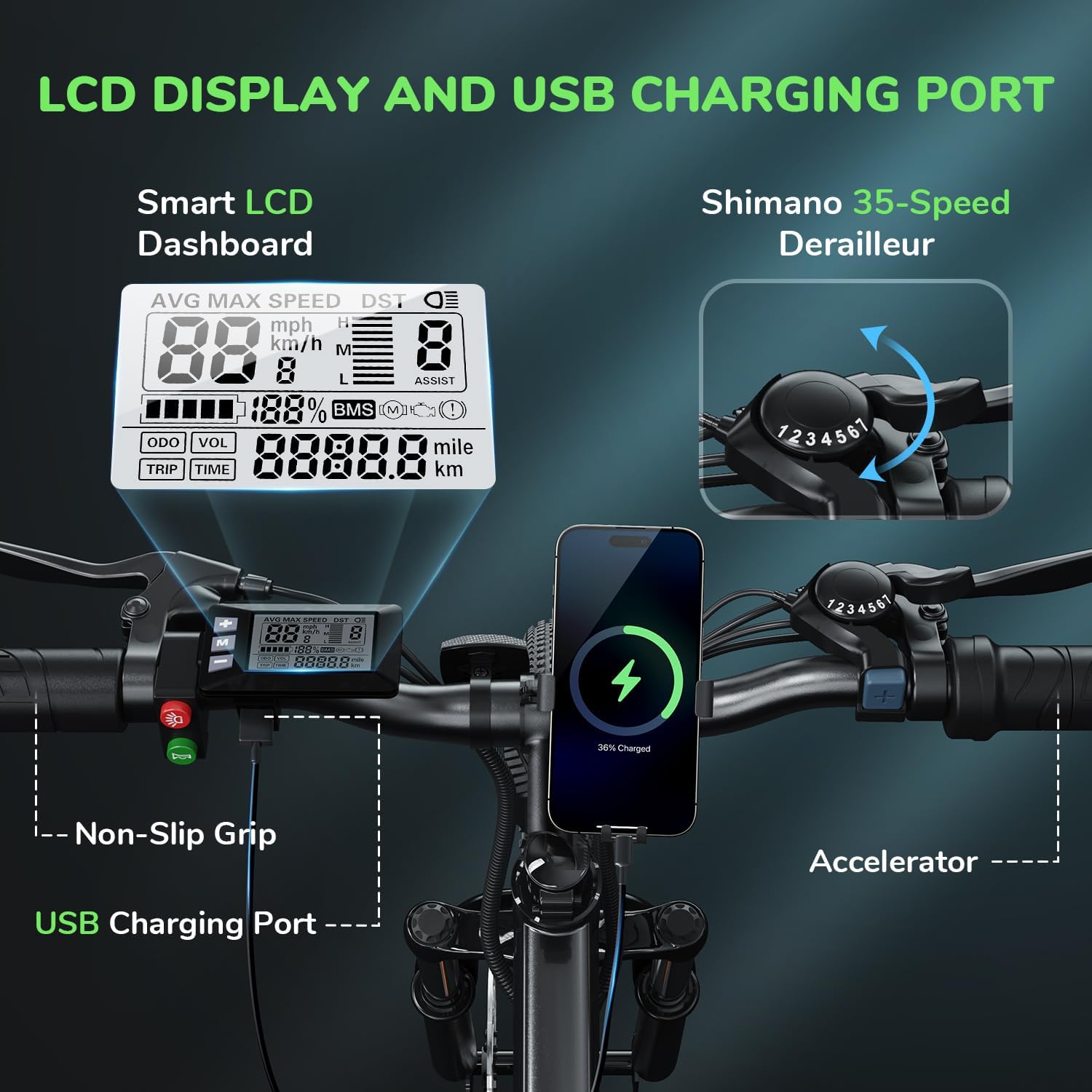
Image: Attaching the front wheel.

Image: Installing the pedals.

Image: Adjusting and securing the seat.

Image: Installing the removable battery.
วิดีโอแนะนำการประกอบ
Video: A comprehensive guide demonstrating the assembly process of the isinwheel M10 Electric Bike, including handlebar, wheel, pedal, and battery installation.
4. คู่มือการใช้งาน
4.1 เปิด/ปิดเครื่อง
- To power on the bike, press and hold the power button on the LCD display for a few seconds until the screen illuminates.
- หากต้องการปิดเครื่อง ให้กดปุ่มเปิด/ปิดค้างไว้อีกครั้งจนกว่าจอแสดงผลจะดับลง
4.2 โหมดการขับขี่
The M10 Electric Bike offers multiple riding modes:
- โหมดช่วยเหยียบ (PAS): Provides motor assistance as you pedal. Adjust the assist level (1-5) using the '+' and '-' buttons on the control panel. Higher levels provide more assistance.
- โหมดไฟฟ้าเต็มรูปแบบ (คันเร่ง): Engage the throttle for motor power without pedaling. This mode is typically used for quick acceleration or when you need a break from pedaling.
- โหมดแมนนวล: ปั่นจักรยานเหมือนจักรยานทั่วไป โดยไม่ต้องใช้มอเตอร์ช่วย
4.3 Shimano 7-Speed Gear System
The bike is equipped with a Shimano 7-speed transmission system. Use the gear shifter on the handlebar to change gears according to terrain and desired speed. Lower gears are for uphill climbing, and higher gears are for flat terrain or downhill riding.
4.4 ฟังก์ชั่นการแสดงผล LCD
The smart LCD display provides real-time riding data:
- ความเร็ว: Current, average, and maximum speed.
- เวลาขี่: Duration of your ride.
- ระยะทาง : ระยะทางในการเดินทางและระยะทางรวมที่บันทึกไว้
- ระดับแบตเตอรี่: ปริมาณแบตเตอรี่ที่เหลืออยู่
- ระดับการช่วยเหลือ: Current pedal assist level (1-5).
Power On Operation Video
Video: Demonstrates how to power on the isinwheel M10 Electric Bike and navigate the LCD display functions.
5. การจัดการแบตเตอรี่
5.1 การถอดและติดตั้งแบตเตอรี่
The 36V 10.4AH Lithium-Ion battery is removable for convenient charging or storage.
- การถอดออก: Unlock the battery with the provided key, then slide it out from the frame.
- การติดตั้ง: Align the battery with the frame slot and slide it in until it clicks into place. Lock it with the key to secure.
5.2 คำแนะนำในการชาร์จ
Use only the provided 42V 2A Fast Charger.
- ตรวจสอบให้แน่ใจว่าจักรยานปิดอยู่
- หาตำแหน่งพอร์ตชาร์จบนแบตเตอรี่
- เชื่อมต่อเครื่องชาร์จเข้ากับพอร์ตการชาร์จ
- เสียบที่ชาร์จเข้ากับเต้ารับไฟมาตรฐาน
- The charger indicator light will show red during charging and turn green when fully charged.
- โดยปกติการชาร์จเต็มจะใช้เวลา 3-4 ชั่วโมง
- ถอดเครื่องชาร์จออกเมื่อการชาร์จเสร็จสิ้น
Battery Removal and Charging Video
Video: Instructions for removing and installing the battery, and connecting the charger to the isinwheel M10 Electric Bike.
6. การบำรุงรักษา
การบำรุงรักษาตามปกติจะช่วยให้ e-bike ของคุณมีอายุการใช้งานยาวนานและปลอดภัย
- การทำความสะอาด: เช็ดจักรยานด้วยโฆษณาamp ผ้า หลีกเลี่ยงการล้างด้วยแรงดันสูงโดยตรงกับชิ้นส่วนไฟฟ้า
- แรงดันลมยาง: Check tire pressure before each ride. Maintain recommended pressure (usually indicated on the tire sidewall) using the included pump.
- เบรค : Regularly inspect brake pads and rotors for wear. Ensure brake levers engage smoothly and provide adequate stopping power. Adjust or replace as needed.
- โซ่: รักษาโซ่ให้สะอาดและหล่อลื่นอยู่เสมอเพื่อป้องกันสนิมและเพื่อให้การเปลี่ยนเกียร์ราบรื่น
- ตัวล็อค: Periodically check all bolts and nuts for tightness, especially on the handlebars, seatpost, and wheels.
- การดูแลแบตเตอรี่ เก็บแบตเตอรี่ไว้ในที่แห้งและเย็น หากเก็บไว้นาน ควรชาร์จแบตเตอรี่ให้ได้ 50-70% ทุกๆ 2-3 เดือน
Air Inflation Instructions Video
Video: Demonstrates how to properly inflate the tires of the isinwheel M10 Electric Bike using the provided pump.
7 การแก้ไขปัญหา
If you encounter issues with your isinwheel M10 Electric Bike, refer to the following common problems and solutions:
| ปัญหา | สาเหตุที่เป็นไปได้ | สารละลาย |
|---|---|---|
| จักรยานไม่สตาร์ท | Battery not installed correctly or discharged; loose electrical connection. | Ensure battery is fully inserted and locked. Check battery charge level and charge if necessary. Verify all visible electrical connections are secure. |
| มอเตอร์ไม่ช่วย | Low battery; assist level set to 0; brake lever engaged; motor cable disconnected. | Charge battery. Increase assist level on the display. Release brake levers. Check motor cable connection. |
| แบตเตอรี่ไม่ชาร์จ | อาจไม่ได้เสียบที่ชาร์จอย่างถูกต้อง; ที่ชาร์จ/แบตเตอรี่มีปัญหา; ปัญหาเกี่ยวกับปลั๊กไฟ | Ensure charger is securely plugged into battery and outlet. Check if the outlet is working. Contact support if issues persist. |
| เบรกรู้สึกอ่อนแรง | ผ้าเบรกสึกหรอ; สายเบรกหลวม; มีอากาศในระบบไฮดรอลิก (ถ้ามี) | Inspect and replace worn brake pads. Adjust brake cable tension. For hydraulic brakes, professional service may be required. |
If you cannot resolve an issue using the troubleshooting guide, please contact isinwheel customer support for assistance.
8. ข้อมูลจำเพาะ
Key technical specifications for the isinwheel M10 Electric Bike:
| คุณสมบัติ | ข้อมูลจำเพาะ |
|---|---|
| แบบอย่าง | M10 |
| มอเตอร์ | มอเตอร์ไร้แปรงถ่านกำลังสูงสุด 500 วัตต์ |
| ความเร็วสูงสุด | ความเร็วสูงสุด 32 กม./ชม. (20 ไมล์/ชม.) |
| แบตเตอรี่ | 36V 10.4AH (375WH) Removable Li-ion, IPX5 waterproof |
| เวลาในการชาร์จ | 3-4 hours (with 42V 2A Fast Charger) |
| เตาประกอบอาหาร (ระบบไฟฟ้าเต็มรูปแบบ) | 39-43 miles (63-70 KM) |
| ช่วงระยะ (ระบบช่วยปั่น) | 50-60 miles (80-96 KM) |
| การแพร่เชื้อ | Shimano 7 สปีด |
| วัสดุกรอบ | โลหะผสมอลูมิเนียม |
| น้ำหนักจักรยาน | 21.3 กก. (47 ปอนด์) |
| ขนาดล้อ | 26 นิ้ว |
| การระงับ | ระบบกันสะเทือนโช๊คหน้า |
| เบรค | ระบบเบรกดิสก์แบบกลไกทั้งด้านหน้าและด้านหลัง |
| คุณสมบัติพิเศษ | Digital LCD Display, Height Adjustable Seat, Lightweight & Portable |
| การรับรอง | UL 2271 (Li-ion battery), UL 2789 (whole e-bike) |

Image: isinwheel M10 Electric Bike dimensions and rider height guide.
9. การรับประกันและการสนับสนุน
The isinwheel M10 Electric Bike comes with a 12-month warranty from the date of purchase. This warranty covers manufacturing defects in materials and workmanship. It does not cover damage caused by misuse, accidents, unauthorized modifications, or normal wear and tear.
For warranty claims, technical support, or any questions regarding your e-bike, please contact isinwheel customer service. Provide your purchase details and a description of the issue for prompt assistance.
ข้อมูลติดต่อ: Please refer to your purchase documentation or the official isinwheel webเว็บไซต์สำหรับรายละเอียดการติดต่อฝ่ายสนับสนุนลูกค้าล่าสุด