
1. สินค้าหมดview
The zelotes C-12 Professional Wired Gaming Mouse is designed for high-performance gaming and office use. It features an ergonomic design, 12 programmable buttons, adjustable DPI settings, multi-modes RGB backlighting, and a customizable weight system.

Image 1.1: The zelotes C-12 Professional Wired Gaming Mouse, showcasing its ergonomic shape and customizable RGB lighting.
เนื้อหาแพ็คเกจ:
- 1 x zelotes C-12 Gaming Mouse
- 1 x คู่มือการใช้งาน
- 1 x ซีดีซอฟต์แวร์
- 1 x Foot Pad Set
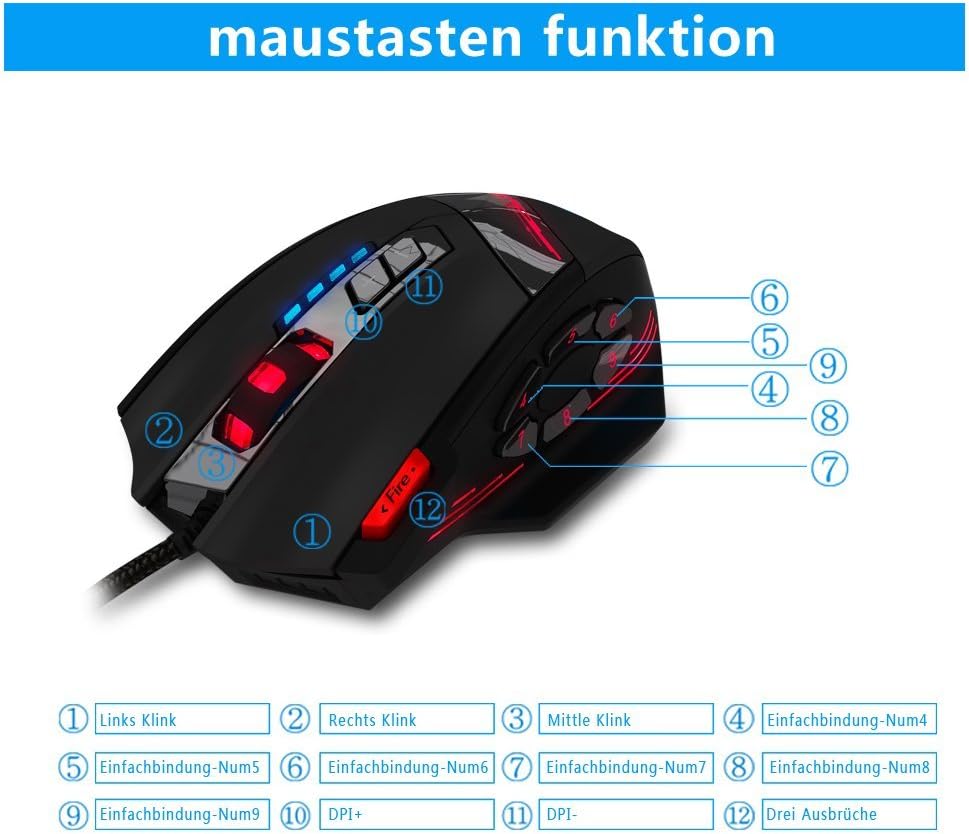
Image 1.2: The complete package contents of the zelotes C-12 Gaming Mouse.
2. การตั้งค่า
2.1 การเชื่อมต่อเมาส์
Connect the USB cable of the zelotes C-12 Gaming Mouse to an available USB port on your computer. The mouse is plug-and-play for basic functionality.
2.2 การติดตั้งซอฟต์แวร์ (ทางเลือก)
For full customization of buttons, DPI, and lighting, install the provided software from the included CD. Insert the CD into your computer's optical drive and follow the on-screen instructions. If your computer does not have an optical drive, please visit the official zelotes website to download the latest software driver.
Note: The programming software is not fully compatible with Mac operating systems.
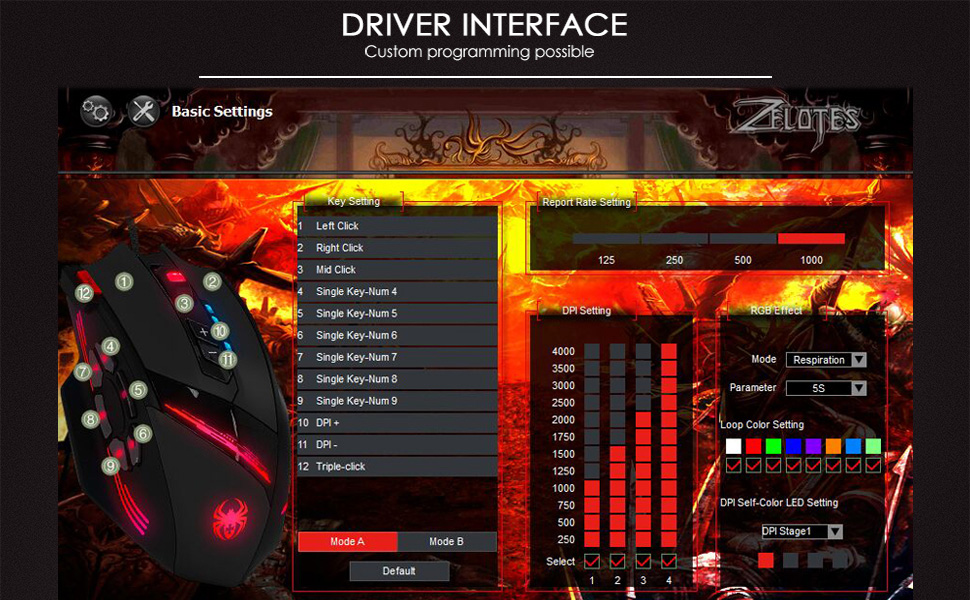
Image 2.1: The software interface for customizing the zelotes C-12 Gaming Mouse.
2.3 Weight Tuning
The mouse includes 8 removable weight blocks, each weighing 2.5 grams, located in a compartment on the underside of the mouse. To adjust the mouse's weight:
- Gently twist and remove the circular cover on the bottom of the mouse.
- Add or remove the 2.5g weight blocks as desired to achieve your preferred mouse feel.
- Replace the circular cover by twisting it back into place.
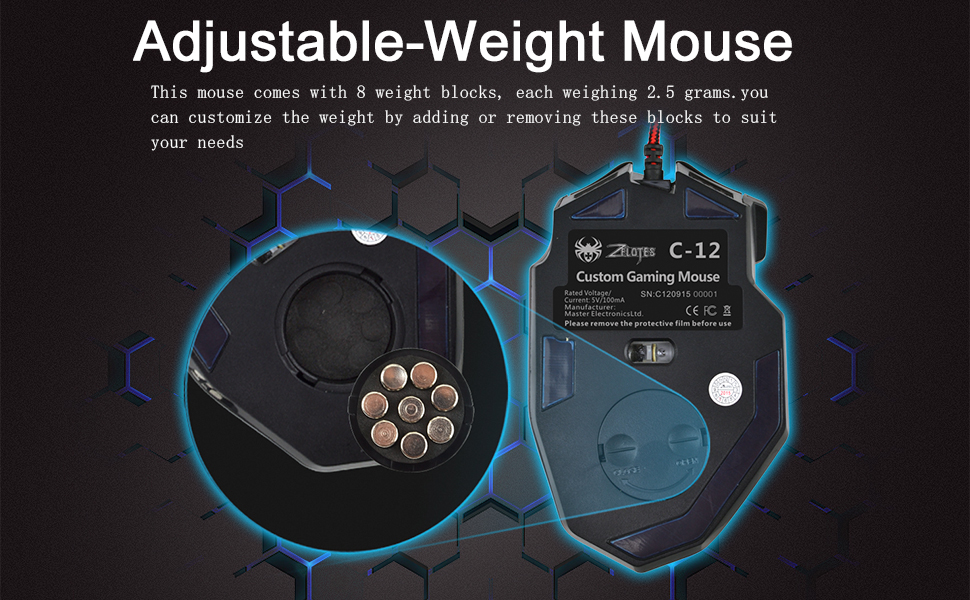
Image 2.2: Adjusting the weight of the zelotes C-12 mouse by adding or removing the 2.5g blocks.
Video 2.1: A demonstration of the weight tuning feature and programmable buttons on the zelotes C-12 Gaming Mouse.
3. คู่มือการใช้งาน
3.1 ฟังก์ชันปุ่ม
The zelotes C-12 mouse features 12 programmable buttons. The default functions are:
- คลิกซ้าย (ปุ่ม 1)
- คลิกขวา (ปุ่ม 2)
- คลิกกลาง / ล้อเลื่อน (ปุ่ม 3)
- ปุ่มด้านข้าง (Buttons 4-9): Default to various functions, customizable via software.
- ดีพีไอ+ (Button 10): Increases DPI sensitivity.
- ดีพีไอ- (Button 11): Decreases DPI sensitivity.
- ปุ่มไฟ (Button 12): Default to triple-click, customizable via software.

Image 3.1: Labeled diagram of the zelotes C-12 mouse buttons.
3.2 การปรับ DPI
The mouse offers 4 default DPI levels: 1000/1500/2000/4000 DPI. You can cycle through these levels using the dedicated DPI+ and DPI- buttons. For finer control and to reach up to 8000 DPI, use the included software.
3.3 แสง RGB
The mouse features multi-modes RGB backlighting, including 7-color cycle breathing and monochromatic constant bright modes. Lighting effects can be customized through the software to match your preferences.
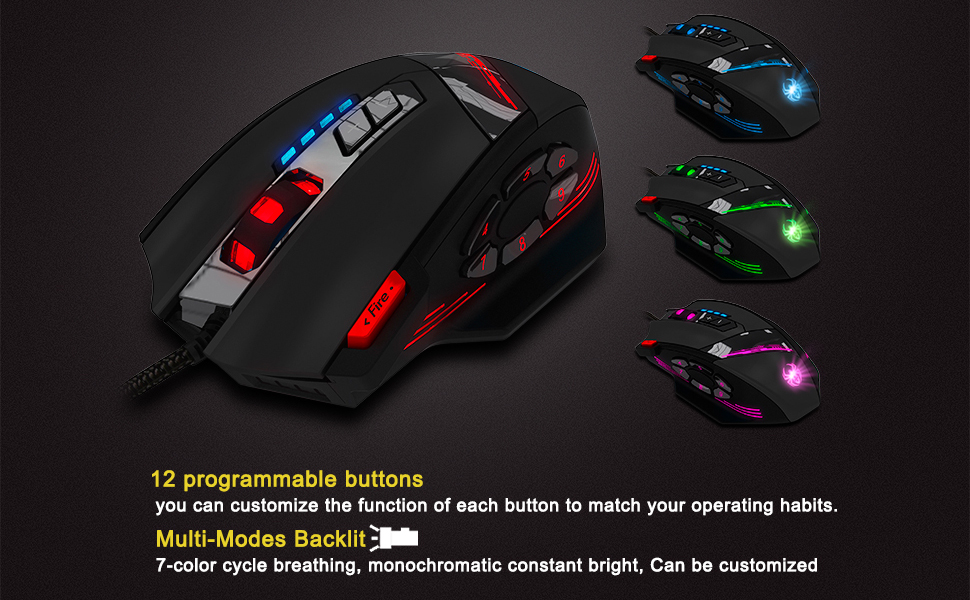
Image 3.2: The zelotes C-12 mouse showcasing its multi-color RGB lighting options.
3.4 การออกแบบตามหลักสรีรศาสตร์
The mouse is designed for comfort during extended use, featuring a sweat-resistant and anti-slip rubber surface. Its ergonomic shape helps prevent wrist fatigue.

Image 3.3: The ergonomic design of the zelotes C-12 mouse provides a comfortable grip.
4. การบำรุงรักษา
To ensure the longevity and optimal performance of your zelotes C-12 Gaming Mouse, follow these maintenance guidelines:
- การทำความสะอาด: ใช้ผ้านุ่มและแห้งเช็ดพื้นผิวของเมาส์ สำหรับสิ่งสกปรกฝังแน่น ให้เช็ดเบาๆampชุบผ้าด้วยน้ำหรือน้ำยาทำความสะอาดอ่อนๆ หลีกเลี่ยงสารเคมีรุนแรงหรือสารกัดกร่อน
- การดูแลเซ็นเซอร์: รักษาเซ็นเซอร์ออปติคัลที่ด้านล่างของเมาส์ให้สะอาด ปราศจากฝุ่นหรือเศษขยะ ใช้สำลีก้านหรือลมอัดหากจำเป็น
- การจัดการสายเคเบิล: หลีกเลี่ยงการโค้งงออย่างแรงหรือการดึงสาย USB มากเกินไปเพื่อป้องกันความเสียหาย
- พื้นที่จัดเก็บ: เมื่อไม่ได้ใช้งาน ให้เก็บเมาส์ไว้ในสภาพแวดล้อมที่สะอาดและแห้ง ห่างจากอุณหภูมิที่สูงหรือต่ำเกินไป
5 การแก้ไขปัญหา
5.1 เมาส์ไม่ตอบสนอง
- ตรวจสอบให้แน่ใจว่าสาย USB เชื่อมต่อกับคอมพิวเตอร์ของคุณอย่างแน่นหนาแล้ว
- ลองเชื่อมต่อเมาส์กับพอร์ต USB อื่น
- Test the mouse on another computer to rule out a computer-specific issue.
- รีสตาร์ทเครื่องคอมพิวเตอร์ของคุณ
5.2 DPI or Button Settings Not Changing
- Ensure the zelotes C-12 software is correctly installed and running.
- Check if the settings are saved within the software after making changes.
- For Mac users, note that the programming software has limited compatibility. Basic DPI changes via mouse buttons should still function.
5.3 ไฟ RGB ไม่ทำงานหรือแสดงผลไม่ถูกต้อง
- Verify lighting settings within the zelotes C-12 software.
- ตรวจสอบให้แน่ใจว่าเมาส์เชื่อมต่ออย่างถูกต้องและได้รับพลังงานแล้ว
5.4 Mouse Movement Is Erratic
- ทำความสะอาดเซ็นเซอร์ออปติคอลที่ด้านล่างของเมาส์
- ตรวจสอบให้แน่ใจว่าคุณใช้เมาส์บนพื้นผิวที่เหมาะสม (เช่น แผ่นรองเมาส์) หลีกเลี่ยงพื้นผิวที่สะท้อนแสงสูงหรือโปร่งใส
6. ข้อมูลจำเพาะ
| คุณสมบัติ | คำอธิบาย |
|---|---|
| ยี่ห้อ | เซโลเตส |
| ชื่อรุ่น | ซี-12 |
| เทคโนโลยีการเชื่อมต่อ | สาย USB |
| เทคโนโลยีตรวจจับการเคลื่อนไหว | Optical (A3050 Gaming Chip) |
| การตั้งค่า DPI | 1000/1500/2000/4000 (Adjustable up to 8000 DPI via software) |
| จำนวนปุ่ม | 12 ปุ่มตั้งโปรแกรมได้ |
| การปรับน้ำหนัก | 8 x 2.5g removable weights |
| การวางแนวมือ | ถนัดขวา |
| ความเข้ากันได้ของระบบปฏิบัติการ | Win11, Win10, Win8, Win7, Mac OS (limited software compatibility for Mac) |
| ขนาด (กว้าง x ยาว x สูง) | 130มม. x 81.5มม. x 39.8มม. |
| อัตราการสำรวจความคิดเห็น | 125-1000เฮิรตซ์ |
| ความยาวสายเคเบิล | 1.8ม. |
| วัสดุ | พลาสติก (เคลือบด้าน) |

Image 6.1: Detailed technical specifications and dimensions of the zelotes C-12 Gaming Mouse.
7. ข้อมูลการรับประกัน
The zelotes C-12 Professional Wired Gaming Mouse comes with a การรับประกันจากผู้ผลิต 1 ปี นับจากวันที่ซื้อ การรับประกันนี้ครอบคลุมถึงความบกพร่องของวัสดุและฝีมือการผลิตภายใต้การใช้งานปกติ แต่ไม่ครอบคลุมความเสียหายที่เกิดจากการใช้งานผิดวิธี อุบัติเหตุ การดัดแปลงโดยไม่ได้รับอนุญาต หรือสาเหตุภายนอก
โปรดเก็บหลักฐานการซื้อของคุณไว้เพื่อเรียกร้องการรับประกัน
8. การสนับสนุน
For further assistance, technical support, or warranty inquiries, please refer to the contact information provided with your product packaging or visit the official zelotes webเว็บไซต์.