
สินค้าเกินview
The JBL Tour One M3 Smart Tx headphones offer a premium audio experience with advanced features designed for immersive listening and clear communication. These over-ear headphones integrate lossless audio capabilities, Spatial 360 Sound with Head Tracking, and True Adaptive Noise Cancelling 2.0. The included JBL Smart Tx Audio Transmitter enhances connectivity options, allowing wireless streaming from various audio sources.

Image: JBL Tour One M3 Smart Tx headphones in blue, showcasinด้วยการออกแบบที่เพรียวบาง
มีอะไรอยู่ในกล่อง
- 1 x JBL Tour One M3 Smart Tx Headphones
- เครื่องส่งสัญญาณเสียง JBL Smart Tx 1 ตัว
- 1x กระเป๋าใส่ของพกพา
- สายเคเบิล USB Type-C ถึงอนาล็อก 1 มม. 3.5 เส้น
- สายเคเบิล USB Type-C ถึง Type C 1 เส้น
- อะแดปเตอร์ USB Type-C ถึง Type-A 1 ชิ้น
- คู่มือการใช้งาน

Image: The JBL Tour One M3 Smart Tx headphones, Smart Tx Audio Transmitter, various cables, and carrying case, laid out as they appear in the product packaging.
การตั้งค่า
การจับคู่ Bluetooth เริ่มต้น
- Ensure your JBL Tour One M3 Smart Tx headphones are charged.
- เปิดใช้งานหูฟังโดยกดปุ่มเปิด/ปิดค้างไว้จนกว่าไฟ LED จะกะพริบ
- On your device (smartphone, tablet, laptop), go to Bluetooth settings and select "JBL Tour One M3" from the list of available devices.
- Confirm pairing if prompted. The LED indicator on the headphones will turn solid blue when connected.
Connecting with JBL Smart Tx Audio Transmitter
The JBL Smart Tx allows you to connect to various audio sources wirelessly, including in-flight entertainment systems, TVs, and PCs.
- Connect the JBL Smart Tx to your desired audio source using the appropriate cable (3.5mm analog or USB-C digital).
- Power on the JBL Smart Tx.
- The Smart Tx will automatically search for and connect to your JBL Tour One M3 headphones. Use the touch screen on the Smart Tx to manage connections and settings.

ภาพ: รายละเอียด view of the JBL Smart Tx Audio Transmitter, highlighting its interactive touch screen for controlling headphone features.
แอพหูฟัง JBL
Download the JBL Headphones app for full customization and control over your headphones' features, including EQ settings, ANC modes, Smart Talk, and Personi-Fi 3.0.
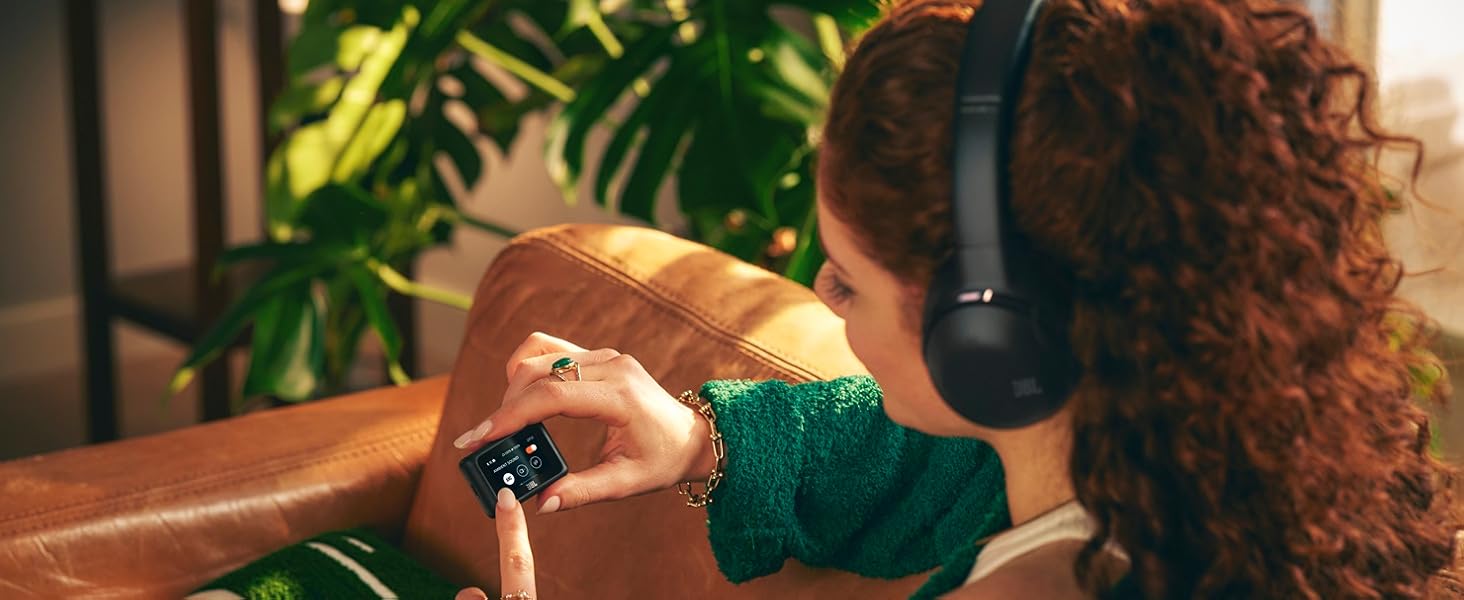
Image: A user adjusting settings on the JBL Headphones app, demonstrating personalized control over the JBL Tour One M3 Smart Tx headphones.
คำแนะนำการใช้งาน
การควบคุม
The JBL Tour One M3 Smart Tx headphones feature intuitive physical buttons and touch controls on the earcups. The JBL Smart Tx also provides a touch screen for comprehensive control without needing your phone.

Image: A close-up of the right earcup of the JBL Tour One M3 Smart Tx headphones, detailing the physical buttons and touch-sensitive area for controlling playback, volume, and features.
ระบบตัดเสียงรบกวนแบบปรับได้จริง 2.0
Experience superior noise cancellation with 8 microphones that adapt to your environment in real-time, eliminating distractions. Use the JBL Headphones app to customize Ambient Aware and Talk Thru modes for situational awareness.

ภาพ: โปร่งใส view of the JBL Tour One M3 Smart Tx headphones, illustrating the intricate internal components and the placement of the 8 microphones for True Adaptive Noise Cancelling 2.0.
ระบบเสียง JBL Spatial 360 ที่สมจริงพร้อมระบบ Head Tracking
Enjoy a natural, realistic, and accurate immersive audio experience for music, movies, and games. Integrated head tracking ensures sounds remain fixed in space even when you move your head.

Image: A person wearing JBL Tour One M3 Smart Tx headphones, with graphical overlays emphasizing the Hi-Res Audio and Immersive JBL Spatial 360 Sound with Head Tracking features.
สมาร์ททอล์ค
Smart Talk automatically pauses your music when it detects your voice, allowing for quick conversations without removing your headphones. Settings can be fine-tuned in the JBL Headphones app.
personi-fi 3.0
สร้างมืออาชีพด้านเสียงส่วนตัวfile by taking a hearing test in the JBL Headphones app. Utilize the 12-band EQ and separate L/R balance optimization for your ideal sound across the entire frequency range.
คุณสมบัติการโทร
Four adaptive beamforming microphones, powered by an AI algorithm, ensure crystal-clear calls by eliminating echoes and ambient noise. The JBL App allows customization of your voice and others' voices during calls, and the headphones are Zoom certified.

Image: A person engaged in a video conference call while wearing JBL Tour One M3 Smart Tx headphones, illustrating the effectiveness of the call features in a professional setting.
อายุการใช้งานแบตเตอรี่
Enjoy up to 70 hours of music playback via Bluetooth (40 hours with ANC on). A quick 5-minute charge provides an additional 5 hours of listening time.

Image: JBL Tour One M3 Smart Tx headphones being charged via a USB-C cable, symbolizing their long battery life and quick charging capability.
Auracast™ Connection
Use the JBL Smart Tx Audio Transmitter to connect to any audio source and stream to any Auracast-enabled speakers or headphones nearby. Share your favorite playlist or TV series with other Auracast-enabled devices.
การบูรณาการสื่อ
JBL Tour One M3 Smart Tx Product Video
วิดีโอ: วิดีโอแสดงผลิตภัณฑ์อย่างเป็นทางการasing the key features and design of the JBL Tour One M3 Smart Tx headphones.
JBL Tour One M3 Smart Tx Connectivity
Video: A demonstration of the various connectivity options available with the JBL Tour One M3 Smart Tx headphones, including the Smart Tx Audio Transmitter.
การซ่อมบำรุง
การทำความสะอาด
เช็ดทำความสะอาดที่ครอบหูและแถบคาดศีรษะด้วยผ้าเนื้อนุ่มและแห้งamp cloth. Avoid using harsh chemicals or abrasive materials. Ensure all ports are dry before charging or connecting cables.
พื้นที่จัดเก็บ
เมื่อไม่ใช้งาน ควรเก็บหูฟังไว้ในกล่องใส่ที่ให้มา เพื่อป้องกันฝุ่น รอยขีดข่วน และแรงกระแทก
การแก้ไขปัญหา
- ไม่มีไฟฟ้า: ตรวจสอบให้แน่ใจว่าหูฟังชาร์จเต็มแล้ว
- ไม่มีเสียง: Check Bluetooth connection, volume levels on both headphones and source device. Ensure the correct input is selected on the Smart Tx.
- คุณภาพเสียงไม่ดี: Verify audio source quality. Adjust EQ settings in the JBL Headphones app.
- ระบบตัดเสียงรบกวนไม่ได้ผล: Ensure earcups form a good seal around your ears. Adjust ANC settings in the JBL Headphones app.
- Smart Tx Connectivity Issues: Ensure Smart Tx is powered on and correctly connected to the audio source. Check that the headphones are paired with the Smart Tx.
ข้อมูลจำเพาะ
| ยี่ห้อ | เจบีแอล |
| ชื่อรุ่น | JBL Tour One M3 Smart Tx |
| หมายเลขรุ่น | JBLTOM3AVIBLUAM |
| การวางตำแหน่งหู | ครอบหู |
| เทคโนโลยีการเชื่อมต่อ | แบบมีสาย, ไร้สาย (บลูทูธ 5.3) |
| การควบคุมเสียงรบกวน | ระบบตัดเสียงรบกวนแบบปรับได้ |
| ขนาดไดร์เวอร์เสียง | 40 มิลลิเมตร |
| การตอบสนองความถี่ | 20 เฮิรตซ์ ถึง 40 กิโลเฮิรตซ์ |
| อายุการใช้งานแบตเตอรี่โดยเฉลี่ย | 70 Hours (40 hours with ANC on) |
| น้ำหนักสินค้า | 278 กรัม |
| วัสดุ | พลาสติก |
การรับประกันและการสนับสนุน
The JBL Tour One M3 Smart Tx headphones come with a รับประกันจากผู้ผลิต 1 ปี. For technical support, troubleshooting assistance, or warranty claims, please visit the official JBL support webหรือติดต่อฝ่ายบริการลูกค้า โปรดเก็บหลักฐานการซื้อไว้เพื่อใช้ยืนยันการรับประกัน