
สินค้าเกินview
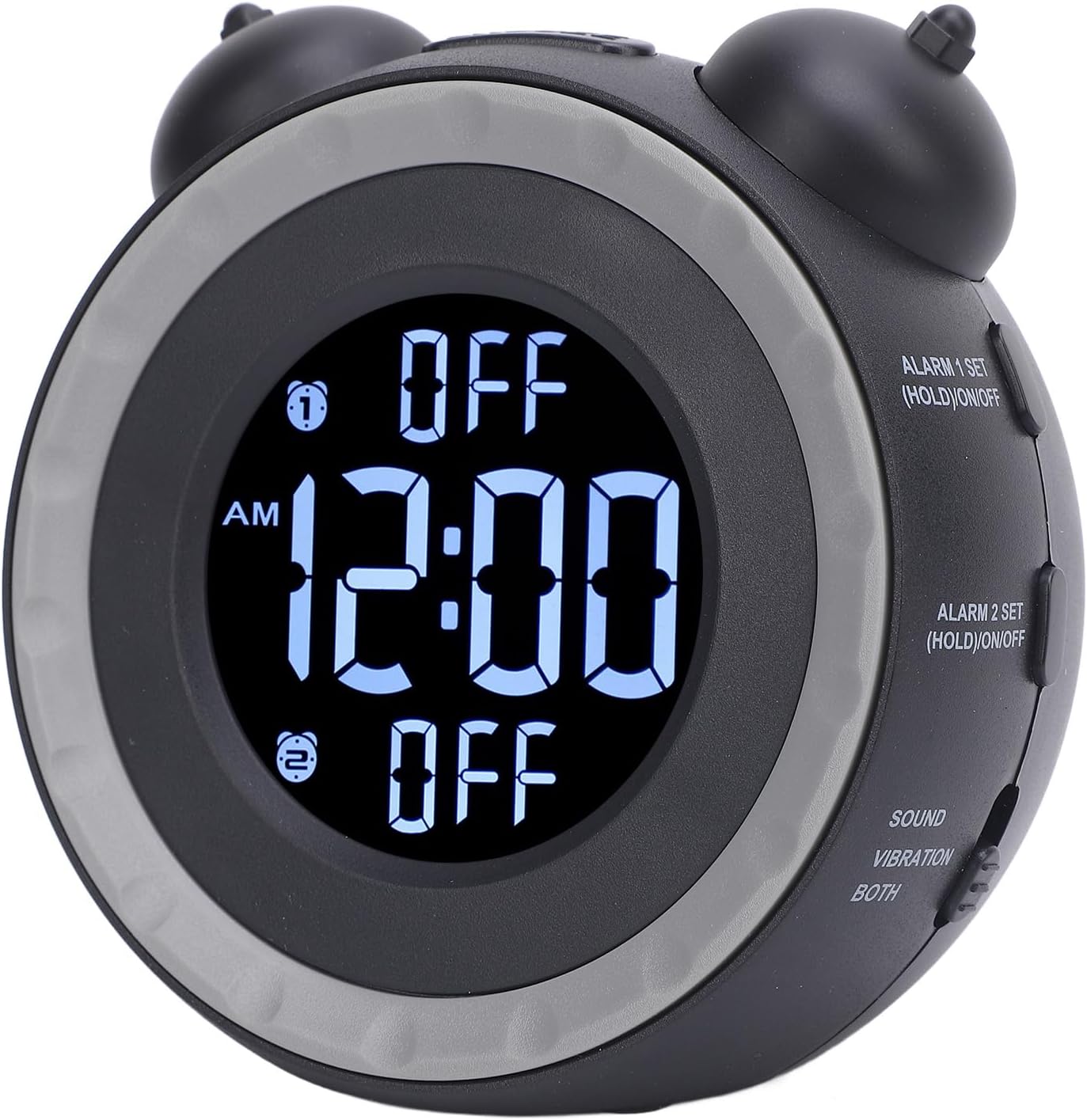
The Ymiko Alarm Clock with Bed Shaker is designed to provide a reliable wake-up solution, especially for heavy sleepers. It features adjustable volume, multiple wake-up modes, and a vibrating bed shaker to ensure you wake up on time.

ภาพ: The Ymiko Alarm Clock, bed shaker, and USB cable. This image displays all components included in the package.
เนื้อหาแพ็คเกจ
ตรวจสอบว่ามีรายการทั้งหมดอยู่ในแพ็คเกจ:
- 1 x นาฬิกาปลุก
- 1 x Bed Shaker
- 1 x คู่มือการใช้งาน
- สาย USB 1 เส้น
การตั้งค่า
การเปิดนาฬิกาปลุก
The alarm clock can be powered via the included USB cable or by batteries for backup.
- Connect the USB cable to the alarm clock's power input port and plug the other end into a compatible USB power adapter (not included) or a USB port.
- For battery backup, open the battery compartment on the back of the alarm clock and insert 2 x AAA batteries (not included), ensuring correct polarity.
Connecting the Bed Shaker
To utilize the vibration feature, connect the bed shaker to the alarm clock.
- Locate the dedicated port for the bed shaker on the alarm clock.
- Insert the bed shaker's plug firmly into this port.
- Place the bed shaker under your pillow or mattress for optimal vibration.
ภาพ: หลัง view of the alarm clock, highlighting the power input and bed shaker port.
คำแนะนำการใช้งาน
การตั้งเวลา
- กดปุ่ม ตั้งเวลา button. The time display will begin to flash.
- หมุน left bell knob (HR SETTING / DIMMER) to adjust the hour.
- หมุน right bell knob (MIN SETTING / DIMMER) to adjust the minute.
- กด ตั้งเวลา อีกครั้งเพื่อยืนยันและออกจากโหมดตั้งเวลา

ภาพ: ด้านข้าง view of the alarm clock showing the "TIME SET" button and other controls.
Switching 12/24 Hour Format
The default time format is 12-hour.
- กดปุ่ม 12/24 ชม. ปุ่มสำหรับสลับระหว่างรูปแบบการแสดงผลแบบ 12 ชั่วโมงและ 24 ชั่วโมง
การตั้งปลุก 1
- กดปุ่มค้างไว้ ALARM 1 SET (HOLD)/ON/OFF button for 3 seconds. The Alarm 1 time will flash.
- หมุน left bell knob เพื่อปรับเวลาปลุก
- หมุน right bell knob เพื่อปรับนาทีของนาฬิกาปลุก
- กด นาฬิกาปลุก 1 ชุด again to confirm and exit alarm setting mode.
- To turn Alarm 1 ON or OFF, short press the ALARM 1 SET (HOLD)/ON/OFF button. An indicator will appear on the display when Alarm 1 is active.

ภาพ: ด้านข้าง view of the alarm clock showing the "ALARM 1 SET" and "ALARM 2 SET" buttons.
การตั้งปลุก 2
Follow the same steps as Setting Alarm 1, but use the ALARM 2 SET (HOLD)/ON/OFF ปุ่ม.
Adjusting Alarm Sound and Wake-up Mode
The alarm clock offers 3 wake-up modes and 3 music alarm tones.
- กดปุ่ม เสียงปลุก button to cycle through the available alarm tones (e.g., beeping, bird chirping, music).
- ใช้ SOUND / VIBRATION / BOTH switch to select your preferred wake-up mode:
- เสียง: Alarm will only use the selected sound tone.
- การสั่นสะเทือน: Alarm will only use the bed shaker.
- ทั้งสอง: Alarm will use both the selected sound tone and the bed shaker.
การปรับระดับเสียง
The alarm volume can be adjusted to suit your preference.
- กดปุ่ม ปริมาณ button to adjust the alarm sound level.
Adjusting Screen Brightness (Dimmer)
The display brightness can be continuously adjusted.
- หมุน HR SETTING / DIMMER knob (left bell knob) or MIN SETTING / DIMMER knob (right bell knob) to adjust the screen brightness.

ภาพ: สูงสุด view of the alarm clock, indicating the hour and minute setting knobs which also function as dimmer controls.
ฟังก์ชั่นการพักชั่วคราว
เมื่อเสียงปลุกดัง ให้กด เลื่อน button located on top of the clock to temporarily pause the alarm. The alarm will sound again after a short interval.
การซ่อมบำรุง
To ensure the longevity and proper functioning of your Ymiko Alarm Clock, follow these maintenance guidelines:
- การทำความสะอาด: Wipe the alarm clock and bed shaker with a soft, dry cloth. Do not use abrasive cleaners, solvents, or harsh chemicals, as these can damage the surfaces.
- พื้นที่จัดเก็บ: If storing the device for an extended period, remove the AAA batteries to prevent leakage. Store in a cool, dry place away from direct sunlight and extreme temperatures.
- หลีกเลี่ยงน้ำ: Keep the alarm clock and bed shaker away from water and high humidity. This device is not waterproof.
- จัดการด้วยความระมัดระวัง: หลีกเลี่ยงการทำอุปกรณ์หล่นหรือกระแทกอย่างรุนแรง
การแก้ไขปัญหา
If you encounter issues with your Ymiko Alarm Clock, refer to the following common problems and solutions:
| ปัญหา | สาเหตุที่เป็นไปได้ | สารละลาย |
|---|---|---|
| Clock display is blank or flickering. | ไม่มีไฟหรือแบตเตอรี่เหลือน้อย |
|
| Alarm does not sound or vibrate. | Alarm not activated, volume too low, or bed shaker not connected. |
|
| ไม่สามารถตั้งเวลาหรือนาฬิกาปลุกได้ | ลำดับการกดปุ่มหรือโหมดไม่ถูกต้อง |
|
| หน้าจอแสดงผลสว่างเกินไปหรือมืดเกินไป | ต้องปรับการตั้งค่าความสว่างของตัวหรี่ไฟ |
|
ข้อมูลจำเพาะ
| คุณสมบัติ | รายละเอียด |
|---|---|
| ยี่ห้อ | อิมิโกะ |
| หมายเลขรุ่น | Ymikovzge57sar2 |
| ประเภทจอภาพ | ดิจิตอล |
| ขนาดสินค้า (กว้าง x สูง) | กว้าง 4.72 นิ้ว x สูง 4.33 นิ้ว |
| แหล่งพลังงาน | AC/DC (USB connectivity) |
| ความต้องการแบตเตอรี่ | แบตเตอรี่ AAA 2 ก้อน (ไม่รวม) |
| วัสดุกรอบ | อะคริโลไนไตรล์บิวทาไดอีนสไตรีน |
| คุณสมบัติพิเศษ | Adjustable volume, 3 wake-up modes, 3 alarm tones, bed shaker, screen brightness dimmer. |
| การใช้งานภายใน/ภายนอกอาคาร | ในร่ม |
ข้อมูลการรับประกัน
For detailed warranty information regarding your Ymiko Alarm Clock, please refer to the warranty card included in your product packaging or visit the official Ymiko webไซต์ เงื่อนไขการรับประกันอาจแตกต่างกันไปตามภูมิภาคและผู้ค้าปลีก
สนับสนุน
If you require further assistance or have questions not covered in this manual, please contact Ymiko customer support.
- การสนับสนุนทางออนไลน์: Visit the official Ymiko store on Amazon for product information and support resources: Ymiko Store
- ข้อมูลติดต่อ: Refer to your product packaging or the Ymiko webเว็บไซต์นี้มีรายละเอียดการติดต่อฝ่ายบริการลูกค้าโดยเฉพาะ