
การแนะนำ
Thank you for choosing the BoxWave SlimKeys Bluetooth Keyboard. This ultra-thin and portable keyboard is designed to enhance your typing experience with your Volla Tablet (12.3 in) and other compatible devices. Featuring a sleek design, comfortable chiclet-style keys, and efficient Bluetooth 3.0 connectivity, it is ideal for productivity on the go. Please read this manual carefully to ensure proper setup and operation.
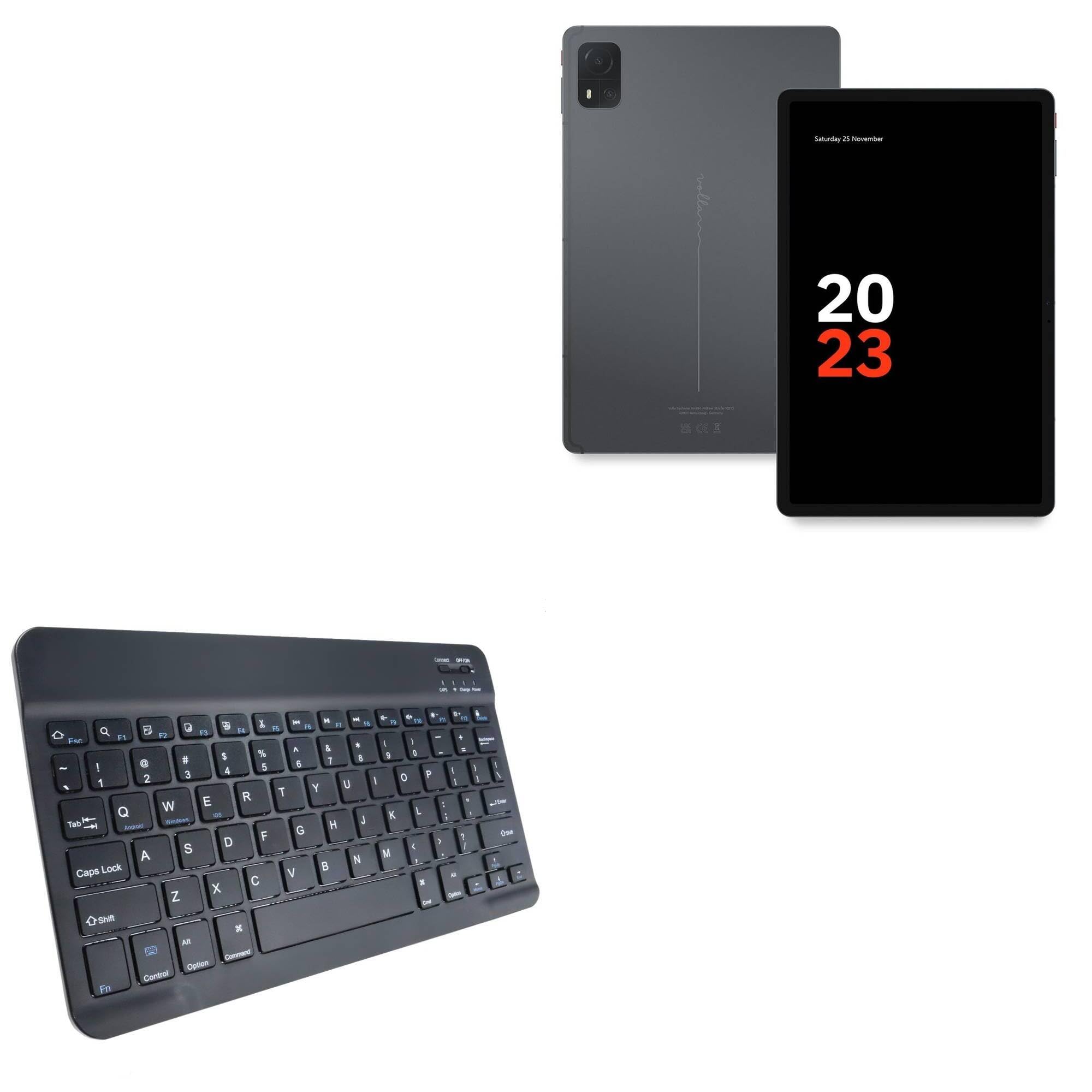
Image: The BoxWave SlimKeys Bluetooth Keyboard in Jet Black, showcasinด้วยรูปแบบแป้นพิมพ์ QWERTY เต็มรูปแบบและการออกแบบที่กะทัดรัด
เนื้อหาแพ็คเกจ
- BoxWave SlimKeys Bluetooth Keyboard
- สายชาร์จ USB
- คู่มือการใช้งาน
คุณสมบัติผลิตภัณฑ์
- การออกแบบบางเฉียบ: Measuring just 3/16 inch thick, the keyboard offers a sleek, compact profile เพื่อความสะดวกในการพกพา
- น้ำหนักเบาและสวมใส่สบาย: Responsive, chiclet-style keys provide a tactile typing experience.
- Power-Efficient Functionality: Built-in on/off switch and Bluetooth 3.0 for reduced power consumption.
- จับคู่บลูทูธอย่างรวดเร็ว: Ensures quick and reliable connection without lag.
- ความเข้ากันได้กับหลายแพลตฟอร์ม: ใช้งานได้อย่างราบรื่นกับอุปกรณ์ Android, Windows และ iOS
- แบตเตอรี่ใช้งานได้ยาวนาน: Up to 30 days of battery life and 6 months on standby.

Image: A visual summary of the keyboard's key features, including Chiclet Keys, Multi-Platform compatibility, Bluetooth 3.0, and its ultra-slim and light design.
การตั้งค่า
1. การชาร์จคีย์บอร์ด
- Locate the charging port on the keyboard (usually on the top edge).
- เชื่อมต่อสายชาร์จ USB ที่ให้มากับพอร์ตชาร์จของคีย์บอร์ด
- เชื่อมต่อปลายอีกด้านของสาย USB เข้ากับแหล่งจ่ายไฟ USB (เช่น คอมพิวเตอร์ อะแดปเตอร์ติดผนัง)
- The 'Charge' indicator light will illuminate during charging. It will turn off or change color when fully charged.
A full charge provides up to 30 days of active use or 6 months of standby time.

Image: The SlimKeys Bluetooth Keyboard connected to a charging cable, illustrating its long-lasting battery feature.
2. การเชื่อมต่อกับอุปกรณ์ของคุณ (การเชื่อมต่อบลูทูธ)
- Ensure the keyboard is charged and the power switch (usually labeled 'ON/OFF') is in the 'ON' position.
- Press the 'Connect' button on the keyboard (often a small button near the power switch or an Fn key combination). The Bluetooth indicator light will start blinking, indicating it's in pairing mode.
- On your Volla Tablet (or other device), go to การตั้งค่า > บลูทูธ และตรวจสอบให้แน่ใจว่าได้เปิดใช้งานบลูทูธแล้ว
- Your device will search for available Bluetooth devices. Select "BoxWave SlimKeys Keyboard" or a similar name from the list.
- If prompted, enter the displayed pairing code on the SlimKeys keyboard and press เข้า.
- เมื่อจับคู่สำเร็จแล้ว ไฟแสดงสถานะบลูทูธบนแป้นพิมพ์จะหยุดกะพริบและติดสว่างต่อเนื่อง หรือดับลง ซึ่งแสดงว่าการเชื่อมต่อสำเร็จ
คำแนะนำการใช้งาน
1. เปิด/ปิดเครื่อง
Slide the 'ON/OFF' switch located on the top right of the keyboard to turn it on or off. To conserve battery, turn off the keyboard when not in use.
2. Operating System Selection
The SlimKeys keyboard supports multiple operating systems. To optimize function keys for your device, press the following key combinations:
- Fn + ถาม: สำหรับอุปกรณ์แอนดรอยด์
- Fn + W: สำหรับอุปกรณ์วินโดวส์
- Fn + อี: สำหรับอุปกรณ์ iOS
3. ปุ่มฟังก์ชัน
The keyboard features specialized function keys (F1-F12) that provide quick access to various commands. These keys are typically activated by pressing the Fn กดปุ่มพร้อมกับปุ่มฟังก์ชั่นที่ต้องการ

ภาพ: ภาพระยะใกล้ view of the specialized function keys on the SlimKeys Bluetooth Keyboard, detailing their icons and corresponding actions.
| คีย์ผสม | การทำงาน |
|---|---|
| ฟน+เอสซี | บ้าน |
| Fn+F1 | ค้นหา |
| Fn+F2 | เลือกทั้งหมด |
| Fn+F3 | สำเนา |
| Fn+F4 | แปะ |
| Fn+F5 | ตัด |
| Fn+F6 | ข้ามกลับ |
| Fn+F7 | เล่น / หยุดชั่วคราว |
| Fn+F8 | ข้ามไปข้างหน้า |
| Fn+F9 | ลดระดับเสียง |
| Fn+F10 | เพิ่มระดับเสียง |
| Fn+F11 | ลดความสว่าง |
| Fn+F12 | เพิ่มความสว่าง |
| Fn + ลบ | ล็อค |
การซ่อมบำรุง
- การทำความสะอาด: ใช้ผ้านุ่มไม่เป็นขุยเช็ดเล็กน้อยampened with water or a mild cleaning solution to wipe the keyboard surface. Avoid excessive moisture. Do not spray cleaners directly onto the keyboard.
- พื้นที่จัดเก็บ: Store the keyboard in a cool, dry place away from direct sunlight and extreme temperatures. When traveling, consider placing it in a protective sleeve to prevent scratches.
- การดูแลแบตเตอรี่ For optimal battery life, avoid fully discharging the keyboard frequently. Charge it regularly, especially if it will be stored for an extended period.
การแก้ไขปัญหา
แป้นพิมพ์ไม่จับคู่
- ตรวจสอบให้แน่ใจว่าคีย์บอร์ดได้รับการชาร์จและเปิดอยู่
- ตรวจสอบให้แน่ใจว่าได้เปิดใช้งานบลูทูธบนอุปกรณ์ของคุณแล้ว
- Press the 'Connect' button on the keyboard to enter pairing mode.
- If previously paired, try 'forgetting' the keyboard from your device's Bluetooth settings and re-pairing.
- Ensure the keyboard is within the effective Bluetooth range (typically 10 meters or 33 feet).
คีย์ไม่ตอบสนอง
- Check if the keyboard is powered on and successfully connected via Bluetooth.
- Ensure the correct operating system mode (Fn+Q/W/E) is selected for your device.
- The battery might be low; try charging the keyboard.
- รีสตาร์ททั้งคีย์บอร์ด (ปิดแล้วเปิดใหม่) และอุปกรณ์ของคุณ
อาการหน่วงหรือการตัดการเชื่อมต่อ
- เลื่อนแป้นพิมพ์ให้ใกล้กับอุปกรณ์ของคุณมากขึ้นเพื่อลดการรบกวน
- Ensure there are no other strong wireless signals or devices causing interference.
- ตรวจสอบระดับแบตเตอรี่ของแป้นพิมพ์
ข้อมูลจำเพาะ
| คุณสมบัติ | รายละเอียด |
|---|---|
| ชื่อรุ่น | SlimKeys Bluetooth Keyboard |
| ยี่ห้อ | บ็อกซ์เวฟ |
| การเชื่อมต่อ | บลูทูธ 3.0 |
| ความเข้ากันได้ | แอนดรอยด์, วินโดวส์, ไอโอเอส |
| ขนาด (โดยประมาณ) | 9.5 in (Width) x 5.75 in (Depth) x 0.2 in (Height) |
| น้ำหนัก | 8.6 ออนซ์ |
| ประเภทแบตเตอรี่ | รายละเอียดเฉพาะผลิตภัณฑ์ (รวมอยู่ด้วย) |
| อายุการใช้งานแบตเตอรี่ | Up to 30 days (active use), 6 months (standby) |
| สี | สีดำเจ็ทแบล็ค |

Image: The SlimKeys Bluetooth Keyboard with its ultra-slim and lightweight dimensions highlighted.
ข้อมูลด้านความปลอดภัย
- อย่าให้แป้นพิมพ์โดนน้ำหรือความชื้นมากเกินไป
- ควรหลีกเลี่ยงการทำแป้นพิมพ์ตกหรือกระแทกอย่างแรง
- เก็บให้พ้นจากมือเด็ก
- Do not attempt to disassemble or repair the keyboard yourself. This may void the warranty and cause damage.
- ใช้เฉพาะสายชาร์จที่ให้มาหรือที่เทียบเท่าที่ได้รับการรับรองเท่านั้น
การรับประกันและการสนับสนุน
BoxWave products are designed for quality and reliability. For warranty information or technical support, please refer to the BoxWave official webหรือติดต่อฝ่ายบริการลูกค้าโดยตรง โปรดเก็บใบเสร็จรับเงินไว้เป็นหลักฐานการซื้อ