
โอโฮวีฟ N10
OHOVIV Portable Charger Power Bank N10 User Manual
Model: N10 | Brand: OHOVIV
การแนะนำ
Thank you for choosing the OHOVIV N10 Portable Charger Power Bank. This device is designed to provide reliable and fast charging for a wide range of electronic devices, ensuring you stay powered on the go.
With its massive 50000mAh capacity and versatile built-in cables, it's an essential companion for travel, outdoor activities, and daily use.

Figure 1: OHOVIV N10 Portable Charger Power Bank
สินค้าเกินview และคุณสมบัติ
The OHOVIV N10 Power Bank is engineered with convenience and efficiency in mind. Key features include:
- Huge Capacity 50000mAh: Provides approximately 10 full charges for an iPhone 15, utilizing a new high-density polymer battery. Ideal for extended trips and multiple device charging.
- Charge 6 Devices at Once: Equipped with 4 built-in cables (Lightning, Type-C, Micro, USB-A) and 3 additional charging ports (2 USB-A, 1 Type-C), allowing simultaneous charging of up to 6 devices. The built-in cables are made from high-quality, bendable TPU material, tested to withstand over 10,000 bends.
- ชาร์จเร็วสุดๆ 22.5W: Features PD 22.5W output and QC4.0 quick charging technology, capable of charging an iPhone to 55% in just 30 minutes.
- USB-C Two-Way Charging (IN&OUT): The USB-C port supports both input and output, offering flexible recharging and device charging options.
- จอแสดงผลดิจิตอล LED: Provides real-time battery percentage, eliminating power anxiety.
- การออกแบบที่กะทัดรัด: Measures 5.82 x 2.83 x 1.18 inches and weighs 1.07 lb, making it easy to carry in a backpack, pocket, or bag.
- ความปลอดภัยที่เหนือกว่า: Built-in quality batteries and 10 multiple system protections prevent overcharge, short circuit, and other potential dangers. Features an upgraded AI smart chip and NTC temperature control technology to minimize power loss and reduce overheating risks by 97%.
- ความเข้ากันได้กว้าง: Compatible with nearly all electronics, including iPhone 16/15/14/13/12 series, iPad series, Samsung S24/S23/S22/S21/S20, Google Pixel, other Android devices, and tablets.

รูปที่ 2: รายละเอียด view of the power bank's outputs and inputs.

Figure 3: High-quality, bendable built-in cables.
การตั้งค่า
Before first use, it is recommended to fully charge your OHOVIV N10 Power Bank.
การชาร์จแบตสำรอง:
The power bank can be recharged in two ways:
- การใช้งานสาย USB-A ในตัว: Locate the built-in USB-A cable. Plug the USB-A end into any compatible USB wall adapter (not included), computer USB port, or power strip.
- การใช้พอร์ต Type-C: Connect a USB-C to USB-C cable (not included) to the power bank's Type-C port and plug the other end into a compatible USB-C wall adapter or device.
หน้าจอแสดงผลดิจิทัล LED จะแสดงความคืบหน้าการชาร์จ โดยระบุเปอร์เซ็นต์ของแบตเตอรี่tage. A full charge is indicated by 100% on the display.

Figure 4: Recharging options for the power bank.
Video 1: This video demonstrates the various charging capabilities of the OHOVIV 50000mAh Portable Charger, including its built-in cables and fast charging features. It shows how to charge the power bank itself and how to use it to charge multiple devices simultaneously.
คำแนะนำการใช้งาน
The OHOVIV N10 Power Bank offers multiple ways to charge your devices:
อุปกรณ์ชาร์จ:
- การใช้สายเคเบิลในตัว:
- Identify the correct built-in cable for your device (Lightning for Apple, Type-C for modern Android/other devices, Micro for older Android/accessories).
- ค่อยๆ ดึงสายเคเบิลที่ต้องการออกจากช่องเก็บ
- Plug the cable directly into your device's charging port.
- การใช้งานพอร์ตภายนอก:
- For devices requiring a different cable or faster charging, use your own USB-A or USB-C cable.
- Plug your cable into one of the available USB-A output ports (USB-A1, USB-A2) or the Type-C input/output port.
- เชื่อมต่อปลายสายอีกด้านหนึ่งเข้ากับอุปกรณ์ของคุณ
- การชาร์จพร้อมกัน: You can charge up to 6 devices concurrently by utilizing a combination of the built-in cables and external ports.
การตรวจสอบระดับแบตเตอรี่:
Press the power button on the side of the power bank. The LED digital display will illuminate, showing the remaining battery percentage.

Figure 5: Charging a device using a built-in cable.
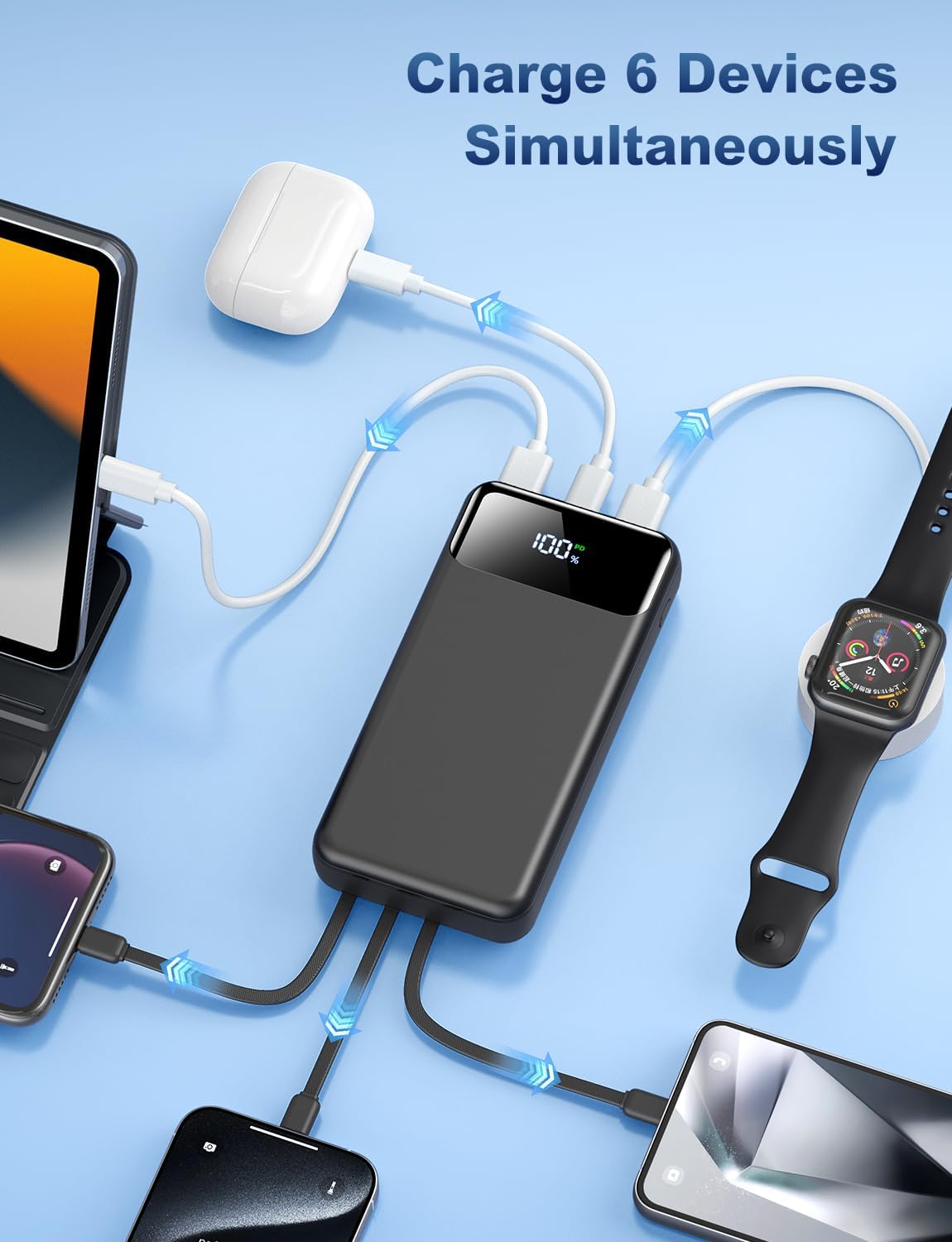
Figure 6: The power bank charging multiple devices at once.
การซ่อมบำรุง
To ensure the longevity and optimal performance of your OHOVIV N10 Power Bank, follow these maintenance guidelines:
- พื้นที่จัดเก็บ: เก็บพาวเวอร์แบงค์ไว้ในที่แห้งและเย็น หลีกเลี่ยงแสงแดดโดยตรงและอุณหภูมิที่สูงหรือต่ำเกินไป
- การทำความสะอาด: ใช้ผ้านุ่มและแห้งเช็ดทำความสะอาดพื้นผิวของพาวเวอร์แบงค์ หลีกเลี่ยงการใช้สารเคมีรุนแรงหรือวัสดุที่มีฤทธิ์กัดกร่อน
- หลีกเลี่ยงความเสียหายทางกายภาพ: ห้ามทำตก ห้ามถอดชิ้นส่วน หรือปล่อยให้พาวเวอร์แบงค์โดนน้ำหรือความชื้นมากเกินไป
- การใช้งานปกติ: For best battery health, use and recharge the power bank regularly, even if not frequently used.
- คุณสมบัติด้านความปลอดภัย: The power bank includes multiple protection systems (overcharge, short circuit, temperature control). Do not attempt to bypass or modify these features.

รูปที่ 7: เกินview of the power bank's superior safety protections.
การแก้ไขปัญหา
If you encounter any issues with your OHOVIV N10 Power Bank, please refer to the following common solutions:
- อุปกรณ์ไม่ชาร์จ:
- Ensure the power bank has sufficient charge (check LED display).
- ตรวจสอบให้แน่ใจว่าสายเคเบิลเชื่อมต่อกับพาวเวอร์แบงค์และอุปกรณ์ของคุณอย่างแน่นหนาแล้ว
- Try a different built-in cable or an external cable to rule out a faulty cable.
- ตรวจสอบให้แน่ใจว่าอุปกรณ์ของคุณใช้งานร่วมกับข้อกำหนดด้านกำลังไฟขาออกของพาวเวอร์แบงค์ได้
- พาวเวอร์แบงค์ไม่ชาร์จ:
- Check if the charging cable (built-in USB-A or external Type-C) is properly connected to a power source.
- Try a different wall adapter or USB port.
- ตรวจสอบให้แน่ใจว่าแหล่งจ่ายไฟทำงานและจ่ายไฟอยู่
- การชาร์จช้า:
- Ensure you are using a fast-charging compatible cable and wall adapter if charging the power bank.
- For device charging, ensure your device supports 22.5W fast charging and that you are using the appropriate port/cable.
- การชาร์จอุปกรณ์หลายเครื่องพร้อมกันอาจทำให้ความเร็วในการชาร์จแต่ละอุปกรณ์ลดลง
- จอแสดงผล LED ไม่ทำงาน:
- กดปุ่มเปิดปิดอย่างแน่นหนา
- หากแบตเตอรี่สำรองหมดเกลี้ยง หน้าจออาจไม่สว่างขึ้นจนกว่าจะได้รับการชาร์จไฟ
If the issue persists after trying these steps, please contact OHOVIV customer support for assistance.
ข้อมูลจำเพาะ
| คุณสมบัติ | รายละเอียด |
|---|---|
| หมายเลขรุ่น | N10 |
| ความจุของแบตเตอรี่ | 50000 มิลลิวินาทีamp ชั่วโมง |
| ขนาดสินค้า | 5.82 x 2.83 x 1.18 นิ้ว |
| น้ำหนักสินค้า | 1.19 ปอนด์ |
| เอาท์พุตการชาร์จ | 22.5W (PD & QC4.0) |
| สายเคเบิลในตัว | Lightning, Type-C, Micro, USB-A |
| พอร์ตเพิ่มเติม | 2 x USB-A Output, 1 x Type-C (IN&OUT) |
| แสดง | จอแสดงผล LED แบบดิจิตอล |
| สี | สีดำ |
| ผู้ผลิต | เซินเจิ้น Daximen นำเข้าและส่งออกเทรดดิ้งบจก |
| ประเทศต้นกำเนิด | จีน |
การรับประกันและการสนับสนุน
OHOVIV is committed to providing excellent customer service and product reliability.
- การรับประกัน: Enjoy peace of mind with a 365-day replacement guarantee.
- การสนับสนุนลูกค้า: 24/7 professional customer support is available to assist you with any issues or questions you may encounter.
- ติดต่อ: For support, please refer to the contact information provided in your product packaging or visit the official OHOVIV store on Amazon. When contacting support, please provide your order number and detailed information about the issue for a faster resolution.

Figure 8: OHOVIV's commitment to customer service and support.
Ask a question about this manual
Ask about setup, troubleshooting, compatibility, parts, safety, or missing instructions. Manuals+ will review the question and use this page’s manual context to help answer it.