
การแนะนำ
This manual provides detailed instructions for the setup, operation, and maintenance of your Twisted Minds TM-FUSION-X 4-in-1 Gaming Accessories Kit. This kit includes an 87-key wired mechanical keyboard, a 4-level adjustable DPI gaming mouse, an LED gaming headset, and a large fabric gaming mousepad. Please read this manual carefully before using the product to ensure optimal performance and longevity.

Image: The complete Twisted Minds 4-in-1 Gaming Accessories Kit, including the mechanical keyboard, gaming mouse, LED headset, and large mousepad, set up with a monitor for a full gaming experience.
คำแนะนำการตั้งค่า
1. Mechanical Keyboard
Connect the USB cable of the mechanical keyboard to an available USB port on your computer. The keyboard is plug-and-play and should be recognized automatically by most Windows operating systems (XP/Vista/7/8/10).

ภาพ: ภาพระยะใกล้ view of the Twisted Minds 87-key wired mechanical keyboard, highlighting its compact design, blue mechanical switches, and dynamic RGB backlighting.
2. Gaming Mouse
Connect the USB cable of the gaming mouse to an available USB port on your computer. The mouse is also plug-and-play. Drivers will install automatically.

Image: The Twisted Minds gaming mouse, showcasing its ergonomic design, 4-level adjustable DPI button, and vibrant 7-color LED lighting effects.
3. LED Gaming Headset
Connect the headset's 3.5mm audio jack(s) and USB cable (for LED lighting) to the corresponding ports on your computer. Ensure the microphone is positioned correctly for clear communication.
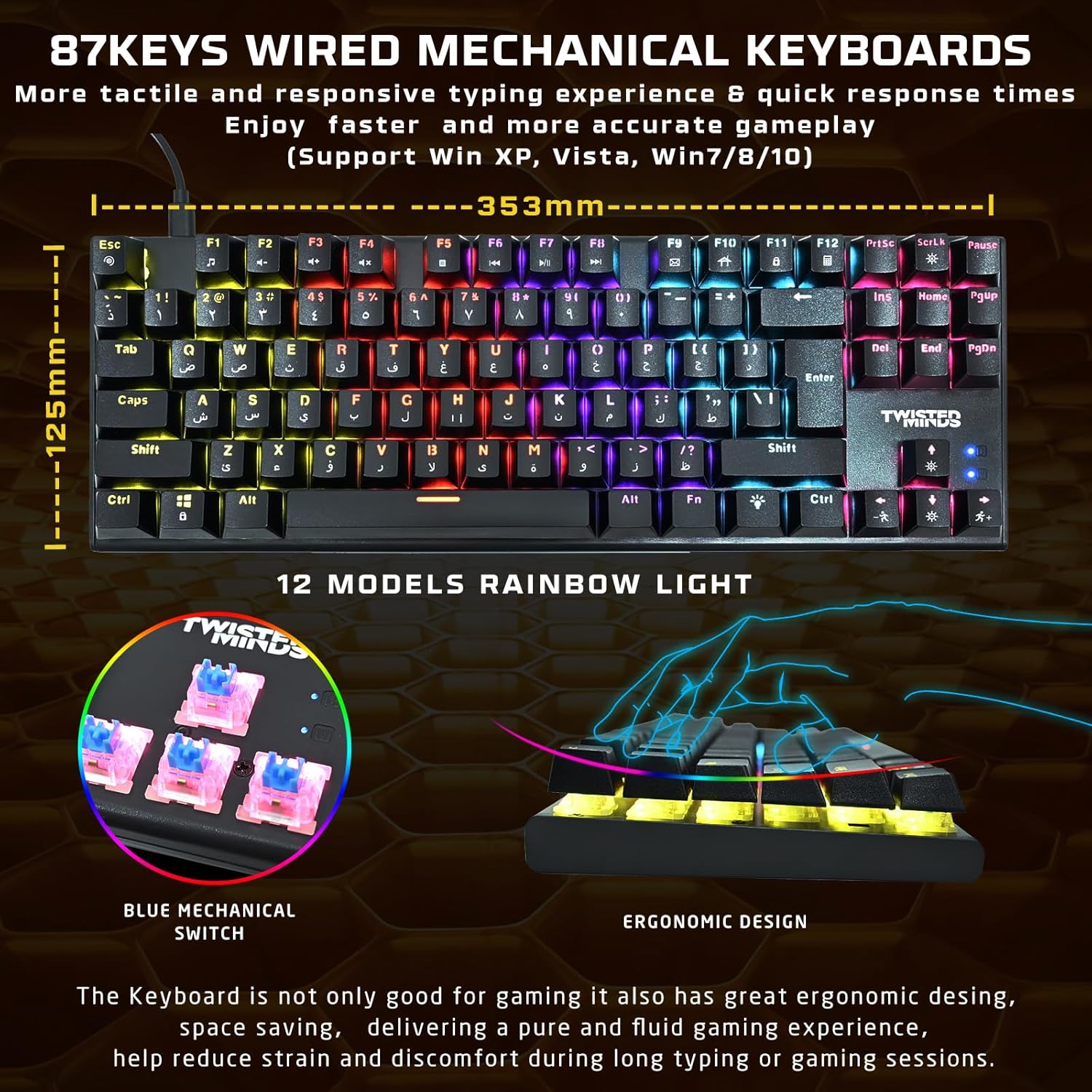
Image: The Twisted Minds LED gaming headset, featuring static rainbow RGB lighting on the earcups, a flexible omnidirectional microphone, and soft PU ear covers for comfort.
4. Gaming Mousepad
Unroll the mousepad and place it on a flat, clean surface. Ensure there are no obstructions for optimal mouse movement.

Image: The Twisted Minds comfy fabric gaming mousepad, illustrating its large dimensions (900mm x 400mm), 3mm extra-thick design, durable edge, RoHS certification, and natural rubber base.
คำแนะนำการใช้งาน
1. Mechanical Keyboard
- สวิตช์กุญแจ: The keyboard features 87 tactile blue mechanical switches for responsive feedback.
- แสงไฟ RGB: Cycle through 12 dynamic rainbow lighting modes using the dedicated lighting control keys (refer to keyboard layout for specific keys, often Fn + a specific key).
- ป้องกันภาพซ้อน: The 25-key anti-ghosting feature ensures that multiple simultaneous key presses are registered accurately during intense gaming.
2. Gaming Mouse
- การปรับ DPI: Use the DPI button (usually located behind the scroll wheel) to switch between 4 sensitivity levels: 1200, 1800, 2400, and 3600 DPI. Adjust according to your preference for different games or tasks.
- ไฟ LED: The mouse features a 7-color LED backlight that changes automatically.
3. LED Gaming Headset
- เสียง: Enjoy rich stereo sound through the 40mm drivers.
- ไมโครโฟน: The flexible omnidirectional microphone allows for clear voice communication. Adjust its position for optimal pickup.
- การควบคุมระดับเสียง: Use the in-line volume control to adjust audio levels.
- ไฟ LED: The headset features static rainbow RGB LED lights, powered via the USB connection.
การซ่อมบำรุง
- การทำความสะอาด: Use a soft, dry cloth to clean the surfaces of the keyboard, mouse, and headset. For the keyboard, you may use compressed air to remove dust and debris from between the keys.
- Mousepad: The fabric mousepad can be gently wiped with a damp ผ้าและสบู่อ่อนๆ หากจำเป็น ปล่อยให้แห้งสนิทก่อนใช้งาน
- หลีกเลี่ยงของเหลว: Do not immerse any electronic components in water or other liquids.
- พื้นที่จัดเก็บ: ควรเก็บอุปกรณ์เสริมไว้ในที่แห้งและเย็น หลีกเลี่ยงแสงแดดโดยตรงและอุณหภูมิที่สูงหรือต่ำเกินไป เมื่อไม่ได้ใช้งาน
การแก้ไขปัญหา
คีย์บอร์ด/เมาส์ไม่ตอบสนอง
- Ensure the USB cables are securely connected to your computer.
- ลองเชื่อมต่อกับพอร์ต USB อื่น
- รีสตาร์ทเครื่องคอมพิวเตอร์ของคุณ
ปัญหาเกี่ยวกับเสียงของหูฟัง
- Check if the 3.5mm audio jack(s) are fully plugged into the correct ports (audio out, mic in).
- Verify that the in-line volume control is not set to minimum or muted.
- Ensure the headset is selected as the default audio device in your computer's sound settings.
ไฟ LED ไม่ทำงาน
- For the keyboard, ensure you have cycled through the lighting modes using the dedicated keys.
- For the headset, ensure the USB cable is connected to provide power for the LEDs.
- Check USB connections for all devices.
ข้อมูลจำเพาะ
| ส่วนประกอบ | ข้อมูลจำเพาะ |
|---|---|
| แป้นพิมพ์ | ABS material, 87 keys, 12 RGB modes, 25-key anti-ghosting. Compatible with Win XP/Vista/7/8/10. QWERTY layout. |
| หนู | 1200-3600 DPI (4 levels), 7-color LED, 1.5m braided cable. |
| ชุดหูฟัง | φ40mm drivers, Omnidirectional microphone (φ60 × 50mm), Static RGB light. |
| แผ่นรองเมาส์ | 900 × 400 × 3mm (Length × Width × Height), Rubber base + Fabric surface. |
| การเชื่อมต่อ | USB (แบบมีสาย) |
| สี | สีดำ |
| แหล่งพลังงาน | สายไฟ |
| แบตเตอรี่ที่จำเป็น | เลขที่ |
ข้อมูลการรับประกัน
Please refer to the warranty card included with your product or contact your retailer for specific warranty terms and conditions. Keep your proof of purchase for any warranty claims.
สนับสนุน
For technical assistance or further inquiries, please contact the Twisted Minds customer support team or your product retailer. Contact information can typically be found on the product packaging or the official Twisted Minds webเว็บไซต์.
การสาธิตผลิตภัณฑ์
วิดีโอ: วิดีโอสาธิตผลิตภัณฑ์แสดงให้เห็น...asing the features and functionality of the Twisted Minds 4-in-1 Gaming Accessories Kit.