
1. บทนำ
This manual provides detailed instructions for the setup, operation, and maintenance of your TOMLOV DM301 Max Digital Microscope. Please read this manual thoroughly before using the device to ensure proper function and longevity.
2. สิ่งที่รวมอยู่
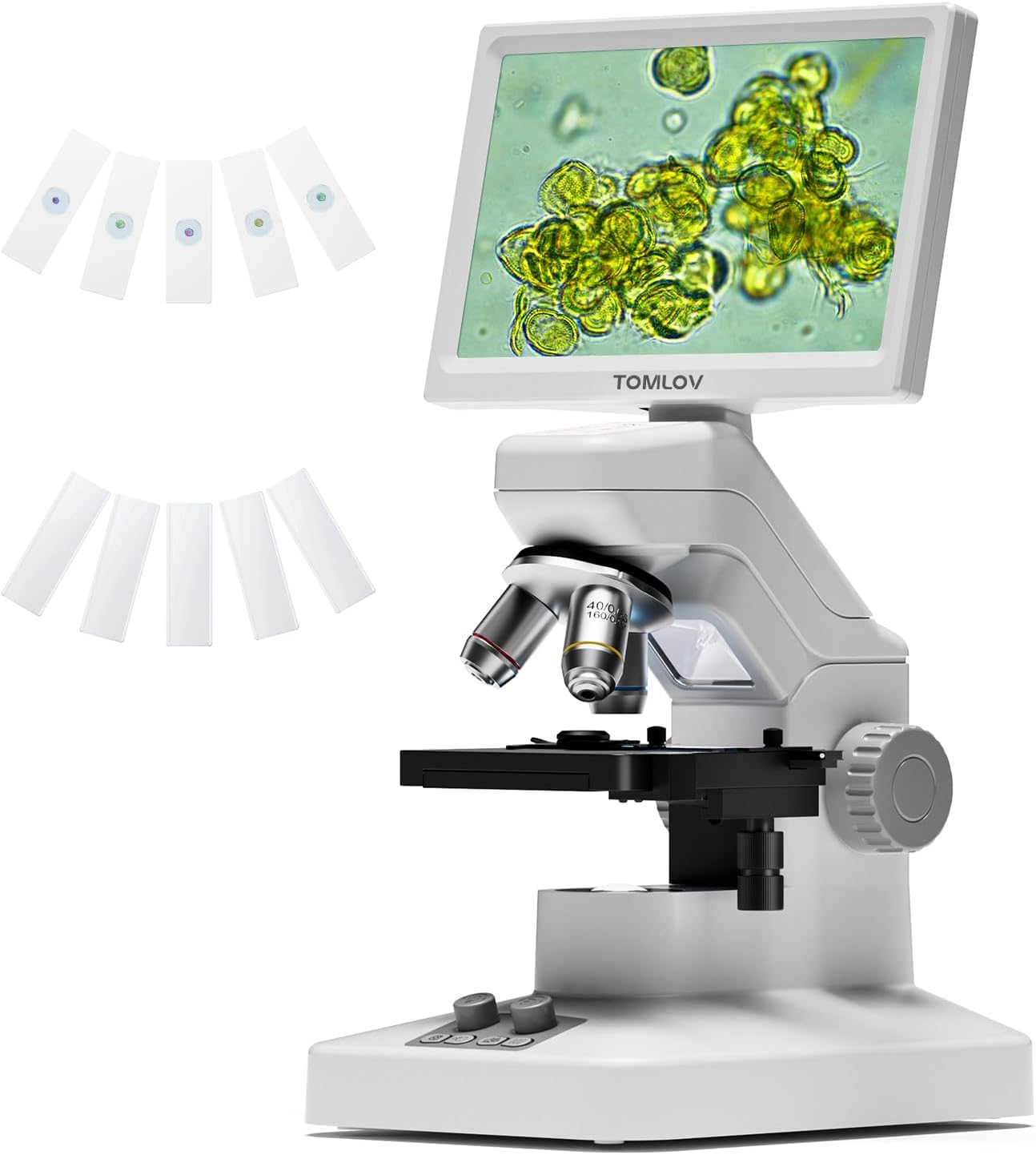
- 1 X TOMLOV DM301 Max Biological Digital Microscope with Screen
- สายไฟ 1 X
- สาย HDMI 1 X
- ตัวแปลงไฟ 1 X
- 5 X Prepared Slides
- 5 X Blank Slides
- 1 X 32GB Micro SD Card
- 1 X Carrying Case

3. คู่มือการติดตั้ง
3.1 การประกอบเบื้องต้น
Carefully remove all components from the packaging. Place the microscope base on a stable, flat surface. Ensure the screen is securely attached and adjusted to a comfortable viewมุมอิง
3.2 การเชื่อมต่อสายไฟ
Connect the power adapter to the microscope and plug it into a power outlet. The microscope features a built-in 2000mAh rechargeable battery, offering up to 3 hours of cordless use once fully charged.
3.3 การปรับหน้าจอ
The 7-inch IPS display can be adjusted up to 120 degrees for optimal viewing comfort, reducing neck strain during extended use.

4. คู่มือการใช้งาน
4.1 Placing Specimens
Place your prepared or blank slide onto the X-Y axis metal stage. ใช้ stage adjustment knobs to precisely position the specimen under the objective lens.

4.2 Magnification and Focusing
The microscope features 3 achromatic lenses, providing up to 1200X magnification. Rotate the objective lens turret to select the desired magnification. Use the coarse and fine focus knobs on the side of the microscope to bring your specimen into sharp focus on the screen.

4.3. การส่องสว่าง
Adjustable dual LED lights provide balanced lighting for both solid objects (top light) and slide specimens (bottom light), ensuring clear visibility in various environments.

4.4 Connectivity and Output
The DM301 Max offers multiple output options:
- WiFi และการควบคุมแอป: Connect wirelessly to Android and iOS devices for real-time zooming, capturing, and sharing. Dual-saving to the SD card and your phone is supported.
- USB & HDMI Output: Connect directly to TVs, laptops, and projectors via USB or HDMI for larger displays without driver installation.


4.5 การบันทึกภาพนิ่งและวิดีโอ
With built-in 8MP imaging and 1080P video capabilities, you can capture high-quality scientific moments. The included 32GB Micro SD card provides ampที่เก็บของ

4.6 On-Screen Measurement
A built-in measuring overlay allows for precise readings across different magnification levels, enhancing interactive and measurable STEM learning.

5. การบำรุงรักษา
- การทำความสะอาด: Use a soft, lint-free cloth to clean the screen and exterior. For lenses, use specialized lens cleaning solutions and cloths to avoid scratches.
- การดูแลแบตเตอรี่ To prolong battery life, avoid fully discharging the battery frequently. Charge the microscope regularly, especially if it will be stored for an extended period.
- พื้นที่จัดเก็บ: Store the microscope in its carrying case in a cool, dry place away from direct sunlight and extreme temperatures.
6 การแก้ไขปัญหา
- ภาพเบลอ: Adjust the coarse and fine focus knobs. Ensure the objective lens is clean and correctly rotated into position.
- ไม่มีภาพบนหน้าจอ: Check power connection and battery level. Ensure the specimen is correctly placed and illuminated. Verify the objective lens is properly engaged.
- Connectivity Issues (WiFi/HDMI/USB): For WiFi, ensure the microscope and device are within range and correctly paired via the app. For HDMI/USB, check cable connections and ensure the external display input is set correctly.
- ไฟไม่ทำงาน: Check the power source and ensure the light intensity controls are adjusted.
7. ข้อมูลจำเพาะ
| คุณสมบัติ | รายละเอียด |
|---|---|
| ขนาดสินค้า | 7.31 x 5.3 x 12.5 นิ้ว |
| น้ำหนักสินค้า | 4.9 ปอนด์ |
| หมายเลขรุ่นสินค้า | DM301 Max |
| แบตเตอรี่ | ต้องใช้แบตเตอรี่ลิเธียมไอออน 1 ก้อน (รวมอยู่ด้วย) |
| ประเภทแหล่งกำเนิดแสง | นำ |
| วัสดุ | 7'' IPS Display + ABS Stand |
| สี | สีขาว |
| มุมจริงของ View | 178 องศา |
| กำลังขยายสูงสุด | 1200 เท่า |
| เล่มที่tage | 5 โวลต์ |
8. การรับประกันและการสนับสนุน
For warranty information and technical support, please refer to the official TOMLOV webเยี่ยมชมเว็บไซต์หรือติดต่อฝ่ายบริการลูกค้าโดยตรง เก็บใบเสร็จรับเงินไว้เพื่อใช้ในการเคลมประกัน
9. วิดีโอผลิตภัณฑ์อย่างเป็นทางการ
TOMLOV DM301 Biological Microscope with Screen
วิดีโอนี้มีเนื้อหาเกี่ยวกับview of the TOMLOV DM301 Biological Microscope, highlighting its screen and general features. It demonstrates the microscope in use, showcasing its capabilities for observing biological specimens.
TOMLOV DM301 Biological Microscope for Kids and Adults
This video illustrates the user-friendly aspects of the TOMLOV DM301 biological microscope, making it suitable for both children and adults. It shows various applications in educational and home settings.
TOMLOV Biological Microscope with Screen (Short Overview)
วิดีโอสั้นๆ แสดงให้เห็น...asing the TOMLOV biological microscope with its screen, emphasizing its ease of use for educational purposes for both kids and adults.
TOMLOV DM301 Max Microscope with X-Y Stagอีคุณสมบัติ
This video highlights the advanced features of the TOMLOV DM301 Max Microscope, specifically focusing on the precision X-Y stage for accurate specimen manipulation, suitable for students and adults.