
สินค้าเกินview
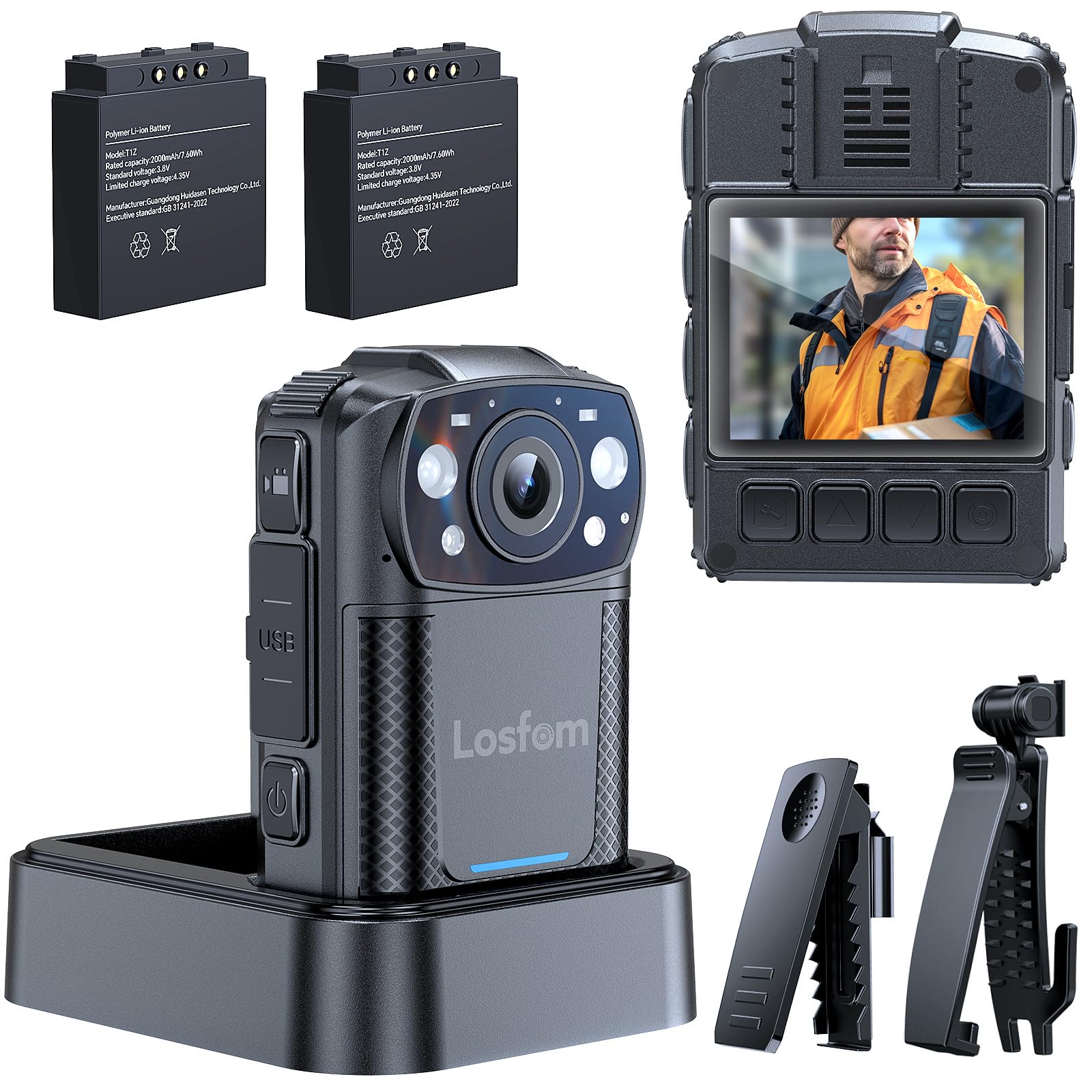
The Losfom WD11 2K Body Camera is a versatile and robust recording device designed for various applications including law enforcement, security, and outdoor activities. It captures sharp 2K resolution video with audio, features clear night vision, and offers flexible mounting options. The camera is equipped with two 2000mAh batteries for extended recording times and includes a convenient charging dock.
มีอะไรอยู่ในกล่อง
- WD11 Body Camera
- 360° Rotatable Long Clip
- 360° Rotatable Short Clip
- Two Rechargeable Batteries (2000mAh each)
- ฐานชาร์จ
- สาย USB-C
- คู่มือการใช้งาน

การตั้งค่า
1. การชาร์จแบตเตอรี่
The WD11 body camera comes with two 2000mAh rechargeable batteries and a dedicated charging base. To charge, insert the batteries into the charging base and connect the USB-C cable to the base and a power source. The charging base allows for convenient charging without constantly plugging and unplugging the camera, ensuring it's always ready for use.
2. Inserting/Replacing Memory Card
The WD11 body camera comes with a 128GB memory card. To insert or replace the memory card, locate the memory card slot on the side of the camera. Gently push the card into the slot until it clicks into place. Ensure the camera is powered off before inserting or removing the memory card.

3. Attaching Mounting Clips
The camera includes 360° rotatable long and short clips for various attachment needs. Select the appropriate clip for your intended use (e.g., uniform, backpack, belt). Attach the clip securely to the back of the camera. The rotatable design allows for optimal camera angle adjustment.

คำแนะนำการใช้งาน
1. เปิด/ปิดเครื่อง
To power on the camera, press and hold the power button located on the side until the screen illuminates. To power off, press and hold the power button again until the device shuts down.
2. การบันทึกวิดีโอ
Once powered on, the camera is ready to record. Press the dedicated video recording button to start capturing footage. The camera records in 2K resolution with audio. Press the button again to stop recording. Ensure sufficient memory card space and battery life before starting a recording session.
3. Night Vision Activation
The WD11 features clear night vision with IR lights. These lights can turn on automatically in low-light conditions or be activated manually. Refer to the user manual for specific instructions on toggling automatic/manual night vision mode.

4. Dash Cam Mode
The camera supports a dash cam mode, allowing it to continuously record when powered by a vehicle's power source. This feature is ideal for documenting journeys or for security purposes while driving. Consult the user manual for detailed setup of dash cam mode.
5. การตรวจจับการเคลื่อนไหว
The WD11 body camera includes motion detection functionality. When enabled, the camera will automatically begin recording when motion is detected within its field of view, conserving battery and storage space. This feature is useful for surveillance or capturing unexpected events.
การจัดการแบตเตอรี่
The Losfom WD11 is equipped with two 2000mAh batteries, providing up to 8 hours of 1080P recording. The easy battery swap system ensures continuous operation for long shifts or extended activities. Always ensure batteries are fully charged before use.

ตัวเลือกการจัดเก็บข้อมูล
The WD11 body camera includes a 128GB memory card. It supports user-replaceable Micro SD cards, allowing for easy expansion of storage capacity. This is beneficial for users requiring extensive footage storage without frequent data transfers.
Media Transfer
To transfer recorded footage, connect the camera to a computer using the provided USB-C cable. The camera will appear as a removable storage device, allowing you to access and copy your video and audio files. Alternatively, you can remove the Micro SD card and insert it into a compatible card reader for direct data transfer.
การซ่อมบำรุง
To ensure optimal performance and longevity of your Losfom WD11 Body Camera, follow these maintenance guidelines:
- การทำความสะอาด: ใช้ผ้าแห้งเนื้อนุ่มเช็ดทำความสะอาดตัวกล้อง สำหรับเลนส์ ให้ใช้ผ้าและน้ำยาทำความสะอาดเลนส์โดยเฉพาะเพื่อป้องกันรอยขีดข่วน
- พื้นที่จัดเก็บ: เก็บกล้องไว้ในที่แห้งและเย็น หลีกเลี่ยงแสงแดดโดยตรงและอุณหภูมิที่สูงหรือต่ำเกินไป ถอดแบตเตอรี่ออกหากเก็บเป็นเวลานาน
- การดูแลแบตเตอรี่ Avoid fully discharging the batteries regularly. Charge them periodically even when not in use to maintain battery health.
- อัพเดตเฟิร์มแวร์: Check the official Losfom webไซต์เป็นระยะสำหรับการอัปเดตเฟิร์มแวร์ที่มีอยู่เพื่อปรับปรุงประสิทธิภาพและเพิ่มคุณสมบัติใหม่
การแก้ไขปัญหา
If you encounter any issues with your Losfom WD11 Body Camera, refer to the following common troubleshooting steps:
- กล้องไม่เปิด: Ensure the battery is fully charged and correctly inserted. Try using the spare battery.
- Recording issues (e.g., not starting, poor quality): Check if the memory card is properly inserted and has sufficient free space. Ensure the lens is clean. Verify recording settings.
- ระบบมองเห็นในเวลากลางคืนใช้งานไม่ได้: Check if night vision is enabled (automatic or manual mode). Ensure there are no obstructions blocking the IR lights.
- อุปกรณ์ไม่ได้รับการรู้จักโดยคอมพิวเตอร์: Try a different USB port or cable. Ensure the camera is powered on when connected.
- อายุการใช้งานแบตเตอรี่สั้น: Ensure batteries are fully charged. Reduce video resolution or disable non-essential features to extend battery life.
For further assistance, please contact Losfom customer support.
ข้อมูลจำเพาะ
| คุณสมบัติ | รายละเอียด |
|---|---|
| ชื่อยี่ห้อ | ลอฟฟอม |
| หมายเลขรุ่นสินค้า | WD11 |
| ความละเอียดในการจับภาพวิดีโอ | 2K |
| แบตเตอรี่ | ต้องใช้แบตเตอรี่ 2 ก้อน (รวมอยู่ด้วย) |
| คุณสมบัติพิเศษ | การมองเห็นตอนกลางคืน |
| น้ำหนักสินค้า | 3.67 ออนซ์ |
| ขนาดแพ็คเกจ | 3.94 x 3.94 x 3.15 นิ้ว |
| เทคโนโลยีโฟโต้เซนเซอร์ | ซีมอส |
| ความยาวโฟกัสสูงสุด | 105 |
| รูรับแสงสูงสุด | 2 ฟ. |
| ประเภทหน่วยความจำแฟลช | ไมโคร SD |
| รูปแบบการจับภาพวิดีโอ | เอ็มโอวี |
| รูปแบบเสียงที่รองรับ | AAC, MP3, PCM |
| ขนาดหน้าจอ | 2 นิ้ว |
| เทคโนโลยีการเชื่อมต่อ | มีสาย |
การรับประกันและการสนับสนุน
For warranty information and technical support, please refer to the official Losfom webหรือติดต่อฝ่ายบริการลูกค้าโดยตรง เก็บใบเสร็จรับเงินไว้เพื่อใช้ในการเคลมประกัน