
1. สินค้าหมดview
The Fanvil V60P is a professional IP phone designed for business communication. It features a color display, programmable keys, and Power over Ethernet (PoE) support for simplified installation and operation. This manual provides essential information for setting up, operating, and maintaining your device.
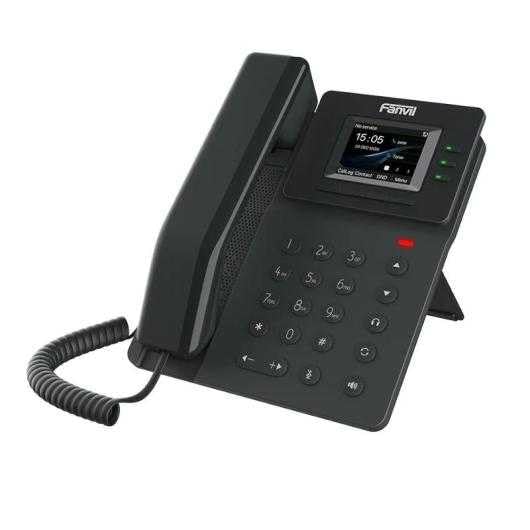
Figure 1: Fanvil V60P Professional IP Phone. This image shows the black IP phone with its handset, color display, and numeric keypad. The display shows "15:05" and menu options.
2. การตั้งค่าและการติดตั้ง
2.1 เนื้อหาบรรจุภัณฑ์
ก่อนการติดตั้ง โปรดตรวจสอบให้แน่ใจว่ามีอุปกรณ์ครบถ้วนตามที่ระบุในบรรจุภัณฑ์:
- Fanvil V60P IP Phone unit
- หูฟังและสายขด
- สายอีเทอร์เน็ต
- ยืน
- คู่มือการติดตั้งฉบับย่อ (ถ้ามี)
2.2 การเชื่อมต่อทางกายภาพ
- ติดขาตั้ง: ติดตั้งขาตั้งโต๊ะเข้ากับด้านหลังของโทรศัพท์อย่างแน่นหนา
- เชื่อมต่อโทรศัพท์มือถือ: เสียบปลายด้านหนึ่งของสายขดเข้ากับหูฟัง และเสียบปลายอีกด้านหนึ่งเข้ากับพอร์ตหูฟังบนฐานโทรศัพท์
- Connect to Network and Power (PoE):
- เชื่อมต่อปลายด้านหนึ่งของสายเคเบิลอีเทอร์เน็ตเข้ากับ แลน พอร์ตบนโทรศัพท์
- Connect the other end of the Ethernet cable to a Power over Ethernet (PoE) enabled switch or injector. The phone will power on automatically.
- เชื่อมต่อกับพีซี (ทางเลือก): If you need to connect a computer through the phone, connect an Ethernet cable from your PC to the PC พอร์ตบนโทรศัพท์
Note: If PoE is not available, a separate power adapter (not included) may be required. Refer to the product specifications for compatible power adapter details.
3. คู่มือการใช้งาน
3.1 ฟังก์ชันการโทรพื้นฐาน
- การโทร:
- ยกหูโทรศัพท์หรือกดปุ่มลำโพง
- กดหมายเลขที่ต้องการโดยใช้ปุ่มกด
- กดปุ่ม โทรออก soft key or wait for the automatic dialing timeout.
- รับสาย:
- หยิบหูฟังขึ้นมา
- Alternatively, press the Speakerphone button or the คำตอบ ซอฟต์คีย์
- การวางสาย: Hang up the handset or press the Speakerphone button.
3.2 Using Programmable DSS Keys
The Fanvil V60P features 6 programmable DSS (Direct Station Select) keys. These keys can be configured for various functions such as speed dial, line keys, busy lamp field (BLF), or other custom features as defined by your system administrator.
- To use a programmed DSS key, simply press the corresponding button.
- Configuration of DSS keys is typically done via the phone's web interface or your IP PBX system.
3.3 Local Phonebook
The phone supports a local phonebook with up to 1000 entries.
- เข้าถึงสมุดโทรศัพท์ผ่านทาง ไดเรกทอรี or ติดต่อเรา soft key on the display.
- Use the navigation keys to browse entries.
- Select an entry and press the โทรออก ปุ่มซอฟต์คีย์สำหรับเริ่มการโทร
3.4 การประชุมทางเสียง
The V60P supports local 6-party audio conferencing.
- Establish a call with the first participant.
- กดปุ่ม การประชุม soft key. The first participant will be put on hold.
- Dial the number of the second participant and establish the call.
- กดปุ่ม การประชุม soft key again to merge all participants into a conference.
- Repeat steps 2-4 to add more participants, up to a total of 6.
4. การบำรุงรักษา
4.1 การทำความสะอาดเครื่อง
To maintain the appearance and functionality of your Fanvil V60P IP Phone (made of plastic material), follow these cleaning guidelines:
- Disconnect the phone from its power source (PoE) before cleaning.
- ใช้แปรงนุ่มๆ ปัดเบาๆamp, lint-free cloth to wipe the surfaces.
- Avoid using harsh chemicals, abrasive cleaners, or solvents, as these can damage the plastic and display.
- ห้ามฉีดน้ำยาทำความสะอาดลงบนโทรศัพท์โดยตรง
การอัปเดตเฟิร์มแวร์ 4.2 รายการ
Firmware updates may be released periodically to improve performance, add features, or fix bugs. Consult your IT administrator or Fanvil's official webเว็บไซต์นี้ให้ข้อมูลเกี่ยวกับการอัปเดตที่มีให้ใช้งานและคำแนะนำในการติดตั้ง
5 การแก้ไขปัญหา
This section addresses common issues you might encounter with your Fanvil V60P IP Phone.
| ปัญหา | สาเหตุที่เป็นไปได้ | สารละลาย |
|---|---|---|
| โทรศัพท์ไม่สามารถเปิดเครื่องได้ | ไม่มีการเชื่อมต่อ PoE หรือสายเคเบิลอีเทอร์เน็ตชำรุด | Ensure the Ethernet cable is securely connected to the LAN port and a PoE-enabled switch/injector. Verify the PoE source is active. |
| ไม่มีเสียงโทรออก | SIP registration failure or network issue. | Check network connectivity. Verify SIP account settings with your IT administrator. Restart the phone. |
| ไม่สามารถโทรออก/รับสายได้ | Network issues, incorrect SIP configuration, or firewall blocking. | Confirm network connection. Check SIP registration status on the phone's display. Contact your IT administrator for network and SIP configuration verification. |
| คุณภาพเสียงไม่ดี | Network congestion or faulty handset/speaker. | Check network bandwidth and latency. Try using a different handset or speaker mode. If the issue persists, contact support. |
6. ข้อมูลจำเพาะ
| คุณสมบัติ | รายละเอียด |
|---|---|
| แบบอย่าง | V60P |
| ระบบ | ลินุกซ์ |
| แสดง | 2.4-inch, 320 x 240 Color Screen |
| คีย์ DSS | ปุ่มตั้งโปรแกรมได้ 6 ปุ่ม |
| สาย SIP | 4 |
| Local Phonebook | รายการ 1000 |
| โทรศัพท์มือถือ | เครื่องสาย |
| การประชุมทางเสียง | 6-party Local Conference |
| Wideband Codecs | G.722, ผลงาน |
| Narrowband Codecs | G.711, G.723.1, G.726, G.729, G.729A, G.729B, G.729AB, iLBC |
| PoE | ใช่ |
| พอร์ตเครือข่าย | พอร์ตอีเธอร์เน็ต 2 x 10/100 Mbps |
| การสนับสนุนด้าน EHS | ใช่ |
| รองรับ IPv6 | ใช่ |
| วัสดุ | พลาสติก |
| ขนาด (กxยxส) | 15 x 200 x 15 ซม. |
| น้ำหนัก | 600 กรัม |
| การระบุหมายเลขผู้โทร | ใช่ |
| การทำงานแบบหลายบรรทัด | ใช่ |
| Conference Call Functionality | Support Multiple Conferences |
| Standby Duration (if applicable) | 10 ชั่วโมง |
7. การรับประกันและการสนับสนุน
7.1 การรับประกันสินค้า
The Fanvil V60P IP Phone comes with a รับประกัน 3 ปี สำหรับข้อบกพร่องจากการผลิตการรับประกันนี้ครอบคลุมข้อบกพร่องด้านวัสดุและฝีมือการผลิตภายใต้การใช้งานปกติ โปรดเก็บหลักฐานการซื้อไว้เพื่อขอรับสิทธิ์การรับประกัน
7.2 การสนับสนุนด้านเทคนิค
For technical assistance, troubleshooting beyond this manual, or warranty inquiries, please contact your reseller or Fanvil's official customer support channels. You may need to provide your product model (V60P) and serial number.