
1. บทนำ
ขอบคุณสำหรับการซื้อasing the VIGORWORK 7-inch Car Stereo MP5 Player. This device is designed to enhance your in-car entertainment and connectivity with its high-definition touchscreen, Bluetooth capabilities, mirror link function, and various media playback options. Please read this manual thoroughly before installation and operation to ensure proper use and to maximize your enjoyment of the product.
2. ข้อมูลด้านความปลอดภัย
To prevent injury or damage to the unit, please observe the following safety precautions:
- แนะนำการติดตั้งอย่างมืออาชีพ: Due to the complexity of car electrical systems, professional installation is highly recommended. Incorrect wiring can cause damage to the unit or the vehicle.
- แหล่งจ่ายไฟ: Ensure the unit is connected to a 12V DC power supply with a negative ground.
- หลีกเลี่ยงน้ำและความชื้น: อย่าให้เครื่องโดนน้ำหรือความชื้นมากเกินไป
- อุณหภูมิ: ใช้งานอุปกรณ์ภายในอุณหภูมิการทำงานของยานพาหนะปกติ
- ความปลอดภัยในการขับขี่: อย่าใช้งานอุปกรณ์ในลักษณะที่รบกวนสมาธิในการขับขี่ ให้ความสำคัญกับความปลอดภัยบนท้องถนนเสมอ
- การระบายอากาศ : ตรวจสอบให้แน่ใจว่ามีการระบายอากาศเพียงพอรอบๆ เครื่องเพื่อป้องกันความร้อนสูงเกินไป
- การเปลี่ยนฟิวส์: When replacing a fuse, ensure the new fuse has the correct ampเรทติ้ง
3. เนื้อหาบรรจุภัณฑ์
กรุณาตรวจสอบแพ็คเกจสำหรับรายการต่อไปนี้:
- VIGORWORK 7-inch Car Stereo MP5 Player Unit
- สายรัดสายไฟ
- Remote Control (Steering Wheel Controller)
- คู่มือการใช้งาน
- Mounting Brackets/Screws (if included)
4. สินค้าหมดview
The VIGORWORK Car Stereo MP5 Player features a 7-inch HD digital touchscreen with a 1024*600 resolution, supporting 1080P video playback. It offers a range of functionalities for an enhanced driving experience.
คุณสมบัติหลัก:
- หน้าจอสัมผัสแบบ HD: 7-inch display with 1024*600 resolution for clear visuals and 1080P video support.
- การเชื่อมต่อบลูทูธ: Hands-free calling, Bluetooth music streaming, and voice navigation support.
- ลิงค์มิเรอร์: Two-way connection for Android phones and one-way projection for Apple phones.
- ระบบควบคุมพวงมาลัย: Compatible with included steering wheel controller for easy operation.
- Reverse Image Support: สลับไปด้านหลังโดยอัตโนมัติ view when reversing (requires optional camera).
- การเล่นสื่อหลายประเภทพร้อมกัน: Supports USB, AUX, TF card, and various audio/video formats (APE, FLAC, WAV, DIS, MP3, AVI, MP4, etc.).
- วิทยุ FM: High-performance digital tuning with 18 radio station presets.
- การปรับแต่งเสียง: Electronic volume, treble, bass, balance, and sound field adjustments with various EQ modes.
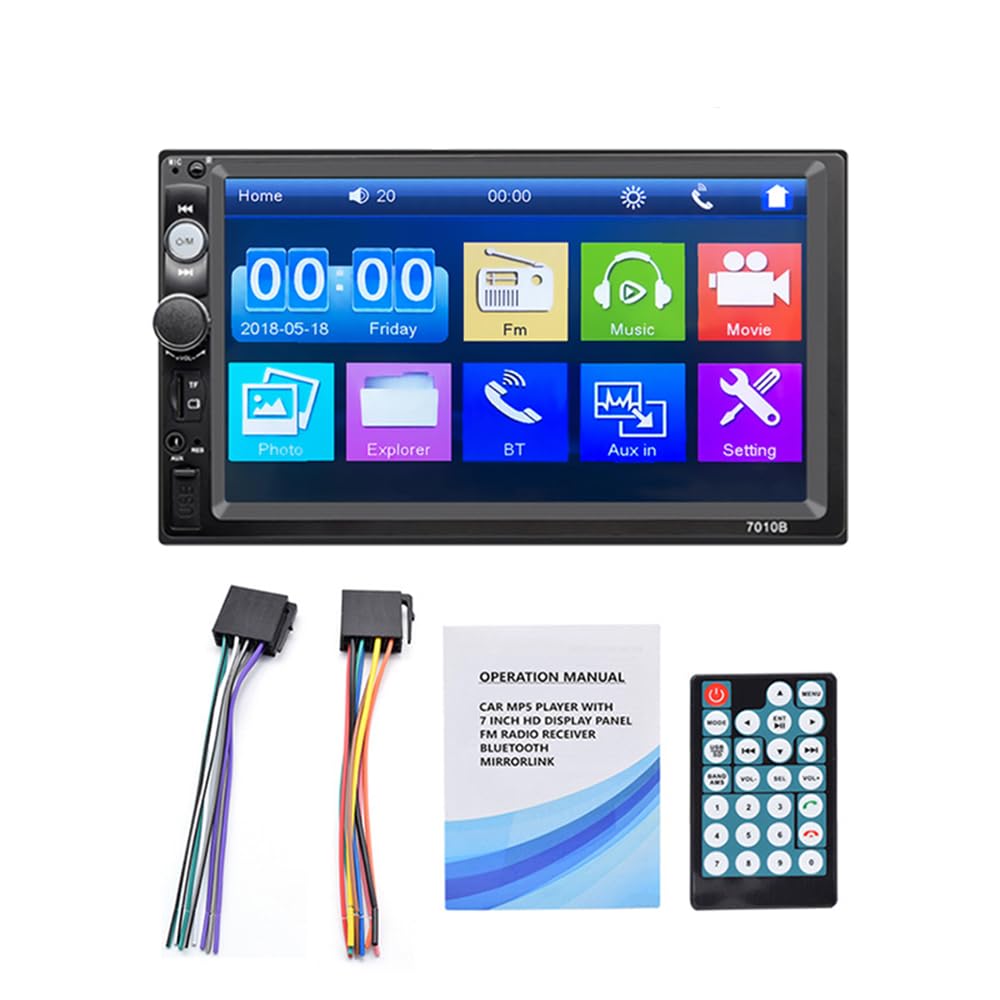
Figure 4.1: The 7-inch car stereo displaying video content, highlighting its 1024x600 resolution and multi-format playback capabilities.
5. การติดตั้งและการตั้งค่า
This section provides general guidelines for installing your car stereo. Due to variations in vehicle models, specific wiring and mounting procedures may differ. If you are unsure, consult a professional installer.
5.1 แผนผังสายไฟ (ทั่วไป)
Refer to the wiring diagram provided with your unit for specific connections. A typical setup includes:
- สายสีเหลือง: Constant 12V (Battery Positive)
- สายสีแดง: ACC (Accessory/Ignition Switch 12V)
- สายสีดำ: Ground (Chassis Ground)
- Orange/Brown Wire: Illumination (Connect to vehicle's illumination wire)
- สายสีน้ำเงิน: เสาอากาศไฟฟ้า/Ampเครื่องขยายเสียง เปิด/ปิดจากระยะไกล
- สายลำโพง: เชื่อมต่อกับลำโพงรถยนต์ที่ตรงกัน (เช่น สีขาว/ขาว-ดำ สำหรับด้านหน้าซ้าย สีเทา/เทา-ดำ สำหรับด้านหน้าขวา สีเขียว/เขียว-ดำ สำหรับด้านหลังซ้าย สีม่วง/ม่วง-ดำ สำหรับด้านหลังขวา)
- สายไฟเกียร์ถอยหลัง: Connect to the vehicle's reverse light circuit for automatic camera switching.
- อินพุตวิดีโอ: สำหรับด้านหลัง view กล้อง.
5.2 การติดตั้งเครื่อง
- Remove the existing car stereo from your dashboard.
- Connect the wiring harness from the new unit to your vehicle's wiring. Ensure all connections are secure.
- Slide the new stereo into the dashboard opening. Secure it using the provided mounting brackets and screws.
- ประกอบชิ้นส่วนตกแต่งแผงหน้าปัดกลับเข้าที่เดิม
- ทดสอบฟังก์ชันทั้งหมดก่อนทำการติดตั้งให้เสร็จสมบูรณ์
6. คู่มือการใช้งาน
6.1 การทำงานพื้นฐาน
- เปิด/ปิดเครื่อง: Press the power button or turn the ignition key to ACC/ON.
- การควบคุมระดับเสียง: Use the rotary knob or steering wheel controls to adjust volume.
- การนำทางเมนู: Tap icons on the touchscreen to access different functions (Radio, Bluetooth, USB, AUX, Settings, etc.).
6.2 การเชื่อมต่อบลูทูธ
เชื่อมต่อโทรศัพท์มือถือของคุณผ่านบลูทูธเพื่อโทรแบบแฮนด์ฟรีและสตรีมเสียง
- บนเครื่องเสียงรถยนต์ ให้เข้าไปที่เมนูบลูทูธ
- เปิดใช้งานบลูทูธบนโทรศัพท์มือถือของคุณและค้นหาอุปกรณ์ที่มีอยู่
- Select "Car Radio" or a similar name from the list on your phone.
- ยืนยันรหัสการจับคู่หากได้รับแจ้ง
- เมื่อเชื่อมต่อแล้ว คุณสามารถโทรออก/รับสาย และเล่นเพลงผ่านเครื่องเสียงรถยนต์ได้

Figure 6.1: The Bluetooth interface of the car stereo, demonstrating hands-free call functionality and music streaming.
6.3 ฟังก์ชันการเชื่อมโยงกระจก
Mirror Link allows you to display your phone's screen on the car stereo. Use a USB data cable for connection.
- สำหรับโทรศัพท์ Android: Supports two-way connection (control from stereo or phone). Connect your phone via USB and follow on-screen prompts to enable USB debugging and allow screen mirroring.
- สำหรับโทรศัพท์แอปเปิ้ล: Supports one-way screen projection (view only, control from phone). Connect your iPhone via USB and allow screen mirroring when prompted.

Figure 6.2: Illustration of the Mirror Link feature, showing how mobile phones connect to the car stereo for screen mirroring.
การใช้งานวิทยุ FM 6.4
เข้าถึงฟังก์ชั่นวิทยุ FM เพื่อฟังสถานีโปรดของคุณ
- สแกนอัตโนมัติ: Press the "SCAN" button to automatically search and save available stations.
- การปรับด้วยตนเอง: ใช้ปุ่มลูกศรเพื่อปรับความถี่อย่างละเอียด
- ค่าที่ตั้งล่วงหน้า: Tap on a preset number (1-6) to recall a saved station. To save a station, tune to it and then press and hold a preset number.

Figure 6.3: The FM radio interface, displaying frequency tuning and station preset options.
6.5 Media Playback (USB, AUX, TF Card)
The unit supports various media inputs for audio and video playback.
- ยูเอสบี: Insert a USB flash drive into the USB port. The unit will automatically switch to USB mode or you can select it from the main menu.
- บัตร TF: Insert a TF (Micro SD) card into the designated slot. The unit will detect the card and allow playback.
- ช่องเสริม: Connect an external audio device (e.g., MP3 player) to the AUX input using a 3.5mm audio cable. Select AUX mode from the main menu.

Figure 6.4: Visual representation of the four available playback modes: USB flash disk, AUX input, Bluetooth, and TF Card.
6.6 ระบบควบคุมพวงมาลัย
Use the provided steering wheel controller for convenient operation without taking your hands off the wheel.
- รับสาย / วางสาย: Manage phone calls.
- ข้ามแทร็ก: Navigate to the next or previous song.
- การปรับระดับเสียง: Increase or decrease the audio volume.

รูปที่ 6.5: ตัวอย่างample of a steering wheel controller, illustrating its functions for managing calls, changing tracks, and adjusting volume.
6.7 ฟังก์ชันกล้องถอยหลัง
หากมีอุปกรณ์เสริมด้านหลัง view camera is connected and properly wired, the stereo will automatically display the reverse image when the vehicle is shifted into reverse gear.

Figure 6.6: The car stereo screen automatically switching to a reverse image with parking guidelines when the vehicle is in reverse gear.
7. การบำรุงรักษา
- การทำความสะอาดหน้าจอ: ใช้ผ้านุ่มและแห้งเช็ดหน้าจอสัมผัส สำหรับรอยเปื้อนฝังแน่น ให้เช็ดเบาๆampชุบผ้าด้วยน้ำหรือน้ำยาทำความสะอาดหน้าจอที่ออกแบบมาสำหรับอุปกรณ์อิเล็กทรอนิกส์ หลีกเลี่ยงสารเคมีรุนแรง
- การทำความสะอาดทั่วไป: รักษาตัวเครื่องให้สะอาดปราศจากฝุ่นและเศษผง ใช้แปรงขนนุ่มหรือลมอัดทำความสะอาดบริเวณปุ่มและพอร์ตต่างๆ
- หลีกเลี่ยงอุณหภูมิที่สูงหรือต่ำเกินไป: Prolonged exposure to extreme heat or cold can affect the unit's performance and lifespan.
8 การแก้ไขปัญหา
| ปัญหา | สาเหตุที่เป็นไปได้ | สารละลาย |
|---|---|---|
| ไม่มีไฟฟ้า | สายไฟไม่ถูกต้อง ฟิวส์ขาด การเชื่อมต่อหลวม | Check power and ground connections. Inspect and replace fuses if necessary. Ensure all wires are securely connected. |
| ไม่มีเสียง | ระดับเสียงเบาเกินไป; ฟังก์ชันปิดเสียงทำงานอยู่; การเดินสายลำโพงไม่ถูกต้อง; ลำโพงชำรุด | Increase volume. Check if mute is active. Verify speaker connections. Test with known good speakers. |
| บลูทูธไม่เชื่อมต่อ | Bluetooth not enabled on phone/stereo; Device not discoverable; Incorrect pairing process. | Ensure Bluetooth is on for both devices. Make sure the stereo is in pairing mode. Delete previous pairings and try again. |
| ลิงค์มิเรอร์ไม่ทำงาน | Incorrect USB cable; USB debugging not enabled (Android); Phone not compatible. | Use a high-quality USB data cable. Enable USB debugging in Android developer options. Ensure your phone model supports Mirror Link with the unit. |
| หลัง view กล้องไม่แสดง | กล้องไม่ได้เชื่อมต่อ; สายทริกเกอร์ถอยหลังไม่ได้เชื่อมต่อ; กล้องมีปัญหา | ตรวจสอบการเชื่อมต่อสัญญาณวิดีโอและแหล่งจ่ายไฟของกล้อง ตรวจสอบให้แน่ใจว่าสายไฟสำหรับทริกเกอร์ถอยหลังเชื่อมต่อกับวงจรไฟถอยหลังของรถอย่างถูกต้อง |
9. ข้อมูลจำเพาะ
| คุณสมบัติ | รายละเอียด |
|---|---|
| ขนาดหน้าจอ | 7-inch HD Digital Touch Screen |
| ปณิธาน | 1024*600 |
| การเล่นวิดีโอ | Supports 1080P video |
| บลูทูธ | Hands-free calls, music player, voice navigation |
| ลิงค์มิเรอร์ | Android (two-way), Apple (one-way) |
| รูปแบบเสียง | APE, FLAC, WAV, DIS, MP3, WMA, ACC, OGG, RA, AC3, MP2, AMR |
| รูปแบบวิดีโอ | AVI, MP4, FLV, PMP, RM, RMVB, MPG |
| รูปแบบภาพ | เจพีเจ |
| พอร์ต USB | High-speed USB 2.0, supports high current output for phone charging |
| สล็อตบัตร TF | ใช่ |
| อินพุต AUX | ใช่ |
| วิทยุเอฟเอ็ม | Automatic scanning, 18 station storage |
| แหล่งจ่ายไฟ | 12V DC (กราวด์เชิงลบ) |
| ขนาด (โดยประมาณ) | 180 มม. (ก) x 104 มม. (ส) x 63 มม. (ล) |

Figure 9.1: Product dimensions of the VIGORWORK 7-inch Car Stereo, indicating width, height, and depth.
10. การรับประกันและการสนับสนุน
VIGORWORK products are designed and manufactured to the highest quality standards. For warranty information and technical support, please refer to the warranty card included with your product or contact your retailer. Keep your purchase receipt as proof of purchase.
For further assistance, please visit the VIGORWORK official webเว็บไซต์หรือติดต่อฝ่ายบริการลูกค้า